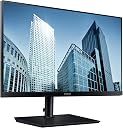
🖥️ Elevate your workspace with crystal-clear clarity and minimalist style!
The Samsung S24H850 is a 24-inch WQHD (2560x1440) PLS monitor featuring a sleek 3-side borderless design and advanced USB-C connectivity that powers and connects your devices with a single cable. It offers eye-friendly technologies like Flicker-Free and Eye Saver Mode, plus versatile multitasking options such as Picture-in-Picture. Ideal for professionals seeking sharp visuals and a clean, efficient setup.


| ASIN | B071YQ8QP1 |
| Adaptive Sync | G-Sync Compatible |
| Aspect Ratio | 16:9 |
| Aspect ratio | 16:9 |
| Box Contents | 1 x Samsung S24H850 24" Wide Quad HD PLS Black computer monitor |
| Brand | Samsung |
| Brand Name | Samsung |
| Colour | Black |
| Contrast Ratio | Mega DCR |
| Customer Reviews | 3.7 out of 5 stars 69 Reviews |
| Display Technology | LED |
| Display Type | PLS |
| Global Trade Identification Number | 08806088799155 |
| Hardware Connectivity | USB 2.0 |
| Has Color Screen | Yes |
| Image Brightness | 300 ANSI lumens |
| Image contrast ratio | Mega DCR |
| Item Dimensions D x W x H | 7.7D x 54W x 32.4H centimetres |
| Item Type Name | Monitor |
| Item Weight | 6.4 Kilograms |
| Manufacturer | Samsung |
| Maximum Display Resolution | 2560 x 1440 |
| Model Name | S24H850 |
| Model Number | B071YQ8QP1 |
| Mounting Type | VESA - supported |
| Native Resolution | 2560x1440 |
| Network Connectivity Technology | HDMI Displayport USB C |
| Picture Quality Enhancement Technology | PLS, Mega Dynamic Contrast Ratio |
| Processor Count | 1 |
| Product Features | Flicker-Free, Height Adjustment, USB Hub |
| Product Warranty | 2 Years |
| Refresh Rate | 60 |
| Resolution | QHD Wide 1440p |
| Response Time | 5 Milliseconds |
| Screen Finish Type | Flat |
| Screen Size | 24 Inches |
| Screen size | 24 Inches |
| Screen surface description | Flat |
| Specific Uses For Product | Gaming |
| Total HDMI Port | 1 |
| Total USB 2.0 Ports | 2 |
| Total USB Ports | 3 |
| Total Video Out Ports | 2 |
| Viewing Angle | 178 Degrees |
| Voltage | 240 Volts |
M**T
Works with 2018 MacBook Pro
Connects straight into my new MacBook with usb C cable, no worries. Kind of wish I got the bigger curve screen now but oh well. Picture is great, not as good as the MacBook, but it will do. There is also a 3rd usb A port on the back, not in the pictures. Comes with usb C and HDMI leads. It did come with a European power lead, not a UK one though, I had a kettle lead in place already so just used that.
R**A
Simple and better than most on the market
Beautiful screen, better than most on the market. Reasonable price considering the features available on the monitor. I love the simple USB-C connection, charges my laptop at the same time. The one negative is that it doesn't come with speakers but can easily be fixed by getting wireless speakers for a clean setup
L**H
Really clear screen - better than HD available
See description for specs - definition is very good for 24" (should have got the 27"...). Utilities allow division into multiple screens and guide lines if required. Low energy sleep mode. Rear 'joystick' button a bit fiddly for wakeup and menus. Not used for gaming so have not rated (& may not be 3D compliant - not tested). Great for video and multi-tasking use. I have only used it with DisplayPort. The screen display area is actually 53cm x 30cm. Screen bezel is 5mm on 3 sides and 18mm along bottom. Good if you have restricted work area.
A**R
Not good for charging via USB-C
The screen is great, but charging a Mac via USB-C doesn't work - when the computer/monitor goes to sleep, they wake each other up all the time, so on/off/on/off/on/off without end.
H**M
Terrible don't buy!
Bought first one - spent ages trying to make it connect. Didn't work. Called Samsung support who agreed I could return it. Bought a second one (wish I hadn't) - worked for a few months, then started getting connection issues. If you google around you'll see lots of people have them with this monitor. It's something to do with the way the monitor connects to the laptop and charges it. Eventually something seems to go wrong and the monitor stops working. Swapped for a Dell which worked within 2 minutes of getting it out of the box. Do not buy this machine!
S**N
Great screen although had a fault that needed repairing
Edit: the backlight died again a couple of months after the repair, so I'm returning it for a refund. Given the number of positive reviews I'm assuming I just got a "bad" one, which is a shame as I was otherwise happy with it. Bought the 24' model as I had limited space. Picture looks great and has minimal glare even though there's a window behind me. Supports several different inputs (HDMI, Displayport and USB-C with a built-in hub), picture-in-picture and various display settings I haven't really needed to tweak. Menu can be a bit fiddly; everything is controlled by a single rockable switch behind the bottom right corner. One issue: the backlight died in the first month; Samsung arranged to collect and repair it, which took around a week door-to-door, although this was early on in the COVID lockdown so I'm happy to cut them some slack - it was likely a busy time with lots changing.
M**L
Great monitor
Great Monitor
T**A
Buy it!
I used this for work and it's very good! Picture quality is great! Adjustable height and it feels very sturdy.
J**N
Sehr guter USB-C-Monitor für Linux und Windows (mit Lenovo X1 Carbon)
Ich war auf der Suche nach einem USB-C-fähigen Monitor für den Einsatz an meinem Notebook auf dem Schreibtisch zu Hause. Bildübertragung, Anschluss der USB-Peripherie und Stromversorgung sollten über nur ein USB-C-Kabel und ohne separate Docking-Station realisiert werden. Im Internet liest man ja viel über Kompatibiltätsprobleme bei Verwendung des vergleichsweise jungen Standards. Nachdem ich lange vergeblich nach positiven Erfahrungsberichten für meine konkrete Hardware gesucht habe, habe ich mit dem Samsung S24H850 wohl einen Glücksgriff gelandet. Ich besitze ein Lenovo X1 Carbon (2017/Gen 5) und benutze Arch Linux und Windows 10. Der Betrieb des Monitors über USB-C funktioniert in beiden Systemen im Wesentlichen (siehe unten*) problemlos und ohne besondere Installations-/Konfigurationsmaßnahmen. Das Notebook wird mit Strom versorgt (ich vermute 45W), das Bild ist gut und ohne Aussetzer, die am Monitor angeschlossene USB-Peripherie (Tastatur und Maus) wird sofort erkannt. Genau das, was ich wollte. *) Zwei Anmerkungen zur Installation/Kompatibilität: - Unter Windows gab es bei mir zunächst die wesentliche Einschränkung, dass beim Booten mit angeschlossenem Monitor die Displays schwarz blieben, der Lüfter hochdrehte und das eingefrorene Notebook hart neu gestartet werden musste; das Anschließen und Erkennen des Monitors nach erfolgreichem Bootvorgang funktionierte dagegen problemlos. Abhilfe schaffte hier die BIOS-Einstellung Config > Display > Boot Time Extension > 3sec, um dem System und dem Monitor beim Booten mehr Zeit zu geben. Mit Linux funktionierte das dagegen von Anfang an einwandfrei. - Unter Linux gibt es bei mir beim Anschluss eines externen Lautsprechers/Kopfhörers am Audioausgang des Monitors Soundprobleme (Knacken/Kratzen/Übersteuern). Da diese Probleme in Windows (und auch in Linux über den HDMI-Port) nicht auftreten, muss es sich um ein Treiber-/Konfigurationsproblem handeln. Da ich den Kopfhörer aber genauso gut über den Audioausgang des Laptops oder über Bluetooth verwenden kann, habe ich keine Zeit in die Lösung des Problems investiert. Das Bild des Monitors würde ich als gut, klar und scharf bezeichnen, und ich kann über Stunden ermüdungsfrei damit arbeiten. Zum Thema Kalibirierung und Farbeinstellungen fehlt mir die Erfahrung und der Vergleich - ich habe hier auch keine besonderen Ansprüche. ;-) Für eine fundierte Bewertung verweise ich lieber auf Testberichte, z.B. ct 5/2018. Der Monitor ist gut verarbeitet, sieht elegant aus, die mechanischen Einstellungsmöglichkeiten (Höhe, Neigung, Rotation) funktionieren einwandfrei. Zahlreiche Features des Monitors (PIP/PBP usw.) habe ich noch nicht getestet, da ich dafür keine Verwendung habe. Besonders erfreulich ist, dass Samsung alle möglichen Kabel (HDMI, DP, und eben auch USB-C!) beilegt. FAZIT: Eleganter Office-Monitor mit gutem Bild und vielen Features, den ich ohne Probleme als Dockingstation für meinen Lenovo X1 Carbon Gen5 in Windows und Linux betreiben kann. Genau das, was ich gesucht habe. ALTERNATIVEN: Etwas günstiger sind die USB-C-Monitore P24h und P27h von Lenovo mit vergleichbarem Funktionsumfang und ebenfalls WQHD-Auflösung, die mir jedoch optisch weniger gefallen haben. Über Kompatibilität und Qualität kann ich nichts sagen. Andere USB-C-Monitore z.B. von Dell oder Eizo sind derzeit noch recht teuer.
G**E
Ottimo
E' piuttosto costoso, pagato quasi 400 euro, ma ne è valsa la pena. La killer feature per me è l'USB-C, con cui collego il MacBook e lo ricarico senza bisogno di altri cavi! L'assenza di altre porte al pc rischia di essere una limitazione ma non in questo caso, in quanto anche una pen-drive potrei collegarla direttamente al monitor e vederla dal computer. La qualità del display è ottima, non sto avendo alcun problema. La risoluzione è persino troppo alta, infatti per ora l'ho settata sui 1080p circa. Pensavo mi servisse una risoluzione maggiore ma per il momento non è così. Magari quando comincerò a lavorarci sul serio apprezzerò lo spazio ulteriore, o una maggiore definizione. Vedremo. E' comunque positivo che sia un'opzione per me. Per la cronaca, il 4K sarebbe inutile a queste dimensioni e queste distanze IMO. Peccato per la mancanza di audio integrato, ma ho fatto questa scelta consapevolmente. Di solito gli speaker integrati non sono assolutamente all'altezza, per cui meglio gli altoparlanti del MacBook. In realtà spesso sto usando le cuffie bluetooth che collego al computer (non al monitor ovviamente, che non ha BT). Però, se ce l'avesse degli speaker integrati, basterebbe un Chromecast per far diventare questo monitor uno smart tv con tutti i crismi, e invece non si può. L'unica cosa che si può fare è collegare una soundbar, o simili, all'uscita jack che comunque il monitor ha a disposizione. Complessivamente ne do un giudizio ottimo, perché non ha difetti che non avevo preventivato. La qualità del display PLS Samsung è all'altezza delle aspettative. Non l'ho provato con console e videogiochi quindi su quello non mi esprimo. Per il resto molto bene. Consigliato. AGGIORNAMENTO: Volevo aggiornare il mio commento a oltre un anno dall'acquisto. Sicuramente trovo che ormai 400 euro sia un prezzo esagerato. Poi volevo ridimensionare il mio commento entusiastico, perché trovo comunque che come schermo non sia adatto proprio a tutti. Innanzitutto non ho detto che è piuttosto ingombrante, infatti io non ce lo tengo al centro della scrivania ma nell'angolo in maniera da avere un po' di distanza. E' un monitor pensato per gli uffici, segmento business. Cercate in rete qualche video o immagine per capire se si adatta alla vostra postazione. Inoltre un'altra cosa importante che ho notato è che è poco color-accurate. Ho lavorato di recente (e per la prima volta) alla creazione di un'icona con un'applicazione grafica. Mi sono poi accorto, vedendo il risultato su altri schermi, che i colori non erano affatto come quelli che volevo. Ovviamente questo non incide minimamente su utilizzi generici, compresa la visualizzazione di video, film, oltre che di lavoro di ufficio. I colori sono belli e vivi, amerete il vostro wallpaper a tutto schermo in alta definizione, ma non sono accurati. In altri termini, il monitor non è adatto a lavori creativi.
A**G
Budget G-Sync Compatible 75Hz Monitor with IPS Panel
This is the best monitor i have bought after a lot of research on monitors, i was looking for an Amazing display quality with G-Sync Compatibility, a Display port, and IPS Panel.....after much research i found this Monitor, this monitor also has inbuilt Samsung Dex for those who have Galaxy phones and wanna connect it to the monitor, this monitor has a 2K panel and a refresh rate of 75Hz out of the box. It has many ports such as 3 USB ports, 1 Audio Out port, 1 HDMI in port, 1HDMI out port, 1 Display Port V1.2 , 1 Type C port ( For daisy chaining and Samsung Dex) Pros : 1. Awesome Display 2. Many latest ports 3. Samsung Dex Inbuilt 4. G-Sync Compatible 5. 75Hz refresh rate 6. IPS 2K Resolution panel 7. Solid Built Quality 8. Wall Mount 9. Comes with Hdmi cable, Dp cable, Type C cable 10. 3 side bezeless 11. Stunning Picture quality 12. Inbuilt High Definition Soundcard 13. Brightness is very amazing 14. Anti Glare panel Cons: So far none
J**F
Buena opción barata para usb tipo c
Una gran decisión de compra para usuarios de ordenadores con usb tipo c, como los MacBook Pro. Y es que esto fue lo que me hizo decidirme. ¿Por qué? El motivo es sencillo. Buscaba un monitor que no tuviera 27 pulgadas y fuera compatible con usb tipo c, de forma que cargara el ordenador y solo necesitara un cable. Así podía tener un escritorio mucho más limpio. ¿Qué pasaba? Pues que el precio de otras opciones era desorbitado, desde el monitor 4K de LG para MacBook Pro, que en ese momento costaba más de 1000€. O los de BenQ, que me encantaban principalmente por su calidad de reproducción de color con Rec.709 y una calibración brutal. Otras opciones que valoraba como las de LG, se me iban también de precio. Sin embargo, encontré esta brutal opción y en el verano de 2018 no había nada que se le acercara de precio ni de lejos. Así que me lancé por él y estoy muy contento. Sí que es cierto que es un monitor muy orientado a la ofimática, pero alguna vez acabo algo cansado de leer words en comparación con la brutal pantalla del MacBook Pro. Pero como digo, es por estar acostumbrado a esa pantalla. Pero os voy a dar una recomendación para todos aquellos que busquéis un monitor con una buena resolución y usb tipo c como yo. Afortunadamente, ha pasado el tiempo y más monitores se han sumado. Así que hay otros que pueden cumplir todo lo que uno busca (buena resolución, calidad, usb tipo c y precio). Sin más dilación, aquí están: Dell UltraSharp U2419HC y el LG 29UM59A-P Monitor 29"QHD. No los he podido probar pero son dos opciones a valorar si esto es lo que buscas. Ojo, el de Dell es solo FHD. Y ahora, yendo a la review como tal. La resolución es buena, sí que hecho un poco de menos nitidez para letras en textos, porque estoy acostumbrado a mi MacBook Pro que está a años luz de muchas pantallas. Sin embargo, para vídeo no está nada mal. Podrás ver películas con un buen rango dinámico y sin muchos marcos en los laterales, son realmente finos. Así que podrás incluso hacer un dual set-up. Lo único que no me gusta es su peana y base. Es demasiado grande y no ofrece la estabilidad que esperaba. Tiene mucho flex la pantalla y sinceramente, no me ha gustado. Ocupaba bastante en mi mesa, ya que mide Pero para gustos colores. Mide 24x30cm la base, la parte que entra en contacto con la mesa directamente (aprox). Por último, el ángulo de visión no está nada mal. Me hubiera gustado eso si que tuviera una mayor tasa de refresco.
C**N
Très bon écran
La dalle est d'excellente qualité, mate, les couleurs sont vives et le mode permettant la duplication d'écran est bien pratique. Je l'utilise comme moniteur externe pour mon laptop de 13 pouces, qui finalement ne bouge plus et est devenu un véritable PC fixe. Il est très élégant, les bords sont très fins et permettent de gagner de l'espace dans les endroits étriqués.
Trustpilot
2 months ago
2 months ago