


Desertcart purchases this item on your behalf and handles shipping, customs, and support to Senegal.
🔥 Stay cool, save energy, and never miss a beat with Flair Puck! 📲
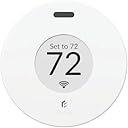
The Flair Puck is a sleek, wireless temperature controller designed for Flair Smart Vents and mini split systems. It offers precise room-level climate control with Room Sense technology, supports over 200 mini split brands, and integrates seamlessly with Wi-Fi and Alexa for smart home convenience. Powered by included AAA batteries and featuring a compact design, it enables energy-saving automation like Smart Away, making it a modern essential for efficient, customizable heating and cooling.



| ASIN | B07TPRLYS1 |
| Backlight | Yes |
| Brand | Flair |
| Brand Name | Flair |
| Colour | White |
| Connectivity Protocol | Wi-Fi |
| Connectivity Technology | Wi-Fi |
| Control Method | App, Voice |
| Control Type | Button Control |
| Controller Type | Amazon Alexa |
| Controller type | Amazon Alexa |
| Customer Reviews | 3.5 out of 5 stars 446 Reviews |
| Display Type | digital |
| Finish Type | Glossy |
| Included Components | Batteries |
| Item Dimensions D x W x H | 8D x 8W x 8H centimetres |
| Item Shape | Round |
| Manufacturer | Flair |
| Manufacturer Part Number | FLAIRPUCK001 |
| Material Type | Plastic |
| Model Name | Flair Puck |
| Model Number | 313699093 |
| Model name | Flair Puck |
| Mounting Type | Wall Mount |
| Number of Batteries | 2 AAA batteries required. (included) |
| Power Source | Air Powered |
| Product Style | Modern |
| Product dimensions | 8D x 8W x 8H centimetres |
| Special Features | Wireless |
| Special feature | Wireless |
| Specific Uses For Product | Vent |
| Temperature Control Type | Programmable |
| UPC | 868596000220 |
| Voltage | 24 Volts |
A**P
Love this system!!
I waited way too long to purchase my Flair vent system as I was leaning towards a zoned duct control system instead. The costs would have been significantly higher (up to 5 times more in parts alone) but also the install would have been a major pain for me to DIY. The Flair vents were easy to install, the app setup was straightforward with the light layout on the vents used to identify which ones were for which rooms. I love that I can set the schedule to deactivate rooms when they are not in use and have it regulate the temperature in the active ones during those days/times. I did mess up a setting by changing the Default Hold Duration setting to forever (supposed to be the default option Until Next Scheduled Event) which caused my schedule not to work but Flair support got this identified and resolved quickly. I now have everything how I want it and the room leveling is perfect (was up to 5-6 degrees difference in some rooms). It is also awesome to be able to change the temperature on-demand in the rooms when needed. So far I am very happy with my purchase, but wish I had done this sooner.
G**T
I do not recommend purchasing one
I purchased the puck, as it was stated, it could run my mini split. I also had hopes of one day adding the registers to my home. When I received the device, the first surprise was that the device would need to be plugged into a wall outlet. I was under the impression I was purchasing a wireless device. after scrolling back through their website I did find mention that the first device would need to be wired. surprise. after some more reading it seems that if my devices are more than 50 feet apart I will need more wired pucks. so if I were to add floor registers being more than 50 feet away from my mini split, I will have another wired puck in my home connected to an outlet. I set it up, the mini split beeped indicating it was receiving data from puck and I thought all was set and I was good to go. I was wrong and far from being good to go. Now I have had this puck "running" my mini split for 3 weeks and here is what I have seen. the setpoint indicated on my mini split never changes away from its last setpoint it received from its factory remote. so is the mini split really running to the setpoint displayed on the puck? ehhh, we may never know. I first noticed that the puck temperature reading varied substantially from other devices I had in the room. so I linked one of my ecobee temp sensors to the flair app so I could watch them side by side. I have seen the temp displayed on the puck vs the temp the puck is showing in the app be different by more than 2 degrees. I have seen the puck vary temp by almost 5 in just a couple minutes. I have seen the temp on the puck vary up and down while the temp from my ecobee sensor holds steady. there is what flair is calling a calibration for the temp sensor in the app. it appears to be nothing more than an offset setting to me than anything else. I've set it up and down in both directions with little satisfaction that it is displaying a relevant temperature. I have had to place it directly in front of the mini split to get any kind of reading close to what devices 10 feet away are reading. Support says It has a defective temp sensor and they will replace, but there are a slew of other problems. the unit runs 24/7 and only shuts off to run the defrost cycle. is it really running to the setpoint of the puck. I have no proof or confirmation that it is. it has reached the desired temp only a couple of times but continues to run. puck is set at 72 for heating and the app says it's reading 73.5 but the unit continues to run in heat. definitely don't believe I am saving any money. some days it gets to temp, some days it just hovers around 70 degrees. again is it really running to the setpoint on the puck? don't know, the unit is displaying 70 as the setpoint when the puck is set to 72. who knows? I don't! if this is the best the puck can do with my mini split do I really have faith it could do any better with their registers? I'm not wasting anymore money to find out, that is for sure. there are settings in the app, where I can ignore the temp from the puck and use the temp from another device. So I did that. Ignored the puck and used temp reading from the ecobee sensor, but still have the same result. does my mini split even know about this app? I don't think it does. I think it is still running of the built in temp sensor, but the only proof I have is it definitely doesn't seem to be running from the temp shown in the app. I have already exuded more energy is running tests and trying to confirm if this thing even works than I ever would have by clicking the remote up and down a couple of degrees each day. does the refresh button on the app work? I speculate it does not. again I have no proof, but I have never seen anything change after pressing it. it doesn't even do the little spinning thing that almost every web based page or site does to make you think something is happening. I had the home/away on initially but the geofence is so small it just wasn't practical. if the puck does work then it will change to your setpoints every time you leave the house. going to the corner store. setpoint is gonna change. going for a walk. setpoint is gonna change. going to the grocery store for an hour? your setpoint is gonna change and you are coming back to a cold or hot house. every couple of days the app will become unresponsive on my phone and I will have to close it out completely, which is usually followed by having to login with my credentials again despite the fact the 'remember me' box is checked. All in all, 1. does it run the the setpoint on the puck? I have no proof that it does. 2. does it shutoff at the setpoint on the puck? I've never seen it happen 3. Is the puck really controlling my mini split. in manual mode I can turn it on and off. in auto? I have no proof that it does. 4. Is it a wired eye sore in the corner of my room that can't even display an accurate temperature. Yes 5. Can you calibrate the temperature? looks like an offset to me. 6. can you change the size of your geofence? nope 7. if the heating temperature setpoint is 72, what temperature will the unit shut off at? best I can tell is 77. 8. does the refresh button work. I don't believe it does. 9. definitely doesn't remember me Save your money.
D**R
Not perfect, but does the trick
(This s a copy of my review for the Flair Smart Vents, as the Puck Thermostat is required to make them work, so they will have to be purchased together. Everything I said in that review applies to the full system) I was cautiously optimistic when I purchased these vents (and the first puck). I had read many of the reviews, especially the negative reviews, and had also read the online documentation from Flair about what smart thermostats were supported, but literally no one else makes a similar product, so I decided to roll the dice. My smart thermostat is a Honeywell model (RTH9585WF) and was a birthday gift from my kids. Now, according to what I had read online, this Honeywell model was not supported by Flair, so I was worried that if I were to make the smart vents work, I might have to ask my kids for the receipt and exchange it for a different model. So you can imagine how happily surprised I was when I connected my puck to my network, and the app immediately recognized my thermostat, and even gave me the option to let Flair control it (that didn't work out for my situation, but more on that later). I must say, I'm a bit surprised by some of the bad reviews, and am wondering if they just got a bad batch of products, because I found the set-up and installation to be quite simple and hassle-free. Each new device paired quickly and easily, and I had the whole system set up in about 30 minutes. I will agree with some of the comments that the puck dial and o/s are a little clunky and cheap feeling, but I don't deem this an issue of any real concern - they seem like a set-it-and-forget-it kind of tool to me. Once I got everything set up, I now control it all through the app on my phone, there's just no need to touch the pucks. I also have the luxury of only needing floor vents, so I didn't have to attach mine - just drop them in. I would also agree that the corded puck is not the most attractive feature in my house, but I guess I understand the need for the gateway puck to require power. My other puck is battery operated and sits attractively on a table in my den. As the title of my review says, this product is not perfect, but with some trial and error, I have the system doing exactly what I wanted it to do, and every room in my house is regularly within a degree or two of where I like it. Compared to the wild disparity that I used to experience in my multi-level townhouse and single-zone HVAC configuration, these results are a dream come true. I've lived here for 18 years, and have always struggled, year-round, to manage and equalize the temps in the house. However, it did take some effort and tweaking to find the right balance. I have both my thermostat and my Flair devices on a schedule, and have synced those schedules so that I have a very cool bedroom to sleep in every night and a comfortable 72° during the day. I've had to tweak the temperature settings on both halves of the system to find this balance. I did try letting Flair control my Honeywell thermostat, but it did not work well for me. The Honeywell has separate heating and cooling setpoints and requires a 3 degree gap between them, so the heat will not kick in until it gets colder in that room than a point effectively 4 degrees below the point where the A/C has stopped running. In contrast, the Flair pucks have a single setpoint, and with the thermostat set to auto heat/cool, it was immediately kicking the heat on when the temp dropped below its setpoint. I also found that the balance between the floors was more difficult to maintain with Flair in full control. And finally, one of the best features of my Honeywell thermostat was lost when I gave Flair control of it: the learning and auto-recovery function. It learns how long it takes to switch between the two halves on my schedule, and will begin a recovery cycle prior to the scheduled time, so when I go to bed, my room is already cold and when I wake up in the morning, my house is not freezing. Your setup and results may differ, and I do think it's cool that Flair gives the option to take full control (especially considering i didn't think it would even work with mine). Mine is a small home, so I only needed 4 vents and 2 pucks to achieve the desired results. I find the vents attractive (better than what I had), and the system easy to use and understand. At the writing of this review it is the start of summer and I've had them for just under a month. I will no doubt have another period of trial and error and a new set of schedules to set up come fall and winter, but I have to say that I am very happy with this purchase. Wish I could give 1/2 stars on these reviews, because it's almost a 5/5, but not quite. I hope this helps!
R**K
**UPDATE** 8/29/24 - was about to return it, tech support called me directly and helped me - WiFi
My original review is below below the line break. But I wanted to update this since buying a second one and using the first one now for a few months. I still haven't tried to connect to my Google home system. Just being able to use the app alone is enough for me. I really hate "talking" to my google home speaker more times than I have to. Every light switch and outlet in my home now is practically google home enabled. So it gets tiresome and most times I'd rather just use the app to push a digital button and know what I chose for an option is going to be executed. As I said, the first one I installed works great. Setup should NOT be done through the app. Go to their website to do it. Sign up for your account there, log in, and add the device via your web browser. (Use a laptop or desktop THAT HAS WIRELESS - if you don't have one, borrow one from a friend just to get the setup done. After that, the app works great). This was no different with my 2nd puck being added. I used my laptop and set it up without a problem. I created a new room, and I created a new mini-split, then added that mini-split to the newly created room. Tested and verified the new puck controls the mini-split without issue. I did notice one small flaw, and it's not likely to ever be corrected regardless of firmware updates and such. While my first Flair puck responds within 3-5 seconds of choosing settings on the app (or in the browser), the 2nd Flair puck I installed takes nearly 30-40 full seconds to respond. Having a background in both computers and RF I think I know why this is happening. Your first puck is set up as the "gateway." (Unless you purchase the specific gateway device from them that's not a puck - which isn't needed.) Every subsequent puck you add after that is just a "puck" device and it's only way to get the commands sent to it is from the 1st puck acting as the gateway. This adds quite a bit of delay to 2nd, 3rd, 4th, etc. pucks added when you make changes to the settings. 30+ seconds for your mini-split to get the command you put in the app is pretty lengthy. I wonder if adding the 2nd puck as yet another gateway would fix this - though that might not work, or even create issues having more than one Flair gateway running at a time. Either way it does work and if there's some more seconds between remotely turning it on/off I don't care as long as it actually does it. So long as it doesn't become 5-10 minutes! As I said in my original review I planned on buying more of these. I have 5 mini-split head units total. I have 3 more to go and they will all get one eventually. I just hope the company doesn't go under because all communication requires their backend system remain up and running, and WITHOUT charging you. If they do go belly up, I ask that they please release an API so that people can still use their very expensive equipment with "Home Assistant" which is a self-hosted smart home software that's free and can run on even just a cheap raspberry pi. I had a "wink" branded system years ago that was sold through Home Depot. I bought light switches, outlets, even 3 deadbolt door locks all on their system that promised "NO FEES - EVER." Well, they reneged on that 2 years into my using it. Wanted to start collecting $15 a month subscription. I ripped every single outlet and switch out of my wall and torched the equipment on my driveway with a blow torch I was so angry they pulled that carp. And again, if you cannot get it connected... it's NOT the equipment. It's you. #1 - DO NOT USE THE APP for setup, regardless of included instructions. #2 - Use their website for setup (see my original review text below for it, or google it) #3 - Stop looking at the strangely low rating here on this, and the negative Nancy's who say it's garbage, it most certainly is not! _____________________________________________________________________________________________ I'm no rookie when it comes to RF or Wi-Fi networks. I have been involved in this technology for 25 years for work. No matter what I did I could not get this Puck to connect to my Wi-Fi. bottom line is the app sucks for setting it up. Skip the entire setup process within the app. set up via the web instead. first, make yourself a flair account. afterwards go to my.flair.co (NOT .com) And log in there. do this on either a laptop or a computer with Wi-Fi. The device must have Wi-Fi as you will need to temporarily connect to a temporary Network that the flair puck creates for the purposes of setup. once you get to the point where it wants you to search for the flare puck, it will instruct you to make your computer Wi-Fi connect directly to the flair Puck temporary Network. once you do this, a pop-up window will come up and search for wireless networks. here you pick the wireless network you want to connect to and enter the password. once you are done, it will direct you to reconnect your computer to your normal Wi-Fi and continue the setup process. again, do not use the app on your mobile device to do the setup. You're asking for frustration and failure. If you don't have a laptop, borrow somebody's! I am happily sitting under my Mitsubishi mini split which I can control now from the app. I have not yet tested Google home speaker integration. however, my son likes to make his bedroom like a bear cave with full blast fans speed and the lowest temperature. now I can simply open an app after he's fallen asleep and lower The fan speed and put the temperature at a more reasonable 67 or 68°. once the puck is set up. it works flawlessly. I have five mini splits all by Mitsubishi. I absolutely will be buying at least two more of these. I'm just waiting to make sure it works well for a week first. eventually I will have one puck per mini split. Mitsubishi makes a direct control module that plugs into a daughter board inside each mini split, but it has terrible reviews and does not work very well. Thank you flair .
R**R
Lots to be desired
I bought this to hopefully control my mini split heat pump (using the IR feature) and act as a bridge to control a Flair Smart Vent located in another room (leveraging the Ecobee SmartSensor located in that other room. So far, I've been disappointed in the puck for several reasons. 1) I loaded my mini split and remote codes, but the IR codes it loaded don't work. I've been going back and forth with customer service for 5 days trying to resolve it and have gotten responses that amounted to "are you sure you did xxx correctly?". It's still not resolved, but they have escalated to another team. Waiting for a resolution. 2) The unit feels like a toy. It isn't well built and is extremely light weight. Normally, I wouldn't care, but I had seen the "built in stand" and thought I would simply have it on the bookshelf. The thing is so lightweight that a tiny bend in the power cord (which is required for bridge mode) is enough to keep it from sitting flat. You pretty much can only wall mount this thing. Beyond that, it simply feels like it could break at any moment. 3) The range is extremely limited. The signal for the smart vent couldn't reach the other room. So I need to have two pucks to do what I want. If your smart vents are separated by more than 10-30 feet depending on conditions, you may need a puck for each room. 4) The thermostat in the unit is about 3 degrees off. There is a way to correct this in the app, but the fact that the calibration is that far off is concerning. 5) The app controlling the devices is frankly terrible. It's basically nothing more than a web interface rather than a native iOS device. Sometimes nothing loads at all. The statistics pages are really hard to navigate... if you touch any of the charts to scroll, it just zooms the chart instead. I really can't say enough about how non-intuitive the app is. I would never use the puck for your primary thermostat. It is basically a really expensive bridge that is poorly made. If you want something to control a mini-split I think the options are limited and this might be one of your better options, but as I said, in my case I'm still waiting for the correct codes. I may update this review once the issue is resolved. All that said, Flair seems to have good quality smart vents (I would rate them higher than the puck), and the puck does seem to be operating the one that I'm testing quite effectively. This is needed to use their vents, and it's really the only reason this product deserves an existence. UPDATE: Flair customer service eventually suggested some steps that resolved the issue. However, the process was very clunky. I picked an IR code from the list that wasn’t causing the receiver to react. It still wouldn’t control the unit. Then I put the flair app into manual mode at Flair's suggestion and the receiver beeped exactly once. But then it wouldn’t do anything else in manual mode and the settings in the Flair app were different than what the unit was doing. I then put the Flair app back to auto mode and the puck showed “error” and then said it was downloading new IR codes. Then the puck displayed that the IR code download was successful, and now it seems to operate completely normally. So hardly a smooth experience, but it is now resolved.
Trustpilot
1 week ago
3 days ago