Buy anything from 5,000+ international stores. One checkout price. No surprise fees. Join 2M+ shoppers on Desertcart.
Desertcart purchases this item on your behalf and handles shipping, customs, and support to Senegal.
🔒 Elevate your security game with 4K clarity and AI smarts — because your peace of mind deserves the best.
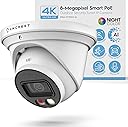
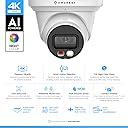
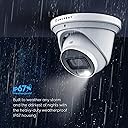
The Amcrest AI 4K UltraHD Night Color PoE Turret Security Camera delivers professional-grade surveillance with an 8MP 4K sensor, 129° wide-angle lens, and advanced AI motion detection. Featuring full-color night vision up to 49 feet, dual illumination LEDs, and a rugged IP67 metal housing, it ensures crystal-clear monitoring day and night. Powered via PoE for streamlined setup, it integrates seamlessly with smartphones, PCs, and cloud storage options, making it the ultimate smart security upgrade for modern homes and businesses.


| ASIN | B0BMWFTFLS |
| Alert Type | Motion Only |
| Antenna Location | Outdoor Security |
| Are Batteries Required | No |
| Best Sellers Rank | #250 in Dome Surveillance Cameras |
| Brand | Amcrest |
| Built-In Media | Quick Start Guide |
| Color | White |
| Compatible Devices | Smartphone |
| Connectivity Protocol | Power Over Ethernet |
| Connectivity Technology | Wired |
| Control Method | App |
| Controller Type | Amazon Alexa |
| Customer Reviews | 4.2 out of 5 stars 543 Reviews |
| Effective Still Resolution | 8 MP |
| Enclosure Material | Metal |
| Field Of View | 129 Degrees |
| Form Factor | Turret |
| Frame Rate | 15 fps |
| Global Trade Identification Number | 00850024042971 |
| Indoor Outdoor Usage | Outdoor |
| Indoor/Outdoor Usage | Outdoor |
| Item Dimensions | 2.36 x 0.79 x 1.57 inches |
| Item Type Name | Security Camera |
| Item Weight | 1.6 Pounds |
| Light Source | LED |
| Manufacturer | Amcrest |
| Model Number | MONITORA11 |
| Mount Type | Wall Mount |
| Night Vision | Night Color |
| Night Vision Range | 49 Feet |
| Number of Channels | 1 |
| Number of IR LEDs | 1 |
| Number of Items | 1 |
| Other Special Features of the Product | Image Sensor, Motion Sensor, Night Vision, Portable |
| Photo Sensor Technology | CMOS |
| Power Source | Ethernet Cable / POE |
| Recommended Uses For Product | Outdoor Security |
| Room Type | Classroom, Kitchen, Living Room, Office |
| Special Feature | Image Sensor, Motion Sensor, Night Vision, Portable |
| Specific Uses For Product | Inside, Outside |
| UPC | 850024042971 |
| Unit Count | 1.0 Count |
| Video Capture Format | H.265/H.264 |
| Video Capture Resolution | 4k |
| Viewing Angle | 129 Degrees |
| Voltage | 12 Volts |
| Waterproof Rating | IP67 |
| Wattage | 7.2 watts |
| Wireless Technology | Power Over Ethernet |
J**N
Great camera with easy setup
I purchased two of these cameras so far, and have been extremely happy with the quality of the product as well as the video and images that they produce. The initial setup was fairly easy, with the most difficult part being to install the SD card into the camera. You have to physically disassemble the camera to install the SD card. It wasn't a difficult process for me; but for some, I could see that being a challenge. That being said, I feel this is a much better system for SD cards than other cameras that I looked at prior to buying these. All the other cameras made the SD card easy to get to and install; however, the downside of that is that it also would be easy for someone else will ill intentions to get access to and remove it as well. Once the SD card is installed, the remainder of the setup process goes very quickly. I recommend doing a "test setup" prior to actually mounting the cameras in their desired locations. I ran a short network cable from my switch to the camera, and it immediately booted up with no problems. The next step was to setup up the app, and associate your camera(s) with your account in the app. This is the only hiccup I had in the setup process.. You actually use the camera on your phone to scan a QR code on the camera to perform this process.. My confusion was that after reading the instructions, I thought the bar code on the exterior of the box is what needed to be scanned. There is actually a QR code on the cable attached to the camera that needs to be scanned in order to add the camera to the app.. After a few minutes to figure this out, the remainder was very easy to complete. The app asks a few other basic setup questions(name of camera, etc) and then you are fairly quickly viewing live video from the camera. While the app is rich in features and adjustments that can be made to the camera setting to finetune the image, I ultimately decided to go with the setup as it was out of the box. Somewhat because I was a little afraid that I would make it worse if I started messing with the settings, but, mainly because the picture and video quality are awesome as they were. In addition to the app, the cameras can also be viewed and adjusted on the computer. This process was also painless and straight forward. Installation in their final position was pretty simple. You just need to find a way to get an ethernet cable from the camera to your NVR and or POE network switch. It's really just that simple. I had a professional install mine just because I wanted the backyard camera mounted on my back fence, and I didn't want to dig the trench to bury the cable to that camera. After they were both installed and re-connected, I just fine-tuned the direction that the camera was pointed, and they were ready for use. One more thing to think about prior to purchasing this camera. Where will you store your video / pictures. I personally, for now, am using the SD card in the camera. I installed a 128gb(the biggest they say the camera will support), and have it recording 24/7 and it holds about 2.5 days worth of video. Eventually, I will probably go to only recording motion events, but want to keep an eye on it for the first 30 days and just make sure it's capturing all events prior to switching. I will say, so far, it has performed above expectations in that area as well. But, if you didn't want to use the on board SD card, you can also use a FTP service, a NAS, or any number of cloud based services to store your video. Amcrest also offers a cloud option, which I believe you get a free trial of. However, I knew that long term I did not want to pay for a service so I opted not to even take advantage of the free trial, so I can't speak to the functionality of that. Overall, I would highly recommend the product. It's simple to setup and use.
F**E
Great drop in replacement!
1. Setup - I already have an NVR setup and I have 2 2k POE cameras and one doorbell camera. I swapped the 2k (also amcrest) in the front of the house with the 4k. Switching it out was super simple. The way these mount is the same so it was straightforward and I didn’t have to use the installation drill guide or anything. The NVR recognized it right away and I was able to set it up without any issues. It was a frictionless swap between the two cameras. 2. Quality - The build quality is pretty much the same as the 2k cameras I have which is not a bad thing and I expect it to withstand the weather without any issues. The image quality is notably sharper. We have a streetlight in front of our house so the camera doesn’t switch to night mode most of the time which is fine. The light isn’t much use to me because of the mounting location. I have it mounted near the top of the A pillar in front of the house so it’s pretty high up and can see the entire cul de sac. Having it so far away meant that details were lost with the previous camera. Zooming in the image, the quality improvement is most noticeable and welcome. 3. Functionality - I have my cameras running 24/7 and recording all movement. I didn’t really test the AI motion capture features because I don’t really feel the need for them currently. It’s not very often that I actually look at the recorded footage and have to look for something, but when I do, the motion capture and person capture flags that I already have setup were enough. I keep the same settings as before. Conclusion After using it for a couple weeks, I didn’t have any connection issues come up. It integrated with my existing system perfectly and without issues. As someone with a NVM system already installed, I think this product is perfect for me as a drop-in replacement to upgrade image quality. The light is a nice feature but not something I use. The improved night vision is welcome but not super important for where I have it installed. Overall I feel good that the footage captured is of much higher quality so that in the event that I do need to scrub back and look for something, I know I’ll have superior details.
E**C
Excellent Camera with a couple of caveats!
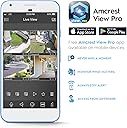
I have had this camera for a couple of weeks now and for the most part, I am very much impressed by it. I currently own four other Amcrest IP Cameras (2 bullets, 2 turret/dome). Set Up - I already had a POE connection available, so set up was a breeze. I connected the camera and was able to find it immediately using the Amcrest View Pro app. Was also able to easily locate it on the Amcrest IP app on my PC. I was able to then quickly integrate it into my Synology Surveillance Station. Honestly, from plug in to set up to fine tuning was only a few minutes. One note, I do not use the Amcrest Cloud App, so cannot speak to set up using that app. Mounting - This is another story. For my particular requirements, I need a wall mount bracket such as AMCPFB203W. However, the size and footprint for this camera will not fit that bracket. Currently, Amcrest does not offer a bracket that would fit this camera. That is a real disappointment and a pain. Picture Quality - In daylight situations, picture quality is excellent. In mixed bright sun with shadows, there is a loss of detail/underexposure in the shadows, but that is to be expected with such a small sensor. The night vision is fantastic with great color. Far exceeds the night vision of my IP4M-1055E dome camera. Accent/landscape lighting does get overexposed a bit, but I am amazed at the color rendering. There is a bit of warping in the picture. But, I think I need to play with the settings a bit to take out that effect. Sound Quality - This is my first security camera with sound. Honestly, I don't really have a need for it. I would say that the microphone is almost too sensitive. It can pick up the sound of someone's footsteps from 20-30 feet away from the camera. I suppose if that is something someone needs, it would be great. I just turn the microphone on mute. Overall, this is a great camera. My biggest issue is the inadequate mounting solution. I would recommend this.
B**L
Good camera, nice 4K image.
The camera was installed using a high quality cable and a new poe injector. Camera fired up and image quality was pretty good, a little better than my Amcrest doorbell camera. Went thru a cold Buffalo winter with no problem. Now that spring is here, the camera only has a good image during the day but the night image is very dark and distorted. UPDATE 3/30/26 pressed the reset button and the night image is back to normal.
R**T
Overall a great camera
The good: - wide angle with a sharp picture. Nightvision is color and provides a very crisp image with minimal blur. - construction feels very sturdy and I like it's waterproof design. I used this camera to replace my 4MP amcrest turret camera (which that had the same design and it's been outside non-stop in use for the last 5 years.) - AI features are really nice and work surprisingly well, which reduces false alarms. - My NVR (PC running Blueiris) detected it immediately and connected. - Amcrest Surveillance Pro Desktop App works great (windows 10/11 app) - Happy that Amcrest is a well known brand and stand behind their products. I've had a few other cameras in the past by random chinese brands and they had all sorts of issues. I have had 0 issues with amcrest products the bad: - doesn't come with a starbit, I have to dig one out of my tool chest (not a big deal) - I've noticed that the android app won't continuously show the feed, after about 1 minute the transfer rate drops to 0 KB/S. I'm not sure if that's a limitation of my phone or what. I have a samsung galaxy s21. Overall I am really happy with this purchase, especially considering the cost vs 4k quality. The nightvision is very crisp on this camera. My wife says that she feels so much more comfortable being able to check on things outside when she hears a bump in the night. Recommend!!
A**I
Crisp picture. A first step in AI for Amcrest. No intruder protection, so mount it high.
Instructions: The bulk of the instructions were discussing how to set up the camera. The process is very similar to other Amcrest PoE cameras, with either IP or P2P options. There was one page at the back discussing how to set up the AI features. It seems almost like an afterthought. If Amcrest is targeting a higher usage rate for the AI features, I would recommend including a dedicated section within the user manual specifically explaining how to use the IVS and other AI features, complete with step-by-step instructions on how to set up a "smart plan" with photos. The instructions should also mention that the AI features are experimental and are not 100% accurate all the time. Functionality: The 8MP 4K camera is generally the very best resolution in home security. I was very happy with it compared to the 5MP camera that I previously had. The "night color" feature is a little misleading: yes, there is a white LED on the front of the camera that can light up, and the camera will be able to see colors due to the light, but any camera can see color during the day or in a well-lit area. If it is truly nighttime and there is no light, or very little light, this camera must rely on IR and the image shows up as black and white, again which is standard. This camera, same as any other camera, cannot see color in "total darkness" as advertised. Although I did not test the audio, I would like to see Amcrest be able to integrate the audio with other more popular camera providers like the Ring doorbell. It would increase adoption and help consumers potentially unify a disparate suite of cameras from several different manufacturers on a single property. Also to note: this camera does not have enhanced protection against physical threats, like some of the other Amcrest cameras. This camera should ideally be mounted high up on a solid wall where it cannot easily be reached by intruders. Of course customers should be aware of the usual with PoE cameras: there is no automatic pan/zoom/tilt despite the circular shape and the camera must be hardwired into an Ethernet cable in order to provide power and data. For outdoor mounting this may require weatherproofing (a weatherproofing sleeve is included) to accommodate cable drops. Overall experience: The AI features were a novelty but not significant. In my testing, the AI face detection offered limited choices ("confused", "happy") and was wrong just as often as it was right. Nevertheless I think Amcrest is moving in the right direction by establishing the IVS platform and starting to incorporate AI into its products. This is extremely important for the future. The white LED feature with motion detection serves as a deterrent, which is wonderful, but standard on outdoor cameras. Overall this is a very good 4K outdoor camera with excellent resolution and many of the standard features including IR, motion detection, and lighting, including some novel exploratory "AI" features. I would like to see this camera have true, useful AI that can detect threats highly accurately. I would also like to see this camera have enhanced protection against physical threats.
O**O
Great Camera for the money!
I recently purchased this Amcrest camera to add to my security system and this thing is awesome. The price was good and the performance matches my other locations set up that cost twice as much as I put in a Lorex system there. This time I wanted something with AI features that was cost effective. The Amcrest camera is 4k which is 8MP and is crystal clear. I love the 129 view I get from this camera, it’s wide angle and in the past I would need to install 2 different cameras to get this wide angle view. The color white matches the gutters and you can barely tell its there unless your looking for it. I love the spot light it has. The up marking on the camera made installing it easy. I wish the camera came with 100ft ethernet cable but I was able to buy one fairly quickly to get this camera set up and running. Im impressed with all the features we get in such a small compact design. The camera can detect humans and cars moving. This allows me to set up alerts on people and filter out cars as the camera is installed near a street where a lot of cars go by.
M**L
Great all around camera at a great price
I currently own several cameras, but I keep on transitioning away from cloud-based solutions in favor of locally controlled cameras, especially Amcrest cameras. The Amcrest camera's I have gotten have been great and this one continues to be great. The price on it for the features especially the NightColor and AI based features, plus the 4K is great. Honestly it is a great package, especially for the price. The build quality of the camera is solid and feels good. It is very sturdy to the touch with a metal like material for the exterior. This to me is important as the camera is to be located outside in weathering, so not feeling ‘plastically’ is a great pro. The only plastic I could tell is around the IR and white light, while the area around the actual camera lens feels like glass. I appreciate that the wrench to open the camera is included this is especially useful to be able to add the microSD card for the camera. It was also a nice touch to open it up and see a nice rubber gourmet to help keep that area try and avoid future issues within the microSD slot. Once the camera was connected via POE it was able to grab an IP from my camera network. I was then able to find the camera via the app and get it setup easily. I appreciated that the camera enforced changing the password from the default ‘admin’, this is a great security feature. Amcrest could go further to enforce a different username as well, but I am happy to see IoT manufacturers slowly moving away from admin/admin! My first item to do was to make sure I had the latest firmware on the camera. There is an option to do an Online Upgrade, which is unchecked by default. I think for many people this is an option that should be checked off so that the camera is on a safe firmware. Personally, I give limited network access to my camers, so I have to do it manually. One item of improvement would be to include the model number in the upgrade or system tabs. I had to come back to my Amazon purchase to get the exact model number to find the firmware to download. It seems like a simple field that could be added to the web interface to make the life of the end user better. After the firmware update, I did another reset of the camera. This is HIGHLY recommended, so be sure to update the firmware before you do lots of changes/settings on the camera. With that said, I was impressed by the picture quality of the camera. The 4K looked good and the IR for the night vision did a great job! The spotlight on the camera was also a nice feature and gives the "NightColor" for the video. The bright light makes everything clearer! I do feel like it could be easier to activate some of the Smart Illumination features. Some of the settings do require a bit of digging around to activate so it's an area where a user guided process would make it more user friendly for the masses. Though overall it isn't to difficult to figure out where the items are, it's pretty logically set. Another interesting feature to me was the TripWire. The AI can help identify objects and it did a pretty good job. With everything said, I truly think this is a great camera especially for the price. I appreciate having the option to keep my recordings all locally stored. I recommend this for anyone that needs a camera with flexibility, great quality and a great price.
Trustpilot
2 days ago
1 week ago