Desertcart purchases this item on your behalf and handles shipping, customs, and support to Senegal.
๐ฎ Elevate your gaming edge with MSIโs sleek power-packed Mini-ITX marvel!
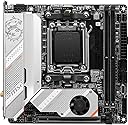
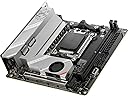
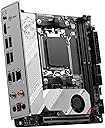
The MSI MPG B650I Edge WiFi is a stylish silver-white Mini-ITX motherboard designed for AMD Ryzen 7000/8000 series processors. It supports ultra-fast DDR5 memory up to 6600+ MHz (OC), features a robust 8+2+1 VRM power design with advanced thermal solutions, and offers cutting-edge connectivity including Wi-Fi 6E, Bluetooth 5.3, and 2.5Gbps LAN. Built on a premium 10-layer PCB, it delivers high performance and reliability in a compact form factor, perfect for gamers and professionals seeking power and style in a small build.


| ASIN | B0BHCRX6K7 |
| Best Sellers Rank | #30 in Computer Motherboards |
| Brand | msi |
| CPU Socket | Socket AM5 |
| Chipset Family | AMD B650 |
| Chipset Type | AMD B650 |
| Compatible Devices | Personal Computer |
| Compatible Processors | AMD Ryzen 8000/ 7000 |
| Customer Reviews | 4.0 out of 5 stars 213 Reviews |
| Global Trade Identification Number | 00824142301029 |
| Graphics Card Interface | PCI Express |
| Item Dimensions L x W x H | 6.7"L x 2.5"W x 6.7"H |
| Item Type Name | Gaming Desktop Motherboard |
| Item Weight | 16 ounces |
| Main Power Connector Type | 24-Pin |
| Manufacturer | MSI |
| Memory Clock Speed | 6400 MHz |
| Memory Slots Available | 2 |
| Memory Storage Capacity | 64 GB |
| Mfr Part Number | B650IEDGEWIFI |
| Model Name | MPG |
| Model Number | B650I EDGE WIFI |
| Number of Ethernet Ports | 1 |
| Number of Items | 1 |
| Number of Ports | 12 |
| Platform | Windows 11 |
| Processor Socket | Socket AM5 |
| RAM Memory Technology | DDR5 |
| Ram Memory Maximum Size | 64 GB |
| S/PDIF Connector Type | Optical |
| System Bus Standard Supported | Serial ATA/600 |
| Total Number of HDMI Ports | 1 |
| Total PCIe Ports | 1 |
| Total SATA Ports | 4 |
| Total Usb Ports | 6 |
| UPC | 824142301029 |
| USB 2.0 | 4 |
| Unit Count | 1 Count |
| Warranty Description | 3 Years |
H**S
Overall a Great Motherboard for Builds of Any Size
I bought this motherboard as part of a new computer build to replace an older computer with an existing MSI motherboard that ran great for over seven years. I am happy to say that so far, things are looking great for how easy the board was to build in and having the M-Flash feature was great as the BIOS that shipped on my motherboard was not compatible with my CPU - not a problem when I was able to update the BIOS without needing the CPU to be compatible. The only issue I have had so far is some intermittent problems with the BIOS not remembering the time, and I have not fully diagnosed that issue. I am not deducting any stars, however, as MSI support has been very helpful so far. If this changes, I will update my review accordingly in the future.
T**R
Solid Motherboard.
Excellent MB. I was reluctant to order this at first because of the Amazon warning that it is a frequently returned item. It turns out I did have to return the first one, as it was obviously a used and damaged board that was sold as new. Amazon replaced it quickly, and the second one had all the signs of a new item. Tape on the bag, CPU socket cover in place, plastic on the back side of the MB and also on the M.2 socket cover. Easy build after that. No BIOS flash required ahead of time. I'd like better drive symbols in the BIOS, but it was easy to change the boot order and load the OS from USB.
M**I
DO NOT BUY
This is absolutely the worst f***ing motherboard I have ever laid my fingers, eyes, and breath on. It's almost served me 3 years down the line because I never turn it off and if I do I have to play Russian roulette on what I guess is memory training. They must've rushed this thing out to jump on the DDR5 RAM train because this thing boots 20% of the time. I wish I could return it or just buy a totally different motherboard but I'm broke so I'm stuck with no PC, luckily I have a SteamDeck.
J**Z
it is working
it was a nice price back then
D**L
Great...with a HUGE caveat
The B650I Edge Wi-Fi is a great motherboard, but it has a huge manufacturing flaw that needs to be addressed. The Clear CMOS button on the back of the motherboard sticks out too far and is pushed down in the motherboard packaging in transit. This results in the CMOS battery being dead when the board arrives to the customer. This means anytime you disconnect the motherboard from power, it resets ALL your BIOS settings including any CPU or Ram overclocking you applied or anything else you applied in the BIOS. This can be resolved by swapping out the CMOS battery yourself, but this requires above average skill on the end user to do this. I personally chose this route over returning or RMA'ing the board since it is a quick and cheap fix if you know what you are doing. The CMOS battery is just a CR2032 battery which is easy to buy just about anywhere, but since this is an ITX board, the battery is not socketed in like most ATX boards. Instead you have to disconnect a lead from from the battery and then swap the battery out using heat shrink or electrical tape in my case to hold the + and - leads on the new battery. Once this fix is applied, the board is great and the only other issue is the extremely slow boot times when XMP Ram OC'ing is enabled. If I stay at the default 4800mhz, the boot is quick, but at 6000mhz it is painfully long for a modern system. I don't think this is unique to this motherboard or brand, but rather all Ryzen 7000 series motherboards.
B**G
Very long startups!
There are not that many choices for mini-itx AM5 motherboards yet, so I got this one knowing its flaws from reviews. Having used it in my main computer for a couple months now I can confirm what all the online reviews have said. Installation and layout are about as good as a mini-itx board can be. There will always be issues in this regard when a board is just this compact, so MSI did a good job. I appreciate having the forced air NVME cooler included. One complaint about the layout is the externally mounted BIOS resetting button. It is convenient that it exists and I have used it a couple times so far. But it is so prominent on the outside of the case that I've accidentally pressed it every single time I've picked my computer up so far. BE SURE TO CREATE A PROFILE IN THE BIOS AFTER YOU CHANGE ALL YOUR SETTINGS SO YOU CAN REVERT TO IT. This button is nice, but it should have been on an internal surface. But startup is soo much slower then I've gotten used to for my last couple of computer builds. It varies a lot, but is often in the range of 40+ seconds before I get to my login screen. There is an option to enable memory context persistence in the bios so the RAM doesnt need to retrain every bootup which seems to be the main culprit here. With that option enabled boot times drop to the realm of 20 seconds but I've only used it intermittently as having it on makes the system very sensitive and at times I was getting chronic BSOD's after I got to windows until i turned it back off. Right now it seems to be booting reliably with it on, but I may have to turn it off again. I am running RAM that is on this board's certified compatibility tables and I am running them at their built in EXPO profile speeds.
Z**W
Very good motherboard
Iโm not the most technically minded person, but I can tell you that this motherboard is a very good motherboard and I had little to no issues setting up the Bios or PC with this motherboard. The only issues I came across while building my new PC is the cooler size and purchasing the correct cooler for the project. Please make sure you purchase the correct cooler for your Motherboard or you will run into issues like I did. the best cooler for this motherboard, in my opinion, would be the ID Cooling IS-55. Just remember that you will have to flip the cooler upside down while installing it or it wonโt fit correctly.
M**R
Doesn't work with my video card
Update: turns out the Ryzen 7600 CPU I bought was the issue. Using a known good 7800x3d helped determine that. Getting a 7600x with the hopes it'll work I tried to use a rx7600 video card. The motherboard will not detect it. I tried subbing in an rx680 with no luck. MSI is telling me to try to swap out the CPU. I'll try that and update this review if that did it
C**2
Great board
Works great! While still expensive (which seems to unfortunately be the norm with itx boards) this one works amazingly! I find no big delay boot times when I turn it on as well
B**P
Best mini-itx from msi!
Everything is fine to be put in a itx build with powerful CPU and GPU, works great.
A**Z
buen producto
muy buen producto, hasta ahora ha estado trabajando bien
P**N
Great well priced ITX mobo!
Excellent mobo, paired it with 7900 non x. Everything working great after bios update.
L**O
Great motherboard, bad instructions
I personally had issues with my board since the M.2 threaded insert was popped out due to improper cable placement underneath the m.2 heat sink. Works just fine with the one screw and the provided thermal pads so didnโt need to warranty or return. M.2 fan is silent (no whine) shrouding and spacing of the ram make itโs great for a large cooler (personally used a noctua dh-15s Looks great, Bluetooth and wifi works good. Solid value for ITX AM5
Trustpilot
2 days ago
1 month ago