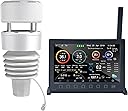
![ECOWITT [2023 Newest Upgraded] Wittboy Pro Weather Station HP2564, with HP2560 TFT Display Console and WS90 Outdoor Solar Powered Weather Sensor, Supports WU/WeatherCloud/Wow/ Servers,915 MHz](https://m.media-amazon.com/images/I/61a6uDOzAzL._AC_SL3840_.jpg)

Desertcart purchases this item on your behalf and handles shipping, customs, and support to Senegal.
🌦️ Stay ahead of the storm with data that speaks louder than weather apps!
The ECOWITT Wittboy Pro HP2564 is a cutting-edge, compact weather station featuring a 7-in-1 solar-powered outdoor sensor and a vivid 7-inch TFT display console. It delivers hyper-accurate real-time weather data including temperature, humidity, wind, UV, and rainfall, transmitted over a long-range 915 MHz frequency. Designed for professionals and weather enthusiasts alike, it supports Wi-Fi connectivity and integrates seamlessly with multiple cloud platforms and additional Ecowitt sensors, making it the ultimate smart weather monitoring hub for home, office, or garden.


| ASIN | B0BM3BQ425 |
| Additional Features | Waterproof |
| Are batteries included? | No |
| Brand | ECOWITT |
| Brand Name | ECOWITT |
| Color | Black or Dark Gray |
| Connectivity Technology | Wi-Fi |
| Customer Reviews | 4.4 out of 5 stars 263 Reviews |
| Display Type | LCD |
| Finish Type | Smooth |
| Frequency | 915 MHz |
| Included Components | [HP2560 TFT display console, WS90 outdoor weather sensor, USB to 2.5*0.7mm DC 5V power cord] |
| Is Used Where | Outdoor |
| Item Dimensions D x W x H | 12.2D x 23W x 18.3H centimeters |
| Manufacturer | ECOWITT |
| Material | Plastic |
| Material Type | Plastic |
| Model | HP2564CA |
| Number of Items | 1 |
| Part Number | HP2564CA |
| Power Source | Indoor Console: Cord Powered. Outdoor Sensor: Solar Powered Or Battery Powered (Batteries Not Included). |
| Power source | Indoor Console: Cord Powered. Outdoor Sensor: Solar Powered Or Battery Powered (Batteries Not Included). Power source Indoor Console: Cord Powered. Outdoor Sensor: Solar Powered Or Battery Powered (Batteries Not Included). See more |
| Recommended Uses For Product | Garden, Home, Office |
| Recommended uses for product | Garden, Home, Office |
| Sensor Technology | Multiple (Temperature, Humidity, Rain, Wind, Light) |
| Shape | Rectangular |
| Special features | Waterproof |
| Specific Uses For Product | HP2560 Indoor Display Console: with built-in temperature/humidity sensor and barometric pressure sensor; Pair with ecowitt developed sensors and send their data to the Internet., WS90 Outdoor Sensor Array: Temperature/ Humidity/ Piezoelectric Rain gauge/ Wind Speed&Direction/ UV light&solar |
| Specific uses for product | HP2560 Indoor Display Console: with built-in temperature/humidity sensor and barometric pressure sensor; Pair with ecowitt developed sensors and send their data to the Internet., WS90 Outdoor Sensor Array: Temperature/ Humidity/ Piezoelectric Rain gauge/ Wind Speed&Direction/ UV light&solar Specific uses for product HP2560 Indoor Display Console: with built-in temperature/humidity sensor and barometric pressure sensor; Pair with ecowitt developed sensors and send their data to the Internet., WS90 Outdoor Sensor Array: Temperature/ Humidity/ Piezoelectric Rain gauge/ Wind Speed&Direction/ UV light&solar See more |
| Style Name | Compact |
| Temperature Accuracy | + 0.3°C |
| Unit Count | 1.0 Count |
D**W
Speedy delivery, nice product.
Overnight delivery! Set-up straight forward, works well.
A**T
excellent consumer-grade weather station
This unit replaces a ten+ year old Oregon Scientific station that over the last five years had steadily decayed. This HP2564 is far better in every respect. The package came with the WS90 all-in-one sensor ultrasonic anemometer/vane, piezoelectric rain gauge, light and UV sensor and thermo-hygrometer; the HP2560_C color display; a ring of bird deterrence spikes; and two paper manuals. The all-in-one sensor is compact and easy to set up. I installed two AA lithium backup batteries. I have it mounted on a PVC pole. I did not opt for the A/C heater module. I can't swear by the rain gauge, but it seems close to nearby station rainfall readings. The display is bright (brightness is adjustable) and easy to read. My unit is about 50 feet and two walls away from the sensor with all-bars on the WIFI icon lit up. It also comes with an interior thermometer and hygrometer, and micro-SD port, 32GB max FAT. The micro-SD card continually outputs readings in CSV format which are easy to analyze in Excel or similar spreadsheets and the card will take a long time to fill up. There is no battery backup (although the micro-SD card could be considered an approximation of same), so get a small UPS for the AC input if that's an issue. It's a little wonky to initialize, although the paper manual is adequate and online resources a little better. However, once you get used to the cumbersome sequential menu drill-down and value setting system (i.e., no touch screen nor direct go-to-setting shortcuts), it becomes quite usable. A cool feature is that if the unit is in a bedroom, it can be scheduled to go dark and then re-enable at certain times (or can be manually darkened and re-enabled at any time). This might also be useful to prevent long-term screen burn-in, but the manual does not say that's a problem with this kind of display. Setup of WIFI and communication with the optional internet Ecowitt.net service is straightforward. I have not tried linking to Weather Underground. The Android app is easy to use, showing current readings. It also shows graphs of various measurements over different time intervals, including yearly. At this point, my only fear is that as opposed to systems with separate sensors, with long-term use if part of the all-in-one sensor fails, then the whole thing must be replaced unless repair is possible. Otherwise, this is an excellent consumer-grade weather station.
V**D
ECOWITT Wittboy Pro Weather Station HP2564, Includes 7 Inch HP2560
Great weather station with many weather info, additional sensors can be added. I have no issues with connection dropouts from sensors /wifi - all works fine. During sunny days, roof sensor is powered solely by solar panel, it uses AA batteries only after capacitor discharges during few days of darkness/clouds. (solar doesn't charge internal AA batteries but supercapacitor) To get accurate readings, some settings need to be done after 1st powerup (like altitude/pressure). Only small drawback i found so far is that lcd brightness in auto mode is controlled by exterior light hitting the outdoor sensor, there's no ambient light sensor on indoor lcd unit
J**N
Simple y completo
Simple y completo. Interfase accesible y fácil de manejar Cumple muy bien su función.
B**N
Best weather station I've owned.
I have an Ecowitt WS 90 sensor and HP2560_C Display. I have had the unit for about 4 months now and I am so please and excited with it. I was worried about it when I ordered, but with the help of the Ecowitt support team. I have calabrated it and it works amazingly. The manual for the displays seems to be a cut and paste of several manuals and sensors. It is not a complete guide to the HP2560_C display. Cons first: 1. Very disappointed with the display size of the HP2560c. There is too much information to display on such a small screen. It looked so much larger in the advertisement photos. If Ecowitt comes out with larger I will buy it. I can’t read much of the display data unless I hold the display in my hands. I know I have the information on my phone, but I like the display and like showing it off. 2. in my Manual the QR code is not correct for HP2560c Wifi set up. 3. The manual for the HP2560c must be used for more than the WS90 sensor and is confusing, because of different references to other sensors. BhmMan: I suggest you go to the Ecowitt website and download the whole manual and quick start. Use the support tech team. They usually respond in 1 or 2 days, and be patient. Pros: Just about everything else. Easy to install, with a little help from support easy to set up, and most of all being able to calibrate your readings. Note: I have emailed the Ecowitt support team all the below questions. They have been super helpful, and maybe this will help you. Q. I have a Wittboy with a Mdl HP2560_C display, I also have a GW2000 hub. Do I get any advantages installing the Hub? I had my HP2560_c already connected to the internet but can’t connect to the Wunderground. It is connected to the Witt weather app though. Ecowitt - If you have HP2560 console, then there is not much use to have the hub GW2000, as they are doing the same job with different display method. (I returned my Hub) Q What am I doing wrong that I can’t connect to the Wunderground? I have wunderground set up. I have put the numbers into the console. Is it supposed to go automatic from there or am I missing a step? I finally deleted everything except my account, started over, and it finally worked. Ecowitt - Please check your spelling for the ID and password input. The characters from WU can be misleading for 8:B, l:1. Etc. (This was my problem) Fill in your WU ID and Password, if it is connected to WU server, the WU icon will be lit on the main display. (Mine is at the top left.) Q. Is the 32 gigabyte micro SD card used just for Backup or just for software and hardware updates? What else is the SD card used for? Can I use the small USB plug in for updates? Can you give me instructions for how to use updates? Can I go directly from computer or cell phone to the Micro USB to update? Ecowitt - You can use any SD card with size no larger than 32GB & 32 fats. Down load the update file to your computer unzip the file, copy user bin file to SD card (max 32GB), insert into console and upgrade will start automatically. BhmMan: The SD card is for firmware updates, you can also leave the SD card in and history data will be saved on your SD card. I guess that would be my back up since there is no battery in the monitor. When I lose power, I only lose data while the unit is off, all the old data is saved on the SD card. Q. How can I use my app on my other devices like my lap top, iPad, my wife’s iPhone, and my neighbors mobile Phone. I know I can share for 30 days. But then I must reset each every 30 days. I’d like to know if I can share permanently. Ecowitt - We are extending the sharing time to 90 days. But it is not possible to share it permanently. You can refresh the share lease time to 90days by click on the “refresh” button and your friends can keep using the same link. What you need to do is refresh the link within the expiring date. Q Main. The Manual for the Ecowitt HP2560_C has a calibration Screen. I Note the Solar, UV, Wind, and Rain. These have a series of Numbers called Gain. I do not understand what each setting does to my overall display. Question 1. In this Calibrations Mode: in Rain Setup “Rain gain” has a “1” showing as a Factory preset, meaning - Sight glass rain gauge with an aperture of at least 4”. What do numbers 0.01 thru 5 Mean? Question 2. In Calibrations Mode: Rain Setup also has Piezo Rain1, Piezo Rain2, Piezo Rain3, Piezo Rain4, & Piezo Rain5. What do the numbers 0.01 thru 5 mean for each of these, and How do I Set these for my Ecowitt WS 90? Question 3. In Calibrations Mode: Wind Gain has a “1” showing as a Factory preset, meaning - Calibrated laboratory grade Wind meter. As in Question 1, What do numbers 0.10 thru 5 mean? Question 4. In Calibrations Mode: Solar Rad Gain has a “0.10” showing as a Factory preset, meaning - Solar radiation conversion from lux to w/m2 for wavelength correction - What do numbers 0.01 thru 5 mean? Question 5. In Calibrations Mode: UV Gain has a “1” showing as a Factory preset, meaning - Calibrated laboratory grade solar radiation sensor. What do numbers 0.05 thru 10 mean Ecowitt - Gain means factor that’s used to multiply with your original sensor data. So if you set gain larger than 1.0, it amplifies, if you have the gain set below 1.0, then it minimizes. BhmMan – this was especially helpful setting my rain gage. When I first set the unit out, my rain readings were way low. I set each rain setting to “2” and now it seems accurate with my Tube Style rain gage. So happy.
Trustpilot
1 month ago
3 days ago