Buy anything from 5,000+ international stores. One checkout price. No surprise fees. Join 2M+ shoppers on Desertcart.
Desertcart purchases this item on your behalf and handles shipping, customs, and support to Senegal.
⚡ Power-Test Like a Pro — Stay Ahead in the Fast-Charging Game!
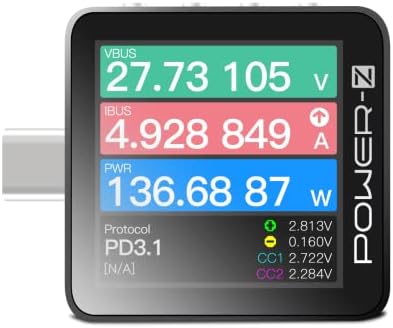
The Power-Z KM003C is a compact, professional-grade USB-C fast charging tester featuring PD3.2 and QC5.0 support, a large 1.54-inch high-contrast LCD, dual USB-C ports plus HID for PC connectivity, and an ARM Cortex-M4 processor with 20-bit ADC. It delivers precise voltage, current, and protocol analysis up to 240W, with firmware updates ensuring compatibility with the latest USB power delivery standards—ideal for tech-savvy professionals and device testers.


| ASIN | B0BJ24PVNJ |
| Best Sellers Rank | #14,128 in Cell Phones & Accessories ( See Top 100 in Cell Phones & Accessories ) #13,726 in Cell Phone Accessories |
| Brand | ChargerLAB |
| Brand Name | ChargerLAB |
| Color | Silver |
| Customer Reviews | 4.5 out of 5 stars 226 Reviews |
| Item Dimensions | 1.4 x 0.34 x 1.44 inches |
| Item Weight | 0.58 Ounces |
| Item dimensions L x W x H | 1.4 x 0.34 x 1.44 inches |
| Manufacturer | ChargerLAB |
| Measurement Type | Ammeter, Voltmeter, Multimeter |
| Model | KM003C |
| Part Number | KM003C |
| Power Source | Usb Type-c |
| Specification Met | CE, EMC, FCC, RoHS |
| Style | Modern |
| Style Name | Modern |
| UPC | 756166474123 |
A**.
⭐️⭐️⭐️ The best of all testers, Alt DisplayPort capable
ChargerLab KM003C is by far the most modern USB-C tester, preserving all cable lines, thus it is Alt DisplayPort compatible and allows for video signal transmission with PD 3.1 support. It is surprisingly small, and the screen displays more information than the competition. By far the best USB tester, kudos to ChargerLab. I am providing an overall comment for three USB testers, all of which deserve to be purchased as they complement each other perfectly and are consistent in their results. I would like to dedicate the majority of this review to the Bit Trade One model, which has recently arrived on Amazon. It deserves a shoutout because the tool is exceptional and inexpensive for what it offers. The ADUSBCIM is a USB cable tester that truly complements traditional USB cable testers. Only the cable to be tested needs to be plugged into the A and B ports, and the tool does the rest. The reference value for calculating the cable's resistance is taken using a CR2032 battery, and I note that the calculation is very precise and stable. You can find on Bit Trade One's ADUSBCIM GitHub page, in the Pull Request section, a manual in English in PDF format. This is my small contribution to the project, as the current official English manual is more of a word-by-word description that is difficult to understand. Thanks to this tester, I discovered, for example, that Anker cables, the 765 series, were actually poor high-resistance cables, and that I had much better options for charging. I ended up wasting money on cables that turned out to be slower than cables that were given to me for free with computer accessories. The FNIRSI FNB58 is a very comprehensive USB-A and USB-C port tester. It notably offers numerous rapid charging protocol tests, can test the quality and resistance of a cable, and obtain oscilloscope-like graphical representations. Now that we are on PD3.0 and with PD3.1 approaching quickly, owning one of these tools is now essential to validate the proper functioning of an installation. I've read a lot of advice on Reddit, and if you're looking to equip yourself with the best products offering the most testing possibilities, here are the tester references to get: - Bit Trade One ADUSBCIM (very thorough cable tester testing all the lines of a cable) - FNIRSI FNB58 (the most comprehensive, many ports, many scenarios, USBA/C Micro) - ChargerLab KM003C (the most modern, TB4, 250W) If you have these three or at least a combination of the cable and usb tester, it will take you no more than a few days to become a USB expert. 👌
R**N
The Software Is Great! Alot of attention of detail went into this meter. A++
Alot of love has been put into this design and the software that goes with it. The software has a USB-C PD protocol analyzer that shows you the communication between devices as they negotiate the voltage and current levels that will be allowed and supplied which is very helpful if your designing a device that had USB-PD sink or source features which is what I'm doing which is something I have not seen in a device at this price range. This was a pleasant surprise when I started looking into the software features. The firmware is easily updatable via the software also which means you will not be missing out on any new features as the USB protocol changes over time. The display has a very nice layout and is easy to read and and navigation of the features is alright once you get used to what buttons do what. It's surprisingly smaller than I expected which makes it easy to bring along if you want. For me this allows me to quickly verify the power output of battery banks, AC chargers, and the power consumption of devices I use or am testing. The software allows you to graph out everything over time and save it to a file for later use or comparison. I can tell a lot of love was put into this design, UI, and Software and feel like for $100 it's a steal if you can use all the extra features it provides. Chargerlab has a great Blog where they tear down power banks and bigger solar charger systems and show exactly what is inside and what chips were used if your into those types of things. They use this meter to verify the capabilities of all these different products which means they have to make sure the meter is capable of detecting all the latest USB PD and other standards which means this will always be getting updates as things change over time. I would say spend the extra money and buy this one if you want the best.
H**K
Expensive, but all you really need.
An expensive device, but really thought out and actually all you really need. The physical case is slick and sturdy, the software is well developed and works well and gives real insight to what is happening with your USB-C device and shows all communication. This device is a well worth investment tool
J**P
Great power adapter tester
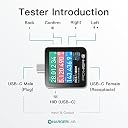
I use this mostly for testing the capabilities (protocol detection) of USB-C power adapters. Quick guide / tips for this feature: Plug the tester's male end directly into the charger. Note that the tester usually doesn't automatically turn on with just one side connected (unless it's a non-PD-capable port), although it would if both sides were connected (i.e. for monitoring a device's charge rate). How do you turn it on then? Hold down the bottom button briefly which activates a pull-down resistor in order to request power from the charger. Then the screen comes on with a prompt, leave the default selection ("Keep CC pull-down resistor") and click the 2nd button from the top to confirm. The buttons, from top to bottom, by the way, are: Back, Confirm, Up/Previous, Down/Next. Now that the device is on you can navigate around and use the testing functions! Although it's easier to use the male side for charger testing, the female side works too if you keep two things in mind. 1) By using a cable, you are introducing another variable (e.g. maybe your 100W charger only reports 60W because your cable doesn't have an E-Marker). 2) The pull-down resistor trick only works with a specific cable orientation - if you hold the bottom button and nothing happens, unplug the cable from the tester side, turn the cable over, plug it back in, and try again. I also own a FNIRSI FNB58 but prefer the Power-Z for several reasons. For example, the fact that it eliminates the variable with the cable. But mainly because the Power-Z has a capacitor that keeps it powered even if the charger briefly cuts out during testing, whereas the FNB58 typically requires two connections (not only to the input being tested, but a stable power connection via the "PC" port) to keep it from cutting out. That said, I have fun playing around with both of them, and I don't regret buying either of them.
S**R
Not easy to use. Capable, but not casual.
Way too complicated. Not intended for casual use. Very difficult to setup and understand unless you’re an engineer in this field. Not fun. Capable, but if you’re not an electrical engineer, it will sit unused.
E**P
Super Sophisticated and Powerful and Highly Advanced -- WOW!
ChargerLAB Power-Z KM003C Portable USB-C Fast Charging Tester PD3.2 QC5.0 Digital Voltmeter. This is a Very sophisticated product! It is out of my league for the massive number of different measurements and capabilities. After some trial and error I was able to save CSV Volts-Amps-Watts data Standalone and using the Power-Z software, then export to Excel for graphing. You practically need an Electrical Engineering degree to fully understand this powerful tool. I wish there were detailed instructions and discussions available. WOW!
M**L
Very handy, useful info, works great!
I could not figure out why some of my devices were not charging as fast as they 'should'. I used this wonderful device to troubleshoot, and found that some of my cables were not great. This device is *fantastic* for troubleshooting and verifying you are getting what you think you are. For example I learned our car is only spitting out 7 watts from its onboard USB ports. My anker powerbank is a 140W unit, but I can only get 30W to my portable device. That's when I learned my portable gaming device has a charge limit of 30W - good to know, now I can plan for how long it will take to recharge under the best of circumstances. So much good use for this tool, I highly recommend! It comes in a nice metal tin case with a protective foam cutout surround to protect it.
G**T
Precision instrument
It is a precision instrument. Extremely well made. A short usb-c to usb-c cable would be useful to connect to HID computer/power. But I have dozens of, right? USB-C female to (device to charge) male connectors would be nice. This meter is very nice.
F**E
Does the job. I recommend!
Does the job to tell what your USB-C to USB-C really is. Is it a pure USB x or a Thunderbolt 3 or 4? This device will tell you. Also allows to make precise power consumption measurement over a period of time. Kudos to the manufacturer. Such a device is not easy to find. I recommend.
S**T
Useful USB C power meter
Useful USB C power/charging meter. Provides useful information about charging protocols iavailable and in use. Precision ifmeasurments is ridiculous, far exceeds devices accuracy!
H**.
5-Sterne-Rezension für den ChargerLAB POWER-Z KM003C
Ich bin absolut begeistert vom ChargerLAB POWER-Z KM003C! Dieses kleine Gerät (gerade mal ca. 4×4 cm) hat es wirklich in sich. Trotz seiner kompakten Größe ist es ein professionelles Messinstrument, das nahezu alle gängigen Schnelllade-Protokolle und -Modi erkennt und analysieren kann – darunter PD2.0/3.1, QC2.0–5, PPS, UFCS, VOOC, SCP, FCP und viele mehr. Ich habe den Tester mit dem "REVODATA Gigabit PoE zu USB-C Konverter Adapter (Typ-C Ausgang Strom & Ethernet 2 in 1, bis 45 W, 5–20 V)" getestet – und der POWER-Z hat alle unterstützten Lade-Modi auf einmal erkannt! Das zeigt, wie leistungsfähig und präzise die interne Protokollerkennung funktioniert. Das Display ist hell, die Bedienung intuitiv, und über den HID-Port kann man ihn sogar am PC mit der Software auslesen oder Firmware-Updates durchführen. Die Protokoll-Erkennung funktioniert sogar ohne angeschlossenes Gerät, wenn man den Tester separat mit Strom versorgt – einfach genial. Zur Bedienungsanleitung: Es gibt einen QR-Code auf dem Gerät, der zur offiziellen Anleitung führt – diese ist allerdings nur auf Englisch. Mein Tipp: einfach die Datei als PDF oder Markdown herunterladen, bei ChatGPT hochladen, und man bekommt alle Erklärungen direkt auf Deutsch. Ein bisschen technisches Verständnis sollte man allerdings schon mitbringen. ⚡ Fazit: Ein echtes Power-Tool für alle, die Ladegeräte, Kabel oder Schnelllade-Protokolle testen möchten. Klein, präzise, robust und seinen Preis absolut wert. Klasse Gerät – uneingeschränkte Kaufempfehlung!
I**T
Utile e tascabile
Non riesco a far funzionare il cambio di orientamento dello schermo con la rotazione fisica dell'apparato, ma per il resto fa tutto quel che promette ed è un attrezzo insospettabilmente utile, che va maneggiato con cura per non sbagliare. Tenere sempre a portata le istruzioni.
J**A
Util herramienta de diagnostico
Es una herramienta de diagnostico bastante util, si te interesa conocer la capacidad de carga de tus dispositivos, bancos de energia y los protocolos de carga de los distintos tipos de cargadores, ademas de verificar la veracidad de alguno cargadores, en especial los de Apple. Es un poco elevado el costo, pero si eres técnico o un fanatico de la tecnologia, es una buena herramienta.
Trustpilot
3 weeks ago
1 month ago