


🎯 Level up your game with precision, speed, and stunning 4K immersion!
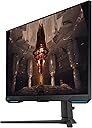
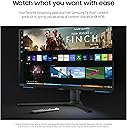
The Samsung Odyssey G70B is a 28-inch 4K UHD gaming monitor featuring an IPS panel with 178° viewing angles, 144Hz refresh rate, and 1ms response time. It supports both NVIDIA G-Sync and AMD FreeSync Premium Pro for smooth, tear-free gameplay. Enhanced with DisplayHDR 400, it delivers vivid contrast and color accuracy. The monitor includes ergonomic adjustments and a Game Bar for on-the-fly settings control, plus Samsung Gaming Hub for instant access to cloud and console games, making it a powerhouse for serious gamers seeking immersive, lag-free performance.








| ASIN | B0BGVYQ8CC |
| Adaptive Sync | FreeSync Premium Pro |
| Additional Features | Height Adjustment |
| Aspect Ratio | 16:9 |
| Best Sellers Rank | #171,328 in Electronics ( See Top 100 in Electronics ) #3,600 in Computer Monitors |
| Brand | Samsung |
| Brightness | 250 to 300 |
| Color | Black |
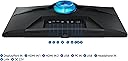
| Connectivity Technology | Bluetooth, DisplayPort, Ethernet, HDMI, Wi-Fi |
| Contrast Ratio | 1000:1 |
| Customer Reviews | 3.8 out of 5 stars 196 Reviews |
| Display Resolution Maximum | 3840 x 2160 pixels |
| Display Technology | LCD |
| Display Type | LED |
| Hardware Connectivity | DisplayPort, Ethernet, HDMI, Headphone, USB |
| Image Contrast Ratio | 1000:1 |
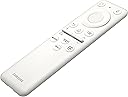
| Included Components | DP Cable, Remote Controller, USB 3.0 Cable |
| Item Dimensions D x W x H | 9.6"D x 25.1"W x 22.7"H |
| Item Type Name | Monitors |
| Item Weight | 15.4 pounds |
| Manufacturer | SAMSUNG |
| Model Name | Odyssey G70B |
| Model Number | LS28BG702ENXGO |
| Mounting Type | Wall Mount |
| Native Resolution | 4K UHD 2160p |
| Picture Quality Enhancement Technology | DisplayHDR 400 |
| Refresh Rate | 144 hertz |
| Resolution | 4K UHD 2160p |
| Response Time | 1 milliseconds |
| Screen Finish | Flat |
| Screen Size | 28 inches |
| Screen Surface Description | Flat |
| Specific Uses For Product | Gaming |
| Total Number of HDMI Ports | 2 |
| Total USB 3.0 Ports | 2 |
| Total Usb Ports | 2 |
| UPC | 887276701387 |
| Voltage | 28 volts |
| Warranty Description | 1 Year Manufacturer |
| Warranty Type | 2 Year Manufacturer Warranty |
A**.
Quality, great value TV
Best tv ever! This tv has great picture and sound quality and was a great deal for what you are getting! The color looks amazing and the tv looks classy.
R**.
I regret buying this monitor
I ordered TWO of this monitor in October 2023. I had had my previous mismatched monitors for 5 & 10 years & thought it was time for an upgrade in terms of technology & aesthetics. I had narrowed my options down to 3 different monitors from 3 different brands. I settled on this Samsung option because I previously had plenty of good experiences with other Samsung products (televisions, washer/dryers, phones). I now regret my choice & cannot possibly recommend anyone buy Samsung monitors. First, let's talk about the biggest issue - the DisplayPort inputs DO NOT WORK. Unfortunately for me, I did not realize this immediately for various reasons or I would've returned them straight away. On one monitor I assumed the issue was with my aging graphics card or the DisplayPort cable that came with the monitor. After upgrading my graphics card & buying new cables, along with support chat troubleshooting, I realized this was not the case. The one monitor that had an issue from the beginning never detected my PC being connected via DisplayPort. The second monitor's DisplayPort issues just became clear today. I woke my PC up from Sleep mode after having used it just fine a couple hours prior and suddenly the monitor was not working. I'll attach pictures to illustrate exactly the picture I was seeing. The menu options would appear crystal clear but the picture from my PC itself was no longer functioning via DisplayPort. I tried two different cables in three different ports in my graphics card to no avail. I have one of my older monitors hooked up to my PC via DisplayPort cable & it's working just fine. Both Samsung monitors always worked okay with HDMI cables but the refresh rate was always limited to 60hz using that type of cable & the picture wasn't as nice, which is not why I bought these monitors. The first monitor is currently being repaired under warranty by Samsung. The second will have to wait until I get the first one back. For a $600 monitor I expect it to work as advertised & not break down within 3 months. I've already paid $32 to have one monitor safely packaged to be sent in for repair & it looks like I'm going to have to do it again in the next couple weeks. The monitor's menu interface is also AWFUL, especially if you buy more than one. The remote controls will work on both monitors simultaneously for some of the buttons. I generally had to resort to attempting to use the buttons on the monitor itself, which are not the most intuitive to use because of their orientation on the underside of the monitor. If you're looking to buy new monitors please look elsewhere.
K**N
SAMSUNG 28" Odd
Crisp, excellent 4K display with nice RGB Lighting handles the PS5 4K 120Hz with ease, no screen tearing was noticeable and the motion transitions were smooth even in 1st person shooters (such as Call of Duty).
R**.
Good quality, easy to use!
6+ months owner here, I love that it has HDMI 2.1 games on it are crisp with fast frame rates, no shadowing or tearing in games with game mode on… Brightness is perfect and the Functionality is easy to use with the remote as well.
C**T
Samsung is awesome!
This came at great cost and worth the money. Clear crisp and perfect for gaming!
K**R
Descent gaming monitor ok tv
I needed a monitor big enough for work and play there is one important takeaway which is the vertical line issue. I try to fix myself and contacted Samsung fix and they made the process seamless. Pros: remote for volume and change settings; Good for work, play, and stream; Tizen OS built in (this is also a Con) HDMI 2.1 for PC, PS5, XBSX, good responsiveness for competitive games, nice LED lights, Netflix, Prime, Max Etc are nice bonus Cons: 400 nits is eh, Tizen OS can be sluggish sometimes, voice feature on remote does not work, vertical line is a common issue with monitors try to get it before the warranty expires. I got this for $600 and overall happy as long as you find it for under 600 it’s a good deal. There’s a G70A variant that is a base monitor without the ‘smart features’ you may find it for $450-$500 which is good.
D**L
Overpriced trash there a better monitors for the same or cheaper prices.
I have had this monitor for over 3 years now and I think I am qualified to make an honest review at this point. The display looks good and the refresh rate is decent…But that’s about all I can praise about this monitor. This monitor sucks!! The persistent UI updates Samsung forces down your throat constantly conflict with its connectivity to my PC. I’ve straight up had it not turn on when I boot up my Pc for a week straight and then all of a sudden it’s back to normal. I’ve tried every possible trouble shooting method and even consulted Samsungs guides directly for this model for a number of issues including the one I mentioned above (THEY NEVER WORKED) Not to mention “smart monitors” just suck, I don’t need all these excess bloatware apps on my monitor either when I can just use the exact same things through a browser instead of Samsungs god awful OS, which in my opinion is just so they can collect and sell your data. This monitor is also absurdly overpriced for the amount of headache it causes and is just not worth it in the long run for gaming or even just for a basic display. Do your self a favor and avoid Samsung all together and get an MSI and make sure it’s not a smart monitor with all the bloatware and filler apps. Also I’d like to add id almost guarantee at least half the 5 star reviews are just out of the box impressions and not an actual long term experience with Samsung products.
C**T
Works great in the desired place.
Very pleased with smart TV
S**I
Thanks to Samsung
Buying Samsung 4k 144hz 1ms gaming monitor is one of my target from last one year. After seeing this on deal i was so excited to buy it. After having monitor in my home i was soo happy with its performance with both PC and Xbox series X. Thanks to Samsung for offering a great 4k Gaming monitor on deal.
E**I
Worst monitor I used ever
I have had so many issues with this bad monitor the nightmare is most oftentimes is not detected by my PC and when I search about it I found so many people who suffering from it
S**L
Please save your money!
This monitor has been causing me trouble since i first bought it...the monitor will just lose connection to whatever it is plugged into randomly! I have bought new cabled to see if this fixed the issue but no. Extremely sad and disappointed.
A**R
Pure amazing for ps5
I was skeptical about buying this moniter because of the reviews i read on here but i bought it and took the chance , and my god i am so happy i did , 120hz on ps5 is amazing , i dont like that its like a tv but i kinda dig it that i can watch movies if i chose to … all in all this moniter is worth the money ( got it onsale)
J**J
Poor contrast/blacks for dark PC games, annoying on-screen menu, flicker
Returned it due to too much dissatisfaction. 1. As I only wanted it as a PC monitor, I found it annoying to always have to tell it via an on-screen menu when I turned the monitor on that I wanted to use it for PC monitor and not, say, for some TV/movie streaming seevice or console gaming service 2. As someone who also owns a Samsung TV on the other side of my room and an old Samsung 1080p monitor as my 2nd PC desktop monitor, it was incredibly frustrating that any time I hit Odyssey's remote control's power button, or any of the 3 Samsung remotes' power button, the same or reverse would happen on the other 2 screens. So, try to turn one on or off, the other 2 turn on or off, respectively. The kicker there is: if my TV was off and my Odyssey was on, and I hit the TV remote on to watch an afternoon TV show, the Odyssey would shut off. Or at bed time when PC was off, I would turn TV on to watch TV from bed, but Odyssey and other monitor would turn on, too. Very frustrating as I'd have to get out of bed and do a juggling act of remote control button aims to try and get the combo of on/offs that I needed or manually power stuff off. Those are just a couple scenarios, there were more. (Samsung treats all monitors/TVs the same, so any remote control for one works for all other Samsungs.) 3. The monitor flickered a lot when not playing games, like when browsing web pages. I don't understand this. Is it to prevent burn-in? 4. This monitor is horrible for dark shadowy PC games like Thief I: The Dark Project or Thief II: The Metal Age. There is no way to adjust the black amounts to your liking, as it tries to just hand hold you by greatly limiting your black/backlight, brightness/contrast controls, and having some auto-brightness/contrast adjuster. The latter would work somewhat, you think all is well when your whole screen is datk and shadowy, but then as soon as a few bright pixels come into view somewhere at the edge of your screen view, like a torch, backlit stained glass window, or sky, the entire monitor would auto-adjust to be brighter and more grayscaled blacks. Very jarring and ruins game immersion. I talked to Customer Support a couple times and they said there was no way around this or the other issues I described I ended up buying an LG UltraGear+ 27GR95QE 1440p. Even though it didn't have as high of HDR NITS, was 27", and was 1440p, I am much happier with it. Per-pixel zero blacks means Thief games, and other games for that matter, look really good. Graphically, its color calibration is much more accurate and natural, which for me is more important than high HDR nits values. The LG's HDR is just fine for me. It does flicker when browsing the web (not while playing games or watching shows), but not as jarring as the Odyssey, in my opinion. (Is this just a thing wth modern monitors??) LG has a nice auto-screen cleaner and such that runs to help prevent pixel burn-in. LG refesh rate hertz is better. And the remote doesn't turn my other Samsung screens on, and vice versa!. Also, the LG just connects to my PC like any other monitor would!, no need to fuss through an on-screen menu to tell it I want to use it for PC. I did really enjoy the bigger size of the Odyssey, but the trade-offs to LG more than make up for it for me.
Trustpilot
4 days ago
2 months ago