🚀 Upgrade your home network — speed, security & simplicity in one sleek device!
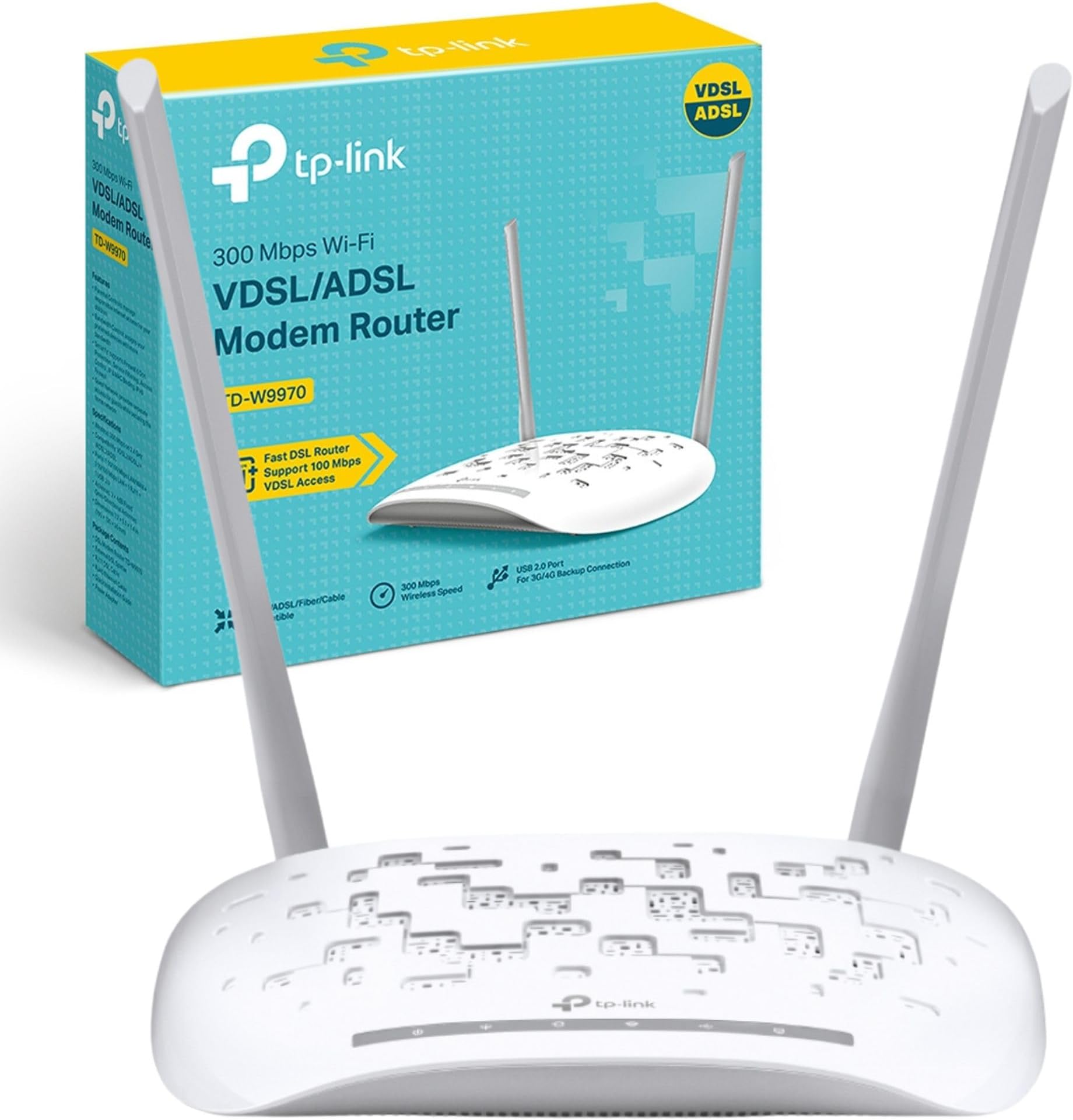
The TP-Link TD-W9970 is a powerful all-in-one VDSL/ADSL modem router delivering up to 300 Mbps WiFi speeds and 100 Mbps VDSL connectivity. Featuring 4 fast Ethernet ports, a USB 2.0 port for media and 4G modem sharing, plus robust security with WPA2 and WPS, it’s designed for seamless setup and reliable performance. Ideal for professionals craving stable, high-speed internet with smart parental controls and guest access, this device maximizes your home or office network range and efficiency.


| ASIN | B013OXVA6M |
| Antenna Location | Gaming |
| Antenna Type | Fixed |
| Best Sellers Rank | 29,640 in Computers & Accessories ( See Top 100 in Computers & Accessories ) 13 in Modems 255 in Routers 851 in PlayStation Legacy Systems |
| Box Contents | TP-LINK 300Mbps Wireless N USB VDSL/ADSL Modem Router; Cables included: LAN (RJ-45), Phone (RJ-11); Power Adapter; Quick Start Guide |
| Brand | TP-Link |
| Brand Name | TP-Link |
| Colour | White |
| Compatible Devices | WIRELESS |
| Compatible devices | WIRELESS |
| Connectivity Protocol | Wi-Fi, Ethernet, DSL |
| Connectivity Technology | 802.11b, ethernet |
| Control Method | App |
| Controller Type | Ios |
| Coverage | Extensive coverage |
| Customer Reviews | 4.1 out of 5 stars 1,192 Reviews |
| Data Transfer Rate | 300 Megabits Per Second |
| Frequency | 2.4 GHz |
| Frequency Band Class | Single-Band |
| Frequency band class | Single-Band |
| Global Trade Identification Number | 06935364092542 |
| Has Internet Connectivity | Yes |
| Is Modem Compatible | Yes |
| Item Dimensions L x W x H | 19.5L x 13W x 3.6H centimetres |
| Item Weight | 2 Grams |
| LAN Port Bandwidth | 10/100 Mbit/s |
| Manufacturer | TP-Link |
| Manufacturer Part Number | TD-W9970(UK) |
| Maximum Upstream Data Transfer Rate | 300 Megabits Per Second |
| Model Name | TD-W9970(UK) |
| Model Number | TD-W9970 |
| Model name | TD-W9970(UK) |
| Number of Antennas | 2 |
| Number of Ports | 4 |
| Operating System | Proprietary Router OS |
| Other Special Features of the Product | WPS |
| Product Warranty | 3 YEARS |
| Router Network Type | hybrid |
| Security Protocol | WPA2-PSK |
| Smart Home Compatibility | Not Smart Home Compatible |
| Special feature | WPS |
| Voltage | 220 |
| Wireless Compability | 802.11n |
| Wireless communication standard | 802.11n |
J**N
Ditch the BT 'Smart' Hub and go for a stable connection with this...
If you're after a reasonably priced, stable and fast VDSL2 (FTTC) router like me, this is perfect. It has all the latest standards like G.INP (be sure to get the V2 model for these, as V1 does not support them) and is a breeze to set up, taking me less than 10 minutes. I'm using mine with BT Infinity 2 and it works perfectly connecting at the same speed as my BT Smart Hub - which had to go, as after EVERY firmware update it crapped out and had to be reset to factory, set back up, etc.; I was done being a beta tester for BT! My old BT OpenReach modem acted as a backup for a short while, however it is too old to last much longer, doesn't support the latest standards and I can't get line stats... I use the modem in 'bridge' mode (see instructions in product description) connected to my firewall, and with the wireless disabled (which I never intended to use), so I can't comment on the wireless functionality. I have the Smart Hub set up as my wireless access point instead, and in this regard it works very well. I did notice that this has a lot of security functions like built-in firewall, wireless guest network, and SPI, but I don't need these; nice to see though. I can get line stats fairly easily by connecting my laptop to one of the free LAN ports on the modem, and it wall mounts. Frustratingly, since I won't be using the wireless, I can't easily remove the antennae as they are moulded, and just get in the way. It would be great if these could be detached without tearing the thing apart, but since I don’t want to invalidate the 3 year warranty I’ll have to live with it - for 3 years at least! Still 5 stars though, as all things considered, this is a fantastic bit of kit that fits my needs more than adequately. I hope you found this review helpful! Update: MY set up above may confuse. For a typical home set up, you don't need any additional equipment, it will serve fine as your modem, firewall and wireless access point, just like a BT Smart Hub. I believe this is the default set up mode too, so should be easy to configure.
D**D
TD-W9980 is proving to be a versatile replacement modem/ router
I installed this on a BT ADSL broadband connection to replace a Belkin N150 modem/ router. I bought this VDSL router so that it would work if I swap to a fibre to cabinet installation in the future. Initially I had the router working within 10 minutes in a temporary location. After an hour I connected it in it's permanent location at which point it stopped working. It would not initialise (could not detect the dsl modulation type). Resetting the router to factory settings was ineffective. Flashing a firmware update was also ineffective. Maybe I was just unlucky but after a couple of wasted hours I decided to cancel a replacement. Update 09/12/2015: I spoke to the manufacturer about my problem. They confirmed there should not have been any compatibility issues with my connection and acknowledged the device was faulty. Good customer service. I have since purchased the higher spec TD W9980 which is working well. Update 11/12/2015 I'm using the TD-W9980 with BT ADSL broadband. Its proving to be a versatile, future proof device.... WAN Basic set up is easy: Select from about 30 pre-programmed ISP options and then enter the ISP supplied username and password. Change the SSID and password (if you want to) and you're done. WiFi The 2.4 GHz WiFi is not as strong as the TD-W9970 model because of the internal aerial but it just about reaches the opposite corner of my 3 bedroomed semi (70dBm). Its working well with an existing "N300 TL WA850RE" extender, boosting the signal to the opposite end of my garden. I've had no connection problems with up to 17 devices so far. The 5GHz range is limited to my lounge - the router is installed in the room above. USB's I have a cloud printer and therefore don't need the print server. I've connected a partitioned 350MB external HDD (USB powered) to check its NAS capabilities. Its working well as a media server - streaming to a PS3. Files are accessible with my pc via "Storage Sharing" (has password protection) and accessible with my Chromebook via FTP. I've been able to capture images from security cameras via the FTP server. The HDD is a backup device for my PC but sadly it will not backup to the drive via the network. This is a shortcoming of my backup software so I'm going to upgrade it or even buy a proper NAS. The router can support 2 disk drives with up to 8 volumes. My first ever modem/ router lasted for 10 years. I'm hoping the TD-W9980 proves to be as robust!
M**T
Efficient gadget
I ordered this router because you can turn off the wi-fi through it. Yes, this is possible - although it turns out that you need to press a tiny black switch at the back of the gadget, which is next to another tiny black switch which can be easily pressed instead if you aren't looking carefully at what you are doing! (The other one is called WPS\RESET.) The router itself works fine - I am not sure if it is faster than my previous TalkTalk Super Router though. I have just done a test at 11.20am on 13-12-2016: the download speed was 827Kb (0.8Mbps) and the upload speed was 2.1Mb (2.6Mbps). This was on the fixed line internet, not wi-fi. The router itself was a doddle to set up - only took a few minutes and it did all the work itself. All I had to do was provide the wi-fi password. The router is about 20cm across, 13cm front to back, and about 3cm high, plus the 17cm high antennae which can be angled around. One unexpected plus is that it can be fixed flat to a wall, which will get it out of the way, although the leads supplied are not particularly long so it would have to be in a similar place to where it is on the desk at the moment. It has a little row of green lights at the front to show you what is working, although they are very small and you almost need a microscope to see what is what. I have only had the router for a few days so can't really give a true report about it, but at the moment it seems to be efficiently connecting to the internet, which is really all I expect from a router. I have given it 4 stars because its speed is not overwhelmingly fast, but I think that is probably because of dodgy phone lines and not the router's fault, so it probably really deserves a 5.
E**Y
This is the EU model
Beware this is the EU version which is NOT stated on the Amazon info. The product is great and will work in the UK faultlessly however the information on Amazon is wrong which means for my purpose it was wasted money. TD-W9970 (UK) This should read EU Model (I required v1 (non "EU/US" model) Live and learn
M**S
Surprisingly good for a basic router
I needed a new router to check out broadband problems I was having, as I tried to work out whether the issue lay with my old but expensive router or the antique and fragile copper my supplier pretends is suitable for the 21st century. I wasn't convinced it was the router, so I opted for the cheapest unit I could find, sure that my test would lay the fault at BT's door. I was wrong, and found that the new router not only returned data rates to where I thought they should be but exceeded my previous best figures. This is an impressive bit of kit, and given my previous router cost over £200 I was delighted to have got away with spending so little to replace it. Setup was a doddle. I just copied the settings across from the old unit and had it up and running within 10 - 15 minutes. It's got most of the important bells and whistles of the old one, so I can tie the MAC address of particular devices to an IP address or open up ports so that my IP phone works properly - though admittedly that took me a while to work out. Sure, the software interface could be a bit better, though if you wanted to you could flash a different firmware to the box. But you'd have to be pretty demanding to have to go that far. The wifi works well, there are four network connectors, and it even looks good! I probably wouldn't have bought this if I'd known I needed to replace my old router, imagining that I'd need something more expensive. That lack of certainty has worked in my favour, saved me a bit of money, and meant I've ended up with a very capable piece of kit.
S**H
Great, budget friendly and excellent on onestream
If you’re with Onestream and want to dodge their monthly router fees, the TP-Link TD-W9970 is an absolute no-brainer. Setup was a breeze—once I realized Onestream forgot to mention you need to enable VLAN and set it to 101. After that little hiccup, it’s been smooth sailing! I’ve disabled the router’s antenna and hooked it up to my eero via Ethernet for WiFi, and they play together perfectly. If you’re looking for a cheap way to set up an ADSL or VDSL connection and connect it to another router, this is a solid choice. Fast, reliable, and super affordable!
N**N
Wireless Scheduler Doesn't Work
I bought this router for one reason only - to reduce EMF (before the pro-EMF trolls start their comments, I have a neurological condition so it DOES matter to me!). So it's low power - it won't reach a lot of the upstairs of the house. More importantly, it has a WiFi scheduler, so you can set wifi to turn off at night. Even more importantly, the scheduler doesn't work. Almost every day I was having to manually go in, delete the schedule and recreate it. That was until the last update, since when the schedule kicks in when you recreate it (again!) but never again switches on. Ever. I've wound up having to put my old Orbi on as an access point and, as it doesn't have a scheduler put on an electric time switch. So no low EMFs when WiFi operating. I can't even just dump this thing, as I still need ethernet when WiFi is off. At some point I'll go look for another router, but it won't be from these guys as their software isn't fit for purpose.
L**C
Had this model for around 6-7 years and had to buy a new one
Well, i had this router for about 7 years. not this very one though as it has been updated to a new style and the router software is much more modern and easy to use than the old version. Also i find that the range is not quite as good as the old one and you cant take out the antenna ether. but its not bad and it giving me internet, hopefully for another 6-7 years. had to buy a new one as the old one reset itself and lost all data including ISP login... it reset to factory. also there was a bad brown spot where the old one got hot so i knew it was on its way out for a while now. Anyways if your not on fibre or cable and still on the old ADSL this router is fine for the home. The software on this new one has a quick setup which is much nicer than the old one and is much easier to navigate. Make sure you pick the correct ISP on the settings as it will not work if you dont and make sure you know your login details for the ISP otherwise it wont work. Most ISPs send routers to their customers so i guess this is a dying item to purchase now. But the EE router was the same price as this so its all good. Anyhow i am moving house within a year and will be running a 4G router instead of paying for line rental and putting up with terrible speeds (8.5mbps AVG) with ADSL. i get 16mbps with EE around here so it makes no sense to have ADSL anymore. but its a good basic router if you are still on good old ADSL, it also has a usb so you can plug in a little 4G dongle as a backup or in place of ADSL if you wanted. but i dont recommend doing that as the speeds would be quite bad indoors, unless you live near a mast. All in all a good router with reasonable Wi-Fi range, nothing to shout about but it does the job if you are looking for a cheap router.
M**N
Le colis fourni n'est pas en mesure d'être utilisé
Modem vendu et expédié par AMA UK. Description sur site Amazon France en ALLEMAND. Réception colis avec uniquement notice rapide en ANGLAIS. Connexion internet sur adresse routeur (pas de traduction en français). Pour pouvoir se connecter, il faut naturellement branché le modem sur secteur. Alors là, PAS de CHANCE, il n'est fourni qu'une prise UK. Je commande donc ce jour, un adaptateur UK vers FR (ou plutôt 2 car vendus par 2) pour 8,99 €. Pas bon pour l'écologie et surtout le client.
S**N
Good modem router for Australian NBN FTTN plan
I recently moved into an apartment building where I could only get a FTTN (fibre to the node) plan from the service providers. I needed to get a RJ11 converter as well for the old school telephone port. From there it was easy to setup this modem as a bridge, turn off the wifi and use my existing WiFi-6 Router as the main router. Shipment from Amazon was same day as I'm a Prime subscriber. Was up and running that same night. Getting speed of between 90-95mb/s download but that's because of the FTTN limit. Can definitely recommend this unit if you're stuck in the same predicament as I was.
Y**R
Built to last
Bought this as a spare. The unite I have now is identical and has worked flawlessly for 8 years. Cheers
B**O
Super!
Iper facile da installare co guida passo-passo 6 minuti e segnale ottimo. Tp-Link è un porto sicuro.
M**T
Fait son travail
Utiliser dans le but unique de modem VDSL2, configuration facile et rapide, fonctionne sans problème. Les plus : Compatibilité VDSL2 Prix Les fonctions nombreuses La rapidité de la mise en place Les moins : Transformateur avec prise électrique Anglaise, nécessité adaptateur pour un nouveau transformateur. OS a priori uniquement en Anglais
Trustpilot
2 months ago
4 days ago