

📡 Elevate your VoIP game—cut the cables, keep the clarity!
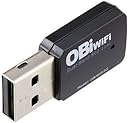
The Poly OBiWiFi5G USB adapter effortlessly converts your USB-enabled VoIP adapter or VVX phone into a wireless device by connecting it to 5GHz Wi-Fi networks. With simple plug-and-play installation, robust wireless encryption, and ultra-lightweight design, it offers professional users the freedom to position their devices anywhere within Wi-Fi range without compromising security or call quality.
| ASIN | B07FZQX1RQ |
| Brand | POLY |
| Built-In Media | Wireless-AC USB Adapter |
| Color | black |
| Compatible Devices | Desktop, Laptop |
| Customer Reviews | 4.4 4.4 out of 5 stars (604) |
| Data Link Protocol | USB |
| Global Trade Identification Number | 00610807882688 |
| Hardware Interface | USB |
| Item Weight | 0.07 Pounds |
| Manufacturer | Polycom Inc. |
| Mfr Part Number | 1517-49585-001 |
| Model Number | 1517-49585-001 |
| UPC | 196188225608 610807882688 |
| Unit Count | 1 Count |
D**E
Works like a charm. It's very easy to install. Once it's plugged into the USB slot of your phone, the phone will reboot. You choose your Wi-Fi network from the phone screen, enter your password and submit. The phone will reboot again. Once it's back online, the Wi-Fi symbol will show on the phone screen. And that's all there is to it.
M**A
This works in making your polyphone connect to wifi. It took me sometime but it works. Here's what you need to do. If you are using a Voip phone for the first time. Connect and activate your phone by an ethernet cable and make sure you are able to make phone calls over the ethernet connection. Once phone is working perfectly with ethernet cable, unplug the ethernet cable. Plug the ploycom usb on the back of the phone. Go to settings, turn on wifi, the phone will ask to be rebooted, select yes. Wait for the phone to restart and then when it initializes it will say able to connect to wifi. Then select which wifi you want to connect and it's done. No need of ethernet cable anymore.
M**R
Tried connecting according to the instructions on the box which didn't work. It took me a while messing with that and I realized it was much simpler than the box said, just plug it into your poly device and on the device go to settings, wifi, enable wifi and connect to your wifi network. Once connected I rebooted my phone and it was up and running!
M**A
Doing the job
L**N
I discovered this OBiWiFi5G USB dongle while looking for wireless connectivity options for my OBi200 analog telephone adapter (ATA). I've been using Google Voice for about 15 years and began using the OBi200 with Google Voice in 2018. The OBi200 needed to be tethered to my router with an Ethernet cable and, unfortunately, this also meant that my analog cordless telephone base station needed to be close to the OBi200 because of the analog telephone cord connection. The OBiWiFi5G enabled me to relocate the OBi200 to a more convenient location with my analog cordless telephone base station. Installation and setup of the OBiWiFi5G USB dongle was a snap. The ability to configure the OBiWiFi5G USB dongle on the 5GHz radio band was particularly useful as I strive to phase out devices on my home WiFi network using the 2.4GHz band. The OBiWiFi5G USB dongle plugs directly into the USB port on the back of the OBi200. The OBi200 recognizes the dongle immediately. Because my OBi200 was already connected to my home network via Ethernet cable, I was able to log into the OBi200 via a web browser and bring up the Polycom-branded configuration screen. The OBiWiFi configuration option is the second choice down the left side of the web page. After entering my WiFi configuration options and rebooting my OBi200, I was able to unplug the Ethernet cable and voila, the OBi200 was now connected via WiFi. One thing of note though... The middle green LED (there are three) on the OBi200 will no longer illuminate when connected via WiFi. This is because the middle LED shows Ethernet connectivity only. Once the Ethernet cable is unplugged, only the left and right green LEDs will illuminate when the OBi200 is functioning properly. The OBiWiFi5G USB dongle has a tiny blue LED on it that flickers to show network activity. The blue circle in the uploaded picture shows the OBiWiFi5G USB dongle in action on my OBi200 next to the analog cordless telephone base station. This is definitely a legacy implementation as Google Voice can no longer be configured with OBi analog telephone adapters. Google has not committed to this arrangement for any length of time, but I continue to enjoy free home VoIP telephone service for the cost of my Internet connection until Google drops this arrangement. Thank you for reading my remarks!
Trustpilot
2 months ago
1 week ago