Buy anything from 5,000+ international stores. One checkout price. No surprise fees. Join 2M+ shoppers on Desertcart.
Desertcart purchases this item on your behalf and handles shipping, customs, and support to Senegal.
๐ฅ Capture Every Moment in Stunning HD โ Stream Like a Pro, Anywhere!
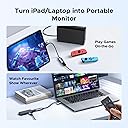
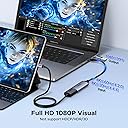
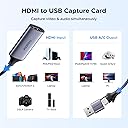
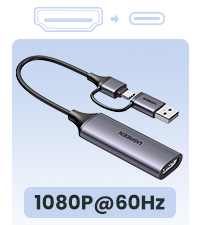
The UGREEN Full HD 1080P Capture Card is a compact, plug-and-play device that converts 4K HDMI input into smooth 1080P video output via USB-A or USB-C. Designed for gamers, streamers, and educators, it supports ultra-low latency transmission at 480Mbps, ensuring lag-free live streaming and recording. Compatible with major consoles, cameras, and multiple operating systems, this lightweight aluminum-alloy capture card delivers professional-grade video capture without the hassle of drivers or external power.


| ASIN | B0BGMYPBF4 |
| Best Sellers Rank | #31 in Internal TV Tuner & Video Capture Cards |
| Brand | UGREEN |
| Built-In Media | Capture Card |
| Color | Black |
| Compatible Devices | PC |
| Connector Type | USB Type A |
| Customer Reviews | 4.5 out of 5 stars 1,568 Reviews |
| External Testing Certification | 177202201739 |
| Global Trade Identification Number | 06957303841899 |
| Item Dimensions | 0.67 x 3.35 x 5.71 inches |
| Item Weight | 0.04 Kilograms |
| Item dimensions L x W x H | 0.67 x 3.35 x 5.71 inches |
| Manufacturer | Ugreen Group Limited |
| Mfr Part Number | 40189 |
| Model Number | 40189 |
| Number of Items | 1 |
| Number of Ports | 1 |
| Package Quantity | 1 |
| Smart Home Compatibility | Not Smart Home Compatible |
| Specific Uses For Product | Streaming, Recording, Gaming |
| Unit Count | 1.0 Count |
| Warranty Description | 24 months |
H**N
Works great to use an HDMI source as a video input/webcam
This is a great product for the price. For my purposes it is just as good as the brand-name gaming-centric video capture devices that cost 10x as much. (I have one of those also, and I never use it and use this one instead because of its size/portability.) I use this almost exclusively for doing live streaming on Zoom for church services, using 1080p video. I use a digital camera that has a mini-HDMI out, from which I use an adapter to go to full-size HDMI, then an HDMI cable into this dongle (then USB into my computer). The quality is great and I've never had significant issues with it. After using one for over a year I bought two more for use by others at another church location, and they've also worked well. I usually use them directly as the camera in Zoom, and I have also used them as a video source in OBS to combine multiple camera feeds into a single stream. I have also used it a couple of times to do a screen recording of a computer (taking the HDMI out of the computer and plugging it into this dongle, then into USB). In that case the source computer sees it as if it is any external monitor. Once for grins I used it as a "loopback" taking the HDMI output of the computer and plugging this dongle into the same computer. It worked to create a "virtual" monitor that I could only see as a camera input on the computer. So if you like doing life on hard mode you could use this to do a screen recording from a computer. A few things to note: 1. I love that it has both USB-A and USB-C connectors built in. This is very convenient. 2. The "no signal" indicator is kind of a funny/strange graphic. It looks a lot like the rainbow-colored bars image that was used on broadcast TV years ago when there was no signal. That graphic appears when no source is connected. It also appears momentarily when I have turned off the camera in Zoom and I turn it back on again, or when I switch camera inputs to this one in Zoom. 3. I was curious so I tried using it to capture copy-protected content. It doesn't circumvent the DRM -- it just shows the "no signal" graphic. 4. Sometimes if I connect this device to my laptop before I turn on my computer and start up Zoom, Zoom doesn't see the camera input. To fix it, I unplug the USB connector and plug it back in, and after that it always sees it. 5. The camera name in my computer/Zoom shows as "USB Video Input" and the corresponding audio feed shows as "USB Audio Input" (or something like that) -- so it's an accurate but generic name, which makes it easy to miss at first glance. (I use a separate audio capture device that shows up as "USB Audio Device" which makes it even more confusing ๐.) 6. I wish the dongle had some label or text that indicates what it is. All it has is the "UGreen" branding, so visually it's impossible to distinguish this dongle from the much more common USB->HDMI dongle that's used to connect a monitor to a laptop. I am careful to keep it separate from other dongles so I don't get confused about what it is.
L**S
Super easy and it just works!
I have an old Canon cinema camera that I wanted to connect to my PC to use as a webcam (partially as a joke because it's wild overkill) and this adapter worked perfectly to grab the HDMI signal from the camera into the computer. I was looking at other capture cards that were almost 10x the cost and for my purposes that was just too much to spend. When I found this one it was an easy decision. UGREEN is a very reputable brand and the price was fantastic. For me this adapter was truly plug and play, and I had it up and running in a matter of seconds. I have a fairly modern desktop PC running Windows 11 and it immediately recognized it as a camera input. The actual adapter is compact and feels very high quality and I love that it has the type C to type A adapter built in. This little device is definitely going to be a useful addition for all kinds of video capture projects... or just the most overkill webcam ever.
J**S
Great for capturing headless server video.
I do IT work. There are times that I have to work on headless servers with no monitor near by. Since I always have my phone, iPad, Chromebook or laptop with me, I just feed the video through this and the camera app so I can see the servers display. So far it has worked with all of my "capture" devices.
J**B
Worked great for hummingbird nest cam live stream on youtube
I got this to live stream a hummingbird nest from my macbook. Most people recommended much more expensive options, but I figured I'd try this first and see what happens. It worked great! I had to tweek the settings to get the right quality with my internet connection, but it worked really well. I'm glad I didn't invest more $ when I'm not making any money on my nest cam stream.
S**7
Correction
My apologies this actually works and grabs video, I haven't been able to properly test as of yet. But for anyone looking to use it turn off HDCP on your device first that's where I made my mistake.
D**G
Great macOS and iOS compatibility out of the box, including OBS.
Great HDMI capture card. Works great out of the box. On Mac OS and iPad OS. Without any drivers. On Mac, it's basically plug and play when using something like OBS. Was instantly detected. Reasonably priced. I used this to record output from other computers.
D**H
Good value
I use this to use my phone as a camera monitor and for that purpose it works great. Canโt speak for any other function. Easy to use. Itโs just plug and play. Size is not too big to use in my case. I think it is priced well.
A**R
Works well with my DJI RC controller 2 and My Mini 4 Pro drone to my Samsung Tablet.
Works as advertised! I use to connect my DJI RC2 to my Samsung Tablet so my customers can see a better picture of what my drone is seeing while I am flying. There is a slight delay but, that is to be expected. When hooking it to the tablet you do need to use a good Video Capture software then turn on the controller last to get a good connection.
A**ใผ
ๅคใใใผใpcใฎใตใใขใใฟๅ
ๅคใใใผใpcใใตใใขใใฟใซใใใใ่ณผๅ ฅใใพใใใ่ชฌๆๆธใซใใใOBSใไฝฟใฃใฆๅฎ็พใใฆใพใใไปไบ็จใชใฎใงๅๅฟ้ๅบฆใฎๆชใใฏใฌใใณใใฆใพใใ
K**S
Works great
Works great. Fine quality, no problems at all, plug and play
P**D
Some lag but works great with OBS and Nikon Z (including under Linux)
In short, I love this thing and leave it plugged into my computer, with or without a cam on the end. I use it, through OBS (under Linux no less), to record screencasts, with g00gle meet, even with the blasted zoom app. I set it for motion JPEG, 1920x1080 at 30fps for these things. My OBS setup would get confused about what is what when I played around with the 2 webcams etc But leaving this into the USB port all the time, and simply having the camera on or off works great--the OBS config is nice and stable, and when there's no camera signal the capture dongle shoots out the classic colour bars, as shown in second image. Trying to tweak contrast or brightness or anything like that in the OBS source interface is not a good idea--use your camera for that stuff and just feed in the signal you want: you have more control and it's better anyway. About the lag... All the USB capture cards I've used have some lag, that can be a pain to sync if you've got a distinct cam and mic. However, this capture card is on par or better in than the others I've used and I have found that the best solution is to hook up the mic to the big camera, and use the camera HDMI cable to bring in both image and sound. If your cam doesn't let you do that, you can still use OBS to add some delay to the audio and sync it manually, but I've found that tricky to get right, and that the lag isn't always exactly the same, so if you can feed sound from the cam, do that. So: I wish these things didn't have such lag (sometimes it feels like a good half second) but I think this is a USB thing more than a capture card thing, and this specific item is now my (almost daily) workhorse for getting audiovideo into my computron.
A**A
Not working on PS4
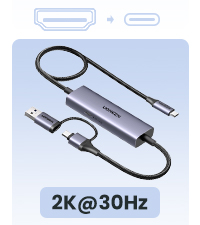
Doesn't work with PS4 And it's 30 fps ( was written on the article tho that's on me , but I don't understand why the 60fps is written in big )
N**O
I like it ^^
Amazing entry level capture card. I was able to do some streaming of my PS5 with this and im very happy. It supports both USB-A and USB-C ports so it should work amazingly on any computer.
Trustpilot
1 day ago
2 weeks ago