Desertcart purchases this item on your behalf and handles shipping, customs, and support to Senegal.
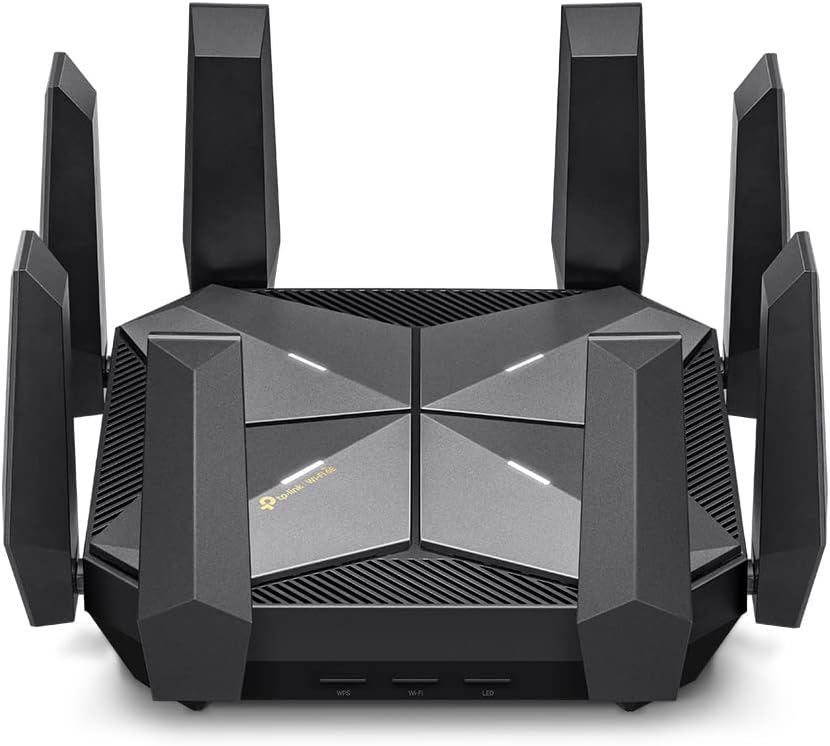
๐ Elevate your home network to warp speed with the Archer AXE300!
The TP-Link Archer AXE300 is an award-winning Quad-Band Wi-Fi 6E router delivering ultra-fast 15.6 Gbps speeds, dual 10Gbps ports, and extensive coverage via 8 antennas. Powered by a Quad-Core CPU, it supports advanced VPN, robust security with TP-Link HomeShield, and future-proof connectivity for gaming, streaming, and smart homes.


| ASIN | B0BCWBCY34 |
| Antenna Location | Business, Gaming, Home |
| Antenna Type | Fixed |
| Best Sellers Rank | #65,381 in Computers ( See Top 100 in Computers ) #995 in Routers |
| Brand | TP-Link |
| Built-In Media | 1 x Archer AXE300 Router, 1 x Power Adapter, 1 x Quick Installation Guide, 1 x RJ45 Ethernet Cable |
| Color | Black |
| Compatible Devices | Personal Computer |
| Compatible devices | Personal Computer |
| Connectivity Protocol | Wi-Fi, Ethernet, USB |
| Connectivity Technology | Ethernet, USB, Wi-Fi |
| Control Method | App |
| Controller Type | App Control |
| Coverage | Standard Router Coverage |
| Customer Reviews | 4.2 out of 5 stars 363 Reviews |
| Data Transfer Rate | 16000 Megabits Per Second |
| Frequency | 6 GHz |
| Frequency Band Class | Quad-Band |
| Frequency band class | Quad-Band |
| Global Trade Identification Number | 00840030708039 |
| Has Internet Connectivity | Yes |
| Has Security Updates | Yes |
| Is Modem Compatible | No |
| Item Dimensions L x W x H | 23.2L x 23.2W x 6.8H centimeters |
| Item Type Name | WiFi 6E Router |
| Item Weight | 1.53 kg |
| LAN Port Bandwidth | 1.6 Gbps |
| Manufacturer | TP-Link |
| Maximum Upstream Data Transfer Rate | 10000 Megabits Per Second |
| Mfr Part Number | Archer AXE300 |
| Model Name | Archer AXE300 |
| Model Number | Archer AXE300 |
| Model name | Archer AXE300 |
| Number of Antennas | 8 |
| Number of Ports | 7 |
| Operating System | TP-Link Customized Linux |
| Other Special Features of the Product | Access Point Mode, Guest Mode, QoS |
| Router Firewall Security Level | Advanced |
| Router Network Type | Quad-Band |
| Security Protocol | WPA2-PSK |
| Special features | Access Point Mode, Guest Mode , QoS |
| UPC | 840030708039 |
| Unit Count | 1.0 Count |
| Voltage | 12 Volts (DC) |
| Wi-Fi Generation | Wi-Fi 6E |
| Wireless Compability | 802.11ac, 802.11ax, 802.11b, 802.11g, 802.11n |
| Wireless communication standard | 802.11ac, 802.11ax, 802.11b, 802.11g, 802.11n |
K**L
amazing router!
No disconnections, more Wifi distance, penetrates through concrete in close distance
T**4
Highest performance consumer grade router
Tons of CPU/Ram, 10GB ports, 2.5 GB ports, LACP support ( combine multiple ports to one super high speed logical port) excellent range through the house and back yard. Future proof!! Best router I have ever owned. Highly recommend.
C**M
Lo bueno: Facil de configurar y de instalar. Lo malo: Cobran por seguridad extra
Es un equipo nuevo, que actualiza a otros modelos como el AX11000 que es un router similar de la misma marca. Es muy facil de configurar, muy sencillo e intuitivo. Es prรกcticamente un equipo para uso continuo y de batalla. La potenchai de todas sus bandas es extraordinaria, rompe muros y es muy estable. Lo unico malo que le encontrรฉ, es que a diferencia de su modelo predecesor, en esta version cobran extra por antivirus online, control parental y otras funciones. Cuando en su predecesor estaba incluido sin costo.
M**S
Best router for LOTS of connected devices and speed
Good: 2.5gbe, 10gbe, fiber connections allow you to use the full potential of your internet provider and your network almost(10gbe is more like 6gbe but I don't have enough devices to absolutely need 10gbe) Wifi coverage is absolutely outstanding out of the box and even better when you tweak a few channel widths and channels in the very simple (for me) setup. I can cover a dull 2500sqft home with full high speed wifi with a single device. Not even my Asus Rapture ax11000 could come close. In the main areas where the router is located most wifi devices connect up to 1.4G. I can pull 800mbs from the back deck 900 on the front porch, 1g in a far bathroom and 500mbs in the farthest room/corner of the house. Connected Clients. This is where the Axe300 shines. I've tried several routers and setups to easily alleviate my main issue with most home routers and mesh. Regardless of what anyone says, most routers start to act up to almost shut down once you get in the 40 device range. I have a very connected home and since I lease I can't go running ethenet drops everywhere and don't care to invest in a mocca and think even the best powerline adapters are not the greatest. I currently have 63 IOT type wifi 2.4 devices on my network, 8 sonos speakers in a mixed ethernet/wifi setup, multiple IP cams, 2 wifi door locks, a wifi doorbell, 4 phones on wifi, 2 3k tvs on wifi, 2 4k tvs on ethernet,1 ps5 on wifi, 1 ps5 on ethernet, a Nas on 10g ethernet, up to 3 macbook pros on ethernet, sometimes an android tablet or two on wifi and I can still pull the numbers listed above when I try to stress everything I can and run and control everything I can. This router just keeps chugging. 2.4 wifi is the best I have had since the old days of great 2.4 only aps/routers, openwrt, ddwrt, boosted signal strength, etc. Even with all the IOT devices I have never seen less than a 65mbs connection to one of them or not been able to pull 60 to 70mbs down from my 2.4 wifi iot/guest band and maintain the FULL upload of my provider (super drops in upload with lots of WIFI iot is usually rhe first sign of your router not being able to handle the connections, then usually ping next and then jitter..) Bad: To me it's ugly. Like I stepped on a spider and it's dead upside down. Ymmv. It's clunky, definitely not pretty or sleek. Web interface just works but I'm a DD-WRT, tomato, openwrt, unifi, managed poe switch kind of guy and miss some of the customizations/features even the Omada or even dare I say an Asus router sometimes gives you. To me the tether app sucks. It works perfectly but you cannot see connected device connection speeds, rssi or even the rudimentary cpu utilization and ram usage you can with the web app. Would be nice is you could "properly" use smart connect for all 4 radios. You can work around this though easily. There are a lot of mesh devices (I won't even need any of them) that are not compatable yet with their mesh system. All those are little nags. The only thing I really do not like about this router is no SQM support for buffer bloat. I don't have buffer bloat issues but without more detailed controls on the router settings and/or SQM some customers may not see the full potential a router of this capability/cost can do. Overall for all in one router/ap for lots amd lots of connected devices plus full access to 10gbe, 2.4gbe, your over 1g provider connection I do not think you can find a better one. Even the new BE routers that are wifi 7 from TPLINK (they were the first to make them) have less 2.4 wifi capability and until something totally changes with cheap wifi IOT, 2.4 wifi is going to be where it is at foe the interim.
J**N
Before you spend $500...
I have worked in IT for 30 years and have typically purchased Linksys products. I bought some Netgear routers in the past as well. Linksys used to give me the ability to support CIDR, or define my network as I wish. For example, I could define my internal network as 10.10.10.0/22, giving me a usable host IP range from 10.10.8.1 through 10.10.11.254 (network 10.10.8.0 with a broadcast address of 10.10.11.255). That means I can give my router an IP address of 10.10.9.0 as a valid IP address if I choose. Linksys did away with that ability, but TP Link still allows it. I hate being tied to 192.168.1.1, as Verizon, Comcast, RCN and other internet providers ultimately are still stuck with those standards, and when you plug in your own router, you may immediately be stuck with an IP conflict. My first TP Link router was the AX11000. That router was not impressive for any reason. Still, I purchased the AXE16000 for its Wifi 6E capabilities. Where the AX11000 struggles to cover my 2400 square foot home, the AXE16000 covers not only the home but the back yard as well. It is feature-rich and gives you the flexibility to define multiple channels, channel width, OFDMA and MU-MIMO support. If you don't know what any of those things are, then save your money and buy something cheaper. The guest network is really cool - when you have guests over, give them a password and when they connect they can be sent to a specific web page of your choosing. I think that's geeky cool. This isn't a small router - and it runs hot. In my house I have about 35 - 40 connected devices. I have my appliances, TV set top boxes (wifi), refrigerator, Alexa, Firecubes, Apple TV's, etc. on a dedicated IoT network, and my Apple/Windows/IOS/Android devices on the 2.4/5/6GHz bands. I have Verizon FIOS 1Gbps internet and have run multiple speed tests simultaneously and the CPU, memory and throughput on the AXE16000 never falter. For $500 I think it's worth it, at least until Wifi 7 comes out.
J**T
Fast Wi-Fi
I love this Wi-Fi! Easy to setup via the download Tether app. Very good signal through house. I get 50Mbps down via my Isp provider. With their Wi-Fi I was getting 866Mbps (WiFi 5 ac), very good. With the tp-link AXE 16000 I am getting 2402Mbps (Wi-Fi 6E @ 6Ghz ax). Very very good. These speeds are measured with my Quest 3 using Virtual Desktop playing Half-Life Alyx on Steam. I had all the eye candy maxed out. The 3D enviroment looked great !!๐
Trustpilot
1 day ago
2 days ago