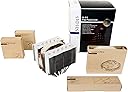
❄️ Stay cool, stay ahead — the ultimate silent powerhouse for your CPU!
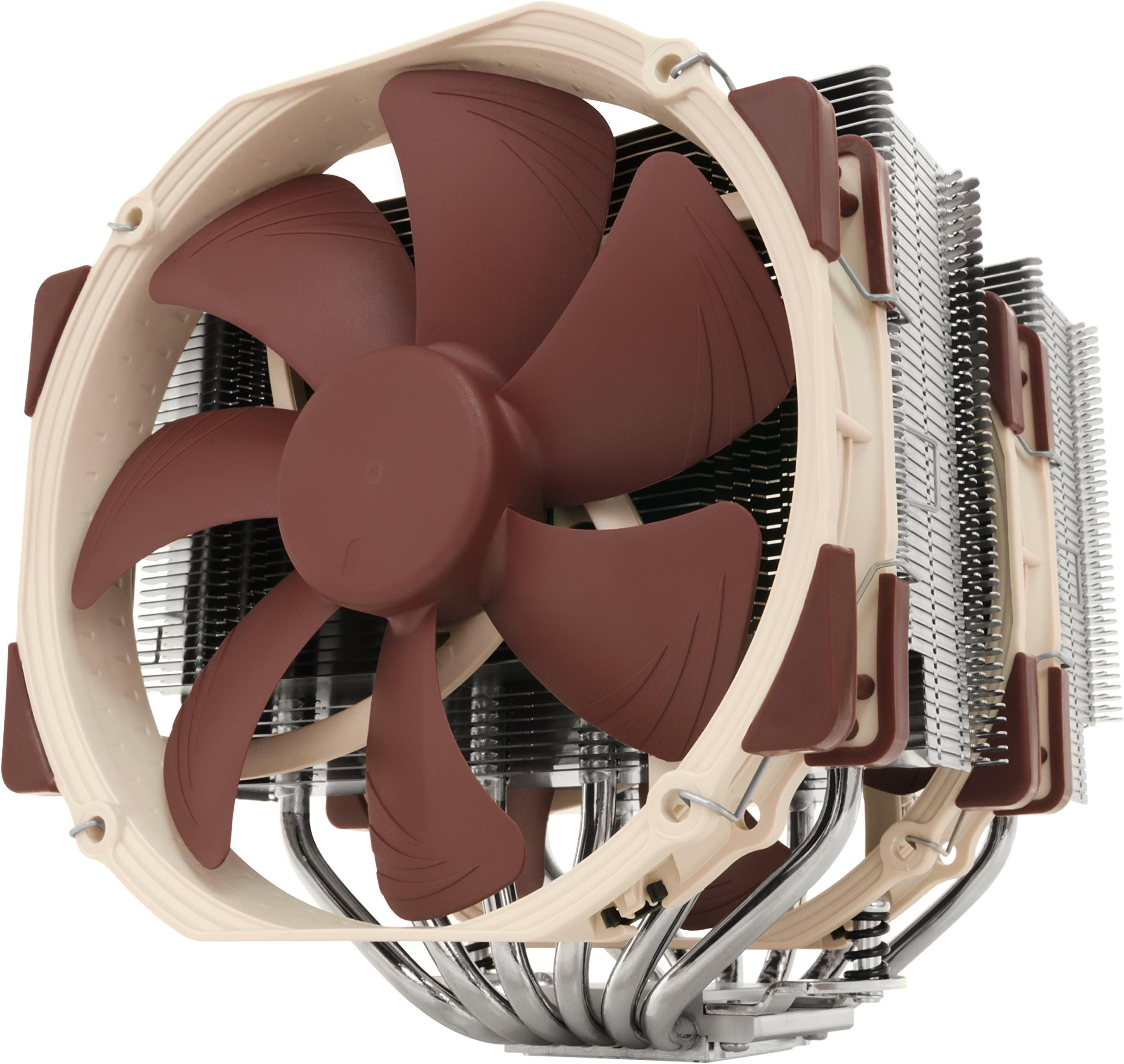
The Noctua NH-D15 is a premium dual-tower air cooler featuring 6 heatpipes and two highly optimized 140mm NF-A15 PWM fans that deliver exceptional cooling performance with ultra-low noise (24.6 dB). Designed for professional-grade overclocking and near-silent operation, it includes the SecuFirm2 mounting system and high-end NT-H1 thermal paste for easy installation across a wide range of Intel and AMD sockets. Renowned for its reliability and backed by over 250 awards and a 6-year warranty, the NH-D15 is the definitive choice for millennial pros seeking top-tier CPU cooling without compromise.


| ASIN | B00L7UZMAK |
| Air Flow Capacity | 140.2 Cubic Metres Per Hour |
| Batteries | Unknown batteries required. |
| Batteries Required? | No |
| Batteries included? | No |
| Best Sellers Rank | 19,264 in Computers & Accessories ( See Top 100 in Computers & Accessories ) 279 in Fans & Cooling |
| Colour | Brown |
| Customer Reviews | 4.8 4.8 out of 5 stars (11,252) |
| Date First Available | 17 April 2014 |
| Included components | NH-D15 |
| Item Package Quantity | 1 |
| Item Weight | 1.3 kg |
| Item model number | NH-D15 |
| Manufacturer | Noctua |
| Material | Copper (base and heat-pipes), aluminium (cooling fins), soldered joints & nickel plating |
| Noise Level | 24.6 Decibels |
| Part number | NH-D15 |
| Product Dimensions | 16.1 x 15 x 16.5 cm; 1.3 kg |
| Size | 165 x 150 x 161 mm |
| Specific uses | personal |
| Specification met | No |
| Style | Classic |
| Voltage | 12 Volts |
| Wattage | 1.56 watts |
C**N
AIO levels of cooling in an air cooler
I begun having issues with my 240mm AIO, temperatures would reach 70°c at idle and would hit 100°c and throttle on any load. Obviously something was wrong and needed to get a replacement. I had seen many reviews of the Noctua NH-D15 online and was sceptical. How can a air cooler come close to the performance of my once beloved AIO? What tipped the balance for me was a change in requirements. My system runs 24/7 almost, and having a pump fail again during the night isn't really an option. Also, the NH-D15 is significantly cheaper than any quality 240mm which made me want to try. That plus Amazon's incredible returns policy meant is was pretty much risk free. The box arrived, it's rather large and heavy for its size. The packaging is mostly cardboard and minimal non recyclables, which is nice to see. Unpackaging the cleverly arranged box is almost a pleasurable puzzle. Installation instructions are simple, to the point and accurate. Just what you want. Out of the box I had Intel and AMD install options which is great. No AM4 support out of the box but you can order the bracket from Noctua free of charge if you require it. Installation goes fairly simple. I installed mine on an ASUS X-99 A 2 (socket 2011-3). Two brackets around the CPU slot, screw in. Add the included Noctua thermal paste. Then screw the cooler to these mounts with the included long reach phillips head screwdriver - a fantastic touch for simplifying the install process. Slight issue getting the second screw in to attach the cooler which took a few moments to sort out - turns out I wasn't pushing down hard enough. Clip on both fans using the metal wire brackets, plug shorter than case fan cables in to your motherboard, you can use the included Y-cable if you don't have the slots for 2 individual cables, you can also install the adaptors to quieten the fans - i personally set a fan curve in my computers BIOS, but it's up to you. You may also have conflict issues with your graphics card and RAM but you can rotate the cooler and move the fans if you do struggle to fit the cooler around your RAM. This cooler is VERY large and to get it in I did have to remove my graphics card to make the install a little easier. And that was it for install. Fairly straight forward, a lot quicker than an AIO. Into the first boot, MSI Afterburner reports a significant drop from the AIO temps to 32°c, some of the lowest temperatures I've ever seen on my system, even during winter. Loading up some benchmarks and stress tests to warm up the cooler proved un-eventful. With temperatures on a 4.2ghz overclock on an Intel 5820K only reaching 59°c. Pushing the overclock further to 4.6ghz (the highest my system has ever gone) got the temperatures to creep just north of 70°c. Doing this whilst remaining whisper quiet at full RPM - I couldn't notice any additional noise over my case fans. Negatives of the cooler: Aesthetics, Noctua does love it's beige and brown fans, it's symbolic to the company and is an instantly recognisable. You can replace the fans with the chromax series, these are all black fans with multiple colour rubber edges to stop vibrations at a cost. Pushing the cooler into quality AIO price territory. You can also get covers for the fin stacks if you'd prefer these to be a certain colour. However, for me that's not really an issue. Size of the cooler. It fits in my system, just. Some may have issues with RAM and graphics cards. Graphics cards can always be moved to another lower slot. RAM however, if you have particularly large RAM modules could be an issue. You can rotate the cooler and move the fans to accommodate the RAM but it is something to be aware of before buying. Overall though, this is a fantastic cooler cannot rate it highly enough. It's exceeded my already high expectations and lived up fully to it's reviews.
B**.
It's huge, but works well!
It's huge! Works well with good instructions on fitting, but take your time and get it right. Seems well made and designed and it is keeping my CPU within temperature range when gaming.
A**M
Excellant bit of kit
My AIO died suddenly, no warning dead. After 2 years I should have expected it. Luckily I had an old Evo 212 in my spares box which got me up and running. I searched through Amazon and on-line to find an alternative to liquid cooling. I was never really comfortable having liquid in an electrical environment. Eventually I came across the Noctua NH-D15. Every review both on Amazon and on the web, Highly recommended it. Basically it's one of the best. Probably the best out there. OK it's big and you need a good sized case to fit it in. My Corsair 540 case had plenty of room. After reading the difficulties others had fitting it. I was pleasantly surprised how easy it was to install. I have low profile hyper x memory cards so the adjustment to clear them was minimal. High profile cards would profit changing the 140mm fan in the front to a 120mm fan. Air flow in my case is good. So it is fed from the front of the case by 2 140mm and out the back by another 140mm fan. Coupled by 2 overhead 140mm fans which remove any hot air pockets. I have to say the temps inside the case have reduced incredibly well. The CPU and Core temps are better than what I was achieving with an AIO which I had to have running at full belt when heavy gaming. With the Noctua NH-D15 I'm running cool and quiet and not going over 40 degrees. That was the big eye opener. Not to mention the reduced amount of power I am using when gaming. Which in the present environment of energy hikes from greedy companies is a good thing. My power consumption has been reduced by half. Which for parents out there, is a good thing. Keeping the kids happy and saving money on energy. The Noctua NH- D15 is a good all rounder. Giving excellent cooling, far superior to many AIO's out there. With energy saving to boot and half the price of AIO's. Air cooling is getting better and better which is a good thing for those like me on a budget and to be honest there isn't any sudden breakdowns apart from a fan failing. Which can be easily and cheaply rectified. All in all the Noctua NH-D15. Is an excellent product. From the moment you turn it on it is giving you the best cooling and energy savings out there.
H**A
Acheté en août 2024 pour 109,90 €, le Noctua NH-D15 s'est rapidement imposé comme le refroidisseur idéal pour mon PC gamer milieu de gamme, équipé d'un AMD Ryzen 7 7700X et d'une GIGABYTE Radeon RX 7800 XT sur une carte mère MSI Pro B650-S WiFi. Et je dois dire que je suis impressionnée ! Tout d'abord, parlons des performances. Bien que je n'aie pas de point de comparaison directe, mon processeur tourne à environ 70° en session de jeu avec un seul ventilateur de monté (2 possibles), ce qui est très satisfaisant. On peut dire que ce refroidisseur fait son travail avec brio ! Côté bruit, c'est le silence absolu. En fonctionnement normal, le NH-D15 est presque inaudible, et même sous charge, les ventilateurs de ma carte mère sont légèrement plus bruyants. Pour les amateurs de silence, c'est un véritable atout. L'installation a été un jeu d'enfant. Tout le nécessaire était fourni : pâte thermique, outils et adaptateurs. Je n'ai rencontré aucun souci lors du montage, si ce n’est que de me rendre compte que je ne pourrais pas ajouter le second ventilateur faute de place dans mon boitier. Je l'ai donc monté avec un seul ventilateur, car le second touchait ma barrette de RAM. Cela n'a pas posé de problème, car même avec un seul ventilateur, les performances sont déjà excellentes. Donc un conseil pour ceux qui envisagent d'acheter ce refroidisseur : faites bien attention à ses dimensions. Il est massif, et il est essentiel de vérifier que le NH-D15 s'adapte à votre boîtier, tant en profondeur qu'en largeur, surtout si vous prévoyez d'utiliser un second ventilateur avec une config plus gourmande en rafraichissement. En termes de design, le NH-D15 est magnifique. Les lamelles du radiateur sont fines et nombreuses, assurant une excellente dissipation de la chaleur dans le boîtier. J'aurais souhaité une autre couleur pour les ventilateurs pour s'accorder avec mes composants noirs, mais cela ne gâche en rien l'esthétique générale. Les tiges de métal qui ressortent du radiateur sont plutôt élégantes et détournent le regard. Quant au rapport qualité-prix, il est indéniable. Les performances obtenues avec un seul ventilateur, couplées à la réputation de Noctua sur les sites spécialisés, justifient amplement l'investissement. En conclusion, le Noctua NH-D15 est sans conteste le roi des refroidisseurs d'air. Il offre des performances exceptionnelles, un fonctionnement silencieux, et un design soigné. Si vous cherchez à garder votre processeur au frais tout en gardant votre PC silencieux, ne cherchez pas plus loin ! 😄❄️
W**Q
Really good! Very silent. Far more enough for my 3900X
F**4
Il est franchement nickel, et facile a monter, le seul truc c’est qu’on doit surélever le 2eme ventilateur a cause des barrettes de mémoire, du coup j’ai mis que le ventilateur du milieu et meme avec un seul ventilateur mon processeur ne chauffe vraiment pas
寺**井
TDP105WのCPUに3年間使用したが、故障無く良く冷やしてくれた。CPUに負荷をかけるとうるさくなるけど、耐久性や冷却性はとても良いです。 但し大きいのでゆとりのあるケースでしか使用できません。
S**E
Utilizzo impianti a liquido custom da anni. Quando è morta la mia ultima pompa ho montato in emergenza il dissipatore stock del mio i7 920: temperature assurde e rumore inaccettabile, come atteso. Considerando le recensioni entusiastiche di questo Noctua NH-D15, secondo le quali sembrava paragonabile per temperature e rumore alle controparti a liquido, ho deciso di provare. Prima di ordinare mi sono informato con il supporto cliente Noctua sul kit NM-I3, necessario per l'installazione su una scheda madre vecchia come la mia (2009); mi hanno garantito che avrebbero inviato gratuitamente a casa il kit con la semplice prova di acquisto. Ho quindi ordinato, e inviato la schermata di riepilogo e una foto della mia scheda madre tramite apposita form del sito Noctua. Ricevuta la confezione del dissipatore, subito salta all'occhio la qualità dell'insieme. Il packaging è perfetto, pulito, compatto. Istruzioni chiare, componenti di qualità. Anche il kit aggiuntivo gratuito, che si aggiunge a quelli già compresi nel package principale, ripropone i medesimi canoni di qualità e chiarezza. Ho smontato la mia scheda madre per montare la base di aggancio (questa scocciatura è d'obbligo per qualsiasi sistema di raffreddamento decente, quindi poco da dire). Il montaggio è rapido e semplice, e in un batter d'occhio avevo reinserito la scheda madre nel case e agganciato anche il dissipatore. Prima di acquistare avevo chiaramente preso qualche misura per essere certo ci fosse spazio. Fortunatamente il mio Thermaltake Armor ne aveva a sufficienza nonostante l'età. Primo avvio, ingresso nel bios. Configuro tutto secondo default per una prima prova. Qualche minuto di utilizzo ed è chiaro che sarebbe stato sprecato senza un minimo di overclock... Secondo accesso al bios, overclock da 2.66 a 4.00 Ghz, avvio di windows... Tutto silenzioso, tutto fresco. Massima temperatura sotto carico 75 gradi, che nel mio studio corrisponde alla temperatura che avevo con il dissipatore stock senza overclock e rumore d'inferno. In breve, è come se non ci fosse, l'unico rumore significativo rimasto è quello della scheda video quando avvio un gioco. Ho immediatamente ordinato uno Xeon x5680 per dare in pasto a questo D15 qualcosa di adeguato. Non avrei mai immaginato di vedere (e non sentire...) questi risultati da un raffreddamento ad aria. Appendice sul supporto: il supporto clienti Noctua, contattato tra l'altro prima del vero acquisto, è assolutamente all'altezza dei prodotti: rispondono subito e in modo cordiale, e gestiscono ogni cliente (o possibile cliente) in modo personale e diretto. Si vede che puntano a risolvere problemi e dissipare dubbi, e soprattutto è evidente la volontà di creare un rapporto di fiducia con l'utente. La sensazione è che ci saranno sempre per qualsiasi necessità, anche negli anni successivi all'acquisto. Significativo che vengano forniti kit per adattare qualsiasi dissipatore a nuove e vecchie piattaforme. Enorme plauso a Noctua!
Trustpilot
2 weeks ago
3 weeks ago