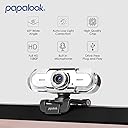
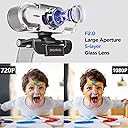
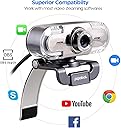
🎥 Elevate your virtual presence with Full HD finesse!
The papalook PA452 is a sleek, plug-and-play Full HD 1080p webcam featuring a 65° viewing angle and a built-in noise-cancelling microphone. Designed for seamless compatibility with Windows systems, it delivers crisp video and clear audio for professional video calls, online classes, and streaming, making it an essential upgrade for any remote work or content creation setup.


| ASIN | B01GYFOXK2 |
| Antenna Location | video chat, video recording, computers |
| Are Batteries Included? | No |
| Best Sellers Rank | 78,820 in Computers & Accessories ( See Top 100 in Computers & Accessories ) 539 in Webcams |
| Box Contents | Webcam |
| Brand | papalook |
| Brand Name | papalook |
| Camcorder Type | Webcam |
| Colour | Silver |
| Compatible Devices | Windows Vista, Windows XP, Windows 7, Windows 8, and Windows 10 |
| Customer Reviews | 4.3 out of 5 stars 6,000 Reviews |
| Digital Zoom | 2.8 x |
| Effective Still Resolution | 1080 Pixels |
| Effective Video Resolution | 1080 Pixels |
| Exposure Control Type | Automatic, Manual |
| File Format | JPG, MJPG |
| Flash Memory Speed Class | Class 10 |
| Flash Memory Type | SD |
| Flash Memory UHS Speed Class | U1 |
| Flash Memory Video Speed Class | V10 |
| Flash memory type | SD |
| Focus Type | Auto Focus |
| Form Factor | Physical Form Unspecified |
| Has Image Stabilization | No |
| Image Aspect Ratio | 16:9 |
| Image Capture Speed | 30 fps |
| Image Stabilization Type | false |
| Item Dimensions D x W x H | 27.9D x 22.9W x 15.2H centimetres |
| Item Weight | 100 g |
| Lens Type | Prime |
| Manufacturer | papalook |
| Maximum Aperture | 2 f |
| Maximum Display Resolution | SD |
| Maximum Focal Length | 1000 Millimeters |
| Maximum aperture | 2 f |
| Maximum focal length | 1000 Millimeters |
| Model Name | PA452 |
| Model Number | PA452 |
| Network Connectivity Technology | USB |
| Operating System | Windows |
| Optical Sensor Size | 1/2.7-inch |
| Photo sensor technology | CMOS |
| Product Features | Low Light |
| Screen Size | 1 Centimetres |
| Sensor Type | CMOS |
| Shooting Modes | Automatic |
| Style Name | Minimalist |
| Supported Audio Format | digital audio formats |
| Supported Image Format | JPEG |
| UPC | 756970597490 |
| Upper Temperature Rating | 50 Degrees Celsius |
| Video Capture Format | MPEG-4 |
| Video Capture Resolution | 1080p |
| Video capture resolution | 1080p |
| Viewing Angle | 65 Degrees |
| Water Resistance Level | Not Water Resistant |
| White Balance Settings | Auto |
| Zoom | digital |
C**S
A bit over priced, but overall - Great!
Its a good camera, no denying that for sure. The sound play back/recording is crisp and clear. We use Zoom and Google Meet and find no issues at all. Its plug and play (for Windows 10 at least) and a significantly long cable so you can position the camera where ever you like to put it! The stand is a little odd, but I see why (its designed to fit onto of a monitor, though not very well). To honest, you can prop it on the desk and tilt the head up just fine, should you see fit. My son is using for distant learning with his school (means Im stuck with Zoom on my mobile for now still ha!). Before, my son was using his phone for meeting, but now the desktop camera is far more practical for an 9 year old!. Overall a good buy (if not a little over priced I feel), but you get what you pay for, don't they say. At least I did in this case. FYI - The blue lights are for effect only, and independent to the camera functionality it seems. You can flip a switch on the back to turn it off/on even when the PC is off (shut down).
A**I
Too expensive for quality, but does the job.
I experienced quite a lot of screen flickering and glitching when plugged into a docking station with all my other connections. It looked like random interference. Once I plugged directly into my laptop, the problem was solved. I also noticed if you plugged into a USB hub, that it worked fine. It just did not like the Laptop Dock (Lenovo P1 thinkpad). Picture is fine, better than a built in camera on most work machines, and a superior to the video quality I see with my colleagues. Did not use the microphone as I have a lavalier into an audio interface, but I am sure it would have been fine. Manual focus is a pain, but if you are not moving around a big room, you can set it once and forget about it. Decent item, does what I needed it to - but a tad expensive for a non-brand manual focus cam.
A**A
Purchasing again after 2 years.
I bought this camera in 2019 and recently moved house and unfortunately miss placed this webcam and have decided to buy again. The two main reasons for this are: 1) The manual focus on this webcam is absolutely amazing. Having control over it, just like you would a DSLR, is brilliant. It has some leeway in it's focus point and doesn't throw you immediately out of focus if you move more than an inch. It's easy to use and does exactly what it says. You no longer have to deal with a webcam deciding it wants to focus on a random point behind you and having no way to fix it. 2) The quality on this is actually what it states to be. I've seen far too many webcams state to be 1920x1080 and when you actually set it up, it sits nowhere near the resolution it claims. The image is crisp and has no issue with a steady 30 fps. If you do have any issues with contrast, brightness or white balance you can download software that lets you change any effecting factors. I can't personally speak for audio quality as it's never something I've used a webcam for and have never used this one for such. I will say, do not expect good audio quality from any webcam you purchase. All in all, it's worth spending a little bit more to get this webcam when over the two years I've had it, I've encountered no issues with it whatsoever.
S**S
A Great Web Cam For Little Money
I am a content creator on my YouTube Channel Stu's Hobby Box and I wanted to start doing live stream. I had a little go with Facebook live on my phone the first one was actually quite good I then tried a second go and in the middle of the stream my phone choose to freak out and turn off. So I came on to Amazon UK to find a good quality and ease of use WebCam. I saw a few which didn't really fit my criteria then I came across this one Papalook HD Web Cam. Very easy to use simply just plug and on you go. I first tested the Web Cam using Skype with my girlfriend she said the video was sharp and voice clear. As of now I also did another live stream and no issues at all. Highly recommend this Web Cam and for the price it's pretty good indeed. Just a quick picture of it on my screen.
O**I
Far too difficult to fix brightness problems
The picture is crisp and it looks better. I have had a problem with looking too bright, and horribly overexposed. I looked like I had an intense spotlight on me. I looked like I was glowing. After much searching and confusion, it turned out I was looking for a software called AMCAP which is available on the Papalook website. However, it took a lot of searching and fiddling to fix this problem myself. If, like me, you don't have permissions on your work laptop (e.g. because you don't have permissions required to download and launch the software) then you will be out of luck. But at least it works on my personal machine. I also note that the "OFF/ON" switch at the back does nothing; it doesn't actually turn off the camera. So that's completely misleading.
K**S
Perfect for me
This camera is excellent if it is used correctly and I have found it perfect for my purposes. The lack of a tripod fixing is my only criticism but, given the price and overall quality, I’ve not deducted a star for that, particularly as screen mounting is preferred if you want the subject to appear to be looking directly at other meeting participants, which is more convincing when the camera is set a little further away. With a little bit of care over lighting and positioning, it is capable of producing much better results than most of the ‘on-line’ interviews I see on TV. It worked immediately with an 8 year old Macbook Air and with a Windows 10 PC without the need for any driver downloads. I obtained it in order to improve on the Macbook pictures, which were very poor, and to add webcam facilities to my Windows 10 PC's and a Chromebook. I have not heard the sound from it - but it hasn't raised any adverse comments from other meeting participants - the four stars for sound is therefore based on those initial responses. The following points might help to ensure good results when using it: The ‘contrast’ issues mentioned by others can be evident under certain lighting conditions when there are extremes of bright and dark areas in the scene. This is because the camera will attempt to make best use of the available light and sometimes ‘burns out’ white areas in the process. So, if the subject is correctly lit from the front with the background in relative darkness, it may be necessary to either soften the main lighting or lift the background illumination, ideally with a suitable ‘cold’ white light source so the colour temperature and illumination matches more evenly across the scene. I use 5000k LED bulbs in plain white lampshades for illumination after dark or to balance daylight. Ceiling lights, especially spotlights, and windows or lamps behind the subject are all, of course, useless for illuminating the face correctly whatever camera is used. The lens field of view is relatively tight for a webcam which enables the subject to sit slightly further back, improving the eyeline when using a laptop (which should ideally be raised so the camera is closer to face level). The manual focus may only need to be set once for the normal subject distance. The depth of field then seems sufficient to maintain focus without the irritations caused by auto-focus ‘hunting’ or noises. If the camera is mounted on a laptop screen, then they should both be placed on a solid base to maintain a steady picture to avoid annoying vibrations and shakes.
A**R
Worth the monety
Okay, we all needed extra equipment in recent times as we discovered the laptop did not cut it. Anyway since this is plug and play and I like the plug bit (keeps the interference to a minimum). It sits nicely on my screen and is weighted so you can angel it and capture the best of yourself. I bought it because it was a best buy in several comparisons articles and the very expensive one was just too much. Simple to set up, good quality images and amazing sound, no head set required anymore.
S**S
It's OK but has shortcomings
The camera is fine, the quality is good but the fact that it's not autofocus is a pain in the neck - if you hold something up to it for folk to read, it's blurry. If you stand up to present, the same. And the lack of a screw to put it on a tripod is surprising - Id have thought that was a pretty basic thing to add? UPDATE - 9 December. This product didn't work for me - it's not a bad product, just not what I need. In fairness to the seller, they saw my review and immediately offered a full, no quibble refund. So I'm upping my review to 5* as a reflection of their really good customer service.
A**ー
シンプルでよい
パソコン内蔵のカメラが壊れてしまったのでこちらを購入しました。かなり明るくはっきり映ります。この値段でこの性能ならコスパがよいと思います。満足しています。
M**S
estupenda con luz del día, malísima con luz artificial. NO LA RECOMIENDO.
La compré para mis clases en línea. En la tarde y mañana se ve genial, la imagen es super HD, pero para mis clases de la noche se ve super mal. Se ve como unas rayas que suben y bajan todo el tiempo. Esto debido a la luz artificial (focos). Me parece una super desventaja ya que se ve de mala calidad ,corriente y es lo suficientemente cara para que sea así. Es súper fácil de instalar, es china y literalmente la conectas y ya es todo.
J**É
Excelente web cam para videochats
En esta webcam he encontrado un modelo que reproduce y graba vídeo a 1080p con una calidad bastante buena y además tiene un precio competitivo. Windows 10 reconoce automáticamente la cámara sin necesidad de usar los drivers que acompañana la cámara. El disco que acompaña al producto también trae un programa de grabación de vídeos muy práctico aunque yo lo he usado poco ya que destino la cámara básicamente para videoconferencias con amigos y familiares. El soporte de la cámara se ajusta bien al borde de cualquier monitor y el cable usb tiene suficiente longitud en mi opinión. Como detalle colorido la cámara incorpora luces led frontales que hacer transiciones suaves entre distintos colores. No es una luz frontal de iluminación sino tan sólo un vistoso y bonito adorno. Dichas luces pueden ser apagadas con un interruptor en la parte trasera de la cámara. En esta franja de precios no he encontrado otras webcam con resolución 1080p real, sin extrapolación. Hasta el momento estoy muy satisfecho con su funcionamiento.
S**S
Works great
For the price this is a real good camera for your computer and it is plug and play out of the box, the picture is clear and stable. I can't ask for anything more at this price, would not hesitate to buy this again Steve
B**U
Nice product
This piece of equipment has lifted the overall aura of all my VC & Video meetings. Small product with big impact.
Trustpilot
3 weeks ago
1 month ago