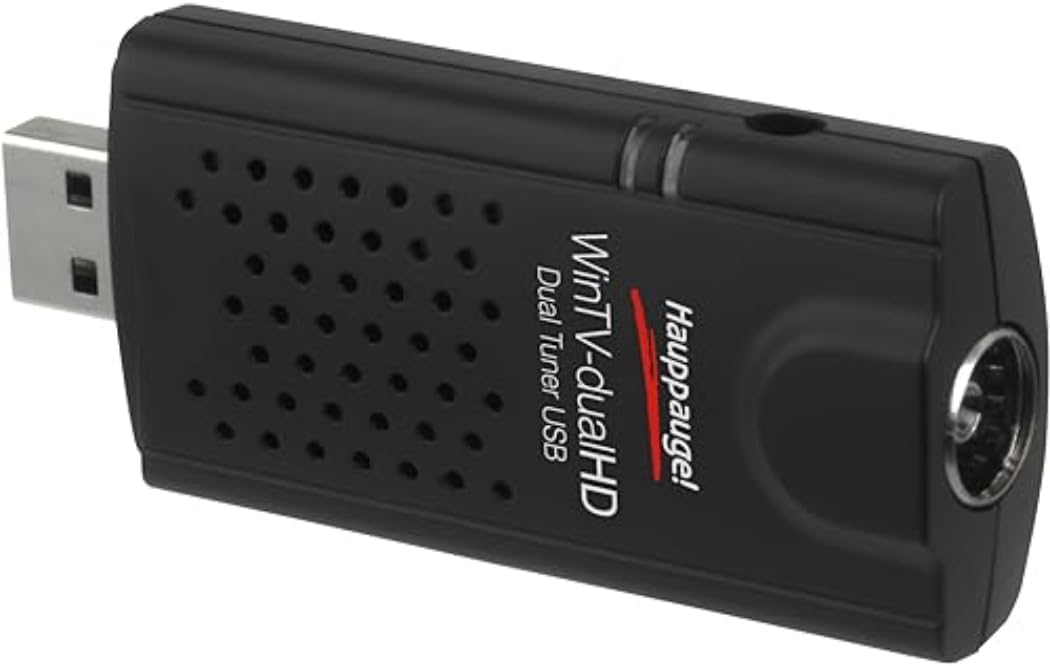
📡 Double the channels, double the power—never miss a moment!
The Hauppauge WinTV DualHD TV Stick is a compact USB tuner that converts your PC or laptop into a full HD DVR. Featuring dual tuners, it allows simultaneous watching and recording of two live TV channels, supports DVB-T, DVB-T2, and DVB-C standards, and includes picture-in-picture functionality. Compatible with Windows, Linux, and Plex Media Server, it comes with a remote, portable antenna, and easy plug-and-play setup, making it the perfect tool for professionals who demand flexible, high-quality TV streaming and recording on the go.


| ASIN | B011Z7I0JY |
| Analog Video Format | No analogue TV |
| AntennaDescription | Television |
| Best Sellers Rank | 3,770 in Remote Controls (Electronics & Photo) |
| Box Contents | USB TV tuner, remote control, USB extension cable, portable antenna |
| Brand | Hauppauge |
| Brand Name | Hauppauge |
| Colour | Black |
| Compatible Devices | Computers, TVs, Set-top boxes |
| Compatible devices | Computers, TVs, Set-top boxes |
| Connectivity technology | USB 2.0/3.0 |
| Connector Type | IEC TV connctor |
| Connector type | IEC TV connctor |
| Customer Reviews | 4.2 out of 5 stars 1,107 Reviews |
| EU Spare Part Availability Duration | 1 Years |
| Global Trade Identification Number | 00785428015927 |
| Includes Remote | Yes |
| Item Dimensions L x W x H | 30L x 2W x 80H millimetres |
| Item Type Name | WinTV-dualHD |
| Item Weight | 115 Grams |
| Manufacturer | Hauppauge |
| Manufacturer Part Number | 01590 |
| Model Number | 01590 |
| Network Connectivity Technology | USB 2.0/3.0 |
| Number of Items | 1 |
| Number of Packs | 1 |
| Product Warranty | 2 years |
| Product dimensions | 30L x 2W x 80H millimetres |
| Tuner Type | DVB-T2, DVB-T, DVB-C and PAL/NTSC/Secam |
| UPC | 078542815901 785428015903 |
| Unit Count | 1.0 count |
J**R
The Best One
I have previously owned the PCTV 290e (roughly same price) and August TV (cheaper) USB sticks, so can compare it to those items. The PCTV operation was clunky with the unintuitive TVcentre software , so I always used manual record mode and the results where good, This was a good unit and worked fine for four years, but it always ran hot and eventually died (due, I suspect, to the high running temp). I replaced it with the August T-210 and what a waste of time this has been. It was extremely hard to load and get my PC (I'm running Win7 64bit pro) to recognise the drivers. Then its tuning list was a jumbled mess and the EPG was always in Chinese, in spite of me selecting "English" during installation. It then decided to not work (twice) having software conflict problems that Windows asked to "shut down"! I then had to re-install it again (twice), still getting the software conflict problems (and Chinese EPG!), so eventually I gave up and binned it. Oh, and it ran very hot. I then bought this unit, which installed with no problems whatsoever and when installing the channels, it even asked me which transmitter I wished to use. It picked up and listed all the stations (incl all HD, using rooftop aerial) with their correct UK channel numbers. Note that it records in the *.ts format (good) and even lists the program name as the file name - the others didn't. The EPG works and records with no problems. Whilst I never thought I'd use it, to have two channels, with one on each of my twin HD monitors, so I can watch them both (shades of "The Man Who Fell To Earth") and even record one of them is brilliant, so if you want the bees knees in TV tuners, just buy it.
P**N
Almost Perfect, but not Hauppauge's fault...
It works reasonably well, however it does have it's issues with newer versions of Windows (Blame Microsoft, Not Hauppauge) which can lead to the drivers hanging/crashing. Works well with SichboPVR, and works very well on Linux (LinuxTV Kernel Patches). Easy to use, provides the ability to record two channels at once, including HD ones which makes this good value for money.
S**N
Works great on Kubuntu/Ubuntu 16.04 using the Hauppauge drivers and Kaffeine Video/DVB player
Works great in Linux. Prior to plugging the device into a USB socket I installed the Hauppauge Linux drivers that are available from the Hauppauge website. Search for Hauppauge Linux support from your search engine to find the link, sorry Amazon rules. As regards the remote that is provided with WinTV-dual HD, I also got some functionality out of it, e.g. selecting channels by number. To do this I installed LIRC and configured for Linux input layer as this model of Hauppauge device wasn't listed. I would think with a little work by me I could get this much slicker. However I don't tent to use a remote on my PC as it's located in an office not a lounge so not a problem for me. To view the the DVB broadcasts I ran kaffeine (for viewing digital broadcast TV) and from the menus selected 'television', then 'configure television' , noted that there was a device 1 and device 2 tabs with the name Silicon Labs Si2168, clicked on the first device tab and selected 'autoscan' for the source. Repeated this for the second device. Then back to the menus, selected television again then 'channels', selected terrestrial as the source and clicked start scan ... it found about 160 channels including the HD channels, then click on one of the channels in the right column, CNTRL A to select all then click add filtered. All the channels then move to the left column which is where you want them if you want to view them. Click OK to get back to the main dialog and you should see all your channels. Overall, if your running Linux this works well with kaffeine. SD & HD broadcasts are view-able but you can't view what my Samsung TV calls 'Data' channels. These are channels that point to multiple internet channels. That may just be a failing of Kaffeine and maybe works with other viewers like Kodi, however I don't tend to watch the data channels so I'm not concerned about that. System details: OS Kubuntu 16.04, KDE Plasma 5.8.9, KDE frameworks 5.36.0, Kernel 4.4.0-131201807270420-generic. 64bit, CPU 8xAMD FX8350 8 core, 23.5GB memory. .. Kaffeine version 2.0.12
A**E
Works with tvheadend on libreelec
Arrived today and my first thought was "it's massive". It is replacing an older PCTV 292e that just stopped working one day and this adapter is twice the size of the old one. But this is dual tuner and it comes with a decently long USB extension cable so there is no problem with clearance where multiple USB ports are close to each other - looking at you raspberry pi. Plugged in to my rpi4 and was immediately detected as a dual tuner and various firmware files were upgraded. Was pre-set to bulk transfer mode out of the box. I'm running libreelec 11 on the rpi with tvheadend server and client installed and enabled and it did take an hour or two to get tvheadend to do the right thing with them but I got there in the end. That's more a tvheadend configuration problem though, not this device. I had tvheadend recording up to 8 different programs at the same time and using both tuners, writing the recordings to NFS mounted shares over the network and writing around 30MB/s to disk. I did have to pick 8 channels that were all on the same 2 MUXes but 7 of those channels were the HD ones. Rpi4 was running at about 20% cpu during this. All recordings played back successfully and other than right at the start of each recording, all seem to be unpixellated and of excellent quality.
A**O
Useful
Original product, 100% as advertised, fast delivery.
T**Y
Easy to setup but freezes regularly
I have this connected to an Nvidia Shield TV and then view the stream using Plex. the setup is pretty straight forward and arranging the channels it easy also. The only issue I have with it is that the picture freezes on a regular enough basis, probably once every 3 or 4 minutes. Its watchable but annoying also as it sometimes happens at a time of crucial information in a program or when a goal is being scored.
C**.
excellent hardware, software interface lacking a little,
For several years I have used an "August" usbtv on my windows7 laptop with Windows Media Centre (or Arcsoft TotalMedia 3.5). I have recently moved to a Win10 laptop, so Windows Media Centre is no longer available to me. I also failed to find a windows10 compatible version of the arcsoft software and I could not get the USB Tuner to work with other interfaces. I have a room at home I use as a home office, I have 2 large monitors linked to my laptop. I like to have TV available while I work. So, I bought the Hauppauge. I downloaded the software from the link given on the leaflet enclosed with the device (Version 8.5) . It installed simply and registered with no difficulty. I then followed the prompts to search for channels, and after a few minutes I was up and running. Picture quality is excellent. I only really want it for watching live TV, so I have not assessed the interface and recording functions. However, the channel information is not particularly detailed and I cannot get the EPG to work properly. I have run the routine to update it, but it still only shows some channel info, and other channels it shows blank info, and you cannot navigate to those channels using the EPG. The device is receiving them OK. One nice touch: it includes a short and good-quality USB extension cable. If you have two USB sockets side-by-side and one is taken up with a tuner like this, the size of the tuner can prevent any other usb-plug being inserted into the next socket. This short extension cable avoids that. I also do not like physically large USB devices plugged directly into my laptop - if they get knocked, it can damage the USB socket of the laptop- this extension cable also avoids that. For me this device, although not the cheapest, is pretty good, but the overall user interface and EPG definitely needs improvement. EDIT Feb 2020: Yesterday I contacted Hauppauge via their website and asked if their was a better software for the stick and the EPG available. My stick was reported as up-to-date whenever I tried the "update" function on the software. I had version 8.5.37210. I got a response from Hauppauge in the UK, after only 15 minutes. As instructed, I uninstalled the software, downloaded a new version form the link they sent (vs 8.5.37283) and installed again. The EPG was then more fully populated, although a couple of the normal free-view channels were missing (Sky News and Dave, although Dave ja vu was there). The Hauppauge rep was exchanging emails with me, and looking at my post-code and the transmitter I was served by (8 miles away), he suggested changing my aerial. from the flat panel I had stuck on the inside of my window. I ordered a "One for All" powered antenna model SV9465 which arrived this morning. I deleted the channels database file, and re-scanned for channels with the new aerial. It found the missing channels and generally the reception is massively better than previously. I am now even happier with the Hauppauge product, and the technical-support was simply brilliant. I have increased my rating from 3-star to 4-star, but I still think the front-end user interface could be better and more informative. It is sad that Microsoft did not support Windows Media Centre into Windows 10.
O**D
A great product, easy to install and use
I have previously had a couple of inexpensive USB TV tuners. They worked but were slow, tedious and frankly unreliable. So I decided to move up a notch and after some research decided the Hauppauge WinTV Dual was worth a try. It was delivered before the expected delivery date so that was a good start. The necessary and most up-to-date drivers and program software were downloaded from the Hauppauge website (a CD is not supplied with the product). However the whole procedure progressed quickly and without any problems whatsoever. Installation likewise was accomplished with minimum fuss. ( I use Windows 10). The scan for channels took a little while to complete but in the end everything, including a comprehensive electronic program guide and the supplied remote control, worked very very well. It took me a little while to work out how to watch one channel whilst simultaneously recording another - but then I am getting on a bit and my few remaining grey cells are not as alert and active as they could be. It did not take me very long to find my way around the program - it is all quite intuitive. In conclusion I am delighted with this product which I think is good value for money. Thanks to all concerned.
I**A
vinTV
Po zainstalowaniu programu vinTV i sterowników ściągniętych ze strony producenta, a także anteny, tuner zadziałał bez problemu. Początkowo nie odbierał wszystkich dostępnych kanałów, ale to ze względu na prymitywną pionową antenę. Po zakupie 5-cio elementowej anteny Yagi wystawionej na parapet zewnętrzny uzyskałam odbiór wszystkich kanałów w pasmie UHF oprócz MUX-8, które jest w pasmie VHF i wymaga anteny o większych rozmiarach. Nadajnik TV jest oddalony około 35 km, a okno "wychodzi" w jego kierunku. Najczęstszą przyczyną słabego odbioru, lub jego braku jest stosowanie prymitywnych anten w postaci pionowego kawałka drutu w wyszukanej czasem obudowie oraz dodanym wzmacniaczem, który przy słabym sygnale wzmacnia także szumy i nie daje poprawy odbioru. Z kolei najlepsza nawet antena nie poprawi odbioru, jeżeli jest umieszczona w miejscu, gdzie sygnał nie dociera. To tak, jakby chcieć łowić ryby najlepszą wędką na bezrybiu. Najpopularniejsze i bardziej skuteczne są anteny Yagi. Są kierunkowe i dają spory zysk, co przekłada się na dobry odbiór, szczególnie, gdy nadajnik jest daleko. Antenka dołączona do tunera vinTV to zabawka, która z pewnością odbierze sygnał z nadajnika TV, który znajduje się w zasięgu wzroku, ale w sumie miły gest.
M**C
Metto online tutta la tv di casa mia ! Ottima !
La Hauppauge WinTV-dualHD è una chiavetta USB per ricevere la TV digitale terrestre (DVB-T / DVB-T2 / DVB-C) direttamente su un computer. È uno dei tuner USB più affidabili disponibili perché integra due tuner indipendenti, cosa che permette di vedere un canale mentre se ne registra un altro oppure gestire più stream contemporaneamente. È un dispositivo molto usato anche in configurazioni avanzate come server TV domestici, streaming su rete locale, oppure integrazione con sistemi di automazione come NextPVR, Plex o Kodi. ⸻ Caratteristiche principali Tipo di dispositivo • Tuner TV USB digitale terrestre Standard supportati • DVB-T • DVB-T2 • DVB-C Numero di tuner • 2 tuner indipendenti Questo significa che puoi: • guardare un canale mentre ne registri un altro • registrare due canali contemporaneamente • usare la chiavetta come server TV per più dispositivi Connessione • USB 2.0 Ingresso antenna • connettore coassiale standard TV Telecomando • incluso (per controllare software WinTV) ⸻ Qualità video La qualità video dipende principalmente dal segnale dell’antenna, ma la chiavetta gestisce senza problemi: • SD • HD 720p • HD 1080i / 1080p broadcast Il flusso video viene trasmesso direttamente dal segnale TV digitale, quindi non c’è compressione aggiuntiva. Risultato: • qualità identica alla TV di casa • latenza molto bassa • registrazioni perfettamente identiche al segnale originale ⸻ Installazione (Windows) 1. collegamento hardware Inserisci la chiavetta in una porta USB del computer. Collega il cavo antenna TV alla chiavetta. ⸻ 2. installazione driver Vai sul sito Hauppauge: hauppauge.com Scarica: WinTV v10 Questo installerà: • driver tuner • software WinTV • codec video • supporto telecomando ⸻ 3. scansione canali Apri WinTV Vai su: Setup → Channel Scan Il software esegue la scansione automatica dei canali DVB-T/T2 disponibili. Durata: circa 2-5 minuti ⸻ Software ufficiale WinTV v10 Il software ufficiale permette: • vedere la TV • registrare programmi • timeshift (pausa live TV) • guida EPG • registrazioni programmate • gestione telecomando Funzioni principali: Live TV guardi la TV sul PC Timeshift metti in pausa la TV e riprendi dopo Recording registrazione in formato .TS EPG guida programmi integrata ⸻ Programmi compatibili (molto importanti) La WinTV-dualHD è molto apprezzata perché funziona con molti software. NextPVR Uno dei migliori server TV. Permette di: • creare un server TV domestico • guardare TV su smartphone • guardare TV su tablet • registrare automaticamente programmi Perfetto per: • mini PC • server domestici • NAS ⸻ Plex (Live TV) Con Plex puoi: • vedere TV su Smart TV • registrare programmi • usare DVR Serve Plex Pass. ⸻ Kodi Kodi supporta: • Live TV • DVR • guida programmi tramite backend come: • NextPVR • TvHeadend ⸻ TVHeadend Molto usato su Linux. Perfetto per: • Raspberry • server media • streaming IPTV locale ⸻ Streaming TV sulla rete Con un server tipo NextPVR puoi: guardare la TV su: • smartphone • tablet • smart TV • browser • Kodi in tutta la casa. ⸻ Uso avanzato Molti la usano per: IPTV domestica Il server TV converte i canali terrestri in stream IP. ⸻ Home Assistant Puoi integrare la TV con: • dashboard • telecomandi virtuali • automazioni ⸻ streaming remoto Se apri una porta sul router puoi vedere la TV anche fuori casa. ⸻ Prestazioni La WinTV-dualHD usa un chipset molto stabile. Vantaggi: • consumo CPU basso • tuner molto sensibile • scansione canali veloce È molto più stabile di molte chiavette economiche. ⸻ Pro ✔ doppio tuner indipendente ✔ qualità video perfetta ✔ compatibile con molti software ✔ perfetta per server TV domestici ✔ supporta DVB-T2 ✔ installazione semplice ⸻ Contro ❌ prezzo più alto rispetto a tuner economici ❌ telecomando non indispensabile ❌ serve buona antenna ⸻ Per chi è perfetta • chi vuole vedere TV sul PC • chi vuole registrare programmi • chi vuole creare un server TV domestico • chi usa Kodi / Plex / NextPVR • chi vuole streaming TV sulla rete ⸻ Conclusione La Hauppauge WinTV-dualHD è una delle migliori chiavette tuner USB disponibili. Il doppio tuner, la compatibilità con software professionali e la qualità del segnale la rendono ideale sia per uso semplice (guardare TV sul PC) sia per progetti più avanzati come server TV domestici o streaming su tutta la rete. Se cerchi una soluzione stabile e versatile per la TV digitale terrestre su computer, è sicuramente una delle scelte migliori.
P**E
Tuner TV pour PC
Pas de CD joint, mais qui aujourd'hui n'a pas la connexion internet pour s'en passer sans râler ? Installation logicielle sans problème via internet. Reconnaissance et déclaration du produit sans problème. Utilisation avec JRiver, qui a piloté la recherche des chaînes. Fonctionnement sans problème, sauf pendant les mises à jour intempestives de Windows ou JRiver. Je l'utilise sans aucun problème en désactivant la connexion internet. Hors sujet : Les mises à jour automatique sont un véritable scandale que je ne supporterai pas longtemps. Oui aux mises à jour quand je le décide : Après le film...
D**R
Absolut gut !!
Ich kann die 24% Ein-Stern-Bewertungen überhaupt nicht verstehen. Das Teil ist super! Hatte schon den Vorgänger für DVB-T mit dem ich zufrieden war und bin jetzt auf DVB-T2 umgestiegen. Kinderleichte Installation, einfache und komfortable Menübedienung, super Empfang. Ist noch SD, da auf HD erst in ein paar Wochen umgestellt wird. Somit kann ich über die HD Bildqualität noch nichts berichten - aber SD ist schon ziemlich gut auf einem normal großen Computerbildschirm. Sehr komfortabel der Zweikanal Empfang. Einfach zu bedienen. Man kann zwei Programme gleichzeitig schauen ;-) oder besser eins aufzeichnen und ein anderes live schauen. Recorder-Funktion auch total gut. Fazit: Absolut zu empfehlen!! P.S: auch noch mit viel Zubehör (Fernbedienung, USB Verlängerung, kleine Antenne) !!
B**M
FACILITE
LE PRODUIT EST FACILE D'INSTALLATION. PAS DE CHIPOTAGE;
Trustpilot
1 week ago
2 weeks ago