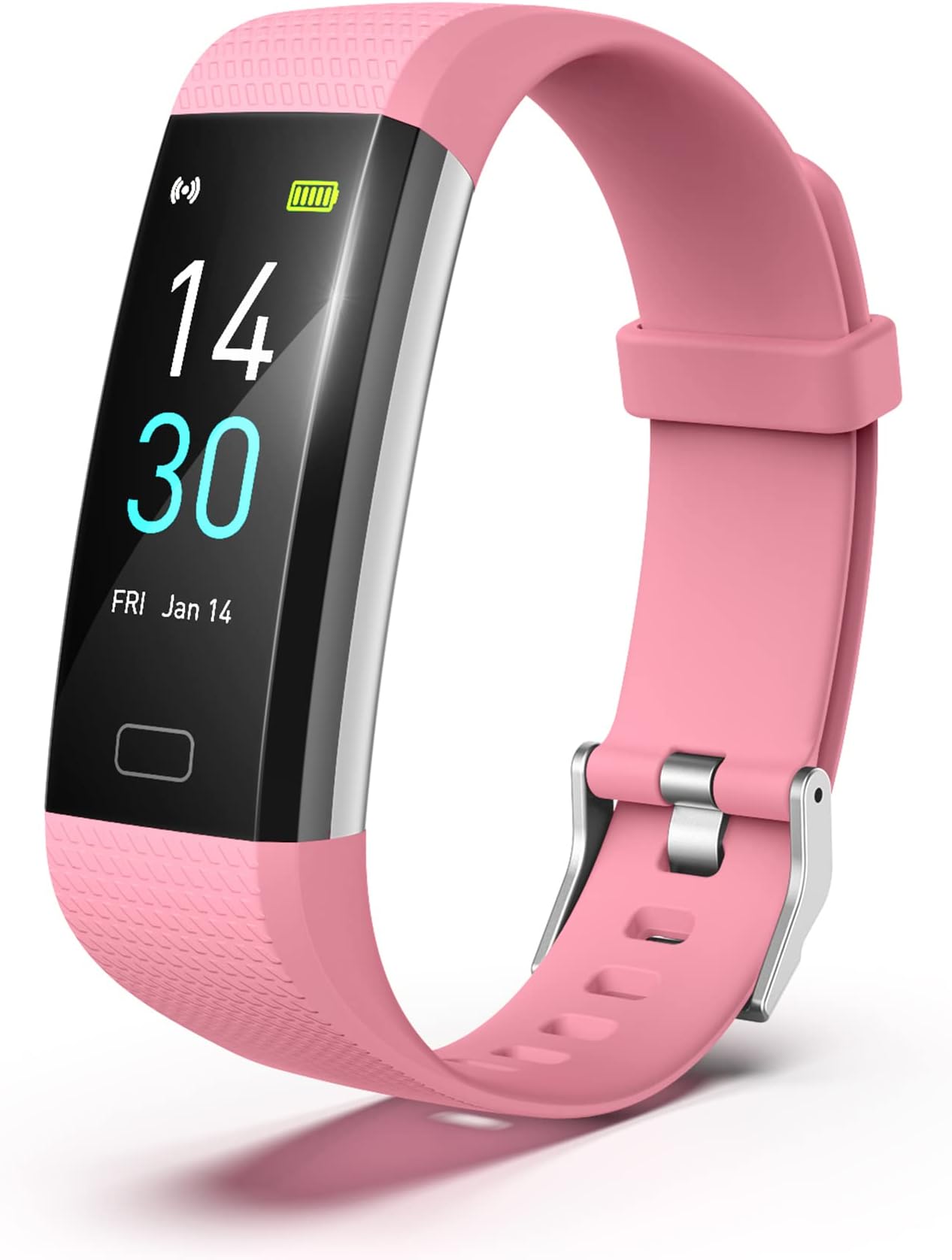
Product Description Warm Tips: How to Power On & Charging Guide (Built-in USB Charger) Q1. How to turn on and charge the fitness tracker? Why no extra charging cable? The fitness tracker has a built-in USB charger ( no extra cable or stand ). Connect to any USB Charger(mobile phone charger,computer) for 30 minutes. Look for the lightning icon on the bottom, then long-press the rectangle touch button at the bottom of the screen for 5 seconds to activate. Only the side with the metal piece charges . Remove the tracker at a 45° angle , align the metal piece with the USB port; the tracker will vibrate once and a green charging icon will appear on the screen when charging correctly. See below charging guide , especially steps 2 and 4. ( Do not pull the band of fitness tracker straight up or at the wrong angle, or it may break or wear out.)If it doesn’t charge, flip the tracker or try another USB port. Some users fail to charge because it was plugged in backwards. Q2: What is the band size of the fitness tracker? The fitness watches can adjust from 120mm to 210mm, fits most wrists: men, women, teens, and seniors. Customize Main Interface You can choose from the fitness tracker face market to customize main interface,or you can put your favorite photos put it into the dial. The adjustment of wristband ,mininum is 4.7inch and maximum is 7.9 inch with 0.96inch TFT screen, weight is 0.84OZ IP68 Waterproof The fitness tracker with IP68 waterproof resistant, it can totally meets your daily use, such as washing hands, sweating,rain. (Note : hot showers and saunas,swimming are not recommended) Call&Message Notification You can view call, text, and all the other notifications including Facebook,WhatsApp, LinkedIn, Instagram, Twitter on fitness watches for women.It will let you never miss any important calls & message when you turn on message notification in Runmefit APP. Sleep Monitoring Wear the fitness tracker to go to bed, the sleep monitor will analyze your deep sleep , light sleep and awake time. Please note that the monitoring data only show on APP and should be for reference only and does not replace a doctor's advice Take Pictures Remotely You can connect your phone and take photos through the remote control of the fitness watches for women.It's also easy to take pictures from a distance USB Charge The fitness watches for women feature a built-in USB charger, eliminating the need for extra cables. Charge the tracker using any of the following (see charging guide picture) Phone or tablet USB adapter USB port on a PC (may take longer) Wall charger or power strip with USB port Warm Tips: How to connect Bluetooh & Pair Fitness Tracker with Phone Q3. How to connect Bluetooth? Make sure your phone system and Runmefit App are downloaded and updated (Android 5.0+/iOS 9.0+, Bluetooth 5.2). Not compatible with PC, iPad, or tablet. Turn on phone Bluetooth and fitness tracker ; keep them close (≤10m / 32.8 feet).Enable GPS and grant all app permissions (e.g., location). Open Runmefit App. If it doesn’t auto-connect, restart phone Bluetooth, fitness tracker, or go to Runmefit app: Devices → Reconnect. If still not working, reset fitness tracker watches to factory settings, delete old pairing info, and repair. Pairing must be done in the Runmefit App , not phone settings. Q4. How to pair the threesheep fitness tracker in Runmefit App? Download official Runmefit App ( FREE ) from App Store or Google Play. Ensure fitness tracker is charged and near your phone. Tap “+” at the top right, select device “S5-XXX” → tap Pair → wait for success. (see above pair guide) Q5. Why is the fitness tracker time/date not correct? The tracker should auto-sync after pairing .If it was out of power, the time may be not correct.Charge fully and reconnect; pull down the Runmefit app home page to refresh if needed. Q6. How do I track steps, heart rate, and sleep? Will my data stay on the watch? Steps & heart rate can be viewed directly on the fitness tracker.For continuous tracking: Open Runmefit APP → Device → Device Settings → Automatic Measurement On. For better accuracy, enter personal info & enable GPS. Sleep tracking runs from 21:00–09:00 and is available in the app only when worn at night, helping you understand your health and stay active.The tracker stores 7 days of data. To save permanently: APP Home → pull down to sync. Q7:Step Count Accuracy The tracker has a built-in 3D sensor . Like most fitness trackers, it counts steps based on hand movement while walking , so step data may take a short time to sync . After walking about 100 steps, you can check if the count updates to confirm proper function. Distance is calculated using an algorithm based on step count, height, and weight ; slight errors are normal. Q8. How do I manage notifications? Open Runmefit APP → Device → Notifications → On (Bluetooth must stay connected).To stop alerts, turn off specific apps or enable "Do Not Disturb". Q9. Other basic settings • Brightness :APP → Device → Device Settings → Brightness Level( Higher brightness uses more power .) • Units (℃/℉, metric/imperial) & Alarms :APP → My → System Settings(Alarms must be set in the app.) • Power Off / Factory Reset : Turn on threesheep fitnesss tracker: long-press button 3s → enter More ( semicircle icon). • App upgrade / Screen unresponsive :Do Factory Reset, then charge for a few minutes. Q10. Green light stays on at night — how to turn it off? Green light = measuring.To stop it: APP → Device → Device Settings → Automatic Measurement → Off.(Re-enable during daytime if needed.) Q11. How to extend battery life? Reduce less-used functions:APP → Device → Notifications Off ; Device → Device Settings → turn off Raise Wrist to Wake, set Brightness ~40% ; Device → Health Reminder → turn off reminders you don’t need. Review: Latest update really improved the ap information on movement - This was just to count my steps and motivate me to do more with three toddlers- yeah you read that right. So I folded 5 loads of laundry yesterday morning and that got me to 6k steps (my goal) before 10:30 am- that’s a con. Also it’s active energy is way below what it normally was on my Apple Watch. Sometimes I have to go in the Ap to get my steps to update to my iPhone- that’s the last con. Tons of watch faces, lots of info most I don’t even use, handles all the watering the lawn and splash pads and wadding pools and buckets I dunk my hands in- really a nice and inexpensive gadget. Only takes a few hours to fully charge but I get busy so I try to only charge when I’m in shower so top it off. Shows phone calls and texts, really useful for someone who wants to know but doesn’t want to respond immediately to things that can wait. Stops me from putting my activities on hold for someone else yet let’s me know if it’s important. Review: Absolutely useless! - I had this just over a month when we had a time change. When the time changed my watch stopped syncing with my cell phone and does not respond to anything. I have tried every step in the little booklet that came with it. I have everything that it tells you to do in the app and anything I could find online. I have also written to the address in the little flyer that came with it and have gotten no response. This is completely useless to me. It is 4 1/2 hours off and will not sync in any respect. I had one the cost about the same price or a little less for probably four or five years and it worked fine. This one is nothing but a piece of junk and I can’t get anybody to talk to me or know where I can return it . So, do not buy this tracker. Spend a little more money and get one that will work. Additionally, I called and talked to an desertcart customer service representative, and they will do nothing for me… Nothing at all… Because the item worked for 35 days and did not stop working within the 30 day return period. They could not even furnish me with the manufacturer information, which incidentally is not on the package. There is only an email address from which I received no response. One would think that desertcart would not handle such junk items. UPDATE: writing the above review I received an email or text. Can’t remember which from the manufacture. They told me that they were refunding my money, which they did to my AMEX account. I felt they deserved my reporting this for what it is worth to anyone who wishes to buy or has bought this product.


| ASIN | B09VGC88DG |
| Age Range Description | Adult |
| Band Colour | pink |
| Band Width | 0.8 Inches |
| Battery Capacity | 105 Milliamp Hours |
| Battery Cell Type | Lithium Polymer |
| Battery capacity | 105 Milliamp Hours |
| Battery cell composition | Lithium Polymer |
| Best Sellers Rank | 673,541 in Sports & Outdoors ( See Top 100 in Sports & Outdoors ) 2,425 in Activity Trackers |
| Box Contents | Fitness Tracker |
| Brand Name | threesheep |
| Case Material Type | Zinc alloy |
| Clasp Type | Tang Buckle |
| Colour | Pink |
| Compatible Devices | Desktops, Smartphone |
| Connectivity Technology | USB |
| Connectivity technology | USB |
| Customer Reviews | 3.7 out of 5 stars 3,970 Reviews |
| Display Type | Digital |
| Human Interface Input | Touchscreen |
| Manufacturer | threesheep |
| Model Number | S5 |
| Operating System | Android, ios |
| Operating system | Android, ios |
| Product Features | Calori, Multisport Tracker, Notifications |
| Resolution | 240 x 240 |
| Screen Size | 0.96 Inches |
| Shape | Rectangular |
| Special feature | Calori, Multisport Tracker, Notifications |
| Sport Type | Fitness |
| Supported Application | Heart Rate Monitor, Phone |
| Target Audience | Men,Women |
| Water Resistance Level | Waterproof |
| Waterproof Rating | IP68 |
| Wireless Compability | Bluetooth |
| Wireless communication standard | Bluetooth |
5**!
Latest update really improved the ap information on movement
This was just to count my steps and motivate me to do more with three toddlers- yeah you read that right. So I folded 5 loads of laundry yesterday morning and that got me to 6k steps (my goal) before 10:30 am- that’s a con. Also it’s active energy is way below what it normally was on my Apple Watch. Sometimes I have to go in the Ap to get my steps to update to my iPhone- that’s the last con. Tons of watch faces, lots of info most I don’t even use, handles all the watering the lawn and splash pads and wadding pools and buckets I dunk my hands in- really a nice and inexpensive gadget. Only takes a few hours to fully charge but I get busy so I try to only charge when I’m in shower so top it off. Shows phone calls and texts, really useful for someone who wants to know but doesn’t want to respond immediately to things that can wait. Stops me from putting my activities on hold for someone else yet let’s me know if it’s important.
B**A
Absolutely useless!
I had this just over a month when we had a time change. When the time changed my watch stopped syncing with my cell phone and does not respond to anything. I have tried every step in the little booklet that came with it. I have everything that it tells you to do in the app and anything I could find online. I have also written to the address in the little flyer that came with it and have gotten no response. This is completely useless to me. It is 4 1/2 hours off and will not sync in any respect. I had one the cost about the same price or a little less for probably four or five years and it worked fine. This one is nothing but a piece of junk and I can’t get anybody to talk to me or know where I can return it . So, do not buy this tracker. Spend a little more money and get one that will work. Additionally, I called and talked to an Amazon customer service representative, and they will do nothing for me… Nothing at all… Because the item worked for 35 days and did not stop working within the 30 day return period. They could not even furnish me with the manufacturer information, which incidentally is not on the package. There is only an email address from which I received no response. One would think that Amazon would not handle such junk items. UPDATE: writing the above review I received an email or text. Can’t remember which from the manufacture. They told me that they were refunding my money, which they did to my AMEX account. I felt they deserved my reporting this for what it is worth to anyone who wishes to buy or has bought this product.
A**A
Love the tracker
I recently purchased the Threesheep Fitness Tracker in my quest for a reliable and affordable wearable device to track my daily activities and workouts. After using it for a few weeks, I am impressed with its performance and features. The Threesheep Fitness Tracker has a sleek and minimalistic design that looks great on my wrist. The adjustable band is comfortable to wear all day long, and I barely notice it while working out or going about my daily activities. This tracker excels at accurately recording my steps, distance traveled, and calories burned throughout the day. The heart rate monitor provides real-time data during workouts, helping me stay within my target heart rate zones for optimal results. The sleep tracking feature is also a standout, giving me insights into the quality of my sleep patterns. The Threesheep app is user-friendly and intuitive, allowing me to sync my fitness data effortlessly with my smartphone. One of the best aspects of the Threesheep Fitness Tracker is its impressive battery life. I can go several days without needing to recharge, which is convenient and ensures that I can rely on it to track my activities consistently. Considering its affordable price point, the Threesheep Fitness Tracker offers excellent value for money. It provides a wide range of features typically found in more expensive fitness trackers, making it a great option for those looking to monitor their health and fitness without breaking the bank. Overall, I highly recommend the Threesheep Fitness Tracker to anyone in the market for a reliable and feature-rich wearable device. It has exceeded my expectations in terms of performance, design, and functionality, and has become an essential tool in helping me achieve my fitness .
M**.
Great Fitbit
This a great watch. Definitely for women who want something simple don’t want a lot of glam just a straight forward watch and great price and it works great with my IPhone!
G**O
Android app follies
I bought this watch because I wanted to explore a fitness watch at a low entry point until I can decide if I want a more capable and more expensive watch. This particular watch requires the use of the Runmefit app to get the most out of it. This includes more complex activities such as recording and displaying sleep data during the night, but also simpler tasks such as setting the watch to display temperature in Fahrenheit and to select the watch face appearance, so the app both receives and transmits to the watch. I had a lot of problems with the app I downloaded for my Android phone. It (not me!) disconnected Runmefit from bluetooth and when I tried to reconnect to bluetooth I kept getting the message that it needed app location permissions turned on … which they were! It at least showed that it still recognized the watch as a “device.” Until I tried to remove it as a device and then reconnect it, thinking maybe that was necessary to get around the bluetooth problem. When I tried that, the app wouldn’t recognize the watch (“device”) at all. So I downloaded Runmefit to my iPad, to see if it would run better there. It immediately connected with no issues. Thank you "Walled Garden"! One other thing to know that you don’t find out until you stumble across the S5 Operation Manual several layers deep into the app, is that the way to move through the various functions on the watch is to tap the little rectangle on the bottom of the face. Also, when the Android app no longer recognized the device (let alone establish bluetooth connection) it would no longer show me the Operation Manual, probably needing to know what kind of device to know what kind of manual … I guess. That makes sense if the app is written for more than one kind of device. Probably works the same on my iPad, but you can bet I’m not going to remove the device from the app just to find out. I have no measurement comparison (other than my thermometer for temperature) for some of the various medical data (heart rate, blood pressure, blood oxygen) but I’m hoping to collect that data on my next doctor visit for comparison. The documentation says that data is “for reference only and cannot be used on a medical basis” which I interpret to mean there are no guarantees or even tolerances (e.g., +/- 20%) for those results. Maybe those are in a specification sheet … somewhere. But that’s okay, as long as the results are reasonably consistent I can record my numbers on a daily or weekly basis or whenever I think of it, and compare the results myself to see if anything is changing in a sinister fashion. The Sleep measurement shows that I slept 8 hours 40 minutes last night. My cpap machine says I slept 8 hours and 45 minutes. That’s amazing, the watch is getting that (and the heart info) from sensors on the back of the watch. The watch shows me the instantaneous values of things like blood pressure and then the app can display a graph showing how they changed during the month. I’m guessing my blood pressure spiked when I was trying to get the Android app to work. I’m not reporting on the various exercise functions, I haven’t tried them out. The watch does tell me how many steps I’ve taken and how many calories I’ve burned during the day with no setup required from me. And maybe the Android app is just fine, maybe I just bungled the initial setup and couldn’t dig my way out, silly me :-( . I’m reporting my misadventures to help out anyone with similar difficulties. *** edited 5-13-23 *** I visited my dentist and after the hygienist measured my heart rate and my blood pressure I compared the measurements she took with those of the watch. Very nearly identical. However, blood pressure measurements seem particularly iffy. Just now I took six consecutive measurements and measured 111/73, 121/83, 126/80, 114/64, 114/64, 108/70. *** edited 6-13-23 *** First watch I've ever owned that I can't read outside in the daylight. Frequently the app will disconnect from Bluetooth, and it is a simple matter to reconnect it in 'Devices.' The clue is that you can't read any chart data on the app because it can't connect to the watch without Bluetooth. And the app won't show the display face options if it is not connected to Bluetooth. *** edited 11-2-23 *** Some temperature data I collected when I wasn’t feeling well, a bigger variation than I was hoping for. Oral thermometer: 99.6 Infra-red forehead: 98.6 Watch: 97.8 Consecutive morning battery voltage levels (as reported by the watch) from a full charge: 100%, 97, 78, 54, 45, 34 and then it quit later that day; so I got almost 5 1/2 days on a charge. *** edited 2-2-24 ***. The watch strap broke! The strap comes in two pieces, one attaches to the top of the face and one attaches to the bottom of the face. The bottom strap is the one you remove to recharge the face piece. The top strap has the buckle and is the one I never remove. Until now. This might be my fault if I was grabbing onto the top strap as leverage when I removed the bottom strap for charging. If I was doing that, I might have broken the glue bond to the top strap. In the future I will be sure and only hold the watch face and not the top strap when I am trying to attach or remove the bottom strap. I glued the top strap back to the top of the watch face with a super glue. It seems to be holding fine. *** edited 8-4-24 *** . My watch would no longer link to the app. I switched to a new, unused watch that I bought recently and it connected fine. I had to update the app and also the watch firmware. *** edited 8-31-24 *** I’m getting shorter charge duration with the new watch. From a full charge: 100%, 78, 48, 21 and then it quite early in the last day. I got just over 3 days of use on the charge. *** edited 12-9-24 *** Select the watch display and the 'How to use' options such as 'Device connection' and 'S5 User Manual' work again. Yay! *** Edited 7-13-25 ***. My second watch broke on the strap again, only this time I couldn’t get it to glue back. I bought a third watch and it has much improved design for the strap: the buckle strap press fits on to the watch in a similar manner as the bottom strap, so no glue to break. The built in instructions are poor or nonexistent again, these things seem to come and go with newer versions of the app. It appears to no longer perform a blood pressure test. I had problems with menu tap at first, it seems okay now. For a few days the watch face rectangle wouldn’t respond to taps until I started double-tapping it to get it started. *** edited 3-25-26 ***. This watch is a rollercoaster. Functionality seems to come and go with different releases of the firmware or app. But my watch finally quit, it would no longer recharge. But it lasted about three years, so I got my money's worth.
Trustpilot
5 days ago
3 days ago