🌡️ The thermostat that thinks ahead, so you don’t have to.
The Google Nest Learning Thermostat 3rd Gen is a sleek stainless steel smart thermostat that intelligently learns your temperature preferences to optimize energy use, controlling up to 60% of your home’s energy bill. Featuring Auto-Schedule, remote control via mobile devices, and Farsight display, it integrates with OpenTherm boilers and Nest Protect for enhanced safety and efficiency. Designed for professional installation, it’s the ultimate upgrade for energy-conscious, tech-savvy homes.
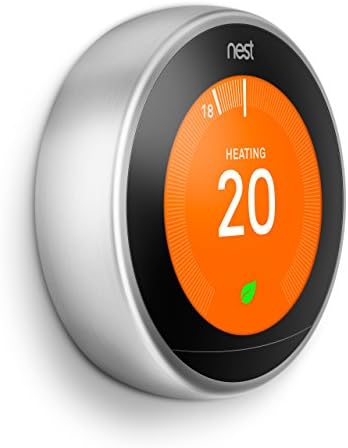





| ASIN | B016PW3JSG |
| Backlight | Yes |
| Best Sellers Rank | 99,970 in DIY & Tools ( See Top 100 in DIY & Tools ) 64 in Home Programmable Thermostats |
| Brand | |
| Brand Name | |
| Colour | Stainless Steel |
| Connectivity Protocol | Wi-Fi |
| Connectivity Technology | Wi-Fi |
| Control Method | App |
| Control Type | Remote Control |
| Controller Type | Google Assistant |
| Controller type | Google Assistant |
| Customer Reviews | 4.4 out of 5 stars 7,392 Reviews |
| Display Type | LCD or LED |
| Finish Type | Shiny |
| Global Trade Identification Number | 00813917021170 |
| Included Components | Nest Thermostat |
| Item Dimensions D x W x H | 3.2D x 8.4W x 8.4H centimetres |
| Item Shape | Round |
| Item Type Name | Google Nest Learning Thermostat |
| Item Weight | 0.22 Kilograms |
| Manufacturer | |
| Manufacturer Part Number | T3028GB |
| Manufacturer Warranty Description | 2 year manufacturer. |
| Material Type | Stainless Steel |
| Model Name | Google Nest |
| Model Number | T3028GB |
| Model name | Google Nest |
| Mounting Type | Wall Mount |
| Number of Batteries | 1 Lithium Polymer batteries required. (included) |
| Power Source | Battery Powered |
| Product Style | Thermostat |
| Product dimensions | 3.2D x 8.4W x 8.4H centimetres |
| Special Features | Auto-Away Mode |
| Special feature | Auto-Away Mode |
| Specific Uses For Product | Boiler |
| Specification Met | certified frustration-free |
| Temperature Control Type | Smart/Remote |
| UPC | 813917021170 |
| Unit Count | 1.0 count |
| Voltage | 24 Volts |
C**C
Nest Learning Thremostat, 3rd Generation fitted to Powermax 185 Boiler
Nest is one of those rare products that is impeccable in its design, functionality, quality and ease of use. All things considered, it is also extremely good value for money as well. However, like me, you will might only realise that once you have started using Nest. The positive experience of Nest actually starts on unpacking the product, the quality of the product is evident in every detail. Even the screws for attaching the product to the wall have a certain quality about them which just is not there in a normal screw. Prior to installing Nest, for years my house has been either too hot or too cold and rarely at just the right temperature. Now, less than two days after installation, with Nest, I can accurately control the temperature inside my house so that it feels comfortable all the time. I have no hesitation in recommending Nest as a new or replacement thermostat / timer. It has certainly given my old boiler a new lease of life, which in its last life was simply controlled by a programmable clock and the thermostatic valves on the radiators. For those interested, the boiler which I fitted Nest to, is the IMI / Range / Baxi / Potterton - Powermax 185 (yes, the boiler was sold and sold again from company to company like a hot potato!). This type of boiler has a chequered history due to a lack of knowledge amongst most heating engineers on the correct maintenance and repair but despite that, like Nest, I consider it to be a design classic!! If Nest can fit this old boiler and give it a new lease of life, then it will probably fit any boiler out there. But do your own research and check the compatibility for yourself. if you are not confident to fit Nest yourself then it is worthwhile getting a Nest installation professional to fit it for you. The installation process took me approximately 2 hours. I prepared well by having my boiler installation manual to hand as well as lengths of power cable and a variety of tools such as a cable stripper, drill, tape measure, electrical screwdriver, pencil etc. I also watched a few YouTube videos on how to install. One important safety point to remember is to switch off the bolier and isolate it from the mains during installation. Following installation, I can see, at a glance, the actual temperature inside the house and also when the boiler is due to be triggered to run and when it is not. When I walk past Nest, the built-in motion sensor wakens so that Nest displays the actual temperature and the temperature that the boiler has been set to come on at. This allows Nest to be setup and adjusted very accurately for each individuals requirements. Adjustment is made by either making adjustments on the Nest display itself or by using the Nest App on your phone. I have setup Nest to operate to a pre-determined schedule because I have a pretty standard routine, however, Nest has been designed to learn your home life patters and adjusts to suit and save energy when you are out. You will need to research this a bit yourself to decide if you want to simply set a schedule or let nest learn and react to your movements. When I am away from the house, I can check the Nest App on my phone to see how much the temperature is dropping throughout the day when the house is empty and Nest has been set to a low temperature, so as not to switch the boiler on unnecessarily. In my case this confirmed that the installation of the loft insulation which was upgraded a few years ago was actually worthwhile! There being a minimal drop in temperature throughout the day. In its history file, Nest stores the boiler's operation details which allows me to check how long the boiler has had to run for each day to maintain the desired temperatures throughout the day and night. This will prove to be helpful in adjusting the Nest settings so as to be as energy efficient as possible or for monitoring the benefits of other energy saving upgrades such as the installation of upgraded windows or loft insulation etc. On researching the possibilities of Nest further, it is apparent that the integration of Nest with other household products will limited only by the ingenuity of Nest's designers (which is obviously there in abundance) and the ingenuity and foresight of designers of other products. It was a pleasant surprise to find that Nest was already able to seamlessly integrate with my Logitech Ultimate remote control. As soon as I realised that this was a possibility, it was done using the Nest App on my phone. I would have never thought that a mere thermostat could be such a joy to use and into the bargain actually provide the very precise boiler control which is necessary to make the living environment as comfortable as possible. With Nest, the days of turning thermostats up and down to control the temperature or adjusting difficult to set time settings on wall mounted programmers are gone. Nest is an absolute pleasure to use and helps us to create a very comfortable living environment, which can only be a good thing. There are not many products on the market that I would take the time to review as most are here today and gone tomorrow. However, Nest is one of those products that stands out and I have no doubt will be here to stay for a very long time. Nest has clearly been designed and brought to market by skilled and enthusiastic designers and others with a vision who are passionate and determined in their efforts. Nest has created a product which can actually help to improve our everyday lives in more ways than you could ever imagine that a thermostat could. I did my research before purchasing and watched a few YouTube videos on the installation but I still felt uncertain about it whether Nest would work with my boiler. Having now bought, installed and used Nest, I would say its a no-brainer! I hope that this review helps a few people in their research prior to making their purchase.
M**O
Great but a little in your face chrome surround.
Product received next day in good packaging giving a good feel of quality at the start. we had an old Honeywell Y plan gravity fed system with a twenty year old Worcester boiler. The boiler is going well and works at about 90% according to the service engineer. I know modern boilers are better, but allowing for the claims on the thermostat, which essentially helps you to not heat an empty house, I can easily see how the money will be clawed back in a year. The thermostat is easy to use and understand and features a fail safe minimum temperature to avoid freezing when off, as well as a minimum temperature setting, which we set at 9 degrees to keep our dogs warmer in case we turn the thermostat right down. The third generation links to the hot water system. There are really only two benefits for this compared with the old set up, that is the ability to set it remotely from a phone or tablet, and the fact that one unit now controls all. For us no more fiddling around in a dark airing cupboard messing with the timer. By the way the Nest timing is far easier to use and see than our old 7 day programmer. I installed the heat link myself. I'm not an electrician or plumber but as someone who runs a building firm has a reasonable knowledge of heating systems and electrical systems. Our wiring centre was a mesh of wires linking to two sets of four connecting blocks. I did take the time to log things as I disconnected and was a little unsure of what supplied what on the cables which went into the wall, but after a little research found out which was the thermostat and which was the power back to the boiler. The nest wiring diagram I used was pretty good once you understood the rudiments and the only problem I had was that there was no indication of how the pump should be wired. Having found a Y plan on Google it all became clear and then relatively easy. I did have an issue with the tank stat as the wires were labelled 1, 2 and C which didn't easily correspond with the Nest wiring diagram which did cause a problem at first in that it worked but I couldn't turn it off.. But thanks to Google it too became clear and after swapping too wires all sorted. My advice, is that if you can identify the various heating parts of your system and are happy with a bit of DIY electricals (safely though) then as long as you have a wiring diagram of what you've got, most people should be able to install the heat link without the need of a "professional" so save yourself a little cash. But do your research first and don't get to a point where you can't revert to the old system. I'm really pleased and the stat is working nicely, just as the weather warms up! However, my wife has an issue. The stat is a large round lit up screen with a shiny chrome surround so in fairness, does stand out in crowd so to speak and she isn't too happy with having a modern piece of equipment on show in our stone built traditional style house with natural wood furniture and apart from the stat, not a piece of shiny chrome in sight, apart from the kitchen, which is a bad room to fit a learning thermostat. The screen times out to blank but the chrome is a bit obvious. Suggestion would be that the unit is offered with a wood effect dial which I am sure would have kept the good lady happy. That aside, I would recommend the product.
D**Z
Well worth the investment - the only "smart home" device you really need
A great device, one of the few who deserve the lable "smart home". You can set it up yourself if you're an above average DIYer, it took me a couple of hours with some extra cabling needed from the distribution board for the hot water + concealing the cable the thermostat itself to the Smart Hive in the wall. A word of caution: DO NOT try to set it up yourself unless you're not absolutely sure of what you're doing: there's a risk of fatal electrical hazard -or, less dangerous but still costly, of damaging the thermostat. Do not play around with electricity :( Once the cabling and mounting is complete, setting up your Nest and pairing it with the app itself is a breeze: after connecting to your wifi network, a few questions about your household, the location of the thermostat, geographical location of your home, etc..., it's ready: just set up your ideal temperature and forget about it! After a week-10 days, the "learning" process will be complete and the thermostat will adjust the temperature automatically if you have set it up yourself a couple of times (e.g. lowering temperature at night and raising it again when you wake up). The "Away" feature is also excellent: when you leave on holidays for example, the Nest will automatically sense the home is empty (+based on your mobile phone's location), and set its function to "eco" an energy-saving temperature + turn off the hot water schedule. Just brilliant! Finally, the hot water schedule is also very easy to set up, bar a minor glitch in the app (Android version, at least), in which you have to set up each day separately for the scheduling to function properly instead of setting up several days at once. I would also have liked a little more flexibility in the duration of the boiler activation (it only accepts 30mins increments), I hope Nest will fix this in a future update. But these are minor comments in the overall experience. Conclusion: this thermostat can be a little pricey but it's arguably best in class, very efficient, and a beautiful object in itself. Highly recommended!
I**N
Works well but a bit too smart
Well made and easy to install but tricky to configure correctly for eco use. It’s smart learning ability is a bit too smart in that it tends to make assumptions about your usage requirements. For example when you set the schedule to turn the heating on at say 5am to 21 degrees centigrade, it’s learnt how long the boiler needs to get to that temperature so will turn the heating on up to 5 hours earlier to give it time to get to the desired temperature for the schedule. This can be disabled. Another confusing ‘feature’ is the hot water bacterium protection setting, which overrides all other settings to ensure the hot water is on for at least 2 hours in every 48 hours, even when the hot water mode is completely turned off! Again this can be disabled. Finally if you manually change the settings on the thermostat itself it has a tendency to add these changes to schedule. This is a nice piece of kit, the app is excellent, and it used correctly can manage your heating and bills, but it’s not fit and forget, you need to set it correctly for your requirements and keep an eye on it.
D**K
Feature rich, beautiful device, with lots of neat features
Bought the thermostat along with the stand recently. My main reasons for buying were to gain the ability to control my heating remotely from my phone/tablet, but also because it looks fantastic. Yes it's expensive for sure... I'd previously invested in a z-Wave wireless thermostat, and while in theory that should have been controllable remotely as part of an overall z-wave system I couldn't ever get it to work. But that's another story. The actual thermostat is a beautiful piece of engineering, excellent design, with a lovely feel to the movement when you rotate the outer ring to make adjustments - it's also heavy, it feels substantial, which is good. I've since learned that the people who founded the company previously worked for Apple - and it shows in the design in my opinion. Everything from the way the item is packaged and presented in the box to the way the software works is kinda like a high-end smart phone! The package consists of the thermostat and also a boiler switch which needs to be placed near your boiler and wired in to your existing set-up - I consider myself reasonably competent with electrics and managed to wire it in myself - but they do recommend professional installation. Considering that part of the install is likely to involve modifying mains voltage cabling it's worth considering if you're not confident with this kind of thing. The two parts communicate via wireless and there doesn't have to be a cabled connection between the two. However the thermostat does need power - I don't think that's made clear in the fancy marketing pictures showing the thing hovering nicely on a wall - the options are either to power it using a 12v supply provided by the boiler switch or use the included USB lead and "charger" which is exactly the same as you'd use to charge a phone! To power it via the boiler switch you need to use existing wires which would be present if you're replacing an existing wired set-up, or run wires to your new location somehow. Using the alternative of the USB lead is easier, but harder to hide the cable! As I'm using mine with the stand it's on a shelf and I've managed to get the connection cable hidden in some existing trunking. I'm only controlling heating as I have a combi-boiler and therefore no hot water tank, so I can't comment on the hot-water side of things. The thermostat needs to "see" your room - it needs to point in to the room - when it senses you are walking around the display comes on and shows in large figures the temperature it's set to - if you walk right up to it the display changes to show more details, which is neat. If no movement is sensed the display turns off completely. The "learning" element is that after a few days it figures out when you usually turn the heat up and down - ie. what time you usually turn it up in the morning, down at night, etc. and then starts to adjust the temperature itself. If you have a reasonably regular routine like our house this seems to work quite well - although we do have an issue where is switches on way ahead of time in the morning to get the house "up to temperature" by the switch on time which results in the house getting too hot in the middle of the night - apparently there are adjustments that can be made to fix this, but at the moment I've resorted to switching it off manually at bedtime! The phone app, iPhone in my case, is easy to configure and link and works easily - if gives a display very similar to the thermostat itself. Being able to adjust the heating when leaving work, or from the couch, is fantastic. The app can also help the system figure out when you're not home - and the heating will turn itself down, how effective that is I don't know yet. It's also worth noting that the boiler switch isn't a standard size and won't mount over a UK 1 or 2 gang socket box - that's a shame and made it a little harder to modify my existing system - I've included "before" and "after" modification pictures to demonstrate what I had to do. Overall it's a fantastic system - likely to need some fine tuning to get it just right, certainly expensive, but with lots of nice features I'd definitely recommend it!
A**D
Excellent product, apps need some work
We have recently refurbed a house and I wanted to kit it out with automation tech... we couldn't really afford it with all the other work going on but I found one on Amazon Warehouse Deals - not a huge discount but enough to tempt me. Despite being a previously returned unit the product that arrived looked brand new, there was absolutely no sign that someone had previously had it which was brilliant. The product itself looks great. It's so much better looking than a traditional thermostat and in my opinion looks sleeker than other equivilants (Hive etc.). The thermostat unit can be as simple or complex to use as you wish - twist the dial to adjust heat or enter the myriad of menus. Being impatient I decided to install the unit myself. You'll need a bit of electrical knowledge for this as the installation instructions for the Heat Link (the bit that connects to the boiler) are not brilliant - you get some diagrams and that's about it. After a bit of time studying the nest wiring diagram and comparing it to the boiler I managed to get the thing hooked up. From that point on it took about 10minutes to be fully functional and controlling the heating from my iPad. I love the ability to control heating remotely but the service is a little let down by the apps. The Windows Phone app does not work - it's a common problem with Windows Phone apps. The iPhone/iPad app does work but little bits of it feel a bit clunky - scheduling, for example, is more intuitive in the web app than it is on the iPad. In any event, I'm saving money. Instead of a traditional fixed schedule, Nest is using the heating as often as we need but as little as possible. The integelligence features do clever things like turn the heating off if it's sunny outside, or on if it's snowy. After a week of using it Nest has learned that we like the heating a little hotter first thing to warm up the towels, then to cool down whilst we get ready, then in the evenings it knows to turn the heating down an hour or so before we head to bed. Would highly recommend to anyone.
B**A
Broke in less than 12 months
Thermostat stopped connecting to WiFi and could not identify any networks. Seems like this is a common problem other users have experienced. Contacted Google support (took about 30 minutes to find a phone number) and they sent a replacement to me on the condition I returned the faulty one by a certain date using a pre-paid DHL label. If they didn’t receive the old one by this date they would charge my card £139. They sent me a refurbished thermostat and I didn’t realise until I opened it that it was stainless steel (not white that I had purchased). I contacted Google to say they sent me the wrong colour replacement. Was told not to send either the faulty or replacement thermostat back until the advisor had a response from Google Store. No response so chased a couple times asking if I should return the faulty one. I was also getting automated emails reminding me to return the old one by the date. As I still didn’t hear from them I dropped off the old thermostat on the day it was meant to be received by Google (in Ireland). Same night got email that they are charging me £139 for the replacement (that was the wrong colour!!!). I’ve emailed back saying they had told me not to return it, that it was on the way back to them anyway and what’s the update on the white replacement. No response. So frustrating to deal with this company. Terrible that something that expensive broke in less than a year. Trying to link the new thermostat to the old heatlink was a challenge & had to call Google support to walk us through what we were doing wrong. Now will need to raise a Section 85 claim to get my money back, plus a refund of hte original cost for the thermostat since the replacement was not a like-for-like. Definitely would not recommend others to get a Nest thermostat, I will never get one again when this refurbished one breaks down in another 12 months.
C**N
Quite simply incredible.
For the 3-4 years since I had it installed, I struggled with a really rubbish Thermostat that came with my new combi boiler. For all intents and purposes it looked pretty good on paper; it connected wirelessly, was battery powered so could be placed pretty much anywhere in my house and allowed me to control and schedule the heating. What was there not to like? Well, its battery life was awful for starters - it was beginning to hammer through a set of two AA batteries to the point where a fresh set were lasting less than a month. After replacing its batteries, the process of getting the thermostat to 'talk' to the receiver next to the boiler was repetitive and tedious and often didn't work. The worst issue was simply when trying to set the temperature; I'd turn the dial, push it to select the temperature and it would often just sit blinking at me and do nothing at all, which was really frustrating! In the end, enough was enough and I decided to look at getting a better thermostat to replace that clunky piece of trash and, being a bit of a gadget nut, I started looking at the new wave of apparently 'smart' thermostats that had recently appeared on the market. It ultimately come down to the Nest and British Gas's own 'Hive' as they both received very favourable reviews - but my mind was more or less made up for me when, during the last Amazon 'Prime Day' event, they'd slashed a massive amount from the cost of the 'Nest', so I took the plunge and bought one! >>>>>>WHAT'S IN THE BOX? In the very smart packaging for the Nest, you'll find the main gadget itself nestled at the top, and beneath that you'll find a set of instructions, a power adapter & cable, a controller ring, the 'heat link' receiver, wall-mounting plate and four screws. >>>>>>STAND AND DELIVER! One thing that wasn't made clear with the Nest when I bought it, is that if you want it to be 'portable' throughout your house, you'll need to get the stand for it. Of course, you can opt to have it wall-mounted if you desire, but I much preferred the thought of being able to put it on a shelf or a cable or something along those lines. The stand, of course, does add a bit more to the cost - and I'll do a separate review of it after I've finished this one. >>>>>>FIRST IMPRESSIONS? Once I'd received the stand for my Nest, I followed the instructions on how to attach it to the stand and by the time it was all connected together, I couldn't help but marvel at its awesomeness. The actual gadget is GORGEOUS - it's all brushed aluminium and thick glass and just exudes quality, as you might expect. It's pretty heavy too, which again (for me, at least) is a good gauge on the quality of it. Despite the fact that the 'heat link' wasn't connected to my boiler at this point., I decided to power up the Nest and have a play with it - and it was a good thing I did because, as is usual with new internet-connected devices, it required some registration and setting up. I registered it with my email account, set a password, entered my location details, set a location where the actual device was going to sit in my house and several other things and eventually came to the point where it started looking for the heat link - which it obviously wasn't going to find. >>>>>>CHECK YOUR BOILER! Not long after I ordered it from Amazon, one of the first things I did was that I got in touch with Vokera, the manufacturer of my combi-boiler to check that it was compatible with the Nest. Thankfully, they came back quickly with an email telling me that it should work fine, so I set about searching the web for hints and tips on how to connect the Nest to it. >>>>>>IF YOU'RE UNSURE, GET IT INSTALLED BY A PRO Now's a good time to say that I'm not en electrician, so while I'm happy with wiring plugs and mending wires, I'm not super-confident at doing more complex things - and doubly so when it came to the prospect of opening my combi-boiler and tinkering about with its innards. I procrastinated for a while but eventually decided that I should leave it to a professional, so set about the usual task of getting quotes from tradesmen. I'll save you the story of woe that invariably involved me being let down by the first company I chose (directly from the Nest website's list of recommended installers, no less) but I did strike gold on the second one and finally got it installed last week. If you're in or around West Lothian, I can highly recommend Edwards Electricals - they're a Nest Pro-Certified installer and did a grand job for a good price. The rule of thumb I would use here is that if you have any doubt in your abilities to install the Nest, get someone who knows what they're doing to install it. I'm glad I did! >>>>>>HOW EASY IS IT TO USE? Once your Nest Pro Installer has set your Nest and the heat link up, this thing is ridiculously simple to use. In basic terms, all you need to do is set the temperature and it will do the rest - the outer rim of the Nest acts as a big dial and you push it in to select things, but most of the time you simply need to rotate it left or right to select your desired temperature and leave it to it. >>>>>>A RIGHT SMARTY-PANTS Of course, with the Nest being a 'Smart' device it is able to detect when you're in the house or out of it by using a combination of the infra-red beam on the front of it to detect when you (or your house's other inhabitants) walk past it and, once you have set up the Nest app on your Smartphone(s), it will be able to also detect when it/they are close-by, so over the course of time it will be able to build a pattern of when people are in the house or not. The beauty of this is that when it thinks nobody's in, it will go into 'eco' mode and keep the house at a user-definable low threshold temperature, which should end up saving you money over the long term. Very smart indeed! And of course, once it detects movement or the proximity of your phone, it will switch to normal heating mode and warm the house up. You can of course set it to keep the house at a steady temperature or set it to turn on and off at scheduled times of the day and night - it's totally up to you. Another cool 'learning' feature it has is that it will learn how quickly your radiators are able to heat your house up and will then be able to tell you how long it is going to take until your house reaches a selected temperature. It's all very clever. Since it is an internet-connected device, it can also be controlled by smartphone apps and even from the Nest website, so it's possible to monitor what temperature you house is when you're out of it and even turn it on if you think it's too cold. This opens up the possibility of you being able to turn the heating on while you're on the way home from work, so you arrive to a nice, cosy house. In addition to that, the Nest can also be controlled by other home automation devices - I bought an Amazon Echo Dot and once I'd added the Nest 'Skill' to it, I'm able to instruct Alexa to turn the heating to a desired temperature by saying 'Alexa, set the heating to twenty four degrees'. Cool, huh? >>>>>>THE GOLDILOCKS EFFECT With that clunky old thermostat, the temperature in the house fluctuated too much into the 'too warm' territory and, once it hard instructed the heating to turn off, it strayed too far into the 'too cold' one before telling it to turn on again. Since the Nest has been installed, we've noticed that the house is staying at a much, much more consistent temperature as it is much more intelligent in the way that it controls the heating. >>>>>>SUMMING UP Wow, I am super impressed with this thing. Not only is it a beautifully tactile piece of kit, it's also brilliantly clever and simple to use. There are no doubt other features that I've not covered in this review (heck, I've only been using it for a week) but for all intents and purposes, it's so smart that you only need to tell it what to do and it really does the rest for you. The fact that it can be controlled by smartphones, computers and even Alexa as well as the device itself makes it incredibly convenient, too.
C**N
Bello da vedere semplice da utilizzare
Il design e' veramente bello .L utilizzo e ' semplice per chi ha dimestichezza con i termostati di altre marche.Al montaggio ho provveduto personalmente visto che ho discrete conoscenze nel campo elettrico,certamente per chi non e pratico di elettricità consiglio di rivolgersi a un elettricista o al supporto tecnico della casa.Per quanto riguarda alla problematica della differenza di temperatura tra quella impostata e quella reale, io non la ho riscontrata,le due temperaturature coincidono perfettamente.La programmazione e' quanto di più semplice si possa desiderare rispetto a molti tipi di termostati sul mercato
G**A
WIFI connectivity issues
Suddenly one day the device disconnects from wifi and cannot connect ever again. Known Google issue and read before buying. Spoke to Google and they said since bought through 3rd party (Amazon Direct) nothing can be done.
G**)
Il termometro intelligente che ti fa risparmiare denaro e risorse
Il Google Nest Learning Thermostat 3rd Generation è un dispositivo davvero sorprendente. La sua finitura in rame gli conferisce un aspetto elegante e sofisticato, che si adatta perfettamente a qualsiasi arredamento moderno. Ma la sua vera forza sta nella sua funzionalità. Il Nest si connette direttamente al tuo smartphone tramite l'app Nest, che ti permette di controllare la temperatura della tua casa in qualsiasi momento e da qualsiasi luogo. Inoltre, il Nest impara i tuoi schemi di utilizzo e regola automaticamente la temperatura in base alle tue preferenze, il che significa che non devi preoccuparti di dimenticare di regolare il termostato prima di uscire di casa o di andare a letto. Il Nest ti aiuta anche a risparmiare energia e denaro. Ti fornisce informazioni dettagliate sul tuo consumo energetico e ti consiglia modi per ridurlo. Ad esempio, ti avvisa quando la temperatura della tua casa è troppo elevata o troppo bassa e ti consiglia di regolarla. Inoltre, il Nest ti aiuta a programmare il riscaldamento e il raffreddamento in modo efficiente, in modo da non sprecare energia quando non sei in casa. In generale, il Google Nest Learning Thermostat 3rd Generation è un dispositivo davvero utile e ben progettato. Mi sento molto più comodo e sicuro sapendo che posso controllare la temperatura della mia casa in qualsiasi momento e che il Nest mi aiuta a risparmiare denaro e risorse. Consiglio vivamente questo termometro intelligente a chiunque cerca un modo semplice e conveniente per regolare la temperatura della propria casa.
X**R
El number one
Lo màs top del top en termostatos.
T**N
Top product
Top product, prima zelf te installeren. Heb een oude ketel daarvoor OpenTherm convertor er tussen om het werkend te krijgen. Het werkt echt top! De ai functie is ook grappig, ben je van huis dan gaat het soms vanzelf uit
Trustpilot
2 days ago
5 days ago