Desertcart purchases this item on your behalf and handles shipping, customs, and support to Senegal.
🚀 Elevate your office game with speed, security, and seamless connectivity!
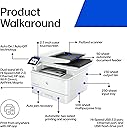
The HP LaserJet Pro MFP 4101fdw is a powerhouse all-in-one monochrome laser printer designed for small teams and busy offices. Delivering ultra-fast 42 ppm print speeds, automatic duplex printing, and a robust auto document feeder, it boosts productivity while saving paper. With intelligent Wi-Fi, broad device compatibility, and advanced HP Wolf Pro Security, it ensures smooth, secure wireless printing from virtually any device. Built for professional-quality black & white documents, this reliable MFP combines printing, scanning, copying, and faxing in one sleek, sturdy unit.


| ASIN | B09ZVMYHGF |
| Additional Printer Functions | All In One |
| B&W Pages per Minute | 42.0 |
| Best Sellers Rank | #14,229 in Office Products ( See Top 100 in Office Products ) #26 in Laser Computer Printers |
| Brand | HP |
| Built-In Media | Getting Started Guide, Power Cord, Toner Cartridges, Warranty Guide, printer |
| Color | white |
| Color Depth | 1 bpp |
| Compatible Cartridge | HP 950XL, HP 951XL |
| Compatible Devices | Laptops, PC, Smartphones, Tablets |
| Connectivity Technology | Ethernet, USB |
| Control Method | Remote |
| Controller Type | Amazon Alexa |
| Customer Reviews | 4.3 out of 5 stars 590 Reviews |
| Display Type | Color Touchscreen (CGD) |
| Dual-sided printing | Yes |
| Duplex | Automatic |
| Hardware Interface | Ethernet, USB |
| Ink Color | black |
| Item Dimensions D x W x H | 16.54"D x 12.72"W x 15.35"H |
| Item Type Name | Multifunction Printer |
| Item Weight | 33 Pounds |
| Manufacturer | HP |
| Maximum Copy Resolution Black and White | 1200 dpi |
| Maximum Media Size | 8.5 x 14 inch |
| Maximum Print Resolution Black and White | 1200 x 1200 dpi |
| Maximum Sheet Capacity | 350 |
| Model Name | New Version: LaserJet Pro 4101fdw |
| Model Number | 4101fdw |
| Model Series | LaserJet Pro |
| Number of Trays | 11 |
| Other Special Features of the Product | Auto Document Feeder |
| Paper Size | 3 x 5 to 8.5 x 17 |
| Print media | Envelopes, Labels, Paper (plain) |
| Printer Connectivity Type | Ethernet, USB |
| Printer Output Type | Monochrome |
| Printer Type | Laser |
| Printing Technology | Laser |
| Processor Count | 1 |
| Resolution | 1200 x 1200 |
| Scanner Type | Flatbed, Sheetfed |
| Series Number | 4100 |
| Special Feature | Auto Document Feeder |
| Specific Uses For Product | Office |
| Total USB 2.0 Ports | 1 |
| Total Usb Ports | 1 |
| UPC | 195161936043 |
| Unit Count | 1.0 Count |
| Warranty Description | 1 year limited hardware warranty |
| Warranty Type | limited warranty |
| Wattage | 510 watts |
N**Z
Fast
What impressed me most 1. Print speed and quality This printer is fast: the first copies come out almost instantly, and it maintains a very high level of sharpness even with small text. Documents look professional, with well-defined colors (when printing in color), and excellent contrast in black and white. 2. Hassle-free wireless connectivity I like that the Wi-Fi setup was simple: I connected it to the router, downloaded the HP app, and was printing from my laptop, phone, and even my tablet. It also has fax, scanning, and copying capabilities, giving it great versatility for office or home tasks. 3. Very useful all-in-one (MFP) features • The automatic document scanner works very well, loading quickly and scanning both sides if the document is needed. • Copying and printing without having a PC in front of you thanks to the front panel and the screen works wonderfully. • The automatic duplexer saves me a ton of paper: it prints on both sides without me having to manually flip them over. 4. Battery Life and Supplies Management The toner yields plenty, and the original HP cartridges maintain consistent colors and deep blacks for a long time. I also like that the paper tray accepts many formats and sizes, making it flexible for different types of jobs. 5. Robust Design and Quiet Operation It looks sturdy, well-built, and stable. It doesn't vibrate when printing large volumes, and while it'll never be a whisper, it's not bothersome: the noise is reasonable even when printing several pages in a row. ⸻ ⚠️ What You Might Consider • The size: It's quite bulky, so it requires a dedicated space. I wouldn't put it on a small desk without enough free space. • Initial investment: It's expensive, especially if you go for the more feature-rich versions, but it pays for itself quickly if you print heavily and make good use of the duplex, scanner, and other functions. • Original cartridges: Non-official consumables may be cheaper, but with original cartridges, you'll notice better print quality, fewer errors, and greater compatibility.
N**A
A Mobile Notary Must have
Best thing for business. Easy set up and easy to use. Prints fast, great quality starter pack ink. Works wonderfully with cell phone printing, laptop and desktop. Connects quickly - no issues
G**R
Prints and scans double sided
This is a very good black and white printer. Fast printing (other reviews will note the number of pages per minute) and the ability to have an all in one copy and scan capability is a must have. Double sided printing/copy/scan is a game changer! I use it in my home, maybe print like 20-50 pages a month. I dislike inkjets because the nozzles tend to clog up or cartridges dry out. Print setup was easy to connect to a 2019 iMac 27" i5 running MacOS 14. I also enabled the scan to network folder to my iMac desktop which required a bit of time to get the shared folder permissions set, but now that it works, I can scan and the file drops seamlessly to the desktop. Connecting to a 2020 Dell Latitude notebook with Win11 took a bit longer, required a separate print driver install from the HP website. Also, no issue printing directly from iPhone. I connected the printer via RJ45 Ethernet and do not have the wifi enabled on the printer. Lastly, it also has a separate manual feed try that pops out so if you're printing a single envelope, labels, or using card stock you don't have to empty the main paper tray to do so. If you're looking for a fast black and white laserjet printer that can scan and copy, this is the printer to get.
M**1
Good printer bad phone software....
I like this printer because it was easy to setup and lets me print from my phone, but I don't like that occasionally the phone printing gets stuck, and I don't know why. I suspect it is something with the HP software and the item I am printing because it works on other items. Oh, when it does get stuck, I sometimes have to cancel the job on the printer, and I always have to print it from the computer which works fine. Basically, good printer bad phone software.
G**L
Great printer!
Easy to setup and use. The feature I like is to be able to print directly from my phone and other computer wireless.
J**B
The (MAC) Software on the HP Site is Corrupted, Making Printer Non-Funtional out of the Box
1 Star for nice packaging and a pretty plastic printer. I use an iMac with Sonoma 14.3. I installed the printer on my network using an ethernet connection. That's as good as it got. When I tried to print from it the first time, it went into "pause" mode and would not print. Files were present in the queue, but all we marked as "waiting" because the printer was in pause mode. Unpausing it worked for 1.333 seconds, then it dropped back into pause mode. I had successfully downloaded the setup software and installed it. I should have know things were going to go sideways when the first warning window popped up saying something about 'Canonljet package is corrupted...' or words to that effect. After reading hundreds of online articles and cries for help, I started to think that my wife, when she told me not to trust the HP name any more than the Brother printer (that was being replaced) name, could possibly be right. But look, dear! Pretty plastic printer and nice packaging! The end result of all my research (other than I was an idiot for trusting the formerly meaningful HP brand name), was that nobody else seemed to own a Mac, and none of the offered solutions ('restart your print server' and 'it's the 3rd party application's fault') worked. I stumbled across one footnote to a HP support posting by some poor user (with a different machine) who said he fixed the problem by installing the printer using a "Generic PCL" printer driver, rather than the model-specific software. That fixed the pause problem. Though I suspect I have features that I bought this printer for that will now be non-functional. In short; The HP printer drivers are corrupt, and the HP Support website is worse than useless. Nobody there answers user requests for help for this model and, where they do, it's the old Calcutta call center solution: "Have you restarted your printer?" Caveat Emptor.
S**L
Easy and fast to use
Fast printing, scanning and fax. Easy to set up!
M**Z
Impresora
Excelente producto
A**N
Great PRINTER
This is a great printer and does all our business needs and does not fail it's been pretty good compared to the brother printers and other ones
V**R
Easy to use - awesome machine.
Love.
G**N
Excellent
Très bon choix
C**N
Pas un bon achat
Vraiment pas un bon achat. Imprimante très fragile, demande un nouveau certificat à tout bout de champ. Je regrette mon achat.
B**B
On time and secure
Excellent
Trustpilot
3 weeks ago
3 weeks ago