Buy anything from 5,000+ international stores. One checkout price. No surprise fees. Join 2M+ shoppers on Desertcart.
Desertcart purchases this item on your behalf and handles shipping, customs, and support to Senegal.
🎶 Unlock pro-level beats anywhere, anytime — your studio just got portable!
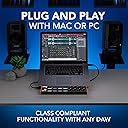
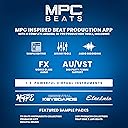
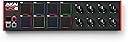
The Akai Professional LPD8 MK2 is a compact USB MIDI controller featuring 8 velocity-sensitive RGB-backlit MPC drum pads and 8 assignable Q-Link knobs, designed for seamless hands-on control of music production software on Mac and PC. With 4 programmable preset slots, plug-and-play USB connectivity, and a rugged yet portable design, it empowers musicians, producers, and DJs to create, mix, and perform with professional precision wherever inspiration strikes.


| ASIN | B0BF9MN8R2 |
| Best Sellers Rank | 1,119 in Musical Instruments & DJ ( See Top 100 in Musical Instruments & DJ ) 10 in MIDI Controller |
| Brand Name | Akai Professional |
| Colour | Black |
| Compatible Devices | Laptop, PC |
| Connectivity Technology | USB |
| Connector Type | USB |
| Control Method | Touch |
| Control Type | Percussion Controller |
| Country of Origin | China |
| Customer Reviews | 4.4 4.4 out of 5 stars (6,337) |
| Global Trade Identification Number | 00694318025567 |
| Hardware Interface | USB |
| Hardware Platform | Intel x86-64 or Apple M1 |
| Human Interface Input | Buttons, Dial |
| Included Components | LPD8 MK2, Quickstart Guide, USB Cable, Security and Warranty Manual, Software Download Card |
| Instrument | Drum |
| Instrument Key | Any |
| Item Dimensions D x W x H | 30.8D x 7.9W x 3.2H centimetres |
| Item Type Name | AKAI Professional LPD8 - USB MIDI Controller with 8 Responsive MPC Drum Pads for Mac and PC, 8 Assignable Knobs and Music Production Software |
| Item Weight | 0.4 Kilograms |
| Keyboard Description | Pad and Knob Controller with 8 velocity-sensitive RGB-backlit MPC pads and 8 rotary controls |
| Manufacturer | inMusic Europe Limited |
| Manufacturer Part Number | LPD8MK2 |
| Material Type | Plastic |
| Model Name | LPD8 MK2 |
| Model Number | LPD8 MK2 |
| Model Year | 2022 |
| Noise Control | None |
| Number of Keys | 8 |
| Platform | Mac, Windows |
| Product Style | Pad Controller Only |
| Product Warranty | 12 months manufacturer. |
| Size | LPD8 |
| Special Features | MPC drum pads, Portable, USB powered, assignable knobs, production software included |
| Supported Software | GarageBand |
| UPC | 694318025567 |
| Unit Count | 1.0 count |
G**T
Getting sound from the Akai LPK25 mini keyboard
This is not so much a review as help for anyone who buys this mini keyboard and expects to play music with it 'out of the box' - even to test that it's working. It won't do anything without other software, but there's plenty around that is free. As far as the LPK25 product is concerned, it's great and does everything it's supposed to. Apart from Amazon, there are plenty of positive reviews and video demos to support this. However, the LPK25 is not really intended for someone who just wants to start playing a music keyboard through a computer by paying as little as possible. In spite of the attractive price for a touch sensitive keyboard, this is actually more a digital music creator's tool. It's not a 'standalone' playable keyboard. The LPK25 is simply a MIDI controller, and there is a big difference. Nevertheless, using a suitable program (many are free), anyone can learn to arrange and play music with the LPK25. A buyer could be forgiven for thinking the unit is faulty out of the box, as although it should be recognised when plugged into a USB port, apart from a light or two working, it will be otherwise unresponsive and no sound will come out of the computer speakers or other sound output when keys are played. What to do now? Before assuming it might be DOA (as have others) I spent countless hours on research in forums, reading reviews, watching YouTube demos, learning about all the different programs you can use for various effects, musical composition etc - downloading, installing and trying them, and I still failed to get a single peep out of the b....y thing! Eventually the 'Aha moment' arrived, sound emanated and things became clearer. On the positive side, I have learned a lot! So here's how to quickly check your LPK25 out and start making music (sound at least!) with it using a suitable music program to control it. Note that the supplied Akai LPK25 Editor isn't for producing sound. It is only for controlling the 4 program presets and built-in Arpeggiator (notes play automatically in sequence). It's not even necessary to install it at this stage. Any computer audio interface/card should work well enough for MIDI output using e.g. Windows MS GS Wavetable SW Synth; however, CoolSoft VirtualMidiSynth (free) gives better instrument sounds. Later you may move on to sound fonts and live instrument patches, but don't worry about that now. The LPK25 needs only one program to play and/or record keyboard input to be sent to your computer speakers. Any MIDI sequencer, composer, mixer, DAW (digital audio workstation) will do. There are hundreds out there, a lot of them completely free or with usable demo versions. Any program that has a MIDI input port controller should work. The problem is that many of them have so many features, it's difficult to find out how to start playing a few notes without going through a whole tutorial - to then decide that you don't really like that program! I tried many, but I found Sequetron LE (free) was very easy to install and use immediately to play notes. The first short YouTube video (search Sequetron 8.06) will be enough to get you going and also provides the publisher website from where you can download the program. 1. Plug the LPK25 into a USB port. The operating system should recognise it as 'LPK25' or simply 'USB Audio Device' and it will use a Windows or other system driver. Nothing else is needed other than speakers turned on! 2. Once Sequetron (or other program) is installed, run it and in Config, Ports, set the MIDI Input to USB Audio Device (LPK25). Close the dialog box, then click the Run (Stop) button (metronome moves in Run mode). Press keys on the 'virtual keyboard' with your mouse and play some notes on the LPK25. From either, you should hear piano sounds from your speakers. If you turn on the LPK25 Arpeggiator button/light, notes you hold should repeat in sequence. It's working! If you press Stop, sound output stops too. Press Run to hear sound. You can change from piano to any MIDI instrument and do all sorts of wonderful things once you learn how by reading and watching tutorials and using your undiscovered musical talents with your eventual software choice!
D**P
Fantastic!
This really is a great piece of kit and dead easy to set-up. So here are some facts about this keyboard. 1. It does not produce any sound on its own. It's designed to work with Virtual Studio Tech (VST) and Digital Audio workstations (DAW) or midi software (Anvil Studio for example). There are plenty FREE to download on the internet. 2. It's plug and play, works a like a dream with Windows 10. I use it with the SuperSonico 5 stand-alone VST synth and it's just brilliant. 3. It comes with set-up program on CD if you want to program the Arppeggiator, sustain and octave buttons to behave in a certain way. The user guide is also included. 4. If you buy it and register it with Akai then you can get some free keyboard tutorial software. Ideal for beginners. 5. It fits into the front pocket on my laptop case so is really easy to carry around. I read some of the reviews before I purchased this product and I can't understand why anyone would give it less that 4 stars at least. I believe there is a wireless version of this keyboard but that's not what I bought. For the price I paid I am more than pleased.
L**A
Simple and cheap.. works great with various devices
I use this quite a lot.. I got into making music on my PC again (FL studio mostly) and wanted something to simply play keys with instead of the actual keyboard.. after using it FL for a while I bought an apple adapter for my phone so I could connect and power a keyboard.. it worked perfectly. I can now control apps on my phone like synth one with the keyboard and use the aux on my pedal to send the sound to. So basically using this keyboard with practically infinite synth sounds. I use the boss RC30 and connect this, a guitar and a bass and can get all sorts of music made without much thought at all.. need a beat open a app to make a beat, loop it.. get some synth and bass going and loop that.. really fun. The only downside is that is is pretty cheaply made and after not long one key started sticking a little. It's still like it and I don't notice it that badly, but it was an issue after not long from having it. That said it does work just fine but kinda feels funny on that key sometimes.. works a treat with most midi things though, really compact and ideal for just finding what you're looking for keys wise on a lot of programs. Bigger with more functions would be better, but this is ideal to start with.
A**R
Increíble, los materiales son de buena calidad, muy portátil y plug & play
J**.
Very cool and sterdy I love it
M**A
Compact and very handy, really value for money. Take note of the dimensions though, it's very small.
J**E
It’s a typical Akai product. Durable, responsive, compatible, and comes with loads of bonus software. The pads are a little stiff. I gotta smack em purdy hard but they just need to be broken in. It’s compact and looks dope. Doesn’t feel too light and cheap or too heavy and out dated. Very durable. Connects via usb. Plug and play all day. If you travel bring it with you on the plane and plug it up to your laptop and you’re back at it. If you’re looking to run it as your main drum pad tho in a home studio setup drop the additional $100 and buy the studio MPD. This is definitely for travel purposes
M**Y
The pads would not fire unless pressed hard, repeat notes were difficult. The velocity curve was fixed so either have to use full velocity and manually tweak or unreliable button presses. Might be ok for launching clips but not as a drum pad. Returned it.
Trustpilot
2 months ago
2 weeks ago