Buy anything from 5,000+ international stores. One checkout price. No surprise fees. Join 2M+ shoppers on Desertcart.
Desertcart purchases this item on your behalf and handles shipping, customs, and support to Senegal.
🚀 Power meets portability — Own the future of work today!
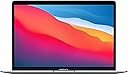
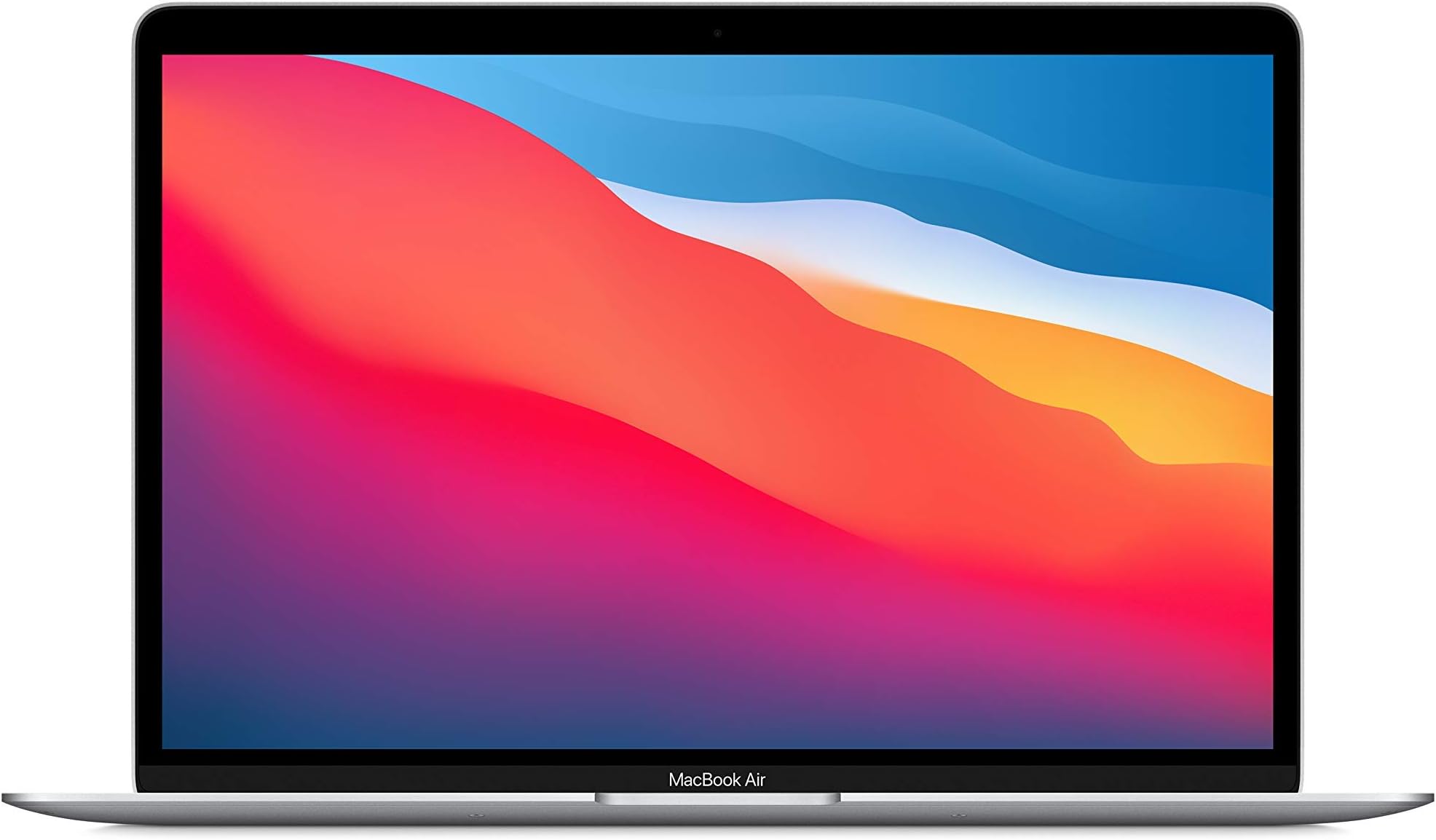
The Apple 2020 MacBook Air with M1 chip delivers exceptional speed and efficiency in a sleek 13-inch design. Featuring 8GB RAM and a 512GB SSD, this renewed premium model is professionally inspected to ensure minimal cosmetic wear and reliable battery life exceeding 80% capacity. Perfect for professionals seeking a powerful, lightweight laptop with a risk-free 90-day return policy.


| Brand | Apple |
| CPU Model | Apple M1 |
| Color | Silver |
| Graphics Card Description | Integrated |
| Hard Disk Size | 512 GB |
| Model Name | Macbook Air |
| Operating System | macOS Ventura |
| Ram Memory Installed Size | 8 GB |
| Screen Size | 13.3 Inches |
| Special Feature | HD Audio, Lightweight |
A**R
Really great laptop at the time it was sold
Why I ordered this item: My kid needed a basic laptop for her online language lessons, so I got this for her. It's ancient, but it has Apple silicon and the price was right. Likes: * The M1 CPU is still a banger if you just need basic web browsing. All the newer features of newer processors don't really matter if you are just looking at websites and doing Zoom calls. * The 8GB of RAM is similarly limited, but it is fine for our use. * The form factor is great. This laptop is so small and light that even my six year old can carry it around. * The metal body feels well-made and durable. * Battery life is excellent. We still get 8+ hours on it even though the battery has never been replaced. * Sound quality is top tier for a 13" laptop from 2020. It's crazy that a cheap laptop from six years ago can still sound this good. * I actually own two of these because I bought one for an employee at one point. When the first one dies I'll switch to the second one. * Performance is fine. It's not going to set any speed records, but it's better than any other laptop from 2020 I have ever used. * It stays cool 100% of the time. No likes: * None Would I pay full price for this product: I'd pay $300 for this laptop in 2026, and it's the only laptop from six years ago that I would still buy. Final thoughts: These are still great computers and if you can get one at a deep discount, I think it's well worth the cost.
A**O
Excellent MacBook
Intro I purchased the M1 MacBook Air in 2023, and the experience has been great, albeit with some minor bugs introduced in macOS Sonoma, which were fixed in macOS Sequoia. Fast forward to March 2024, Apple replaced the base model M1 MacBook Air with the M2 MacBook Air. This now makes it an even greater time to purchase the M1 MacBook Air, as prices have decreased, making the price of admission more accessible to a wider audience. The power and performance that you get with an M1 MacBook Air are greater than that of a 16-inch MacBook Pro with an Intel i9 processor. When that machine came out, it cost 5x the cost of the M1 MacBook Air. Let that sit in your head for a minute, and be sure to never question or doubt the power that the M1 MacBook Air possesses. As said in the slogan of the M1 MacBook Air by Apple, “Power. It’s in the Air.” That remains true in 2025, even with the release of the M3 MacBook Air. This machine is powerful enough to be used for audio, video, and photo production, and it won’t be reduced to typing documents and web browsing anytime soon. All Macs based on the modern architecture of Apple Silicon are fully capable of doing professional work regardless of needs, and the M1 MacBook Air is no exception. If you are currently on any Intel-based machine, the improvements in performance are night and day. If you are limited on cash, you no longer have an excuse not to purchase a brand-new Mac laptop. In addition to great performance, Apple Silicon is far more efficient in power consumption than its predecessor. Because of this, we are able to get “real” all-day battery life using the same battery, in the same chassis as the previous Intel-based MacBook Air. The chassis features the iconic wedge-shaped design with no sharp edges, making this machine comfortable to type on. Specs The M1 MacBook Air sports what Apple calls “Magic keyboard,” which is essentially a refinement of the “proper” keyboard that Apple has used all these years before the tragedy known as the butterfly keyboard was introduced. We get a 13-inch IPS LED backlit display with a native resolution of 2560x1600, 400 nits of brightness, wide color P3 gamut, and true tone technology. This is an improvement over the previous Intel-based Retina MacBook Air released the same year, which only featured an sRGB color gamut. These improvements enable photo and video editing with more accurate color grading to be achieved on the M1 MacBook Air. The 720p webcam features an “advanced image signal processor with computational video,” which enhances video quality over its predecessor. Wi-Fi 6 (802.11ax) is also included in the M1 MacBook Air as opposed to Wi-Fi 5 (802.11ac) in its predecessor. This means multiuser support (OFDMA) with support for up to 8 AP spatial streams and a max data rate of 9.6 Gbps. 802.11ax supports these performance benefits on both 2.4 GHz and 5 GHz bands. In contrast, 802.11ac supported 4 AP special streams, a max data rate of 6.9 Gbps, and was only supported on the 5 GHz band. 802.11ax includes BSS (basic service set) coloring, which adds a field to the wireless frame in order to overcome interference associated with same-frequency cell coexistence, leading to increased capacity and stability over its predecessor. 802.11ax also uses less power than its predecessor, adding to improved battery life. The M1 chip features an 8-core CPU with 4 performance cores and 4 efficiency cores, a 7-core GPU, and a 16-core Neural Engine. The notebook comes with a 49.9 watt-hour lithium-polymer battery and a 30W USB-C Power Delivery power adapter. Apple says that the battery life can last up to 15 hours when web browsing and up to 18 hours while watching Apple TV. That is an improvement over its predecessor, which provided up to 11 hours when web browsing wirelessly and up to 12 hours for Apple TV movie playback. Touch ID offers a convenient and secure authentication method, particularly when using your MacBook Air in public spaces where you may not desire your keystrokes to be recorded by unethical individuals. Desktop Setup After purchasing and using this machine in a proper desk setup, there are two things I have taken note of. The included 30W charger is underpowered when the MacBook Air is used in a "desktop" setup with an external display and SSD attached, as the additional power is drawn from the batteries during peak usage. The M1 MacBook Air has 2 USB-C ports. If you are using a non-USB-C based monitor, you will be required to use a USB-C hub with HDMI, etc., in order to use this device in a proper desktop configuration. Apple’s Multiport USB-C AV Adapter takes 6W of power for itself, leaving a theoretical 24W for the MacBook Air. macOS’s energy management is top-notch; however, when used in this configuration, processor and graphically intensive tasks will cause the MacBook Air to pull power from the battery in addition to that being supplied by the power adapter. The max power will be pulled initially, but after thermal throttling kicks in, the power requirements are reduced, and power is then taken exclusively from the power adapter. During the initial stage, coconutBattery shows 1-5W of power being pulled from the battery, but then this amount is gradually reduced to 0W after a few minutes. The battery loses less than 1% state-of-charge during this process according to coconutBattery; however, this negligible amount is not displayed by the built-in battery meter, which will still indicate 100% SoC. At first, I had assumed that this would not be an issue, as I was advised by other “pros”. The M2 & M3 MacBook Air and many Windows-based notebooks conduct this same behavior out-of-the-box when pushed with their included charger connected directly to them. My mind was at rest regarding the matter until I saw my battery health degrading rapidly. After less than 5 months, macOS showed a battery health reading of 89%, and coconutBattery displayed a reading of 84%. I continued using the default charger until less than a month later when macOS displayed a battery health reading of 88%, and coconutBattery displayed a reading of 82%. I began to assume that my battery was defective and that I would have to return and replace my machine as it was less than 6 months old. Despite all the noise from other “tech pros” in the IT industry who claim that “your Mac can manage itself” and that using the underpowered charger is a non-issue, my intuition was telling me that due to power being pulled from the battery while plugged in, the battery health meter was incorrect and needed to be re-calibrated. Thankfully, I had already owned an Anker A2613 60W Power Port Atom III Gan charger purchased on Amazon in 2019 that I used exclusively to charge my previous Non-Retina MacBook Air. That Mac along with its battery is still going strong today, albeit with the unavoidable “Service Recommended” tag that only just came on in February of 2024. I swapped out the included 30W Apple power adapter for the 60W Anker. I then used it exclusively with the M1 MacBook Air over the period of 2 weeks, discharging to 0% and back to 100% at least 2 times per week. This re-calibrated the battery’s health sensors, and sure enough, the battery health reading in coconutBattery increased, thankfully. macOS held on to its 88% battery health percentage for the greater part of 2024, while coconutBattery reported an increase to ~85.2% up from the 82% it previously displayed. Battery Temperature When charging from 1% SoC, battery temperatures climb to 38 ℃ when using the included 30W charger and up to ~40 ℃ with the 60W Anker charger. The max charging temperature for lithium-ion batteries is 45℃, and so this temperature is well within tolerances; macOS will automatically disable charging if temperatures reach that level. During sustained processor and graphically intense usage, the M1 MacBook Air’s battery temperature can be seen maxing out at ~45.5 ℃ until thermal throttling kicks in and consequently reducing battery temperature to ~43 ℃ while the task remains in progress. This is the “intense usage” temperature regardless of the M1 MacBook Air being used while plugged in with a full battery or while being used unplugged. The maximum discharge rate for lithium-ion batteries is 60℃, so once again this is within tolerances. When the task is completed, the battery’s temperature gradually cools back down to an idle temperature of ~36 ℃. Using the MacBook in clamshell mode surprisingly has little effect on its thermals from my testing. The thermal management of the M1 MacBook Air is very impressive for a fan-less device. Conclusion Overall, the M1 MacBook Air is an excellent machine in 2025, with its iconic, classy, and timeless design. It continues to demonstrate the real meaning of value and performance. Like I said before, the power and performance that you get with an M1 MacBook Air is greater than that of a 16-inch MacBook Pro with an Intel i9 processor. When that machine came out, it cost almost USD$4000. Many professionals still use that machine till this date for work. In 2025, the slogan for the M1 MacBook still stands true today: “Power. It’s in the Air.” As an audio professional, I have completed several projects using a base model 2013 MacBook Air with 4GB RAM and 128GB SSD. Projects were stored on an external drive, and the internal drive used exclusively for the OS and its applications. That laptop is still running flawlessly today. Fast forward to 2023 when I purchased my M1 MacBook Air with 8GB RAM and 256GB SSD. Performance is flawless, and the value is unmatched. This laptop has been recommended by almost everyone in the tech industry over the M2 MacBook Air as the best laptop to buy in 2020-2024 until Apple removed it from their website. M2 runs hotter and is less efficient than M1, making its gains negligible in the chassis of a fan-less MacBook Air. With the M3 MacBook Air, Apple has improved upon the shortcomings of the M2 MacBook Air. They have brought back dual NAND chips for SSD speeds compatible with the M1 MacBook Air, and with the new 3-nanometer architecture of the M3, efficiency and thermal performance have improved. In my experience, the M2 MacBook Air is the one to skip. If you are looking for value and performance, get the M1 MacBook Air, and if you are looking for the latest, get the M3 MacBook Air. Both machines, in their base configuration, are fully capable of professional audio, video, and photo editing.
B**E
Excellent product
Excellent product. Easy to setup and use. Very useful. Great condition. Incredibly durable. Great value.
J**T
My first love
I bought the MacBook Air M1 two years ago because I was starting my first year as a CS major. I purchased the MacBook with 8GB of RAM and a 256GB hard drive. I've used this laptop for coding, professional video editing with software like Adobe, and daily tasks. I have to say, I LOVE this laptop. It's lightweight and portable. You can quite literally hold it open or closed with one hand, and it doesn't take up much space. I love the feature where the keyboard lights up, which is especially handy since I consider myself a night owl. The battery life is AMAZING. I've never worried about overheating with this laptop. I write my code and do video editing on this device, so I'm using it for long periods, and the battery has never been an issue since it can last 6+ hours. The performance has always been good. The MacBook has a feature where you can have multiple desktops open. I typically have one desktop with all my video editing software and another with all my coding software. I have never experienced lag or delay whatsoever. The movement between different desktops is effortless since there's a keyboard shortcut to switch between them. The speaker on the MacBook Air is also very good. My only complaint would be that the camera is horrible. I was honestly shocked at how bad the camera quality is for this laptop, but it wasn’t a feature I was looking for. I decided this week to switch over to Windows 11 Pro because most of the software I need is found on Windows. I honestly would have just upgraded to the MacBook with the M3 chip if Apple supported the applications I needed. That sucks because I honestly adore Apple products.
Q**E
Love this notebook!
I recently migrated to Apple after many years using a wide variety of PCs running Windows or Linux. I decided to make that move after Apple's introduction of the M1 processor, which has been proven to be an excellent hardware platform. Now. of course, the M2 has been released, but, depending on your needs, the 2020 Macbook Air with the M1 will save you some money while still delivering outstanding performance and some of the most attractively and perfectly manufactured hardware. You can search the Internet for professional reviews of the Macbook Air, but I feel confident you'll find plenty to verify what I'm saying. The Retina display is beautiful. The sound system is superior to any other laptop I have owned or used. The battery holds up all day under typical use, and I can verify that the battery holds its charge well for at least a week while the notebook is powered off. The Apple OS (Monterey) is smooth and fast, and I was able to learn my way around in it quickly. When you need help, a Google search will yield tons of tips quickly, or you can avail yourself of Apple support. I will say that the Air is a little short on USB ports, lacks a built-in card slot, and, of course, is not equipped with a touchscreen. However, I have run a USB hub from one of the two Thunderbolt ports, and there seems to be enough power to support my flash drives and card readers...even a portable DVD-burner. As far as a touchscreen goes, I have that on a Dell laptop I run Linux on, but I never use it...guess I'm a mouse or touchpad guy. The aluminum housing is beautifully machined and finished, the keyboard has a very nice touch, the battery seems to charge quickly, and the Air is light at under 3 lbs. One last thing! I have been a heavy user of both Google and Microsoft services, and I have found that Apple provides ample support for integrating those services into the Mac environment. I run Google's Backup and Sync and Microsoft's OneDrive with no problems. My AVG subscription allows me to use my antivirus software on both Mac OS and Windows machines. I have no regrets for this purchase. Actually, the Air was my 3rd M1 Mac. I also have an iMac and a Mac Mini. They all work together very well!
B**E
Refurbished & Still Going Strong Years Later — Worth Every Penny!
I purchased this MacBook refurbished back in 2021 while I was in tech school for the Air Force, and I’m still using it today. I absolutely love this laptop! It has never given me a single issue, and I’ve gotten my money’s worth out of it ten times over. It runs smoothly, holds a charge well, and continues to handle everyday tasks without slowing down. Buying refurbished saved me money, but I never felt like I was missing out on performance or quality. I can’t say enough about how much I love my Mac — it’s reliable, durable, and easily one of the best tech purchases I’ve ever made. Highly recommend!
C**.
Floats like a butterfly, stings like a bee
Extremely fast and reliable, especially for the weight and price.
O**R
Very lightweight, good speed, but NOT gold at all
Updated review with more detail [after 2 weeks]. ** See additional note re color. I switched to Mac 11 years ago, and for that entire period, I had the same laptop, a Macbook Pro, late-2011 model. After the initial adjustment, it has been a great laptop for all of these years. I used it for school, work, online browsing, a few applications, and streaming videos. I have never gamed on my 2011 laptop. Of course, it slowed down considerably after several years, and software and hardware updates can only help so much with an older model. So, I finally decided to purchase a new laptop, and based on my research on recent macbook models, the price and value was right on this 2020 Macbook Air. GENERAL FEATURES: Switching from a Pro to an Air model is weird at first because the Air is SO thin and lightweight. It has an extremely slim profile. I have to be extra careful when I grab the laptop to move to another room. Like other reviewers have said, the screen extends almost to the edge with minimal bezel, which also means very minimal border, so you are getting a "larger" screen. I did not mind the thick bezel black border on my pro and have been used to it for so long, but I took for granted that it actually provided a lot of protection for my screen. The macbook air has almost no bezel, which in my opinion, is not ideal. Let's hope it doesn't drop or get off balance because there is basically no protection for the screen. My older macbook pro has fallen a few times on it's corner or edge in 11 years and been fine, aside from minor cosmetic damage. But the larger edge and bezel came in really handy on the macbook pro when it lost balance and fell off the counter several years ago, but I quickly saved it by grabbing it by the screen and significantly reducing the impact when it landed [luckily not on hard floor]. Obviously not an ideal way to grab it, but it was a necessary save in that moment. The only damage was cracks through the top of my screen from the pressure of my palm, and some minor dent in the bottom of the laptop. Cosmetic damage, but thankfully did not effect the screen light, LCD, or anything else. I do not think the macbook air would survive this, especially how the screen is built. BATTERY: Upon opening the box, the battery life was already pretty high, and I decided not to charge it until the battery decreased to around 10-15%. I was still using my original macbook during the day for work, and the new macbook air during the evening for mostly online use and going through all of the system preferences and settings, and watching youtube in the background. Keeping that limited use in mind, I did not need to charge it for maybe 1 week. Great battery life thus far. I will likely be shifting to use this macbook air for work soon, in order to take advantage of the current OS, higher ram, and M1 chip, especially because I connect to virtual servers, which can take a toll on the ram and processor. SPEED/PORTS/BLUETOOTH: Compared to an older model pro, it has good speeds so far. I already knew that the number of ports have been reduced significantly, and that air has less ports than a pro anyway, so I purchased a thunderbolt adapter and a USB hub in advance to take care of that issue. So far, the thunderbolt adapter works fine to connect the macbook air to my Thunderbolt Display monitor. The bluetooth was able to connect to my ear buds, although pairing did take a bit longer than I expected. The bluetooth preferences do seem to be less detailed/less options than my previous macbook pro. CHARGER: ** In my opinion, the previous magnetic chargers were superior to the current ones. They attached via magnet, the indicator light was red while charging, and green when fully charged. Easy and convenient. The mag-safe charger on this computer requires an additional push to be plugged in fully. This is just like most electronic devices, so it is not a bad feature, just requires an adjustment. It is probably safer for the computer and prevents it from easily coming unplugged. However, there is no indicator light, so you can't tell that it is plugged in and successfully charging unless you look at the battery status in the menu bar, and you also cannot see when it is finished charging just at a glance. You cannot confirm when the laptop is closed or on lock screen. You have to open the laptop, log in, and then check. Big bummer. ** MISCELLANEOUS FEATURES: My previous macbook had a great feature: check the battery life at a glance with a quick push of a button while the laptop is still closed. After some additional research, I realized that apple removed the battery light indicator on the macbook pros many years ago, and that airs never had this feature. Big bummer. There is no way to check the battery life on this model without opening the laptop AND logging in, as the battery status in the menu bar on lock screen only shows the icon, but won't show you the percentage until you log in. Not ideal at all. ------- Quick review for recently purchased product [during Black Friday]. I will update with a more detailed review once I have used it for a longer period. ***** Important Note: If you are on the fence about purchasing the "gold," don't get it. I had a silver MacBook Pro for many years, and I went back and forth for several days about the gold, especially after reading recent reviews and viewing customer images on multiple retailers that said the gold is closer to rose gold. I would disagree and say that the color is actually better described as dark blush pink or dark a reddish-mauve. Definitely not the look I wanted to have, and I regret not purchasing the staple silver, especially as I keep my electronics for many years beyond the 'normal time.' It would be a hassle and a lot of money to purchase the silver instead, since we cannot exchange in-store.
Y**H
الضمان
لا أنصح بشراءه من أمازون، خدمة التوصيل سيئة، والفاتورة ليس بها الرقم التسلسلي للجهاز مما يعني ليس له ضمان، وخدمة العملاء سيئة للغاية، اشتر الجهاز من مكان آخر
A**O
Perfeito como sempre, entrega a jato!
Perfeito como era de se esperar, com entrega a jato! Estava previsto pra chegar entre 27 e 30 de abril. Comprei dia 13 e chegou dia 15! Quanto ao computador não tenho nem o que dizer, já é meu terceiro MacBook Air, desde 2011 e ainda tenho os outros dois sendo usados pelos meus filhos, quase sem nenhum problema, que mesmo quando aparecem são coisas pequenas e plenamente resolvidos pelas assistência técnica on-line, que tem os melhores atendentes que já vi na vida. O preço continua sendo alto demais para o Brasil, mas frente aos outros no mercado, vale cada centavo suado gasto. Esse modelo é ágil, tem como novidade touch para senhas e o teclado é maravilhoso. Super rápido o processador e a memória de 8Gb era o que faltava pra mim, pois dando aulas on-line uso muitos programas conectados ao mesmo tempo e meu MacBook antigo com 4Gb não estava conseguindo dar conta. Mas será perfeito pra minha filha que não usará poucos programas. Já era e continuo sendo fã total, melhores compras sempre são dos produtos Apple. Só queria ganhar melhor pra poder investir mais.
J**S
Comprometimento e entrega
Entrega super rapida. Chegou em apenas 3 dias à minha casa. Produto eatá em excelentíssima qualidade e funcionamento. Além disso, o atendimento foi muito bom quando tive duvidas a tirar sobre a entrega e algumas coisas do produto em sí. Abaixo vai algumas considerações a ser feita. Obs.: Produto é padrão de tomada e teclado americano. Mas para tomada eles mandam um adaptador, com relação ao teclado é apenas questão de adaptação. Obs 2.: O produto poderia vir melhor embalado com plástico bolha, não custaria nada, à uma discrepância muito grande entre o tamanho da caixa do Mac para o da caixa dos correios, o que faz o produto vir sacolejando na entrega. Obs 3.: A garantia já veio ativa quando tentei inseri-la aqui manualmente, mas pouca coisa e apenas consumiu alguns dias da mesma. Obs 4.: Por se tratar de um Mac m1, entradas há a penas duas, então certifique-se de comprar logo um dock station ou um hub para voce, se não tera muito dificuldade para muita coisa. Recomendo o dock da Green, um dos poucos que funcionou perfeitamente aqui. Obs 5.: Vi comentários acima que o Mac era refurbished, contudo se for não aparenta em nada, nem em questões de beleza nem em funcionamento. utilizei-o para aplicações pesadas e mesmo assim está como se fosse um novo de fábrica importado dos rua.
G**E
Rápido, lindo e promete inovações. Eu gosto.
Amei! Vale muito a pena. Depois de tentar inúmeras vezes em outras lojas e ter diversos problemas com a transação, a amazon foi a única empresa que foi incrivelmente rápida com a resposta e aprovação. No dia seguinte o vendedor enviou, e como precisava rapidamente para continuar o meu trabalho, chegou em dois dois aproximadamente. Vamos lá: acho que merece uma avaliação extensa. O processador M1 equivale a um intel I9. se o uso for mt pesado recomendo pegar o de 512 gb/16 gb ram. O meu de 8 está segurando bem. Utiliso obs estudio, faço streaming, mas n trabalho com cinema ou coisas que demandem muitas edições pesadas. 10- A bateria me surpreendeu. Demora muito pra descarregar. Autonomia de 10 horas. Acima do normal. ( Todas essas impressões se aplicam há uma semana) 10- teclado. Delicioso de teclar. Recomendo colocar proteção por ser um apple. Nada se consegue modificar muito. 10- design. NUNCA vi algo tão fininho. Leve e o tamanho é perfeito se vc quer mobilidade. Pontos negativos: Alguns app nativos você não consegue deletar ( ocupa a memória) Obsolescência programada gigante ( money) >>>>>>>>>>>>>>>> N recomendo instalar todas as atualizacoes que eles mandam antes de 6 meses. Verifique antes. Pesquise. Eles ja me mandaram algo e eu ainda n fiz. Peças soldadas, pelo que pesquisei não é possível aumentar a memória dele. caso o meu uso aumente a demanda vou precisar trocar. ( Capitalista, porém n é só algo dessa empresa em si. Vale a pena o investimento mas pense bem e faça muita pesquisa e testes baseados no seu uso) USB - o usb dele é o novo. Prepare o bolso pra gastar entre 100/200 pilas pra comprar um hub com umas 4 ou 5 usbs se seu uso for intenso. Tem outros mais baratos mas n vi nada confiável por menos de 90. Vendedor ótimo, gostaria de agradecer muito. Mudou meu trabalho e sou eternamente grata. Estou deixando logo a avaliação pra que vc possa receber tudo o quanto antes. Só me preocupo se perco algo deixando antes do tempo? Acho que não né, estou usando e por enquanto te sendo ótimo. Sou muito cuidadosa. Bom, de toda forma é uma máquina linda e potente. Pra um uso leve/moderado. Se vc acha que vc precisa investir em algo, vai colher bons frutos. Mas pesquise se esse modelo é o exato.
L**S
Macbook air m1 é, de fato, um excelente computador
O Macbook Air M1 tem uma excelente performance e é muito leve. Ele é tāo bom quanto o Macbook Pro i5 que eu usava, mas com o triplo de duraçāo da bateria. Passo o dia inteiro com ele sem precisar colocar na tomada, mesmo vendo videos e usando o Google Chrome (que é menos eficiente que o Safari). O único problema é que a capacidade máxima da bateria esta caindo muito mais rápido que o meu Macbook Pro i5 anterior. No caso do macbook intel, depois de 3 anos de uso, eu perdi 5% de capacidade máxima. Por outro lado, com o processador M1, em 10 meses, ele perdeu 12% de capacidade máxima. No geral, valeu a pena e estou contente com ele, mas seria bom se a Apple cuidasse desse rápido decaimento na capacidade máxima da bateria.
Trustpilot
1 week ago
5 days ago