Desertcart purchases this item on your behalf and handles shipping, customs, and support to Senegal.
๐ Upgrade your rig, not your power bill!
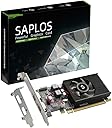
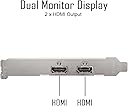
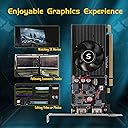
The SAPLOS Radeon HD 6570 is a low-profile, energy-efficient graphics card featuring 1GB GDDR3 memory, dual HDMI outputs, and 480 stream processors. Designed for small form factor PCs, it supports DirectX 11 and delivers smooth Full HD (1920x1080) visuals with minimal power consumption (60W). Ideal for professionals seeking a budget-friendly upgrade to enhance office productivity, video editing, and everyday computing.


| ASIN | B0B12FY9SF |
| Antenna Location | Office |
| Best Sellers Rank | #304 in Computer Graphics Cards |
| Brand | SAPLOS |
| Compatible Devices | Desktop |
| Customer Reviews | 4.0 out of 5 stars 232 Reviews |
| Display Maximum Resolution | 1920 x 1080 pixels |
| Display Resolution Maximum | 1920x1080 pixels |
| GPU Clock Speed | 650 megahertz |
| Graphics Card Interface | PCI-Express x16 |
| Graphics Card Ram | 1 |
| Graphics Coprocessor | AMD Radeon HD 6570 |
| Graphics Description | AMD Radeon HD 6570 |
| Graphics Processor Manufacturer | AMD |
| Graphics Ram Size | 1 |
| Graphics Ram Type | GDDR3 |
| Item Dimensions L x W | 6.3"L x 4.7"W |
| Item Weight | 4.48 ounces |
| Manufacturer | SAPLOS |
| Memory Clock Speed | 667 MHz |
| Mfr Part Number | Radeon HD 6570 |
| Model Name | GDDR3 64-bit |
| Model Number | Radeon HD 6570 |
| Number of Fans | 1 |
| Video Output Interface | HDMI |
| Video Processor | AMD |
I**R
Helping me extend my use of my old Lenovo M93p small form factor computer
This review is for the 1G model of this video card. My computer is old. It's a Lenovo M93p small form factor machine that I bought reconditioned several years ago, and when the Lenovo web site detected it, it told me that the warranty started in 2014, so the machine is now 9 years old. I'm frugal, though, and I try to squeeze all the use I can out of my things. I recently bought a new 29-inch wide monitor. The monitor only has HDMI inputs. My computer only had display port and VGA outputs for video. So for a short time, I had to use a VGA to HDMI adapter to use this new monitor. Using the adapter, my alternatives for my screen were a resolution that filled the entire monitor but with distortion, or a resolution that did not distort but left black "sidebars." I needed a new video card with an HDMI port to make good use of my new monitor. I looked online at video cards and saw that for most of them, a power supply of 300 watts or more is recommended. I found that the power supply for my computer only puts out 240 watts, and apparently replacement power supplies for my small form factor computer are not available, or would be too complicated for me to install. There are people on YouTube who have used higher powered video cards in the very same model of computer that I have, with the original power supply, to turn them into gaming machines, believe it or not, but I didn't need anything like that. I am grateful to those YouTubers, though, because that's how I learned to open my computer case to install the video card. The hardest part of the installation of this card was replacing the long metal slot-cover that is for full size computer towers with the included slot cover that is for small form factor cases. It's tricky to get the tiny screws back into place. You will need a very small Philips screwdriver. I'm happy to report that this new video card with its HDMI outputs allows me to use all the "real estate" of my 29-inch wide monitor and at the proper resolution. Windows 10 recognized it right away. I do notice a little bit of fan noise. Overall, though, I'm satisfied.
D**.
Worked in a Dell Optiplex 3020
Was easy to install, and it worked in an older Dell Optiplex 3020 which had built in vga and displayport outputs but the displayport stopped working. Worked at first startup after installing but on a basic Windows driver at a lower resolution. Very easy to go onto the website and update the driver, and within a few minutes it was working with all the features and at optimal resolution.
A**T
Works great in my really old shop computer
This video card works great in older computers. I am using this card in a computer that runs my CNC laser cutter with one monitor displaying G-Code and the other with the machine interface. As another reviewer stated do not waste your time trying to use the drivers on the included CD, just go to the vendor website and download the latest.
R**Y
Not a good choice for a budget card to upgrade an older PC
I bought this to enhance an older PC to use for general tasks. I had a cheap card but thought this would be a better option for dual monitors. Turns out this card was not a good option. Colors were all messed up when the mouse is moving around and had a hard time rendering anything beyond the desktop colors. Put my old card back in, one HDMI port and one DVI with DVI to HDMI adaptor, and it works 100% better and it was a cheap replacement 5 years ago. Best to pass on this card for something else.
J**A
sGreat reasonably priced card, but not for gamers.
This is a reasonably priced video card for someone wanting two monitors on one computer. It works beautifully with adequate speed for my needs using Photoshop and other various programs for my PC. However, this card does not have the "horsepower" to give high end smooth graphics for gamers.
T**S
Fantastic HDMI Dual Monitor Graphics Card
Easy to install. Easy to update software. Quiet. Fast. Purchased for an older Dell 5050 Optiplex that dearly needed a graphics card update. Very happy with performance and value. A+!
V**A
It works well but...OUTDATED.
I needed to replace my graphic card on my XPS desktop with something new but apparently this graphic card isn't a latest edition. It's drivers have no support anymore and are from 2016. It's still newer than the graphic card it had and it works better but it's not what I expected. I also had a hard time trying to download the driver, the driver disc did not work for me either, for whatever reason. For that reason I give this graphic card 3 stars.
A**A
Disable UEFI Secure Boot in BIOS
I installed this in my low profile Dell Inspiron and the machine wouldn't boot. I suspected a power supply problem but needed to make sure it wasn't the BIOS since I've seen these issues before. After about 10 minutes of research I found to disable UEFI Secure Boot. It booted after the change was saved. Also, I have Ubuntu Linux. I didn't even need to install drivers. It worked right out of the box which almost never happens. I'm so happy I didn't waste time introducing new hardware. The machine has a tiny footprint. It fit fine where other graphic cards didn't fit. Glad I gave it a try
J**P
Nice, simple card
Basic card that does the job. Can't comment on gaming performance, but based on the price point, this is not a high end card. That said, it does the job and is well built. Instructions for installation are useless and the CD that is included is useless. That said, popped the card into my windows 11 machine. but could only get one port working. After trying to find drivers, I figured I would reboot and Windows recognised the card and it is performing well.
A**L
Simple but affective Graphics Card
Amazing graphics card for a simple PC. Works very well with most games and has a decent framerate. I use this graphics card for my Dell OptiPlex 790 and it runs most of my applications and games pretty smoothly without any lag. Would highly recommend if you are going with a simple but affective graphics card.
M**L
Works Great in XP !!!!
Works great in Windows XP. Get drivers from AMI site (legacy download section) I am driving two high resolution monitors seamlessly. There were two items that I did not like: The drivers added a sound feed to the monitor (my system is set up for daw so I did not want this)...Just disabled in Device Manager The SFF faceplate for the card did not fit in my Lenovo SFF computer. I had to cut metal.
A**R
Only one HDMI and noisy fan
Lose my time trying to make it work and noisy fan.
F**P
HDMI CARD
Very difficult driver install. Was hoping it would be plug and play. Not ideal for novice computer people.
Trustpilot
1 month ago
4 days ago