Buy anything from 5,000+ international stores. One checkout price. No surprise fees. Join 2M+ shoppers on Desertcart.
Desertcart purchases this item on your behalf and handles shipping, customs, and support to Senegal.
๐ Elevate Your Projects with Precision!
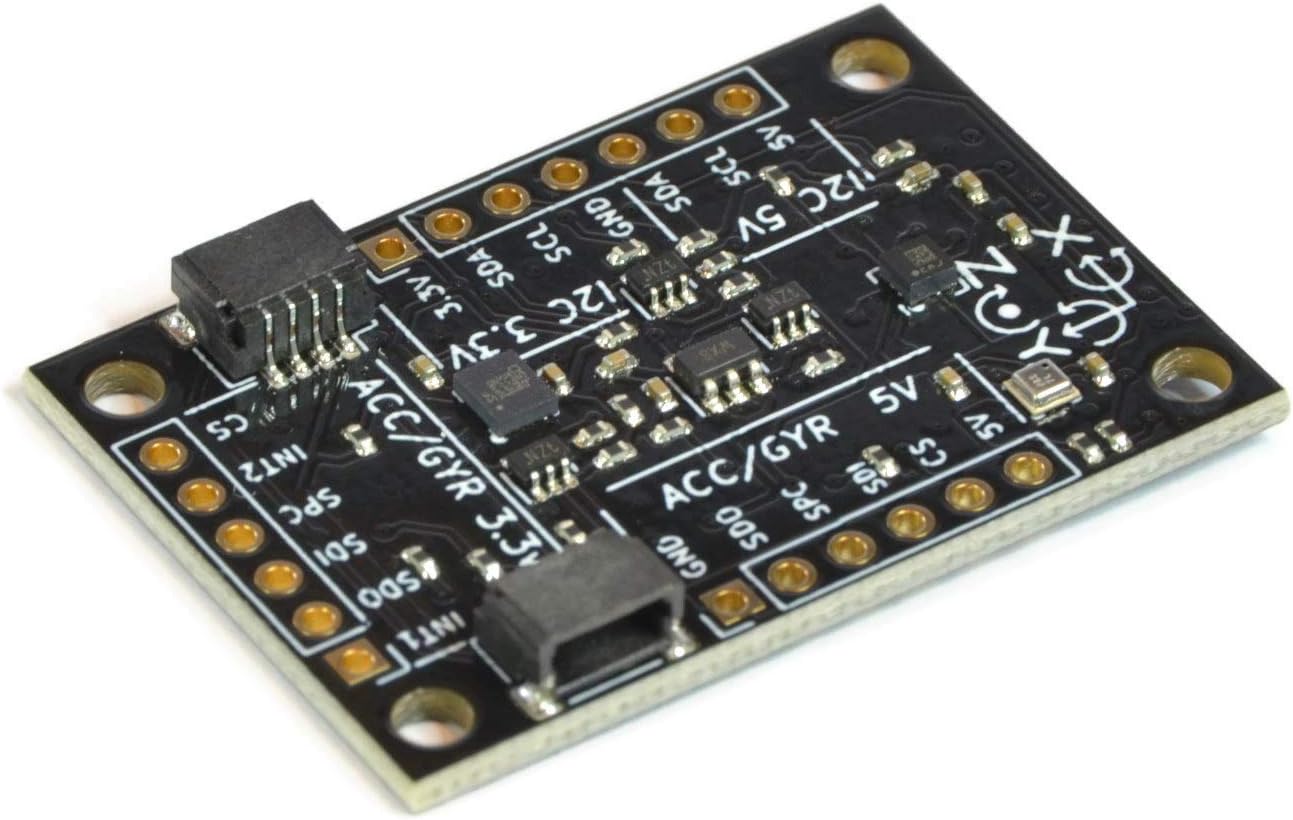
The BerryIMUv3-10DOF is a versatile sensor module that combines an accelerometer, gyroscope, magnetometer, and barometric sensor, making it the perfect companion for your Raspberry Pi, Arduino, and other microcontroller projects. With an impressive output rate of 6.7KHz, it provides real-time data for tilt and tap detection, ensuring your applications are both interactive and responsive.
| ASIN | B072MN8ZRC |
| Best Sellers Rank | #120,731 in Industrial & Scientific ( See Top 100 in Industrial & Scientific ) #34 in Acceleration Sensors |
| Brand | Ozzmaker |
| Brand Name | Ozzmaker |
| Customer Reviews | 4.6 out of 5 stars 35 Reviews |
| Item Weight | 0.06 Pounds |
| Manufacturer | Ozzmaker |
| Material | Copper |
| Material Type | Copper |
| Maximum Supply Voltage | 5 Volts |
| Measurement Accuracy | ยฑ0.6 m |
| Model | BerryIMUv3 |
| Mounting Type | Surface Mount |
| Output Type | Digital |
| Part Number | BIMULSM9DS0 |
| Response Time | 6664 cycles |
| Smart Home Compatibility | Not Smart Home Compatible |
| Specific Uses For Product | electronics, robotics, prototyping, altitude measurement |
| Style | Modern |
| Style Name | Modern |
| UPC | 704438461319 |
| Unit Count | 1.0 Count |
| Upper Temperature Rating | 85 Degrees Celsius |
K**.
This is the one to buy for your Pi
This is the IMU to buy if you want to use it on a Raspberry Pi. "Berry" provides a "Standard Package" of software on their website and once unpacked just simply works. I bought someone else's IMU first but they didn't provide any Python code examples, so I had to return it. Then I looked into this IMU and there was lots of python code. Simply type "unzip BerryIMU-master" into the command line editor on your Pi computer and it installs. I picked the code with the compass, ran the code and it started printing out data. I then modified the code to operate inside Tkinter to give me X, Y, and compass so I can point and level my telescope quickly in the future. In the photo you see my telescope "CNC" drive suitcase. I put the Berry IMU in a surface mount telephone box (seen on the floor) and I use a telephone cable to attach it to another phone box, which is attached to the Pi's SCL and SDA pins. Be sure to get their short cable to attach the IMU to the Pi terminals for writing and testing your code. I cut the cable wires so I could attach the IMU to the telephone box.
N**.
Cool features for pi projects
Did what i needed for an electronic compass with a raspberry pi. There's a lot of potential in this little pcb. I will probably do more using the other sensors available. I really only scratched the surface of the potential.
A**M
Works as described!
Everything worked as expected. I canโt wait to get this fully integrated in future projects!
J**H
Best way to get started with an IMU and I2C
I bought two of these because they're the easiest I've found to interface with a raspberry pi pico using micropython. So happy I found it. I'm still trying to perfect the z axis compass correction. Can't wait to try it with a new pico 2!
M**L
Works great!
This IMU is fast, my loop times while retrieving and processing data on an Arduino mega are below 10ms. Support for 3.3 and 5v and many other features make this IMU very versatile. The code/libraries are good once you get them up and running. The acc/gyro filter was a nice touch. My only complaint is that their was no code/library included for the barometer/temperature sensor, however this was fairly simple to find online and set up. Overall would recommend!
A**.
Awesome IMU!
Shout out to Ozzmaker for all the hard work in making this board! Very straight forward compared to other IMU's.
Trustpilot
1 month ago
3 weeks ago