


๐จ๏ธ Print smarter, save bigger โ the future of home printing is cartridge-free!
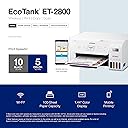
The Epson EcoTank ET-2800 is a wireless, cartridge-free all-in-one printer designed for home and small office use. Featuring high-capacity refillable ink tanks, it delivers up to 7,500 color pages per refill, drastically cutting ink costs and waste. With Micro Piezo Heat-Free technology, it produces sharp text and vibrant color prints. The built-in flatbed scanner and copier, combined with wireless and USB connectivity, make it a versatile, reliable solution backed by a 2-year warranty.







| ASIN | B096N8CNBZ |
| Additional Printer Functions | Copy, Scan |
| B&W Pages per Minute | 10.0 |
| Best Sellers Rank | #27,662 in Computers ( See Top 100 in Computers ) #70 in Ink Cartridge Printers |
| Brand | Epson |
| Built-In Media | Ink Bottles |
| Color | White |
| Color Depth | 16700000 colors |
| Color Pages per Minute | 5 ppm |
| Colour | White |
| Compatible Cartridge | [Epson EcoTank cartridges] |
| Compatible Devices | Laptops |
| Connectivity technology | wired, wireless |
| Control Method | Voice |
| Controller Type | Push Button |
| Customer Reviews | 4.2 out of 5 stars 9,450 Reviews |
| Display Type | LCD |
| Dual-sided printing | No |
| Duplex | Automatic |
| EU Spare Part Availability Duration | 1 Years |
| Hardware Interface | USB |
| Initial Page Print Time | 10 Seconds |
| Ink Color | Cyan, Magenta, Yellow, Black |
| Is Electric | Yes |
| Item Dimensions D x W x H | 37.6D x 57.9W x 25.4H centimeters |
| Item Type Name | Inkjet Printer |
| Item Weight | 11.56 Pounds |
| Manufacturer | Epson |
| Maximum Copies Per Run | 99 |
| Maximum Copy Resolution Black and White | 5760 x 1440 dpi |
| Maximum Copy Resolution Color | 5760 x 1440 dpi |
| Maximum Copy Speed Black and White | 10 ppm |
| Maximum Media Size | A4 |
| Maximum Print Resolution Black and White | 5760 x 1440 |
| Maximum Sheet Capacity | 100 |
| Maximum print Resolution Color | 5760 x 1440 |
| Model Name | ET-2800 White |
| Model Number | C11CJ66202 |
| Model Series | 2800 |
| Model name | ET-2800 White |
| Number of Ethernet Ports | 1 |
| Number of Licenses | 1 |
| Number of Trays | 1 |
| Other Special Features of the Product | [INF] Cartridge Free Supertank |
| Output sheet capacity | 250.0 |
| Paper Size | 8.5 x 14 inches |
| Power Consumption | 12 Watts |
| Print media | Envelopes, Glossy photo paper, Paper (plain) |
| Printer Connectivity Type | wired, wireless |
| Printer Output Type | Color |
| Printer Type | Inkjet |
| Printing technology | Inkjet |
| Processor Count | 1 |
| Resolution | 2400 x 1200 |
| Scanner Type | Flatbed |
| Series Number | 2800 |
| Special features | [INF] Cartridge Free Supertank |
| Specific Uses For Product | [INF1] Home office, small business, family printing, photo printing |
| Total Usb Ports | 1 |
| UPC | 010343957893 |
| Unit Count | 1 Count |
| Warranty Type | limited warranty |
E**N
Power cable
I need some one from amazon to contact me, as I need only to replace the power cable itโs not as per UAE standard Please advice what to do as I canโt return all the printer
A**E
Amazing
Good ๐ค
E**O
Buena impresora
Ya tiene tiempo que la tengo, y estรก sรบper bien para el precio
A**S
Epson EcoTank TE2800: A Step Up
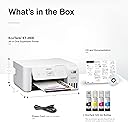
The Epson EcoTank ET2800 was delivered two days ago. I was worried about the setup because my last printer (a Canon) was quite difficult and complicated. I had no problems with this Epson EcoTank. It came with printed step by step instructions which led to the Epson app.. When the app wasn't quite enough, the printed instructions were. Even better, the connection to WiFi was pretty smooth. It failed the first time but I restarted the router and that solved the problem. The connection to my laptop was a little more complex because of the firmware upgrade from Epson. I ended up solving it by downloading the firmware directly from the printer. The best part? The ink. The easiest ink filling I ever saw. Much easier than cartridges. The bottles of ink snap directly into the color coded tank well and automatically fills the tank. The bottles could empty a bit more completely but not a big deal. The test prints were successful. The paper loading is quite easy and the feed is smooth. When I printed out a bank statement from the bank app, the result was crisp, full color and very clear. Printing speed could be faster but, for my purposes, quite acceptable. So far, so goid.
P**L
Epson EcoTank ET-2800
My old Cannon printer was almost 20 years old and I finally decided to replace it. I decided on this one and have now had it for 3 1/2 weeks. I don't generally print much but I have put it through its paces some and am very happy with it. Installation was easy and flawless. I have it hooked up via USB cable to my desktop, so I can't comment on printing from a phone or tablet. I love the ink tank system. Because I don't print much I have a weekly reminder in my calendar to print a page. I found a test graphic that uses a little color from each of the tanks and black. So far so good. There are also some great guides online on how to clear badly blocked nozzles. Printing text is fast and the quality is IMO excellent. Text with light graphics on plain white paper is also fast and the quality is also great. I bought some 8 1/2" x 11" Epson glossy photo paper and some Epson ultra premium glossy to test out for pictures, just to see what this puppy could do. The reviews lead me to believe this printer performed poorly at this. I downloaded some HD, good quality photo files and picked a few of those to try out. I printed the same picture on ordinary white paper and the two photo quality papers using Paint Shop Pro 2023. I have been an amateur photographer for decades so I know what photo quality prints look like. The prints with the photo quality paper are way better than I expected. Yes, the shadows and highlights loose some detail, but it is working with three colors and one black. And if I look at the resolution and sharpness through a magnifier I can see the difference compared to photo printer output, but again, this is not a photo quality printer. I can also not comment about color fidelity because my monitor is not currently color calibrated (hoping to fix this soon), but IMO it's not bad. In the end this is a printer that is really inexpensive to run and can print pictures that look really good unless you judge it against a better, way more expensive system. The only negatives I've found so far is in the software. I am running an old computer on Windows 10 Pro and this could be one issue here. I have had a few print files get stuck in the print queue and could not delete them. This seems to be an issue for some people because I found a couple of workarounds online for it and one is working well for me. Another one is the print driver seems a make choosing my photo print quality options a little finicky. Regular printing is easy. I'm pretty computer savvy so I don't usually have problems like this, but it is getting better as I learn the driver's quirks so maybe it's just me. I have not needed to contact Epson about anything yet to solve a problem and I'm still getting better at working with it. I just wanted to mention these to round out my experience with this machine so far. All in all, I'm loving the ET-2800. If this changes I'll come back with an update.
B**E
GET THE DAMN PRINTER WORTH IT!!!!!!
To start, I brought this Espeon printer to replace my HP Inkjet 8010 series and THANK GOD I bought it! I cant stand how much money I lost alone from the ink for the HP Inkjet printer! HP is a complete scam. $50 every two weeks for a year replacing the colored ink ALONE! Not including Black ink LOL! The setup was horrible compared to the Espeon setup which took 10 Mins max! Extremely professional set up once you download the app! The amount of ink that comes with this printer is CRAZY GOOD! To replace all 4 inks is only $20! Ive printered around 30 stickers so far for the past first week that ive had it and the ink hasn't even moved!!!!!!! Easy at printing, quick, no issues, and the App is amazing! Sticker paper works beautifully, Glossy and Holo! Also amazing at printing regular documents!
Trustpilot
2 days ago
2 weeks ago