Buy anything from 5,000+ international stores. One checkout price. No surprise fees. Join 2M+ shoppers on Desertcart.
Desertcart purchases this item on your behalf and handles shipping, customs, and support to Senegal.
🔗 Connect to Success with Style!
The TOTU 12 in 1 Surface Pro Docking Station is a versatile USB C hub designed for seamless compatibility with a range of devices, including Surface laptops and MacBooks. It features 4K HDMI output, a gigabit Ethernet port, and rapid data transfer capabilities, all housed in a sleek, portable design.


| ASIN | B09T9GZBD2 |
| Best Sellers Rank | #250,632 in Electronics ( See Top 100 in Electronics ) #2,046 in Laptop Docking Stations |
| Brand | TOTU |
| Color | Grey |
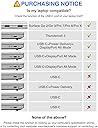
| Compatible Devices | MacBook Air, Microsoft Surface Go, Microsoft Surface Go 2, Microsoft Surface Pro 7 |
| Customer Reviews | 4.3 out of 5 stars 65 Reviews |
| Hardware Interface | HDMI , USB 2.0 Type A, USB 3.0 Type A, USB 3.0 Type C, VGA |
| Item Weight | 102 Grams |
| Manufacturer | TOTU |
| Mfr Part Number | TT-HB029 |
| Model Number | TT-HB029 |
| Number of Ports | 12 |
| Total Number of HDMI Ports | 1 |
| Total USB Ports | 4 |
| Total Usb Ports | 4 |
| UPC | 196852877621 |
| Warranty Description | 1 year product warranty |
| Wattage | 92 |
P**I
Works great
It is grwat
N**2
Great Product
Great Product, Great Value for the money spent!!
J**T
Plug and Pray
I bought this for the HDMI port and Ethernet ports. Ethernet worked fine. The HDMI was very inconsistent. Every time I plug it in, a warning that the display might be limited. Limited is fine as I was just using it for presentations, not watching movies. All I wanted it to do was display my screen on a projector. Some times it did, some times it did not. I could get it to work by disconnecting, re-connecting, rebooting, etc. I tried rebooting with it plugged in and without, waiting to plug it in after rebooting, waiting to use it after plugging it in, etc. Sometimes it just worked and other times it did not. I could never predict when it would work nor find any consistent method of getting it to work other than just doing all of that multiple times until it finally did. The last straw was when it took me 20 minutes of fiddling before it finally worked, after my presentation was scheduled to start. Two stars not one because if I got it to work, it continued to work until I was finished with a presentation. But I almost wish it didn't because then I would not have put up with it so long before buying something more basic and cheaper that had none of these issues.
T**E
Great USB hub!
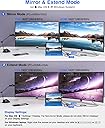
I have a few of USB hubs for my MacBook pro and laptops. this is one of the best, in term of material and quality. Just a reminder, for dual monitors, since it only has one HDMI port, you will need to connect the secondary monitor via VGA port. It works very well and totally worth the money.
K**I
Excellent Product.. Works as expected.
An excellent product, easy to carry, plug in and out. My Lenovo Yoga has limited USB Ports, after connecting this HUB, its multiple ports allow you to connect multiple devices and all works perfectly fine. It's cable length is also long, and it's 90 degree right angle connector is a Plus. Highly recommended at an affordable price.
U**R
Premium Product for Premium USB-C devices
I'm glad I bought this USB-C hub. The experience was high end when unboxing the product. Everything is shipped nicely and it even comes with a soft carrying pouch. The ports all work well and feel secure. The long cable is a nice extra as all the plugs can be moved away from your computer to create a clean, organized workspace. The VGA and ethernet ports are a bonus.
T**L
It gets hot
Just got it and plugged in a monitor (via VGA), TV (HDMI), portable monitor (USB), and a mouse (USB). It works well but very hot quickly (10 min). Do not know if it will last long. Keep in a ventilated area.
D**E
Excellent all-in-one USB C Docking Station
A nice addition for my Lenovo Legion Y540. I toss this in my backpack, then I can connect my wireless mouse and USB keyboard in a jiffy when I use my laptop in the classroom. At home, I plug into my own docking station setup to connect with my 4k monitor, external USB keyboard, mouse and external hard drives. I don't have need for many of the other ports, but they all tested fine when I used them at my home. I added pictures of the size of the connection cable (that is NOT detachable from the main unit) so there is a good reach from the USB C port. The only very small, tiny issue I have is that the included soft carrying case does not totally enclose the USB C cable, so part of the cable sticks out of the enclosing loop. Other than that, a nice addition.
N**F
Excellent
Excellent, works with Microsoft surface well.
J**N
No válido para un portatil medio
La salida USB-C no soporta más de 50 W aprox de potencia y no alcalza los 55 W mínimos que requiere un portatil medio como un Dell sencillo, asi que no arranca.
M**G
Great dock for my Dell Precision 3550, Fedora Linux 38
On the whole I'm satisfied with this, it works fine out of the box with Fedora 38 I'm using a HDMI 1920x1080 @60hz external screen, mouse, keyboard via usb-2-PS/2 adapter, and analog headset via a little usb dongle-style sound "card". The latter i was hoping to use with the built-in audio adapter but the quality is _horrible_! Playback is ok but the microphone is so noisy as to be unusable, so 1 mark off a 5-star review. If you need the microphone input look elsewhere, otherwise, recommended!
T**U
An Excellent Docking Station
A quality docking station with a good blend of ports. The Totu TT-HB029 is fully compatible with all full-function USB-C laptops (if you're not sure what "full-function" means, do your research before buying this product), as well as Thunderbolt 3 / Thunderbolt 4 laptops. The docking station expands 1 laptop port into 12 simultaneously usable ports. These are: 2 x USB-A 3.0 (5 Gbps); 2 x USB-A 2.0 (480 Mbps); 1 x USB-C 3.0 (5 Gbps); 1 x USB-C 100W PD (Power Delivery only - not for data transfer); 1 x HDMI (4K@30Hz); 1 x VGA (1080p@60Hz); 1 x SD Card Reader; 1 x TF Card Reader; 1 x RJ45 Gigabit Ethernet (1 Gbps); 1 x 3.5 mm Audio Jack. Most bases covered there - a useful array of ports. The docking station's aluminium shell is strong yet lightweight. Aluminium is a practical choice of material for the job - its conductive properties allow it to effectively dissipate heat, preventing internal components from overheating and suffering damage as a result.
J**S
Not good with Jabra USB headsets that I use
At first, I thought this was the perfect USB-C hub. It has all the interfaces I am going ever to need. I wouldn't ever need a VGA tho; I would rather have a display port. But hey, it has the HDMI, so it is okay. The 90degree connector is perfect; it also makes things tighter. I always think of those mini USB hubs as a temporary device, something to use during travels or days that I go to the office. For my set-up at home, I bought an actual beefy USB-C docking station with its power supply. They are expensive but last forever. In my opinion, those small ones are not made for prolonged use. They, including this device, get extremely hot, and no electronic device that is so hot without any heat dissipation will last for long. But the part that disappointed me and led to my three stars is the price and my poor experience with some USB devices. £80 is way too much for an unknown brand with a not super well made. And the main problem that ruined my experience was while USB headsets from Jabra, which I use a lot at work. For some reason, they keep failing; the sound keeps failing like there is some kind of lack of bandwidth or something. That was on a Macbook Pro 2020. I tried different USB ports, but nothing. So I returned to my old USB hub with fewer ports, but it works fine with USB headsets.
Trustpilot
1 month ago
3 weeks ago