Desertcart purchases this item on your behalf and handles shipping, customs, and support to Senegal.
⚡ Stay Ahead of Your PC’s Pulse with WOWNOVA’s Sleek Temp Monitor!
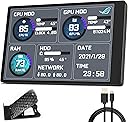
The WOWNOVA English Version Computer Temp Monitor is a compact 3.5-inch IPS display that connects via a single USB-C cable to provide real-time, accurate monitoring of CPU, GPU, RAM, and HDD usage. Featuring customizable ARGB themes, wide viewing angles, and energy-saving functions, it serves as a stylish and reliable second screen for professionals and enthusiasts who demand precise system insights without clutter.


| Adaptive Sync | FreeSync |
| Additional Features | Flicker-Free |
| Asin | B09WJGP8BN |
| Aspect Ratio | 16:9 |
| Best Sellers Rank | #109,589 in Electronics (See Top 100 in Electronics) #2,485 in Computer Monitors |
| Brand | WOWNOVA |
| Brightness | 250 candela_per_square_meter |
| Color | black |
| Compatible Devices | [INF] Based on connectivity technologies, potential compatible devices could include systems with USB, HDMI, or USB-C ports such as laptops, desktops, and gaming consoles. |
| Connectivity Technology | USB |
| Contrast Ratio | 1000:1 |
| Customer Reviews | 3.6 3.6 out of 5 stars (562) 3.6 out of 5 stars |
| Display Resolution Maximum | The maximum resolution is not explicitly stated, but based on the native resolution of '320 x 480', a possible maximum resolution could be '1920 x 1080' as this is a common maximum resolution for many displays. |
| Display Technology | LCD |
| Display Type | LCD |
| Hardware Connectivity | USB Type C |
| Included Components | USB-C cable |
| Item Dimensions D X W X H | 0.31"D x 3.35"W x 2.17"H |
| Item Weight | 0.11 kg |
| Manufacturer | WOWNOVA |
| Model Name | 68ee4603-bd1c-44b6-96a6-2f49d3d5aace |
| Model Number | 68ee4603-bd1c-44b6-96a6-2f49d3d5aace |
| Mounting Type | Panel Mount |
| Native Resolution | 320 x 480 |
| Picture Quality Enhancement Technology | adaptive sync |
| Processor Count | 1 |
| Resolution | 320 x 480 |
| Screen Finish | Glossy |
| Screen Size | 3.5 inches |
| Specific Uses For Product | Business |
| Total Usb 2 0 Ports | 1 |
| Total Usb 3 0 Ports | 1 |
| Total Usb Ports | 1 |
| Viewing Angle | 170 degrees |
| Voltage | 5 volts_of_direct_current |
User
Smaller than I expected (despite reading the description), but I still like it a lot
I should have measured out the screen dimensions on a piece of paper before ordering, but I was too impatient. I was looking for something a little bigger, but I'm satisfied with what I received. As you can see from the photo, the screen isn't that much bigger than an air pods case. Two reasons I was hoping for something bigger - 1 is that I don't usually wear my glasses at the computer, so I need to bend down a bit to see it clearly; 2 - it's too lightweight to sit on my desktop - its cable is pretty short and due to its stiffness, it limits the options where I can place this. I'm sure I could secure the cable to the desktop but it's not worth the effort to me.Despite the size (which is my fault), I'm really impressed with the brightness and clarity of the monitor. The device was relatively easy to set up, and it has a surprisingly large variety of display faces and information options. Overall, for the money spent I'm happy with my purchase.
User
Software doesn't work
provided Website doesn't let me download software in order to make this work, and screen will not work with any other software.i was unable to find a workaround. terribly disappointed.
User
App is a little weird but it’s great
I figured that 35$ wasn’t too bad for a cool little display. I use it to monitor my temps and percentages of my GPU and pc.The app is a little weird with how to load the various backgrounds and the themes but once i watched a YouTube video, it worked great! Now I’m not smart enough to completely customize it but it works well as it is.I had an open void in my case and i used the WOWNOVA to cover it while adding some functional flair. For the price you really can’t beat it at all. I’ve seen the touch screen ones that are 5x the price but this does everything you need.It does take a USBC cable that has to run out of the external portion of your case. So i was able to tuck the wire and go out to the rear by my power supply. You can’t see it. I kinda assumed it would go into a USB slot on the motherboard.Its temps aren’t completely accurate but the % line up with my task manager. Overall a great cheap and fun product
User
I freakin love it
For the price, I honestly wasn't expecting much but I thought it would be a neat touch for my new build. The software is a bit confusing at first but there's PLENTY of yt videos explaining how to use this device properly. I reckon the readings would be slightly off (since again it's pretty cheap cost wise) but compared side by side with Open Hardware Moniter, the readings are spot on! The background is also customizable to your own pictures but I was happy with this stock MSI screen that came with the software file since my MOBO is MSI (It comes with roughly 20 different background choices already)10/10 happy with this purchase, and I would suggest it to anyone who want's a neat addition to their custom builds.For common bought pc's, there are many alternate ways and programs that are free that will show you your computer's stats on screen whenever you'd want if need be.To all the negative reviews saying it's too hard to figure out, you're just not trying hard enough to understand. There are many yt videos explaining how to set this up. There are no sort of just "plug and play" devices like this without software setup.
User
Software issues
The software sucks, downloaded the driver but the app to control it is hiding somewhere on my pc and i cant find it to change the screen. The actual unit it metal and sturdy
User
Worked for 2 days
I bought this secondary display to monitor my temps, installation was a breeze I have a 2.5 display as well which is the one mounted on the inside of my case at the top works perfect. Wanted this one because I liked the small size of it, worked the first 2 days and it wanted to move it in a better spot for me to see originally was mounted on the front of my case but decided to put on the side near the bottom as seen in the picture and once I turned my pc on all I got was black screen with a green line going down the middle I know I didn’t drop it or touch the screen when I changed positions of where I wanted to mount it, tried uninstalling and reinstalling software along with plugging in the usb cable into either of the slots and still same result. Can’t believe 2 days is all I got out of this would send back for refund or exchange but to much of a hassle for me atleast and will just use aida64 and a ips monitor instead
User
Exactly what I wanted to display system info
Perfect, exactly what I was looking for. Software is fine, not sure why some have issues with it. Lots of interface choices, I prefer Gradient. Stand that came with it seems pretty useless, but not an issue. I only wish I could adjust some settings, like date/time format. As long as it holds up, I love the little thing.
User
Awesome little screen for monitoring system stats
I render on a second machine at my desk, and share a monitor between primary machine and my render machine. Render machine is on and rendering for hours/days at a time, and instead of switching my monitor input to check on it, or getting another monitor for the render machine, I started using this little guy. This way I can see the CPU usage and temperatures quickly and it takes up such little space on my desk.Plugs into USB, run the software that you download and pretty soon you have a little display showing you the system stats from CPU usage to temps, GPU usage and temps, RAM usage, HDD, etc. The display is customizable to display many different system stats, and you can set fonts, color, size, position, background, etc. The editing process could be a little more elegant, but it's fine, and there are plent of templates included to appeal to a wide range of uses and tastes. Highyl recommend. You do NOT need to have HWInfo or 3rd party app running like with other screens of this type, the included software does it all for you.
User
Winzig aber mächtig gewaltig
Ich bin erstaunt über die Leistungsfähigkeit dieses kleinen Teils, das nur über USB. Ich habe es schon einige Zeit in Betrieb und es hat auch schon einen Gehäuseumzug überstanden. Was wirklich nervig ist, ist die Konfiguration des Programms. Ich habe nach einiger Suche im Internet ein Thema gefunden, mit dem ich zufrieden bin. Die amerikanische Datumsanzeige lässt sich nicht ändern aber wenn nan es weiß. Bisher hat es bei jedem Neustart zuverlässig mitgemacht und ich werde das auch weiterhin so lassen.
User
Works as described
Works as described
User
3 and a half inches
Small but dose the job, make sure you download the English version of the program, if it don’t work download it again.
Trustpilot
3 weeks ago
1 week ago