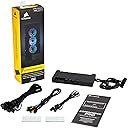
🌟 Command your PC’s cool and color like a pro with Corsair iCUE Commander PRO!
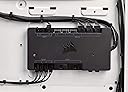
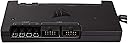
The Corsair iCUE Commander PRO is a compact, all-in-one fan speed and RGB lighting controller that supports up to 6 fans, 8 RGB LED strips, and 4 temperature sensors. It integrates seamlessly with Corsair’s iCUE software, enabling precise thermal management and stunning synchronized lighting effects, while offering dual USB 2.0 headers for expanded connectivity and cleaner cable management.




| ASIN | B0725HP1J2 |
| Best Sellers Rank | #80,185 in Home Audio Accessories |
| Brand | Corsair |
| Brand Name | Corsair |
| Color | Black |
| Customer Reviews | 4.6 out of 5 stars 11,148 Reviews |
| Display Type | LED |
| Global Trade Identification Number | 00843591094344 |
| Included Components | Commander PRO^RGB LED hub cables(2)^Thermal sensors(4)^Fan extension cables(4)^Mounting tape(2)^Installation guide |
| Item Dimensions L x W x H | 5.24"L x 2.72"W x 0.61"H |
| Item Type Name | CORSAIR Commander PRO, Digital Fan and RGB Lighting Controller, 2 year warranty |
| Item Weight | 10.58 Ounces |
| Manufacturer | Corsair |
| Material | Aluminum |
| Material Type | Aluminum |
| Model | CL-9011110-WW |
| Part Number | CL-9011110-WW |
| Product Dimensions | 5.24"L x 2.72"W x 0.61"H |
| Smart Home Compatibility | Not Smart Home Compatible |
| UPC | 843591094344 |
| Unit Count | 1.0 Count |
| Voltage | 13.2 Volts |
| Warranty Description | 2 years |
M**S
Necessary for Extensive Fan Control
I have the SP 120 high performance fans, which are great fans overall. Out of the box, though, their speed cannot be controlled at all - unless you hook them up to your motherboard, and leave them at the mercy of your motherboard's proprietary software. I tried that and trust me, it's not ideal. Also, I hated having to reach into my case for the included RGB controller. Sure, I could've mounted that outside of my case, but making that work with my case would be nothing short of a pain. Thankfully, the Commander Pro solves both of these problems. It allowed me to quiet my PC down SIGNIFICANTLY - I use the "quiet" fan speed mode, and I can barely hear the fans at all. Even when gaming, the PC is very quiet, contrary to before I had the controller, when the fans were running loud all the time - even at idle. This is a must-have if you care about acoustics, or for that matter, not wasting electricity, especially given the power-hungry nature of gaming PCs. And I'm not noticing any increase in temps of my CPU or graphics card. I love being able to adjust the RGB settings right within the Link software. I saw several complaints about this software, but it works flawlessly from my experience - and it looks way nicer than software for my other hardware. Now, the only reason I gave this product 5 stars is because it works so well. I think it's absolutely ridiculous, as you'll see in my photo, there are two boxes - the RGB controller, then the Commander Pro. Why couldn't the functionality be combined into one box? This is really messy on Corsair's end, and makes for a ton of extra cables. There's gotta be some way this could be made more streamlined. Also, $60 for this? That seems a bit high. But in the end, despite these issues, the Commander Pro has worked wonders for my PC, quieting it down by a huge margin. If you have Corsair SP or HP fans, I recommend getting this.
M**G
Install and Review from an average person
Thought I would go ahead and write a review/install walkthrough since no one wrote one on here! Take about an hour if you don’t care for cable management. INSTALL: Setup fans, follow instructions and label each fan, they must be plugged into the commander pro IN ORDER. If you don’t then all the fans will malfunction. You need to plug the commander pro into your power supply with the computer completely off via SATA, then plug the USB 2.0 into the MB. Don’t plug the commander pro into a dedicated fan pin on the MB because the commander pro will not work. After setting up your CORSAIR RGB fans into the “lighting node pro” that comes with the 3 pack (in order). This must also be plugged into the power supply via SATA. Then plug the Power cords into the command pro ports labeled “fan” (in order). Instead of using the lighting controller, use a 3 pin female adapter to connect the lighting node pro into the commander pro port labeled “LED 1”. Make sure to do this same technique if adding more than 3 fans, and keep the fans plugged into the commander pro in order. I’m attaching a diagram I found on corsairs website. Hopefully this helps! REVIEW: The commander pro is an amazing product! I is an essential to anyone who wants to control their fan speed and colors with iCue. I did previously use Corsair fans without the commander pro, and honestly you’re only getting half of usage out of them because settings are limited without the commander pro. It’s still possible to use fans without it but honestly being able to control everything from the iCue app is worth it, so if you can’t get it right away save up. I would say this product is essential to anyone using Corsair fans and iCue. Disclaimer: I am just an average person that set this up.
B**N
Why the Commander Pro vs. some other solutions
When I decided to build my rig in a Corsair 1000D case, I got the commander pro that comes with that case. Didn't think too much about it at the time. I looked for other methods to extend the number of fan headers I had, and figured I'd just used the commander pro for RGB control. Turns out, I shouldn't have bothered with anything else BUT commander pro's. the build in usb connectors (2) on them, + fan headers, + RGB controls + iCUE software combined with Corsair mag lev RGB fans allows for both function and fantastic all in one package. The commander pro combines temperature probes into the 4 pin fan header / rgb control, with their iCUE software it allows for real time changes to fan profiles, along with the temperature inputs this means you can set your system for aggressive cooling, or silent running depending on your preferences. And the RGB control can be as fine down to a single component you want to do something different. There are also some lighting moods I've not seen anyone else doing (one of which - Rain - is my favorite), And you do NOT have to go through your bios to do any of it. No rebooting needed. As a part of a the Corsair system for fan control / temp / rgb - it's tops. So.. now i'm up to 4 of them that I own, and I still adore these controllers :)
T**T
Useful, but complicated
Recent PC builds have trended to more internal devices that need a USB header from your motherboard and this can quickly get out of hand. I just did a combination of a Corsair H80i AIO water loop for my CPU and an EKWB system for my GPUs. Each needs a USB header, my case had a controller needing a USB header, and then--oh yeah--I'm supposed to use those USB headers for actual USB. The Corsair iCue Commander Pro controller has been a huge help. It's also been a huge pain to figure out, but once I got it all put together and working, it's been everything I needed. I'm also using it to control the RGB on three iCue fans and even a daisy-chain of Corsair RGB lighting strips, just for fun. There's no easy-to-understand PDF of all these parts, so let me walk you through it: - The Commander Pro on its own plugs into a USB header on your motherboard and gives you two more USB headers to connect other devices. It uses iCUE software to control the way anything connected to it behaves. Even though Corsair's coolers (like the H80i v2) use a USB header *and* are iCUE compatible, they will NOT work when connected to the Commander Pro. You still have to have them directly connected to a USB header on your motherboard (per Corsair tech support). Trying to use the Commander Pro to control this Corsair product broke it and I had to get an RMA and replace the H80i v2. - The Commander Pro also has four sensors you can string through your case and monitor temperatures at various points. Corsair does not recommend putting them in hot spots--for example, it's okay to put one next to the CPU or GPU, but not to but them on the cooling surface like other sensors might be used. The intention is more that you'd check case temperatures at certain spots. If you just want fans and sensors, you can stop here. If you have RGB lighting, however... - The lighting controller doesn't actually work directly with Corsair iCUE RGB fans. I had to connect a Lighting Node Pro to the Commander (per Corsair tech support) in order to get my fans' RGB to show up and be configurable. I could use the lighting controller for lighting strips, just not the fans. Thankfully these tend to be sold with the fans, it was just very confusing that this redundancy was needed. - The terminology is confusing - while talking to tech support we had to keep straight "The Lighting Node", "the Commander Pro", and "The Lighting Node Pro" to talk about which part needed to be connected to which. - In the end, if you're going to use the Commander Pro, RGB fans, and lighting strips, you're going to be buying three separate packages and you'll have extra controllers you don't need. I'm glad the system works as well as it does, and I'm really impressed with how closely I can tweak every last little aspect of every fan and cooler in my case using the iCue software. I can make profiles specific to demanding programs or games and I can have it run in 'quiet' mode when I'm just doing everyday computing. This software is the best I've used and much better than Speedfan or ASUS GPUTweak. That said, Corsair should bundle these items correctly so people can buy the specific solution they need. They should provide documentation--there is no PDF and the website is just one page about how to plug the fans into the controller. For any other tasks, you need to go searching for that specific page, again and again. Last, it's disappointing that the Commander Pro broke my H80i v2. The documentation should tell you what Corsair products DO and DO NOT work with the Commander Pro. This is why I give it 3 stars for "easy to install" and "easy to use".
S**M
A bit pricey however works right out of the box
Gave this a 5 because it does exactly what it says it will do no bs'ing around period. It's a bit high on price "Your paying for the name", And it lives up to the quality of that name! Out of the box easy setup, Instructions are pretty simple and easy to follow. Screwing around and taking my time with wiring it only took 10 minutes to install and another 10 playing with the lighting FX You get plenty of extra wires including extenders for your case fans. You cannot mix fan types. either you use sp for all or hd versions or it will not work at least at the time i am posting this. "Correct me if i am wrong, however i looked this up in the corsair forum prior to purchasing" Everything can be controlled via the Icue software np.
C**L
Love this unit
Love this unit. Originally picked up the Lightning Node Pro for quite cheap and included a few RGB strips and the 2 connectors on the Node. Unfortunately, that required me to expand my headers as my Asus IX Hero only has 1 internal USB header which was being used by my H100i. I ordered the NCIX internal USB hub, but just had a lot of issues with fitting it in my case. (For note, it's fairly bulky, the DC power plug makes it another 3 inches longer than it's measurements, and it uses Molex for some reason which required me to dig out the appropriate cable from my modular set. This unit was ready to go with minutes of installation. It is a bit big but that's just due to the number of connections, it's about as thick as a standard SSD. It comes with several fan/RGB extensions (a welcome sight since the ones from the fan are woefully short). There's 2 RGB connections which worked great (can expand with a $10 hub from corsair to 6 additional) and a built in USB hub, which made my day and the primary reason I ordered (beyond the 6 fan connections). I wanted to be able to quickly control fan speed via profiles. I loved the older AISuite Asus software, but the newer version was just so slow to load and adjust on the fly. With the Pro Commander, I was able to seamlessly move everything over to it, and integrate it into my existing profiles which was awesome. It also had the side effect of not having to hear the case fans spin to 100% every time the computer boots up until the AISuite software loaded. I did for kicks test the thermal probes, and they seem to work well. However, it seems they're pretty close to what my internal M2 SSD reports and the case temperature that Link reported, so I just left them off to tidy up the case. Now if only they can come out with their new software which combines Link+CUE it would be perfect and I can die happy. This unit costs a bunch, but well worth it when it comes to micromanaging profiles, fans, LED's and monitoring. The only downside is it's fairly big, so if you mount it somewhere, you'll have to plan all your routing ahead of time, but I knew that going in, so can't knock a star off for that.
J**S
It works great
I got this thing to control my 6 Corsair RGB fans and 4 Corsair RGB strips along with a corsair H150I RGB Pro XT 360mm water cooler. It works great. But recently my RGB in my case occasionally turns into RGB puke but then quickly back to the color i had it set to. So i think i got a defective unit but hey it happens. Sometimes you get unlucky and get a defective unit. I can just contact warranty support and they will help me out. Like they did last time for my front panel glass on my pc case being shattered on arrival. Corsair support is usually very helpful and fast for me. But it is still a very great RGB and fan controller for Corsair RGB fans. This corsair controller hub will ONLY work with Corsair fans. I would recommend buying this if you want one big hub instead of smaller ones controlling all your Corsair RGB and other things along with it. The corsair software is also great too. It works very great without any issues at all. The software is only taking less than 1GB of my storage drive too. I have never had any issues out of corsair's products or there special Corsair RGB software which works great.
N**N
Worked great until it didn't. (customer service has since made it right)
UPDATE: Customer service worked with me on getting an RMA replacement, and I bought a second one to accommodate more radiator fans (push/pull). So far so good. Loving being able to tie all my radiator fans to the liquid temperature sensor on my pump. Worked great for a few months, but all of a sudden it's stopped working. No power to lights at all, no communication with the 3 fans connected to it, and worst of all it's not reading temperature sensors. I have a problem right now with my liquid coolant getting too hot, and now I can't even monitor it so I can troubleshoot and fix the problem. I have tried the factory reset 5 times, but when reinstalling the firmware iCUE freezes at 99%, the lights come on in default rainbow for a couple seconds and the then cut back off, and only two temperature sensors pop back up and show absurdly inaccurate readings and pop on and put. The LED on the controller does not light up until I factory reset, then cuts completely back off after firmware update. Really don't want to pay another $80 for a replacement, but I've got all Corsair stuff, so I don't have much of a choice. Been several days and so far no peep from Corsair customer service about my RMA request.
S**M
just a bit expensive, but got all functions you ever need
Just if they have provide more extension cables that will be better, the 3 PIN Lighting cable both side is male header, so you could only extend to lighting node pro.
M**L
Fa quello che deve, e lo fa bene.
Ho acquistato questo prodotto data la necessità di poter controllare tramite software tutte le ventole del mio case, in modo da poter avere totale silenziosità nel normale utilizzo e allo stesso tempo poter aumentare gli RPM delle ventole durante sessioni di gioco o di alto carico della CPU. La qualità costruttiva è di primissimo livello, e nella confezione troviamo anche 4 sensori termici, utili per visualizzare la temperatura in punti precisi del nostro PC. Attenzione alle dimensioni, non è proprio piccolissimo e in base al vostro case potreste avere problemi di posizionalmento, anche se personalmente non ne ho avuto nessuno, l'ho attaccato facilmente sul retro con comodo accesso a tutti gli ingressi (CASE: NZXT Noctis 450). Non ho utilizzato le funzionalità di controllo LED del dispositivo perchè non ne ho necessità, ma ho collegato 4 ventole e 4 sensori termici, e funziona tutto a meraviglia. Il software permette di controllare indipendentemente tutte le ventole e di impostarle a valori fissi (fino allo 0% e spegnerle) o con delle curve personalizzate, e la cosa migliore è che le curve possono essere impostate per rispondere alla temperatura di QUALSIASI componente interno rilevato. Potete ad esempio impostare le ventole in base alla temperatura della GPU, dettaglio che potrebbe risultare utile a molti. Il software, Corsair LINK, funziona perfettamente, almeno per me. Lo trovo fatto benissimo e pieno di utili funzioni, come quella di creare vari profili personalizzati, che contengono impostazioni per LED e ventole, e poterli cambiare e selezionare comodamente con due click in qualsiasi momento tramite l'icona del programma presente nella taskbar. Ultima nota importante è la presenza di due porte USB 2.0, fondamentale per me visto che per collegare il dispositivo ho dovuto rimuovere il collegamento USB del dissipatore della CPU (Corsair H110i V2) che ho quindi potuto facilmente collegare al Commander stesso. Il prezzo è forse un po' alto (pagato 69€), ma è sicuramente utilissimo viste le sue particolari funzionalità, e non mi sento di togliere una stella per questo.
B**B
Je passe de NZXT à ça : Je revis !
Vraiment un excellent produit. Le logiciel est complet et permet des choses sympa si vous avez d'autres produits Corsair (moi j'ai le clavier). J'avais un ensemble NZXT, j'ai changé pour Corsair : Pas donné non-plus, mais c'est vraiment beaucoup plus qualitatif. En fait le seul défaut que je trouve à ce produit c'est qu'il manque un peu de documentation, même en cherchant, on peut tomber à côté d'infos utiles. Par exemple, j'avais pas eu l'info qu'il fallait forcément le "Fan Hub" pour y connecter vos ventilos Corsair, Hub qui se connecte ensuite via un seul câble (fourni avec le Commander) RGB entre le Hub et le Commander. Autre élément : Comme quasi toujours, le RGB est propriétaire, ça ne sera donc utilisable qu'avec des produits Corsair. Bon, leur écosystème est vraiment bien, donc ça passe, mais il faut le savoir. Venant du combo NZXT, voici ce que je remarque : - Déjà la connexion électrique est en SATA plutôt que Molex (ouf). - Mais la grosse différence se situe au niveau du logiciel. Vous utiliserez le logiciel ICUE qui permet d'unifier la gestion du RGB sur les produits Corsair. Le logiciel est très bien fait, pas besoin de CAM qui met 15 ans à se lancer et ne fonctionne pas sans internet (bon c'est rare, mais quand ça arrive c'est relou). - Les contrôles de ventilos sont beaucoup plus précis que chez NZXT et les réglages plus flexibles. - Le Commander Pro inclus deux prises USB internes, comme un hub USB, ce qui permet de tout connecter à l'arrière, et surtout d'avoir assez d'USB 2 pour ceux qui auraient une carte mère récente. J'apprécie énormément, ça fait vraiment de ce Commander une excellente base pour son build RGB/Fan controller. - Il ne se monte pas nativement sur une cage SSD 2.5 (dans mon Fractal Design Define S), dommage. Bon, j'ai plein de scratch double face, donc j'ai utilisé cette méthode pour le fixer, comme je le fais souvent, je recommande vivement. Niveau ventilation : - Vous pouvez faire un réglage personnalisé indépendant par ventilo, vous pouvez en créer autant que vous voulez. - Vous pouvez bien-sûr associer un preset à plusieurs ventilos (selectionnez le preset, puis cliquez sur les ventilos sur lesquels l'appliquer). - Le 0 RPM est supporté sans souci (par exemple, j'ai certains ventilos -le dessous du boitier et l'arrière- qui ne s'allument que si le GPU commence à chauffer). - J'ai branché les trois SilentWings de mon AIO via un adaptateur sur une seule entrée, et ça se passe très bien, la puissance est donc suffisante en sortie. - Le réglage a pour logique de se faire en RPM et non en % (sauf pour une valeur fixe), c'est un peu déroutant au début mais au final c'est vraiment super car ça permet d'unifier la vitesse des ventilos (chaque modèle est différent) et d'avoir un bruit plus homogène. Il faut du coup tester ses ventilos en mode % fixe (ou RPM fixe) pour avoir une idée des valeurs qui conviennent niveau bruit, et surtout pour connaître le RPM max de son ventilo. Le seul défaut de ça, c'est que l'échelle du graphe va de 0 à 5000 RPM, hjors, en mode silence on ne monte qu'à 1500 grand max, donc l'échelle est un peu imprécise verticalement car trop grande... J'aurais aimé qu'on puisse définir la valeur max souhaitée du coup. Mais on peut utiliser les flèches du clavier ou rentrer les valeurs à la main donc ça reste utilisable, c'est juste pas aussi pratique que tout le reste. - Le passage de 0 RPM à une vitesse quelconque est très smooth, le démarrage se fait en douceur, pas de bruit de turbine avant de retourner au calme comme chez NZXT, ici ça monte progressivement. - On peut descendre très très bas en RPM (dans les 400 tours sur mes ML140), mais bon, finalement je reste autour de 580 RPM en idle, un peu en dessosu du seul d'audibilité pour moi car j'ai peur que descendre trop bas oblige le contrôleur à "pulser" (fort/pas fort) pour tenir la cadence, et donc que ça détériore les ventilos sur la durée. - Bien sûr, chaque preset peut se caler sur la température CPU ou GPU. Niveau lumière : C'est moins mon délire, mais en somme il y a tout ce qu'on peut espérer d'un produit RGB. - Les LED strips ont l'inconvénient d'avoir une "dead zone" un poil importante entre les strips, on peut se débrouiller pour les tordre un peu pour les rapprocher, mais ça peut être un peu compliqué pour rester clean. Bon, une fois installé, si comme moi vous faites en sorte qu'on aie pas de visu direct sur les strips, le résultat est tout à fait convainquant, mais c'est le seul point ou NZXT était un peu plus pratique. - Les LED strips sont bien-sûr aimantés et autocollants et l'aimantation est parfaite dans mon Fractal Design Define S (pour ma part j'ai vraiment pas envie de les coller, donc tant mieux) - Il faudra jouer quelques minutes pour comprendre le fonctionnement - Une fois compris, c'est très simple - On peut caler les ventilos sur la température - Perso j'ai choisi un rouge fixe sur les strips (j'ai horreur des trucs qui bougent) et les ventilos passent de bleu à rouge en fonction de la température. Je suis très satisfait de l'effet. En conclusion, je suis tâtillon sur ce genre de produits, en particulier la partie ventillation, et le Commander Pro fait vraiment bien le job et m'apporte entière satisfaction. Vous pouvez y aller les yeux fermés une fois bien renseignés sur le produit, c'est certainement ce que vous trouverez de mieux sur le marché.
J**E
Excelente producto si tienes una Pc con varios productos Corsair
Funciona de maravilla si tienes una Pc con ecosistema Corsair. Es excelente para controlar la iluminación, personalizar fan-curves y monitores temperaturas, muy fácil de instalar, excelente servicio al cliente por parte del fabricante y calidad muy buena, en mi opinión si vale cada centavo. El único detalle que se podría poner es que a veces hay problemas con ICUE mas no es un problema de hardware y usualmente lo arreglan a la brevedad con actualizaciones.
J**L
El Commander Pro no es tan caro, el problema está en los accesorios y módulos
Mucha gente critica el precio, pero el problema del mismo estaría en que utiliza un conector propietario para las luces RGB y, por lo tanto, estás obligado a utilizar las tiras led de la marca, que esas si son caras de narices. Lo que está claro es que quien critica este controlador como tal NPI de comprar otro tipo de controladores. Empezaré valorando lo que a mí me interesaba: Un controlador de rpm para ventilador PWM. Tiene seis puertos para ventilador de 2, 3 y/o 4(PWM) pines, con salida de 1A por cada uno y 4,5A combinados, siendo recomendable no pasar de los dos ventiladores por enchufe. Todo controlado por software (Corsair Link), programable individualmente desde Windows para hacer el ajuste de velocidad asociado a cualquier sonda térmica que posea el resto del hardware instalado de una manera bastante precisa y pudiendo utilizar diferentes perfiles. Teniendo en cuenta que Corsair cuida muy bien este software y es bastante intuitivo, ESTO ya lo sitúa entre los mejores controladores de ventilador sacados al mercado, por no decir el mejor. Ahora a esos +-60€, que para cualquiera con sentido común ya estarían justificados, habría que añadir las cuatro sondas térmicas que se pueden instalar y vienen incluidas, otro "extra" que para equipos de gama media o ciertas aplicaciones viene muy bien. También trae dos conectores RGB propietarios que admite cuatro conexiones en línea y control+sincronización también por software. Otro añadido que tiene peso para los amantes de las "lucecitas". Luego están los dos puertos USB 2.0 internos que añade, pero que no recomendaría para otra cosa que no fueran aparatos o Hub Corsair (yo tengo ahí mi Corsair HX850i, lo que me da también control sobre ella). Yo veo más que justificado el precio. -------------------------------------------------------------------------------------------------------------- Por supuesto tiene partes negativas: Una sería lo mencionado de las tiras led, que usan conexiones propietarias de Corsair, por lo que te ves obligado a comprar un pack de la propia marca que, para el tipo de producto que es, tiene un precio totalmente desproporcionado. Y a pesar de las "alabanzas" a la calidad de las tiras RGB Corsair siempre puede existir la persona que no sea capaz de adaptar su idea estética a ellas y preferiría más variedad, como es mi caso. El tamaño del aparato es bastante grande a pesar de que lo anuncian como de perfil bajo. A mi no me entra donde estaba puesto el controlador genérico que traía mi actual torre, por lo que tuve que conformarme con una posición más "visible". También se echa en falta unos imanes para la fijación aparte de la cinta de doble cara, así no perdería la capacidad de ser removible fácilmente. Otro detalle que no vendría mal sería tener la posibilidad de atornillar el mismo de alguna forma, ya que por ejemplo mi torre permitiría hacer eso en diversos puntos donde me interesaría que estuviera situado. Aunque lo peor para mi es la escasa cantidad de líneas de ventilador que controla, aparte de que no existe aparato para ampliar las mismas excepto el RGB Fan Hub Controller que, como no, trae conexiones también propietarias y no las estándar para ventilador. Corsair si pensó en quienes quieren añadir más y más luces RGB al Pc, pero no en quien pretende una refrigeración avanzada con varios sistemas RL, necesitando de muchos controles de rpm para controlar todo el sistema y ventiladores de altas prestaciones que no fueran los de la marca. En teoría se pueden conectar dos en línea y el software lo soportaría, pero no tengo visto esto de manera práctica (si a alguno hacer comentarios vagos de que tienen este sistema) y si quejas al respecto de que no funciona. Puede que con mi próximo Pc termine intentando hacer esto y entonces lo probaré en la práctica. Por todo lo demás, es un gran aparato plenamente recomendable y de precio está muy bien. EDITO para añadir que tiene también compatibilidad con el Corsair iCue, que es una castaña de software totalmente orientado al RGB y no al control de ventiladores, pero al menos conserva la compatibilidad con Corsair Link, que había alcanzado la excelencia en ese aspecto. También que se pueden conectar en línea para añadir más ventiladores de ser necesario. Dicho de otra forma, que el sistema te reconoce dos Corsair Commander Pro conectados en el mismo Pc. Me parece una solución radical, pero está bien que Corsair piense en ese posible escenario y se tenga esta opción.
Trustpilot
1 week ago
5 days ago