Desertcart purchases this item on your behalf and handles shipping, customs, and support to Senegal.
๐ Power your professional edge with confidence and style!
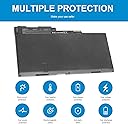
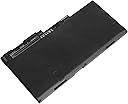
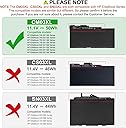
The TREE.NB CM03XL is a premium 6-cell lithium-ion battery designed specifically for HP EliteBook and ZBook series laptops. Delivering 44Wh capacity at 11.1V, it supports up to 500 recharge cycles, ensuring durable and reliable performance. Compatible with multiple HP part numbers, it offers a perfect fit and easy installation backed by 24/7 customer support, making it the smart choice for professionals seeking dependable mobile power.


| ASIN | B01MS3DVS9 |
| Amperage | 3 A |
| Antenna Location | Adults |
| Battery Capacity | 4400 milliamp_hours |
| Battery Cell Composition | Lithium Ion |
| Battery Cell Type | Lithium Ion |
| Battery Weight | 239 g |
| Best Sellers Rank | #3,023 in Computers & Accessories ( See Top 100 in Computers & Accessories ) #113 in Laptop Batteries |
| Brand | TREE.NB |
| Compatible Phone Models | 717376-001, CM03050XL-PL, E7U24UT, E7U24AA, CM03XL, CM03, 716724-421 Fits HP Elitebook 740 G2, 745 G2, 750 G2, 755 G2, 850 G2, 755 G2. HP EliteBook Folio 9480m. HP Zbook 14. HP Elitebook 850 G1, 1040 G1 |
| Customer Reviews | 4.3 out of 5 stars 1,504 Reviews |
| Included Components | Battery |
| Item Dimensions | 12.01 x 5 x 0.39 inches |
| Manufacturer | Dongguan Lewe Electronics Co., Ltd |
| Model Name | cm03,cm03xl |
| Model Number | CM03XL |
| Number of Batteries | 6 Lithium Ion batteries required. (included) |
| Recommended Uses For Product | Adults |
| Reusability | Rechargeable |
| UPC | 732330368313 |
| Unit Count | 1 Count |
| Voltage | 11.1 volts_of_alternating_current |
| Warranty Description | 1 year |
D**Y
Great replacement part.
Great fit eaay install and works great. Saved me $130 DIY.
A**R
Perfect
Replacement battery fit perfect into my Acer A515-54 laptop. It charged up really fast. Easy to install.
J**D
Bigger than original but supposedly last longer.
Bigger than original but supposedly last longer. Sticks out rear of computer about an inch but other than that is working great. We donโt move laptop much so it doesnโt really matter to me. I wish I had known I could buy a new battery sooner. The original has been bad for many years. I will purchase again when this one stops charging. Cheap. We get about 4 hrs from a full battery
J**N
Received wrong battery, at first
I had to have the original battery replaced. The one I initially received had an adapter part on the contacts of the battery itself. It was not removable and stuck out slightly from the battery. It caused the battery to not fit on the laptop contacts. It might have been a battery for another Asus laptop model but it did not fit mine which is F555L. Otherwise, the battery seemed identical. If you look at the images at the top of the purchase page you will see the contacts are flush against the battery. Keep that in mind if you order this battery and want to avoid confusion or frustration when trying to install the battery. When i received the correct battery it fit perfectly with ease. I contacted Amazon for a replacement and was immediately approved for one. The replacement arrived just a few days later and it was the correct battery. I'm not sure if this was a mistake by Amazon since they fulfilled the order or the seller itself. I'm taking off 1 star for the hassle of having to send back the original and waiting for the replacement. Though, the replacement was received in a very short time. If you're willing to look for a YouTube video on how to replace the battery then it's very easy to do yourself. Otherwise if not for receiving the wrong battery initially everything seems to be running fine so far. The price I paid was more than reasonable.
M**O
Battery and tools. Great
Received the battery with the tools I need to replace it. It was great
D**R
Easy install! and The Right fit! have Patience
Needed to replace my battery in my Asus X555LA. The shop wanted to charge 69.00 and my son isn't home from college yet. With the old battery starting to expand inside the laptop and the top of keyboard starting to rise I had to make a move early. So I called Asus up. Being that this Laptop has no more warranty, Asus wanted to charge a $69.00 diagnostic fee. They wouldn't even give me the part number. Very sad after you purchase something from a company and just because the warranty has run out they want to charge you these outrageous prices to work on, but most of all not willing to give me batteries party number. Sad!!! I knew this wouldn't be a hard job, but wanted to double-check on battery out number. This is where Amazon customers helped with various questions I had from former purchasers of this battery. Thank God good people still exist that are willing to help others. Once confirmed that this battery was an exact replacement just made by a different company, I had went on and purchased this battery through Amazon. The battery was delivered fast, and the Amazon driver was very kind and considerate and made sure I was the one to recieve such purchase. This battery was very inexpensive as well compared to others. Hopefully this pays off for me in the long run. Back to the battery. Install was easy, except for the ribbon cables for keyboard and mouse. One thing to remember. Once you remove the keyboard cover, Do Not, if you can, pull up the keyboard cover all the way. Just pull it up easy just enough to get old battery out and new battery back in. Once you flip laptop over and you remove the screws, and then you flip laptop back over to remove the keyboard, the battery for this particular laptop will be in the front left corner, it's really easy to get it out and get a new one in. That's why I said I was able to do this without dealing with the ribbon cables that much. see Tutorial on YouTube!! You'll know why I didn't want to remove them. It's not hard, it's just tedious to get them back in place. I went and purchased the same size screwdriver tip that fit the battery screws which are 3, and it's just about 4 inches tall. Tall enough to replace screws without having to deal with ribbon cables for mouse and keyboard. Again see tutorial on YouTube. You will see why I purchased a shorter screwdriver, although the battery comes with the screwdrivers. So far battery is charging and will update how well it holds charge later. Other than that, battery fits for X555LA Install was easy if you have steady hands and able to deal with the ribbon cables then disconnect them but they are an SOB to reinstall back. I have big hands so it was a little difficult for me I just found the easier way by not having to disconnect them. When I received the battery all I had to do was put battery in, put the three screws back in the same spot. Snap back in keyboard. Turn over laptop, close and make sure everything is snapped back into place before you screw all the screws in the bottom. Please make sure you make a diagram as you're unscrewing each screw, stick it in like a piece of paper and just make a little diagram of the bottom of the computer because some screws are longer than the others. Again I will update how this battery works later thank you. Battery I received would not charge. Amazon sent another out and that one did work. Remember to always unplug laptop from computer before working on anything. Once new battery is installed, turn computer on and let battery run down to 2%. This will take some time so just let something like an internet radio station play. Please do not fool with battery while charging. Double check screws that are put in the right place and do not tight down hard, just snug is all. Once battery is at 2% then plug laptop up and leave it be for about 24 hours. Constantly check for any unusual odors. Battery may be leaking and if so, stop immediately and unplug laptop from wall. Wear gloves and safety glasses and throw laptop away. better to be safe than sorry. Remember before you start any project like this wear safety glasses and gloves. Remember to work in a well lighted area. Remember to unplug Laptop from computer before removing and installing anything hardware like a battery. If battery hasn't charged in 24 hours then the battery is most likely bad. And finally communicate with Amazon on any issues if exchanges are needed, Update: AC Doctor Inc truly is a stand up company. I had my battery fail after 10 months or so and they replaced it with a new one. These batteries are great because they come with a warranty. No questions asked! Update: Reduced review to 1 star. second battery from is company will not last past 88%. I tried to get answers. All they said is they refunded my money and replaced the other one under warranty. That's all fine and great but if these batteries aren't able to hold a charge hen they are useless. 88% and laptop screen shuts off. This battery last only 20 minutes unplugged from 100%-88% and then screen shuts off. Totally unacceptable. No wonder they warranty them for so long. STAY AWAY FROM THIS BATTERY. I have spent hours upon hours of trying to get answers from manufacturer. All they say is we refunded you and replaced battery. Again if they can't last past 20 minutes unplugged why bother. Please use another SELLER!!!!
R**H
Lasts a very long time
Way better than the OEM version for this laptop. Unless you are watching a DVD movie it should last close to 3+ hours on a charge. The motor to turn disks can suck up a lot of juice.. Be very meticulous about following the instructions for conditioning the battery. Afterward, it lasts longer on a charge and should have a long lifetime as well. Of course the original battery the 1545 came with survived over a dozen years, most of it doing presentations. The main issue is that the laptops it's designed for are mostly obsolete. FYI- you can install a Widows 10 upgrade on the Inspiron, but it will slow down the system unless you have 8GB of RAM.
W**N
It does the job for a bit
This is my second attempt with this battery. Its pros are that it is easy to install and fits well. The previous purchase did not last very long, less than one year. It actually swelled a bit in the compartment and didn't quite charge all the way. I am giving it another try with this one because batteries for this laptop are hard to find.
R**W
Price performance
Excellent quality and performed well
C**R
Great battery
Overall its good, i needed two of them so i can have one act as a spare while i have my laptop in the field or when i travel. It fits perfectly, and way cheaper then getting one from hp directly Two things though, first the lock switches are a bit tricky but they do lock in place when the battery is installed, and second thing the battery shows that its charged at 99%? I hope its a error from the computer and not the actual battery, I will be testing it using a volt meter to be on the safe side.
K**I
Awesome thank you it works good
Recommend this battery to anyone With Asus X555QA Laptop works well easy to install 5 out 5 stars
R**I
Power
Good enough to keep on going
A**R
A good battery.
The battery works well. I would recommend.
Trustpilot
1 month ago
1 month ago