Desertcart purchases this item on your behalf and handles shipping, customs, and support to Senegal.
🖨️ Print smarter, faster, and connected—because your work deserves the best.
The HP LaserJet Tank MFP 2606sdw is a versatile monochrome laser printer offering print, copy, and scan functions with fast 22 ppm output. Featuring a 40-sheet automatic document feeder, dual-band Wi-Fi, Ethernet, USB 2.0, and Bluetooth LE connectivity, it supports seamless wireless and wired workflows. With a large 250-sheet input tray, auto duplex printing, and a robust 25,000-page duty cycle, it’s ideal for home offices and small businesses seeking reliable, high-volume performance backed by a 1-year warranty.


| ASIN | B09T3SK8M9 |
| Additional Printer Functions | All In One |
| B&W Pages per Minute | 22 ppm |
| Best Sellers Rank | #18,791 in Computers & Accessories ( See Top 100 in Computers & Accessories ) #39 in Laser Printers |
| Box Contents | LaserJet Tank Imaging Drum,Power Cord,Setup Guide,Reference Guide,Regulatory/Support Flyers,CD) |
| Brand | HP |
| Brand Name | HP |
| Colour | White Gray |
| Compatible Devices | Smartphones |
| Connectivity Technology | Bluetooth, Ethernet, USB, Wi-Fi |
| Control Method | App |
| Controller Type | iOS |
| Country of Origin | Vietnam |
| Customer Reviews | 4.0 out of 5 stars 542 Reviews |
| Dual-sided printing | Yes |
| Duplex | auto |
| Hardware Interface | Ethernet |
| Importer Contact Information | HP India Sales Private Limited, No. 24, Kothari Arena, Hosur Main Road, Adugodi, Bangalore, Karnataka, India, 560030 |
| Ink Color | black |
| Item Dimensions D x W x H | 34.5D x 41.8W x 31.1H Centimeters |
| Item Type Name | Laser Printer |
| Item Weight | 8 Kilograms |
| Manufacturer | Canon Vietnam Co., Ltd. Que Vo factory,Lot B1 Que Vo Industrial Park,Que Vo District, Van Duong Ward, Bac Ninh City, Bac Ninh Provinance, Vietnam VN1, HP |
| Manufacturer Contact Information | Canon Vietnam Co., Ltd. Que Vo factory,Lot B1 Que Vo Industrial Park,Que Vo District, Van Duong Ward, Bac Ninh City, Bac Ninh Provinance, Vietnam VN1 |
| Max PrintSpeed BlackWhite | 600 |
| Maximum Copy Resolution Black and White | 600 × 600 dpi |
| Maximum Copy Speed Black and White | 22 ppm |
| Maximum Media Size | 8.5 x 11 inch |
| Maximum Sheet Capacity | 250 |
| Model Name | HP LaserJet Tank MFP 2606sdw Printer |
| Model Number | 381U2A |
| Model Series | LaserJet Tank |
| Network Connectivity Technology | Bluetooth, Ethernet, USB, Wi-Fi |
| Number Of Trays | 1 |
| Other Special Features of the Product | Auto-Duplex |
| Output sheet capacity | 100 |
| Packer Contact Information | Canon Vietnam Co., Ltd. Que Vo factory,Lot B1 Que Vo Industrial Park,Que Vo District, Van Duong Ward, Bac Ninh City, Bac Ninh Provinance, Vietnam VN1 |
| Paper Size | 11x17 inches |
| Printer Output Type | Monochrome |
| Printer Type | Laser |
| Printing Media Type | Glossy photo paper, Paper (plain) |
| Printing Technology | Laser |
| Resolution | 600 |
| Scanner Type | Flatbed |
| Special Feature | Auto-Duplex |
| Total USB Ports | 1 |
| UPC | 196068152918 |
| Unit Count | 1.0 Count |
| Warranty Description | 1 Year |
| Warranty Type | Limited |
A**R
Good modern functionality, but price is steep
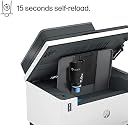
Having used 2 HP printers at **home** over the last 20+ years, we wanted to look for a newer printer as the current printer was giving trouble related to the paper feeder despite having it serviced for this problem once. Our requirements are fairly simple: * Multi-function printer (MFP = Print, Scan, Copy): non-negotiable * NO color printing required * LaserJet quality prints / photocopies...no messy colored inks to deal with * Wireless preferred since multiple laptops / mobile devices can use the printer without the need to be physically connected to the printer * Duplex printing preferred * HP product preferred (perhaps would have considered Canon, if HP didn't provide a product that provides these features With these requirements, I found out that there were a couple of **HP** printers that fit the above requirements, except that one was a traditional LaserJet MFP, and the other was the newer one under the product **label** of LaserJet Tank. Though the price difference on Amazon.in was a good deal more by Rs. 5K plus for the Tank version, I went with this product, that is, HP MFP LaserJet Tank 2606sdw printer. The single reason I chose the MFP 2606sdw was the high cost of an HP original ink cartridges for the other printer. The MFP 2606sdw promises a 15 second reload of ink toner at a fraction of the cost of the toner cartridge. (I hope it stays true to the promise). This also comes with a **FREE** installation service offer which, of course, we didn't need. There are plenty of YouTube videos to get one started. Some other features that this printer offers: * Automatic Duplex side printing * ID Scan, and ID Photocopy (front and back side) of an ID (e.g., driver's license, PAN card) on 2 halves of a single page * Auto Document Feeder for photocopying / scanning a collection of papers (only single side at a time; invert and feed for the even side pages) * Supports connection via Ethernet cable (e.g., connected to a WiFi router's LAN connections), or USB (With the provided USB cable) to a computer's USB port Let me state this first: the printer works most beautifully out of the box (if you know how to make it work, that is). I will give it the best ratings, except for the price point. Meanwhile, there are some reviews on Amazon.in (and perhaps other websites) that mention that HP makes it feel that you MUST use the HP SmartApp (available for Android (from the Play Store), and Windows (from the Microsoft Store). In particular, there are reservations that the HP SmartApp requires creation of an HP Cloud account to use functionalities like Scanning to use HP Cloud (I wonder why). We are not interested in the details whether it uses HP Cloud or not; all we want is that we MUST be able to use print and scan functionalities using a standard Windows laptop (Windows 11 in all our laptops). We haven't tried it on Linux yet, but should work as per my experience. I will update this review as necessary. Since my interest was to use the printer over WiFi, I had to use the HP SmartApp (used the Android app) to connect the printer to the local WiFi network (home network, in my case). Note that this is the only time you need to use the HP SmartApp; no other options exist if you want to setup the printer to connect over a WiFi network. After that, I had to search Google to figure out how to operate the printer and scanner functionality without using the HP SmartApp. Also, there is not a single place I could find where all the device's functionalities are mentioned in detail (you know, popularly known to oldies as a "user manual"). Maybe I didn't search enough. I will publish these details in a blog, to which I cannot link here, but provide hints enough to find it via a web search. All in all, this is an undersold product in India. This has to be publicized much more, in my opinion. And, a thorough single place Documentation for the "oldies" please. Update (18th Dec 2024): Subsequent to the original review above, I have checked the connectivity from both macOS (I tested on macOS 15 Sequoia on an M1 silicon) as well as Kubuntu Linux 24.04 (requires "hplib" package). For macOS, there is no need for any additional drivers as the printer supports Air Print / Air Print Scanner. On both operating systems, the printer was flawlessly and automatically detected without any manual steps.
V**L
HP LaserJet Tank MFP 2606sdw
The HP LaserJet Tank MFP 2606sdw is a great all-in-one black-and-white printer designed for home and small office use. It stands out mainly for its low running cost, thanks to its refillable toner tank system, which allows you to print thousands of pages at a very low cost per page. It comes pre-filled with enough toner to print up to 5,000 pages, and refills are quick, clean, and affordable. The print quality is excellent for text documents, making it ideal for reports, assignments, invoices, and office use. This printer also supports automatic two-sided printing (duplex) and has a 40-page automatic document feeder (ADF), which makes scanning and copying multiple pages easier. It prints quite fast when connected via USB or Ethernet, although Wi-Fi printing may be slightly slower. It also supports mobile printing using the HP Smart app, Apple AirPrint, and other options, which adds to the convenience. However, the scanner and ADF are average, and it does not support double-sided scanning automatically—you have to manually flip the pages Overall, the HP LaserJet Tank MFP 2606sdw is a cost-effective and reliable choice for users who mostly need high-volume black-and-white printing, occasional scanning and copying, and want to save on toner costs. It’s best suited for home offices, students, teachers, and small businesses.
C**U
V v v bad always paper jam
It is good but don't buy this printer I have been using this printer for 3 y and now 8 am writing this review because In this printer paper will jam always and we can't remove the paper by our self we shall take to store only in 3y I have taken 4 times so please please don't bye this v v v bad
E**T
Good Printer for Light Use, Not for Heavy Work
I am using the HP MFP 2606sdw and overall it is a good printer for normal home or small office use. Print quality is decent and performance is stable for daily work. However, this printer is not recommended for heavy or bulk printing/scanning. The ADF works fine when there are only a few pages, but it is not suitable for large quantities of documents. Also, the ADF supports only single-side scanning, not double-side, which can be a limitation for some users. In short, it’s a good value-for-money printer for light usage, but if your work involves heavy scanning or duplex ADF, you should consider a higher-end model.
Y**D
HP LaserJet Tank MFP 2606sdw
The HP LaserJet Tank MFP 2606sdw is a great all-in-one black-and-white printer designed for home and small office use. It stands out mainly for its low running cost, thanks to its refillable toner tank system, which allows you to print thousands of pages at a very low cost per page. It comes pre-filled with enough toner to print up to 5,000 pages, and refills are quick, clean, and affordable. The print quality is excellent for text documents, making it ideal for reports, assignments, invoices, and office use. This printer also supports automatic two-sided printing (duplex) and has a 40-page automatic document feeder (ADF), which makes scanning and copying multiple pages easier. It prints quite fast when connected via USB or Ethernet, although Wi-Fi printing may be slightly slower. It also supports mobile printing using the HP Smart app, Apple AirPrint, and other options, which adds to the convenience. However, the scanner and ADF are average, and it does not support double-sided scanning automatically—you have to manually flip the pages Overall, the HP LaserJet Tank MFP 2606sdw is a cost-effective and reliable choice for users who mostly need high-volume black-and-white printing, occasional scanning and copying, and want to save on toner costs. It’s best suited for home offices, students, teachers, and small businesses.
J**G
Best printer I’ve used for my work – super value for money!
I’ve been using the HP LaserJet Tank MFP 2606sd for a few weeks now, and I’m really impressed. Setup was super easy, and I could connect it to Wi-Fi and start printing within minutes. The HP Smart app made everything even simpler. What I love the most is the toner tank system – no more running around for cartridges! It came with enough toner to print up to 5,000 pages, which is a huge plus for me since I print regularly. Refilling the toner is also very clean and mess-free. The print quality is great – sharp and clear every time. I also use the scanner and copier features a lot, and they work smoothly. Duplex printing (both sides automatically) and the automatic document feeder (ADF) save me a lot of time. It’s compact and fits nicely on my desk, yet it feels sturdy and well-built. It’s definitely a smart buy for anyone who prints a lot and wants something that lasts.
S**R
Value for money
Easy setup, works fine.
P**A
Late Printing
Now a days all HP Printers taking long time in spoiling while printing back to back task. Mainly this model. Some time print works only after restarting pc/laptop. I tried different computers to check these issue where occured. Task also not able to cancel from print Queue. No solution in online also. Better to think before purchase of this model.
Trustpilot
3 weeks ago
3 weeks ago