Description
🎯 Precision meets space — Own your desk, own the game.
- CLEAN READY - Machine washable at 30-40°C—keep your workspace fresh and your performance sharp.
- STAY GROUNDED - Durable rubber base locks your pad in place—even on glass or slick desks—no slip, no slide.
- MASTER EVERY MOVE - Finely woven fabric ensures pixel-perfect mouse control for gamers and pros alike.
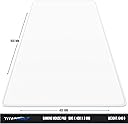
- SPACE TO DOMINATE - Massive 900 x 400 mm surface gives you the freedom to execute swift, sweeping motions without limits.
- BUILT FOR THE LONG HAUL - Premium craftsmanship designed to withstand intense daily gaming or work sessions.
The TITANWOLF XXL Gaming Mouse Pad offers a massive 900 x 400 mm finely woven surface with optimal sliding resistance for enhanced precision and speed. Its 3 mm thickness balances comfort and control, while the rubber base ensures a stable, non-slip grip on any surface. Designed for gamers and professionals, it’s durable, washable, and built to elevate your mouse performance during intense sessions.