Desertcart purchases this item on your behalf and handles shipping, customs, and support to Senegal.
🚀 Upgrade your laptop to elite speed and power — don’t get left behind!
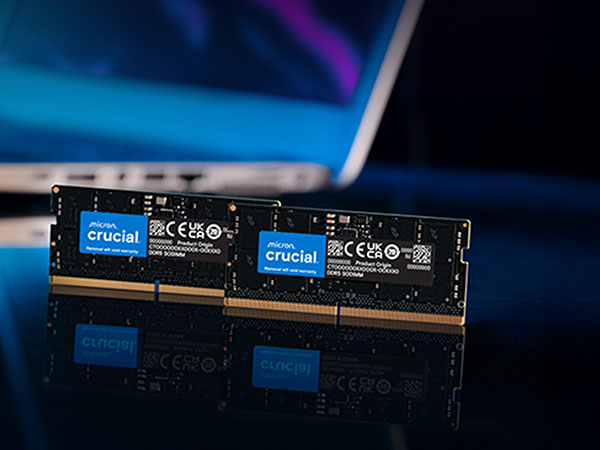
The Crucial 16GB DDR5 RAM module (CT16G48C40S5) delivers ultra-fast 4800MHz performance with a low 1.1V power draw, designed specifically for 12th Gen Intel Core and AMD Ryzen 7000 Series laptops. This SODIMM 262-pin memory enhances multitasking, gaming, and content creation with reliable Micron quality and support for Intel XMP 3.0 and AMD EXPO overclocking profiles.


| Additional Features | Lightweight |
| Asin | B09S2MN8JH |
| Best Sellers Rank | #36 in Computer Memory |
| Brand | Crucial |
| Column Address Strobe Latency | 40 |
| Compatible Devices | Laptop |
| Customer Reviews | 4.6 4.6 out of 5 stars (2,341) 4.6 out of 5 stars |
| Data Transfer Rate | 4800 MHz |
| Form Factor | SO-DIMM |
| Global Trade Identification Number | 00649528906526 |
| Item Type Name | DDR5 Laptop Memory |
| Item Weight | 8.21 g |
| Manufacturer | Crucial |
| Memory Form Factor | SODIMM |
| Memory Generation | DDR5 |
| Memory Speed | 4800 MHz |
| Mfr Part Number | CT16G48C40S5 |
| Model Name | CT16G56C46S5 |
| Model Number | CT16G48C40S5 |
| Number Of Items | 1 |
| Number Of Pins | 262 |
| Ram Memory Technology | DDR5 |
| Ram Size | 16 GB |
| Unit Count | 1 Count |
| Upc | 649528906526 |
| Voltage | 1.1 |
| Warranty Description | Limited Lifetime Warranty |
User
WORKED EXACTLY AS ADVERTISED!
EXCELLENT PRODUCT! Easy to install and worked like a champ!
User
Perfect for improving ram on a laptop.
Fast and easy installation for ram. It works right out the box. The upgraded speed and total ram is perfect for my rog laptop now that its 32gb it no longer lags for certain games and it improved overall speeds for it now being in dual channel. The price or availability is hard to find but at $70 its a great deal for current times but to be honest kind of expensive.
User
Works great on my ROG zephyrus G14 GA402
I recently reached the maximum capabilities of the 16GB of RAM that initially came with my Zephyrus G14 (2022) model. After researching my options, getting a 16GB stick to replace the existing 8GB stick in the laptop already would be the best option. Although I had considered a 32GB stick, reviews on YouTube proved that it might be slower than getting a 16GB RAM stick. The speed of 4800 MHz matches the current RAM in the laptop, and getting anything faster would not work because the laptop would still run at the speed of the slower RAM, which would be the RAM already soldered into the laptop (4800 MHz). This stick seemed to be the most cost-effective and overall option that met the needs of this laptop well. Installing the new RAM was not difficult at all and I am happy to report that it has worked very well for my workflow.
User
Works well
The card performs as expected. It has improved my system’s performance, and the price was reasonable.
User
La mejor inversión
La mejor compra que hice
User
The price is now absolutely ridiculous
Bought this RAM for my U Green DXP-2800 NAS on August 26, 2025, for $37.78. Easy to install, nice performance upgrade, the Crucial 16GB DDR5 RAM, 4800MHz CL40 is rock solid. I just came back to buy more for a second NAS. The price is now absolutely ridiculous. I'll make do with what I have until the price comes back down.
User
Great Product!
I've previously had a 16GB RAM stick on my Zephyrus M16 gaming laptop but I needed more to run the applications. This RAM stick helps me achieve 32GB of RAM and is still going strong despite the high temperatures and performance of the gaming laptop. The RAM stick is perfect for those who need an upgrade of RAM. Just make sure you have the same specs if you’re planning to add multiple sticks to your laptop. I’m using two different brands but with the same specs and it works great.
User
Compatible with Dell G15 5520
Crucial and Amazon stand behind the products, but buying quality RAM to put in a Dell will get you a support run around. Be confident in your ability to troubleshoot and resolve issues before saving the money, because Dell will not help you if there are any questions related to 3rd party RAM, even when it's top quality RAM and guaranteed compatible like Crucial is.I installed the Crucial RAM in my Dell G15 5520, and it APPEARED to be incapable of POST (power on self test) after the install, but it turns out, this laptop needs time after RAM installation to return to normal operation. Apparently, BEFORE THE DELL LOGO APPEARS, the system is doing some sort of internal testing or verification of the new RAM that requires you to be patient and let it finish.Amazon handled a replacement product when I thought the RAM was defective with no trouble whatsoever, and Crucial was willing to replace the RAM again later when I had taken too long to return to Amazon (30 days is reasonable, but there were delays in trying to install in the laptop again).DELL Service and Support gets 1 Star when handling 3rd party RAM, and thank goodness I happened upon the solution. I got fed up with the apparent lack of POST that I just angrily walked away from the computer, and when I came back, it was at a BIOS screen waiting for a confirmation key press due to hardware change.So to reiterate, if you put this into a DELL Laptop, be patient, and give it time to make sure it recognizes it. Don't be impatient like me and think it's failing to POST.
User
Bei tempi quando ram così te le tiravano dietro a due spiccioli
ram onesta come prestazioni e sempre affidabile. La utilizzo su mini pc integrato N150 a basso consumo che uso come micro server / NAS casalingo e non ha mai dato alcun problema. Prestazioni commisurate alla classe dell'oggetto, quando la comprai aveva un ottimo rapporto qualità prezzo, ma ora...
User
Easy Upgrade, Works Perfectly in Zephyrus G14
I bought this Crucial 16GB DDR5 RAM to replace one of the 8GB chips in my 2022 Zephyrus G14. Installation was simple and there were no issues at all—my system recognized it right away.Performance has been great so far. Everything runs smoothly, and I’ve noticed better responsiveness in daily tasks and heavier applications. I’m especially impressed with how easy the upgrade process was.Overall, it’s a solid memory upgrade that worked exactly as expected. Very satisfied.
User
Funciona en Dell G15 5520 - Leer descripción
Funciona de maravilla con la Dell G15 5520. Pero, como dicen otras reseñas, hay que tener paciencia. La primera vez que instalé los dos módulos que compré (2 de 16gb), los instalé los dos al mismo tiempo y la computadora se quedó trabada antes del logo. Después seguí este procedimiento:1. Desconectar la batería y el cable de alimentación2. Reemplazar solamente 1 de las ram de fábrica con 1 de las nuevas RAM3. Reconectar la batería4. Prender la computadora, esperar a que el sistema reconozca la nueva batería (tarda unos minutos a veces, no desesperar) y darle OK al mensaje de la BIOS que dice que la configuración de RAM cambió5. Iniciar sesión y ver en el Administrador de tareas la RAM (en la pestaña de rendimiento). Debería aparecer los 8gb + 16gb = 24gb6. Apagar el equipo7. Desconectar la batería y el cable de alimentación de nuevo8. Reemplazar la RAM vieja restante9. Reconectar la batería10. Prender la computadora y esperar nuevamente el mensaje de BIOS11. Iniciar sesión y confirmar en el administrador de tareas que todo está en orden.Ojo. Para la Dell G15 5520 la página de Crucial menciona que el máximo admitido por la tarjeta madre es de 64gb pero en la página oficial de Dell menciona que son 32gb. Yo me fui a la segura y le instalé 2 sticks de 16gb ya que es una de las configuraciones admitidas según la página de Dell.Excelente rendimiento de la RAM, muy recomendada y seguir las instrucciones para no tener problemas. Recuerden usar una pulsera anti ESD o bien, hacerlo con guantes de látex para evitar descargas eléctricas.
User
Running perfectly
It has been running perfectly for last 24/7
User
رائع
بمجرد التوصيل تم قراءة السرعة الاضافية وتم زيادة سرعة الرام عندي من 16 الى 32 بسرعة قراءة 4800
Trustpilot
2 months ago
1 month ago