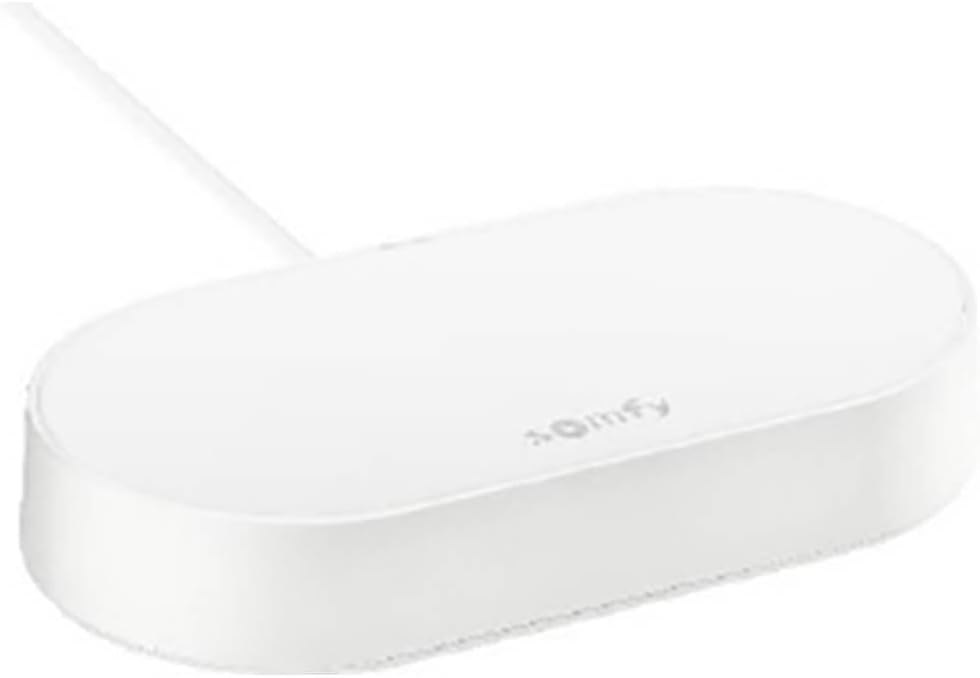
Somfy 1870755 Connectivity Kit, Control of Shutters, Garage Doors and Lighting with Voice Control
Product ID: 408845133
📱Control up to 20 devices
📶Wi-Fi 2.4 GHz wireless connection
🎙️Voice control via Alexa, Google, HomeKit
🏠 Elevate your home control game—because convenience is the new luxury.
The Somfy 1870755 Connectivity Kit is a compact, entry-level smart home hub that enables seamless control of up to 20 motorized shutters, garage doors, and lighting devices via smartphone or voice assistants like Alexa, Google Assistant, and HomeKit. Compatible with io- and RTS motors, it connects wirelessly over 2.4 GHz Wi-Fi, allowing users to create personalized scenarios and monitor device status remotely for a smarter, more connected home experience.


| ASIN | B094YLCZFR |
| Batteries Required? | No |
| Batteries included? | No |
| Best Sellers Rank | 126,802 in DIY & Tools ( See Top 100 in DIY & Tools ) 80 in Home Automation Hubs & Controllers |
| Colour | Multi-coloured |
| Customer Reviews | 4.3 4.3 out of 5 stars (3,534) |
| Date First Available | 18 Jan. 2022 |
| Guaranteed software updates until | unknown |
| Included Components | 1 x connection kit, 1 x power cable |
| Item Package Quantity | 1 |
| Item Weight | 198 g |
| Item model number | 9913950 |
| Manufacturer | Somfy |
| Part Number | 1870755 |
| Product Dimensions | 13.8 x 7.2 x 2.6 cm; 198 g |
| Special Features | Compact entry-level model for smart control |
| Style | Connectivity Kit |
| Voltage | 230 Volts |
M**R
Works as expected.
Ordered this to control all our somfy blinds. Installation was straightforward and integrated well with Alexa. So simple to use voice commands to open and close the blinds once linked with Alexa. No need for several controllers. No, it can't open to a percentage as some people have asked for but that's because it doesn't seem native in the Somfy firmware. Don't think it's something I need anyway.
D**N
Great product
Excellent - easy to set up I’ve linked to Google home app so my blinds now close and open at sunset and sunrise Just connect to WiFi, add your blinds or other devices , connect to Google and you’re done !
I**.
Suprisingly good
I had previously rather regretted buying Somfy Blinds because the rolling code system of RF signals made it impossible to clone the commands to a Broadlink RM Pro and then to Alexa automation. The Tahoma device was ridiculously expensive and had poor reviews.. And Somfy were not exactly know for their high standards of customer service. But I thought I would give this a try and would return it if no good. Well, pleasant surprise. This was easy to set up with a set of 6 blinds and has worked flawlessly for a week now. Moreover it can be set up with Alexa routines (making the more expensive Tahoma unnecessary). The trick here is to set up each blind in the Somfy App. Then create Scenes for the various combinations of blinds up and down that you want. Then those scenes should appear in the Alexa app and you can set up the routine to call those scenes. So Device-Scene-Routine is the way to do it. Hoping that I won't regret these words and it will go on working and not fall over leaving me to the tender mercies of Somfy Customer Support. One small oddity. The app asks you to click a button called "Validate" . This puzzled me for a bit wondering why they needed to validate my credentials when I was setting up blinds. It just seems to be the Franglais for "OK". Once you realise that the app is plain sailing.
M**S
Price and ease of use
Easy to connect and works well. I have 4 blinds connected to it and added it to my Alexa 👍
K**N
Solid product, works without much input
Works well, setup with google assistant so i didn't need to buy the more expensive version. It's set and forget, so you don't need to mess around with it after initial setup (when using google to control it)
R**N
Does what it says
Product was delivered yesterday and was relatively to set up. I did have some difficulty with the initial setup as the system would not work with the primary remote control that came with the Somfy blinds. Luckily it did work with the second one. There are limitations with this item when using with the TaHoma app in that you cannot schedule operations. The system basically allows you to add "Up", "Down" & "My" buttons to your phone and with this comes remote access control. However, once you add Alexa voice control, you can then create scheduled scenes based on time of day or voice control etc. All in all this is a relatively smooth product to set up but to make full use of it you really need to pair it with a voice assistant. This is certainly a cheaper option than the TaHoma switch and does exactly what I need it to do.
R**H
Terrible Product for RTS Blinds
Very disappointed with this product. I've been wanting to make my blinds "smart" for a while, but wasn't prepared to pay the ludicrous £200 for the TaHoma hub. This cheaper option looked like a good option. The app for setting up isn't great, but I got through it. 1st issue is you can close the blinds (down position) with one press, but anything else involves flicking a virtual switch in the app, and opening them incrementally, 10 degrees or so at a time. The "MY" button position doesn't work. Lastly, despite linking and unlinking to the Alexa SOMFY skill multiple times, my blind was never detected baby Alexa as a smart home device. The Connectivity Kit Box was, and I could change how bright the indicator light was, but that's it. Very disappointed, and returning for refund.
V**D
Good for awnings/covers, not so good for controlling lights (HomeKit not supported for lights).
Reasonably easy to set up with the Tahoma app. I'm using it to control three io-homecontrol devices: my 1. Pergola roof, 2. Pergola side screen, 3. Pergola lighting (embedded dimmable LED strips controlled by "Light var IO"). I had to plug the connectivity kit in VERY close to the Pergola to have all 3 devices successfully connect (using my manual remote control to set each of them into "programming mode" in turn). At first I got errors on the lights and side (see picture), but those cleared up by themselves a day or two later. The range of this device is not huge. With one brick wall in the way, mine _just_ manages to reach about 15m to control the Pergola. If I place it further away then it doesn't work reliably. Now, who wants to use yet-another-app? Nope: I wanted to connect these 3 controls to both (a) Apple HomeKit and (b) Home Assistant - alongside all the other smart devices in my home. Connecting the two awnings (roof and side screen) was super easy -- scan the QR code and they quickly and automatically show up in HomeKit and can be added (and provide full LOCAL control - no cloud needed). However, in their wisdom Somfy have chosen not to integrate lights (or at least this kind of light) into HomeKit via this connectivity kit. Bit daft: Somfy please fix this. The only available path was to use the "Overkiz" integration into HomeAssistant which goes via Somfy's cloud and with that I could get the lights into Home Assistant and then across to Apple Home as well. The response time is adequate but not great. One last issue to be aware of: while programming the device, using your old remote control (ballpoint-pen into the small button to turn on programming mode), it is VERY easy to mess up your remote control (partly because you have to try 2-3 times to get some devices to sync correctly): I ended up with my side shade moving from button 3 to button 2 on my remote, and button 3 now controls both lights AND side-shade. The only way to fix this (according to an hour on the phone with Somfy) is to find where the electric controls of these devices are (dismantle part of the pergola!), and manually disconnect each in turn from the power in order to reprogram the remote. Searching the internet shows I'm not the only person who has had this issue. So overall a 3/5 given the complications, range and lack of full HomeKit support. But I did choose to keep the device.
W**8
Fungerar perfekt
Enkel installation via tydliga instruktioner i Tahoma appen.
R**.
Muy útil para domotizar persianas. Compatible con HA, y parcialmente compatible con Apple HomeKit
Lo tengo instalado en un piso de alquiler para controlar persianas y otros dispositivos Somfy desde el móvil, y va de maravilla. Fácil de configurar, compatible con asistentes de voz y muy estable. Me gusta tanto que ya tengo claro que me lo llevo conmigo cuando me mude a mi futura casa.
G**Y
Installation facile et très pratique au quotidien
J'ai acheté le kit de connectivité pour piloter mes volets roulants Somfy IO. Installation facile : - Déballer le produit, brancher le cable micro usb sur l'appareil d'un coté, et de l'autre la prise usb sur une prise de courant (non fournie dans le kit, oh les radins !) ; - Installer sur votre téléphone (ou tablette) l'application Tahoma (QR code sur le produit), il vous faudra créer un compte (gratuit) ; - Suivre la procédure d'installation pour détecter chaque volet à partir de la télécommande Somfy (en appuyant sur le bouton marqué PROG au verso de la télécommande) ; - Renommer chaque élément, ex. "Volet du salon" ; L'application Tahoma est bien faite et permet de piloter les volets facilement mais l'intérêt pour moi étant le pilotage à la voix j'ai poursuivi l'installation dans Alexa : - Ajouter à Alexa le skill Tahoma By Somfy ; - Renseigner dans Alexa (une fois pour toutes) vos identifiants Tahoma ; - Les éléments créés dans Tahoma sont alors tous récupérés ; - De base on peut commander chaque élément à la voix en langage naturel via Alexa, par ex. "Alexa baisse le volet du salon" ; - Avec les commandes de base c'est du tout ou rien (volet ouvert ou fermé), pour être plus "subtil", il faut créer des routines, "Alexa ferme à moitié le volet de la cuisine", "Alexa je pars" (pour fermer tous les volets, eteindre les lumières etc.). Il est également possible de créer des routines activées tous les jours au lever ou au coucher de soleil (fermer les volets et allumer les lumières via des prises compatibles Alexa). Il est également possible de faire ces actions à distance via votre téléphone (à condition d'avoir laissé votre box allumée bien sûr). J'ai mis environ 30 mn pour tout paramétrer, au quotidien c'est très pratique. Je précise par ailleurs que j'éteins tous les soirs la multiprise sur laquelle ma box, mon Echo Dot et le kit de connectivité Somfy sont branchés, et au rallumage le matin tout redémarre nickel. Pour moins de 70€ le kit, je suis satisfait.
A**X
Costa ma funziona bene
Usato per controllare da remoto un set di tende, funziona bene ed è stato facile da configurare. Un po' caro
P**L
Mega einfach zu installieren und funktioniert top
Das hektische Heimfahren, wenn ein Gewitter kommt und die elektrische Markise ist noch ausgefahren. Einfach zu installieren. WLAN und Box und meine Markise wurden easy erkannt. Alles in allem hat das nicht länger als 5 min gedauert. Sehr zufrieden!!😀
Trustpilot
2 months ago
1 month ago