Desertcart purchases this item on your behalf and handles shipping, customs, and support to Senegal.
๐ฆ๏ธ Weather Smarts That Keep You One Step Ahead!
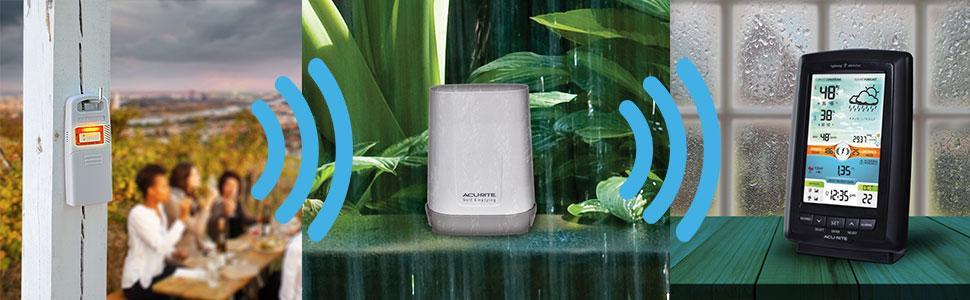
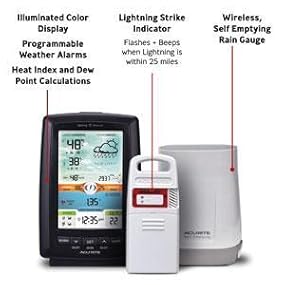
The AcuRite Weather Station combines advanced lightning detection within a 25-mile radius, a wireless self-emptying rain gauge, and a vibrant color LCD to deliver comprehensive hyperlocal weather data. Featuring patented barometric and elevation calibration, it provides accurate 12-hour forecasts alongside detailed historical rainfall records, temperature, humidity, and moreโperfect for professionals who demand precision and style in their home weather monitoring.


| Additional Features | Lightning Detector |
| Are Batteries Included | No |
| Asin | B01LNALKYA |
| Best Sellers Rank | #19,074 in Patio, Lawn & Garden (See Top 100 in Patio, Lawn & Garden) #470 in Weather Stations |
| Brand Name | AcuRite |
| Color | Color Display with Lightning |
| Connectivity Technology | wireless frequency |
| Customer Reviews | 4.2 4.2 out of 5 stars (615) 4.2 out of 5 stars |
| Display Type | LCD |
| Global Trade Identification Number | 50072397010219 |
| Included Components | Receiver^Rain gauge^Lightning sensor |
| Item Type Name | Rain Gauge |
| Item Weight | 2 Pounds |
| Manufacturer | Chaney Instruments |
| Model | 01021M |
| Number Of Batteries | 6 AA batteries required. |
| Part Number | 01021M |
| Power Source | Corded Electric |
| Recommended Uses For Product | Outdoor,Rain |
| Sensor Technology | Electrostatic/Electromagnetic & Tipping Bucket |
| Shape | Rectangular |
| Specific Uses For Product | Heat Index |
| Style Name | Color Display with Lightning |
| Temperature Accuracy | +/- 2 degrees Fahrenheit |
| Temperature Reading Accuracy | plus_minus_1_degree_celsius |
| Unit Count | 1.0 Count |
| Upper Temperature Range | 100 Degrees Fahrenheit |
User
Easy peasy to install - Colorful, but not a color, display - I like
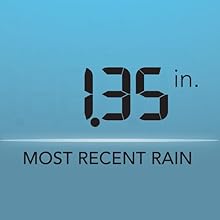
This unit is attractive and easy to install. It will come in 3 pieces - the base unit, a rain sensor and a temperature/humidity/lightning/pressure sensor. You will need a total of 8 AA batteries (no batteries are included) - 4 for base unit backup (which plugs into the wall for its primary power) and 2 each for the rain and temperature combo sensor.First I'd like to mention the base unit is a very attractive, colorful, unit. Is it a color display? In a word - NO. It's a LCD display (black/clear) which is in front of a very colorful background. This unit is backlit and you can select auto dim, bright, medium or low brightness levels. Auto dim simply uses bright during the day and dim at night automatically. Overall a very attractive and well executed display. As a consultant by profession I'm impressed. Nice.To install you first need to select the channel on all the devices by setting a switch inside the battery compartment. Your choices are A, B or C. Do this BEFORE installing any batteries or plugging the base unit into an outlet. ALL 3 OF THE DEVICES MUST BE SET TO THE SAME SETTING. Once the channel has been set install batteries into all the units. As a matter of course I'd recommend the base unit first and then the other 2 in any order (it probably doesn't really matter). The battery orientation is well marked but pay attention. Once batteries have been installed you can then plug in the supplied A/C adaptor for the base unit. As I stated before the batteries in the base unit are for backup - why you ask? Well because the base unit will hold recorded values and if you didn't have batteries it would lose all history if A/C power was ever lost. RULE #1: When changing batteries in the base unit leave it plugged into the wall or else you'll lose all your recorded history. The base unit is the only unit that operates using A/C power. RULE #2: Your remote sensors (rainfall & combo temp) use batteries which should last a year or 2 - so when you place these they will be outside and you need to make sure you put them in a place which doesn't make changing the batteries a royal pain in the you know what.Common question: You've been warned about leaving the base unit plugged in to change batteries but what happens when you change the batteries in the remote sensors? Will you lose history when doing this? Well since the history is recorded inside the base unit it really doesn't matter if you pull the batteries out of the remote sensors to replace them. However there could be a little itty bitty issue. Normally once the batteries are re-installed in the remote sensors they will re-connect to the base unit automatically. But if they don't guess what? You may need to reset the base unit (by removing the batteries and unplugging the A/C adaptor). And if you have to reset it guess what? You're going to lose your history. So hopefully your remote sensors reconnect after changing batteries. Of course it's not the end of the world if you lose your history but still.Installing the rain sensor: This should be placed somewhere where it's not under trees or any other obstructions. I put mine on top of a vent on the roof. Be aware this unit really needs to be level in order for it to work correctly. One way to level this is to put it on a piece of wood (using the included 2 screws) which then in turn is placed on silicone caulk with washers used to hold the wood level until the silicone has cured (about 24 hours). Worked OK for me. Just be aware that the main threat to this device will be debris (like leaves in the fall) getting into it's collection area. As I said before just install this where you can periodically check things and easily perform routine maintenance (changing batteries or cleaning it out). They indicate this can be 100 feet from the base unit. RULE #3: Check the signal strength before permanently mounting - there are signal strength indicators on the base unit.The rainfall sensor can be calibrated if necessary but it's a pretty entailed process. It requires mechanical adjustment of the "buckets" in the rainfall sensor itself.Installing the combo sensor: It's rated as "weather resistant". The notes say to put this under a tree limb or some other "sheltered" area. To install this they have provided an opening in which it can be hung on a hook or something similar. In the directions they indicate you could use string to tie it on the bottom of a branch. Just be sure it is sheltered and not next to your house (because then readings could be wrong). I put mine under the north side of my shed's roof overhang. They indicate this can be mounted up to 300 feet from the base unit - call me a little skeptical - but you've been warned with RULE #3 above.The temperature, humidity and pressure of the combo sensor can be calibrated on the base station if required.Once everything has been positioned the unit will go into a 14 day learning mode in which it tries to understand your local weather better. It does this because a part of the display has a "predictive" feature which tries to identify what the upcoming weather will be - storming/clearing/whatever. Out of the box it actually does a half way decent job. 100% accurate? Nope - but neither is the TV weather. I find this unit to be more entertaining though.What's on the display? It's got a lot of goodies. You can refer to the online manual but in short here's what you can expect:-Temperature, with trend (higher/lower/steady) and daily low & daily high.-Humidity, with trend and daily low & daily high.-Calculated dew point.-Pressure, with trend.-Upcoming weather "prediction".-Lightning strike count and nearest distance (also have recorded values for various periods).-Rainfall in hundredths of inches (so down to .01" - also have recorded values for various periods).Overall this device is easy to install, easy to use and is attractive. Out of the box it seems to be accurate enough for me. Yup, I like and would recommend.
User
Nice weather station but do a manual setup if readings are inaccurate
This is a simple but vibrant color display weather station that works well and gives temperature, humidity, lightning readings and a rain gauge. If they are not calibrated correctly when received here is how to get "as close as possible" accuracy. I received my kit and had it up and running within 30 minutes however the temp/humidity/lightning detector in the kit was bad giving indications of interference and false lightning detections of up to 400+ strikes per day. I followed the troubleshooting guide in the manual and finally reached out to Accurite and they replaced the sensor for free under warranty. The new sensor works as it should. I also purchased a La Crosse weather station that provides temp, humidity for indoor and outdoor readings as well as wind speed. Using my local weather app I verified the La Crosse system was accurate on temp +-2ยฐ and +-5 for humidity. I then setup the new Accurite sensor to within the weather app and La Crosse system readings. Accurite allows manual adjustment for temp and humidity on the display. This was the right move because both systems are now within 3ยฐ of the temp readings and 5 points of humidity readings of each other and the weather app. I recommend ordering the Accurite outdoor sensor protection housing to protect the temp/humidity/lightning detector sensor and gain the most accurate temp readings. I like the dimmable display and keep mine on lowest setting. Time will tell how durable the two systems are but I am happy with both systems and love the fact that Accurite allows user modifications to gain desired readings.
User
Great display with easy sensor connectivity.
Excellent weather station with a clear display. Very easy to connect the lightning detector and rain sensor. Both are outside and send strong signals to the station. Lightning detector has been working great along with accurate temperature and humidity readings. Rain sensor has not been tested yet with rain but sends a strong signal back to the station. Great price, highly recommended.
User
Rain gauge accuracy needs some polish
I'm happy with the features of this product. I was debating between it and the 5-in-1 system. We have a wooded lot so I think that an anemometer, like that that comes with the 5-in-1 system, is likely to be useless. It is best to have a set of instruments that I can use. As another reviewer pointed out, this product has an advantage over the 5-in-1 gauge in that you can locate the rain gauge in a separate place from the temperature gauge (which should not be in direct sunlight).After an evening of frustration in trying to calibrate the rain gauge, I finally learned some important things about the calibration procedure (both of which are noted in the manual but I want to emphasize).1) It is important the rate at which you feed the 8 oz. of water into the gauge be very slow: drop by drop. The book suggests a small pin hole in a disposable cup. The problem is that a hole that is small enough for a full cup of water will be too small and stop flowing as the cup empties due to the changing pressure at the bottom of the cup. So you really need to pour the 8 oz. of water into the cup from another container about one ounce at time. You don't want the internal "tipping cups" tipping at a rate greater than about once every 5 seconds.2) You must apply some water repellent to the internal tipping cups. I had a bottle of "Rain-X" that is used for auto windshields and so I polished the cups with this. This was absolutely critical. Prior to doing this, the cup would not fully empty. (You can test with the cover removed and dripping water onto the tipping cup assembly.) A large drop of water would cling to the lip tipping cup. Since it is designed to take 5-10 drops to make the cup tip, this large remaining drop far out on the lip makes a significant balance problem. The result is many more drops are required to make the cup tip and the gauge ends up ready very low (sometimes as much as 50% low) and is very unreliable (different values for repeated test with the same amount of water). After waxing, I could see the tipping cup was shedding all the water and the gauge became more accurate and reliable. The manual notes application of water repellent as a maintenance item, but I would argue this is a mandatory first step if you care about the accuracy of the gauge.I've only had the instrument for a couple of days, so I can't speak yet to the durability, but wanted to post the notes above for those who may be having trouble with the rain gauge calibration.
User
There is a definite process to setting it up.....
When we first set it up the rain gauge didn't work. Contacted the AccuRite company and they responded quickly with these directions. The thing now works perfectly! It was near a laptop and too close together when first tried it.ย "Please perform the following reset. Please make sure all units are 3 feet away from all windows and electronics including each other or this can cause interference.ย 1. Bring the rain gauge, lightning detector, and display unit together and power down by removing all the batteries from each and the power adapter from the display for 2 full minutes.2. Change the A-B-C switch on all units to a different letter but make sure the letter you choose matches other units3. Reinstall the batteries in the Lightning detector first, then the rain gauge.4. Reinstall batteries into the display unit and the power adapter.5. If this does not correct the issue please repeat the steps but choose a different letter on the ABC switches"ย AcuRite provides a one-year warranty from the date of purchase.
User
Not bad as a basic weather station, but....
Feb '18 Update: I purchased this primarily for remote reporting of the temp/humidity. I have a 5 in 1 station which is inherently inaccurate on the temp since the sensor assembly is not in a shaded location. I also purchased it for the lightning detection and rain gauge. The lightning sensor does not appear to be accurate (sensitive). Strokes within about 3 or 4 miles are detected. Beyond that there is no detection. The sensor is mounted about 8' above the ground in a shaded location. The rain gauge was not accurate out of the box. I used the calibration procedure in the user guide to improve accuracy. The procedure was simple and accuracy is greatly improved.I've downgraded my original rating from a 4 star to a 3 star. As a basic weather station (temp/humidity/rain), I give it high marks. The ability to calibrate the sensors is a plus. For lightning detection, not sensitive enough.Original review:Nice weather station. Worked first time out of the box. Easy setup. Min/Max 24 hour readings for rain, temp, and humidity self clear. Does not appear to provide min/max for barometric pressure. If it did, I would rate it 5 stars. Seems pretty accurate out of the box, but can be calibrated.I am a serious weather enthusiast with experience with a number of manufacturers weather stations over the past 4+ decades.
User
Accu weather system
Our weather system does not workโฆthe temperature is always wrong, the rain gauge never registers any precipitation and weโve had several rains. Would like a refund or a new weather system.Nancy Reed
User
Should have read the reviews first!
I guess I should have read the reviews first! Like other people, I'm having trouble getting the rain gauge to connect to the main unit. Right now I have the rain gauge less than 6 feet away from the main unit and it still won't connect. I had the same problem with the lightning sensor. I couldn't get a strong signal until I hung it right outside the window about 3 feet away from the main unit, but at least it finally connected. It was very frustrating! I switched out batteries - changed the frequency from A to B to C on all the units to try to connect and still no luck. What's strange is I have the Acurite Access that sends all the information from your sensors over the Internet to my My Acurite app on my phone. It's probably 30 feet away from my lightning sensor and rain gauge and it's actually picking up the signal from those sensors and sending the readings to my app on the cell phone. I just can't get the same info on my weather station unit. So maybe the problem is in the main unit. I sent an email to Acurite about my problem and I'm waiting to hear back from them. If the problem can't be fixed I'll probably return the units to Amazon because it's not working properly. BTW the rain gauge was pretty accurate. I have an professional rain gauge and yesterday I got .33" of rain. The Acurite showed .30" on my app. I think with some calibration I could get it to match up, but I'm not going to go to all that trouble if it's not working properly. Other than the problems I'm having I really like the display and the information that it should provide - I just wish it would work and provide the info.UPDATE: I tried contacting Acurite Customer Support through email about my rain gauge problem and never heard from them. So I returned my original unit to Amazon because it wasn't working and got a replacement and it works perfectly. The rain gauge signal was picked up immediately. The rain gauge is completely accurate - I filled my professional rain gauge to .50" and then to 1" and then slowly poured it into the wireless rain gauge and it was accurate both times. No calibration was needed. I've now changed my rating to 5 stars.
User
Weather
Great weather gage
User
Works great.. easy to setup
Arrived on time and very easy to setup. Put the batteries in, plug in the base unit and the sensors link up in less than a min. A few days after setting up, a strong thunderstorm swept through. Recorded lots of lightning strikes and showed their approximate distance. Rain gauge showed accurate rainfall. The sensors seem to have good range, as I have both sensors in the backyard and the receiver is at the front of the house with no issues. Overall a really nice looking weather station and it works well.
User
Facile ร comprendre
Bien fait et facile ร utiliser et comprendre
User
Nice features but 1 glitch.
Product is good. My only issue is in 3 weeks I have had it, it has โfrozeโ and I had to twice remove the batteries and power supply then set it all up again. And there goes the history records.
User
Fun
Measuring rain, lightning .
Trustpilot
3 weeks ago
2 days ago