Buy anything from 5,000+ international stores. One checkout price. No surprise fees. Join 2M+ shoppers on Desertcart.
Desertcart purchases this item on your behalf and handles shipping, customs, and support to Senegal.
๐ Connect with Confidence!
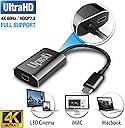
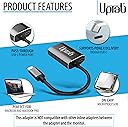
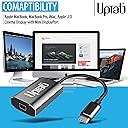
The uptab USB C to Mini DisplayPort Adapter allows you to connect your USB-C devices to Mini DisplayPort displays with stunning 4K resolution at 60Hz. It features a pass-through USB-C power jack for charging, requires no drivers for installation, and is compatible with a variety of devices including MacBooks, iPads, and more.
C**S
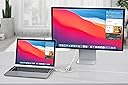
Used to connect Dell laptop to Mac Cinema Display from 2008!
Hi everyone! So I have a DELL Latitude 5401 laptop from work, and I wanted to connect it to this giant 24" Apple display monitor (from 2008, its called a cinema display, looks like they don't make them anymore). Multiple problems included the Apple monitor having an old mini display port (which is pretty much obsolete tech) as well as having a hard time finding adapters that would connect properly to both systems. Also, I have a USB-C port charger for my dell, and it only has the one port.......Thankfully this adapter worked for me, I was able to simultaneously hook up the monitor AND charge my laptop :)PROS:- connects to a mini display port with no quality issues- the additional USB-C port allows me to charge my laptop AND connect to the monitor- worked on 2008 Apple Cinema Display monitor- worked on Dell Latitude PC laptopCONS:- although it is charging my laptop, I recently saw a pop up on my laptop that said it was charging at a low speed. No biggie since I leave it connected the entire time it is in use- the USB-C port on the adapter (which I am using to plug in my charges) is on the same side as the USB-C connector, so it makes it kind of awkward to plug in my charger as it twists the cords up a bit.- the length is fairly short for my use (I think extra length would make it less awkward to plug in to the USB-C port) and it would have been nice to have a couple more inches on the adapter to make it more "flexible" for my setup...this is totally a FIRST WORLD problem as not many adapters out there on Amazon even have this capability
D**Y
Worked for my Mac Cinema Display monitor
When we all got shooed home for the National Pandemic, I was given a 15" 2019 Macbook pro from work, so I purchased a $50 adapter directly from Apple for my older Mac Cinema Display monitor (the newer kind with the thinner casing, not the silver picture frame all the way around kind). I squinted at the laptop screen for a week and some waiting for that sucker, then the Apple adapter didn't even work! Read some reviews that said something about needing a power bypass - blah blah technical stuff - and buy this one instead. So I came to Amazon, ordered here and got it IN TWO DAYS (because obviously!) and this one worked beautifully, was much cheaper, and has not presented any problems. There's no delay, nor pixel distortion or anything. Just like I had plugged my monitor in directly. Highly recommend!
J**N
Powerbook 2020 to LED Cinema Display - it works!
It took a couple of tries with the wrong adaptor, so I'm glad to have found this. This works to connect a 2020 Powerbook to an old LED Cinema Display. The LED Cinema Display has a three-ended cable with a USB 2.0 plug, MagSafe power, and a MiniDisplayPort. With this adapter, the display works, and there's a port to plug in a thunderbolt charger to power the laptop as well. Works great! Now I can continue to use that great display and charge my powerbook.
S**R
Works great for my macbook Air
This worked great for my setup and it display images crystal clear. This worked for my 2019 Macbook Air and Apple Monitor. I plugged in my monitor to this adapter and the USB-C end to my macbook and it worked great !
T**M
Works to connect M1 MacAir to Apple LED Cinema Display
This adapter worked for me to connect a November 2020 M1 MacBook Air to a 2009 Apple LED Cinema Display 24-inch (1920 ร 1200) Model number: A1267. This display has a 3-part cable with Mini-Display, USB, and power. In order to fully function, both the Mini-Display Port and USB both need to be plugged into to the Macbook, and yet this adapter only has the Mini-Display port. That means you also have to have another adaptor to connect the USB. Without that USB, brightness control, the USB ports on the back of the display, and perhaps other functions won't work.To solve this problem I also purchased an adapter (Aukey 6-in-1) having a USB port. However, this means that with this external display working I have no other ports available since since the M1 Macbook Air only has 2 USB C ports. That means that I can't, for example, plug an external hard drive into that port.It's true that this adapter also has a USB C port, but I tried plugging the second adapter into this port and it did not work. That's because the USB C port on the adapter is only for power pass through.Other than that limitation, I'm happy with the purchase because it looks nice, appears to be a quality product, and allows me to keep using this perfectly functioning 12 year old monitor.
M**W
Not working consistently with 2023 16" MacBook Pro M2
I'm using this adapter to connect to an Apple Cinema Display LED (27-Inch) (model A1316). On startup the monitor is not detected. Sometimes tapping the fingerprint scanner to put the machine to sleep and closing and reopening the laptop lid gets the monitor to be recognized. More often, 1 or 2 reboots are required before it is detected. Also, sporadically, when waking the laptop from screensaver, the monitor resolution is magnified even though the System Settings indicate the default resolution is selected. Choosing a different resolution and changing back to default does not resolve. It's been a disappointing and frustrating experience so far..
D**J
Almost a 5-star review
I don't write reviews but thought I must for this product. It does work. I does allow me to hook up my old Apple Cinema Display to my new MacBook Pro. I will give it that. But the auxiliary outlet has never worked. Also, the display doesn't always turn on when it should. I need to reboot it by unplugging/plugging it back in, Frustratingly so.
S**F
Extended Life of Apple Cinema Displays with Mini DisplayPort Cables
Quite happy with the quality of manufacture and performance; these are one of the better-looking dongles with an attention to finish equal to the MacBook Pro.I have two 27" Apple Cinema displays with Mini DisplayPort cables, I purchased two adapters in order to drive them using a 2017, 15" MacBook Pro. The adapters work wonderfully without introducing flicker, reduction in brightness or change in color profile. In effect, I have extended the life of these handsome monitors, with above average performance, until Apple changes to yet another type of display port.
Trustpilot
2 weeks ago
2 months ago