

Desertcart purchases this item on your behalf and handles shipping, customs, and support to Senegal.
⌚ Elevate your wellness game—track, connect, and conquer every day!
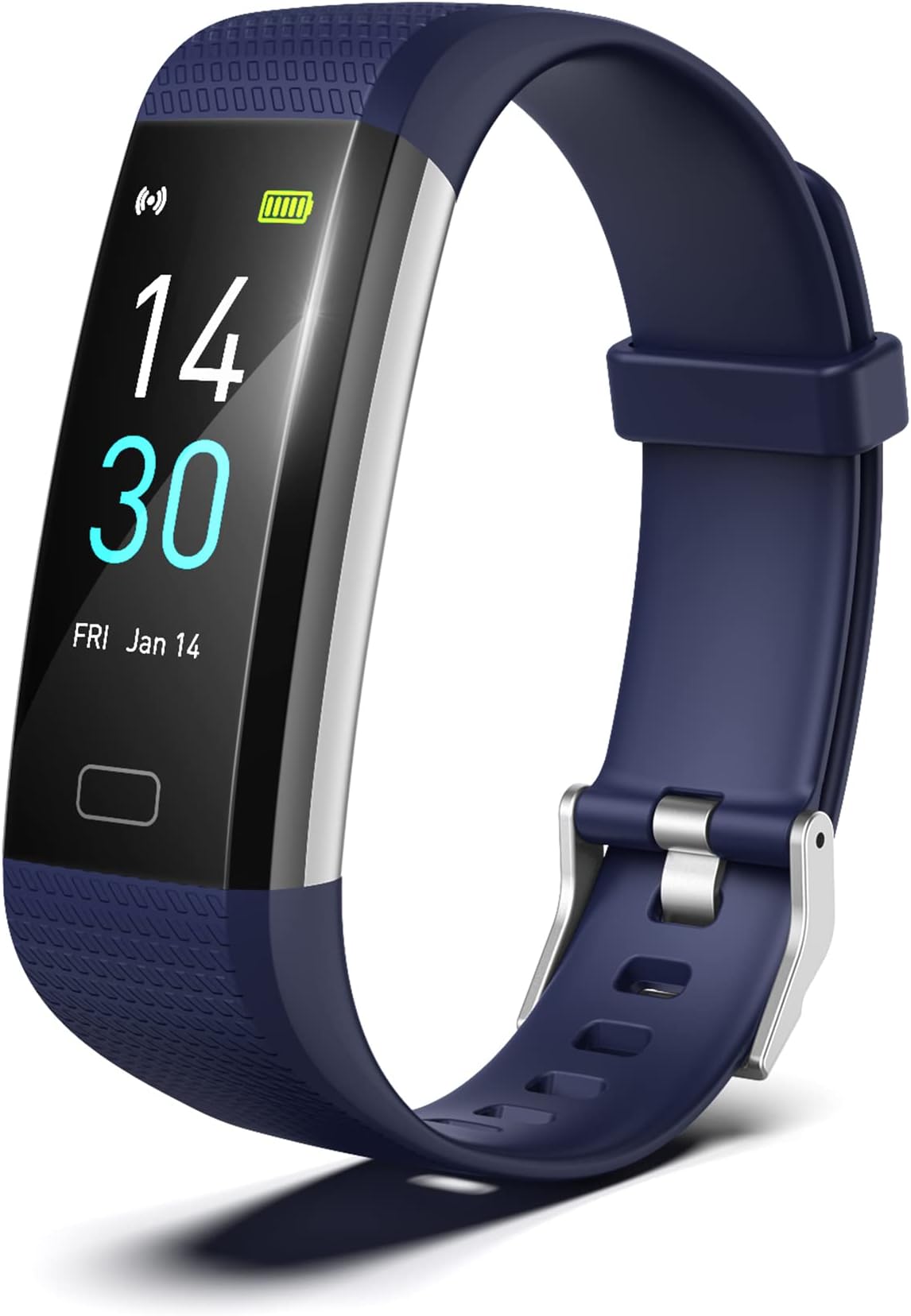
The threesheep Fitness Tracker is a sleek, waterproof smart watch with a 0.96-inch LCD screen, offering 24/7 activity tracking across 16 sports modes, real-time heart rate, blood pressure, blood oxygen, and sleep monitoring. Compatible with Android 5.0+ and iOS 9.0+, it delivers call and message notifications directly to your wrist. Featuring a built-in USB charger for hassle-free power-ups and a comfortable adjustable TPU band, it’s designed to keep busy professionals motivated and connected throughout their day.


| ASIN | B09M3KQ6D7 |
| Additional Features | Activity Tracker, Heart Rate Monitor,Blood Pressure Monitor, Sleep Monitor, Notifications, Pedometer, Body Temperature Monitor, Waterproof, Sedentary Reminder |
| Age Range Description | Adult |
| Band Color | blue |
| Band Length | 7.9 inches |
| Band Material Type | Thermoplastic Polyurethane (TPU) |
| Band Width | 0.8 inches |
| Battery Capacity | 105 milliamp_hours |
| Battery Cell Composition | Lithium Polymer |
| Battery Cell Type | Lithium Polymer |
| Battery Charge Time | 2.5 hours |
| Best Sellers Rank | #23,055 in Sports & Outdoors ( See Top 100 in Sports & Outdoors ) #86 in Activity & Fitness Trackers |
| Brand | threesheep |
| Built-In Media | Fitness Tracker, USB Charging Cable |
| Case Material Type | Plastic or Resin |
| Clasp Type | Tang Buckle |
| Color | Blue |
| Communication Feature | True |
| Compatible Devices | Smartphone |
| Compatible Phone Models | Android 5.0+ and iOS 9.0+ |
| Connectivity Technology | Bluetooth |
| Controller Type | Android |
| Customer Reviews | 3.7 out of 5 stars 4,149 Reviews |
| Display Type | LCD |
| External Testing Certification | Não aplicável |
| GPS Geotagging Functionality | No GPS |
| Human Interface Input | Buttons |
| Manufacturer | Shenzhen Starmax Technology Co.,Ltd |
| Metrics Measured | Heart Rate Monitor, Blood Pressure Monitor, Blood Oxygen Monitor, Sleep Duration |
| Model Name | S5 |
| Model Number | S5 |
| Operating System | Android,Ios |
| Resolution | 240 x 240 |
| Screen Size | 0.96 inches |
| Shape | Rectangular |
| Special Feature | Activity Tracker, Heart Rate Monitor,Blood Pressure Monitor, Sleep Monitor, Notifications, Pedometer, Body Temperature Monitor, Waterproof, Sedentary Reminder Special Feature Activity Tracker, Heart Rate Monitor,Blood Pressure Monitor, Sleep Monitor, Notifications, Pedometer, Body Temperature Monitor, Waterproof, Sedentary Reminder See more |
| Sport Type | Fitness |
| Style Name | Modern |
| Supported Application | Fitness Tracker, Sleep Monitor |
| Target Audience | Men, Women |
| Water Resistance Depth | 1 meters |
| Water Resistance Level | Waterproof |
| Waterproof Rating | IPX4 |
| Wearable Computer Type | Activity Tracker |
| Wireless Communication Standard | Bluetooth |
| Wireless Compability | Bluetooth |
A**A
Love the tracker
I recently purchased the Threesheep Fitness Tracker in my quest for a reliable and affordable wearable device to track my daily activities and workouts. After using it for a few weeks, I am impressed with its performance and features. The Threesheep Fitness Tracker has a sleek and minimalistic design that looks great on my wrist. The adjustable band is comfortable to wear all day long, and I barely notice it while working out or going about my daily activities. This tracker excels at accurately recording my steps, distance traveled, and calories burned throughout the day. The heart rate monitor provides real-time data during workouts, helping me stay within my target heart rate zones for optimal results. The sleep tracking feature is also a standout, giving me insights into the quality of my sleep patterns. The Threesheep app is user-friendly and intuitive, allowing me to sync my fitness data effortlessly with my smartphone. One of the best aspects of the Threesheep Fitness Tracker is its impressive battery life. I can go several days without needing to recharge, which is convenient and ensures that I can rely on it to track my activities consistently. Considering its affordable price point, the Threesheep Fitness Tracker offers excellent value for money. It provides a wide range of features typically found in more expensive fitness trackers, making it a great option for those looking to monitor their health and fitness without breaking the bank. Overall, I highly recommend the Threesheep Fitness Tracker to anyone in the market for a reliable and feature-rich wearable device. It has exceeded my expectations in terms of performance, design, and functionality, and has become an essential tool in helping me achieve my fitness .
D**Y
Worst tracker I've ever had!
I don't write many reviews, but I am so unhappy with this tracker that I wanted to warn others. The only redeeming quality it has is that it does keep track of the date and day of the week. Other than that, nothing else works correctly. These are the following problems I have had with it: 1. Doesn't remotely count steps correctly. 2. Loses time and has to be charged frequently. 3. Whatever material is on the face of the watch is so inferior it gets marred easily. I can wake up after a night's sleep and find marks on it. 4. It frequently changes the settings on it and it is not intuitive on how to change them back. 5. The mobile app leaves a lot to be desired. 6. It is so inaccurate, it can tell me my blood pressure numbers without the watch even being on my wrist. 7. It's supposed to give you the time by lifting your wrist, but frequently that doesn't work and you end up having to scroll through all the options just to get the time. That is my #1 pet peeve! It is VERY frustrating. Bottom line, don't waste your money. I should have sent it back at the beginning, but now it's too late. It's just trash!
K**R
Great watch for the price.
Great watch with many options for health monitoring.
W**E
It's not as good as the original
I have had one of these for a few years. The band and connector broke, so we had to part ways. This one has been changed from the original. I prefer the original. The blood pressure has been taken out and blood oxygen is in place of it. Also where the steps are shown also has calories and miles. I preferred just the steps, because it was easier to read instead of all that in one section. Luckily it survived considering it was sent in the same box as kitty litter and the kitty litter was directly on top of it🙄Guess that shows it's sturdy LOL
G**O
Android app follies
I bought this watch because I wanted to explore a fitness watch at a low entry point until I can decide if I want a more capable and more expensive watch. This particular watch requires the use of the Runmefit app to get the most out of it. This includes more complex activities such as recording and displaying sleep data during the night, but also simpler tasks such as setting the watch to display temperature in Fahrenheit and to select the watch face appearance, so the app both receives and transmits to the watch. I had a lot of problems with the app I downloaded for my Android phone. It (not me!) disconnected Runmefit from bluetooth and when I tried to reconnect to bluetooth I kept getting the message that it needed app location permissions turned on … which they were! It at least showed that it still recognized the watch as a “device.” Until I tried to remove it as a device and then reconnect it, thinking maybe that was necessary to get around the bluetooth problem. When I tried that, the app wouldn’t recognize the watch (“device”) at all. So I downloaded Runmefit to my iPad, to see if it would run better there. It immediately connected with no issues. Thank you "Walled Garden"! One other thing to know that you don’t find out until you stumble across the S5 Operation Manual several layers deep into the app, is that the way to move through the various functions on the watch is to tap the little rectangle on the bottom of the face. Also, when the Android app no longer recognized the device (let alone establish bluetooth connection) it would no longer show me the Operation Manual, probably needing to know what kind of device to know what kind of manual … I guess. That makes sense if the app is written for more than one kind of device. Probably works the same on my iPad, but you can bet I’m not going to remove the device from the app just to find out. I have no measurement comparison (other than my thermometer for temperature) for some of the various medical data (heart rate, blood pressure, blood oxygen) but I’m hoping to collect that data on my next doctor visit for comparison. The documentation says that data is “for reference only and cannot be used on a medical basis” which I interpret to mean there are no guarantees or even tolerances (e.g., +/- 20%) for those results. Maybe those are in a specification sheet … somewhere. But that’s okay, as long as the results are reasonably consistent I can record my numbers on a daily or weekly basis or whenever I think of it, and compare the results myself to see if anything is changing in a sinister fashion. The Sleep measurement shows that I slept 8 hours 40 minutes last night. My cpap machine says I slept 8 hours and 45 minutes. That’s amazing, the watch is getting that (and the heart info) from sensors on the back of the watch. The watch shows me the instantaneous values of things like blood pressure and then the app can display a graph showing how they changed during the month. I’m guessing my blood pressure spiked when I was trying to get the Android app to work. I’m not reporting on the various exercise functions, I haven’t tried them out. The watch does tell me how many steps I’ve taken and how many calories I’ve burned during the day with no setup required from me. And maybe the Android app is just fine, maybe I just bungled the initial setup and couldn’t dig my way out, silly me :-( . I’m reporting my misadventures to help out anyone with similar difficulties. *** edited 5-13-23 *** I visited my dentist and after the hygienist measured my heart rate and my blood pressure I compared the measurements she took with those of the watch. Very nearly identical. However, blood pressure measurements seem particularly iffy. Just now I took six consecutive measurements and measured 111/73, 121/83, 126/80, 114/64, 114/64, 108/70. *** edited 6-13-23 *** First watch I've ever owned that I can't read outside in the daylight. Frequently the app will disconnect from Bluetooth, and it is a simple matter to reconnect it in 'Devices.' The clue is that you can't read any chart data on the app because it can't connect to the watch without Bluetooth. And the app won't show the display face options if it is not connected to Bluetooth. *** edited 11-2-23 *** Some temperature data I collected when I wasn’t feeling well, a bigger variation than I was hoping for. Oral thermometer: 99.6 Infra-red forehead: 98.6 Watch: 97.8 Consecutive morning battery voltage levels (as reported by the watch) from a full charge: 100%, 97, 78, 54, 45, 34 and then it quit later that day; so I got almost 5 1/2 days on a charge. *** edited 2-2-24 ***. The watch strap broke! The strap comes in two pieces, one attaches to the top of the face and one attaches to the bottom of the face. The bottom strap is the one you remove to recharge the face piece. The top strap has the buckle and is the one I never remove. Until now. This might be my fault if I was grabbing onto the top strap as leverage when I removed the bottom strap for charging. If I was doing that, I might have broken the glue bond to the top strap. In the future I will be sure and only hold the watch face and not the top strap when I am trying to attach or remove the bottom strap. I glued the top strap back to the top of the watch face with a super glue. It seems to be holding fine. *** edited 8-4-24 *** . My watch would no longer link to the app. I switched to a new, unused watch that I bought recently and it connected fine. I had to update the app and also the watch firmware. *** edited 8-31-24 *** I’m getting shorter charge duration with the new watch. From a full charge: 100%, 78, 48, 21 and then it quite early in the last day. I got just over 3 days of use on the charge. *** edited 12-9-24 *** Select the watch display and the 'How to use' options such as 'Device connection' and 'S5 User Manual' work again. Yay! *** Edited 7-13-25 ***. My second watch broke on the strap again, only this time I couldn’t get it to glue back. I bought a third watch and it has much improved design for the strap: the buckle strap press fits on to the watch in a similar manner as the bottom strap, so no glue to break. The built in instructions are poor or nonexistent again, these things seem to come and go with newer versions of the app. It appears to no longer perform a blood pressure test. I had problems with menu tap at first, it seems okay now. For a few days the watch face rectangle wouldn’t respond to taps until I started double-tapping it to get it started. *** edited 3-25-26 ***. This watch is a rollercoaster. Functionality seems to come and go with different releases of the firmware or app. But my watch finally quit, it would no longer recharge. But it lasted about three years, so I got my money's worth.
5**!
Latest update really improved the ap information on movement
This was just to count my steps and motivate me to do more with three toddlers- yeah you read that right. So I folded 5 loads of laundry yesterday morning and that got me to 6k steps (my goal) before 10:30 am- that’s a con. Also it’s active energy is way below what it normally was on my Apple Watch. Sometimes I have to go in the Ap to get my steps to update to my iPhone- that’s the last con. Tons of watch faces, lots of info most I don’t even use, handles all the watering the lawn and splash pads and wadding pools and buckets I dunk my hands in- really a nice and inexpensive gadget. Only takes a few hours to fully charge but I get busy so I try to only charge when I’m in shower so top it off. Shows phone calls and texts, really useful for someone who wants to know but doesn’t want to respond immediately to things that can wait. Stops me from putting my activities on hold for someone else yet let’s me know if it’s important.
R**A
Tracker watch i use for steps
I ordered this one for fiance, i already have one, it works great for me. I use it for my steps but it has many other features. When i do my arm stretching it sometimes counts as steps so it isnt always accurate but im very pleased with this. Its not bulky on my wrist. It will monitor my sleep hours, but some nights if my arm isnt laying right, it wont monitor it. But thats only happened a few times. It isnt exact or percise on blood pressure count but very close. When i use the treadmill i remove my watch and place it on my waist band , because if i use the hand rails, it misses steps. ( recovering from hip replacement) i wanted a inexpensive step counter tracker watch, and got alot more out of it very pleased. I charge it only once a week.
M**R
barely usable
I'm on day 1 with this smart watch, my first "fitness watch". I figured I'd get the cheapest one and see what it does before venturing into the pricey ones with better features. For exercising and various other situations, I hoped to have a timer, like set a 1 minute timer, 15 minute timer, etc, but this watch doesn't seem to have that functionality at all. It does have "health reminders" that might be usable as ad hoc timers, but there's only 2 of them, labelled "sedentary reminder" and "drink water reminder". It does have a stopwatch, which could be useful during exercising, but to reach the stopwatch you have to tap many times and then long press twice. The entire interface of this watch is extremely primitive, only short and long taps on a very tiny on-screen button. There's no touchscreen controls other than one button. So navigating different functions seems pretty horrific in my first attempts to use it. The watch screen is on the small side, which isn't a problem, but the firmware/software doesn't give any options for changing font sizes, etc to make it readable. There's no way I can read most stuff on this watch without wearing reading glasses, which defeats the purpose of having a quick and convenient alternative to a phone for some things. The small screen could be better utilized with a full touch screen interface and larger text/numbers. The "skins" offered are okay for just reading the time and date, but not much else. Some things can be done via the phone app that pairs via bluetooth. For example, setting alarms. That's good. The app has some awkward parts clearly due to the author not being a native English speaker. It has a list of "sports modes", but you can only choose 4 of them to actually use. Maybe some of the fitness tracking functions will be useful, but again the numbers/text are unncessarily tiny. Overall, a terribly designed and barely usable product, which is what I expected for the price. I'm happy it does actually work at all and I will at least be able to use it as a watch to read the time and as an alarm clock and for "health reminders", so I will get some use out of it until I eventually study which smartwatches are actually usable for more general things.
Trustpilot
2 months ago
1 month ago