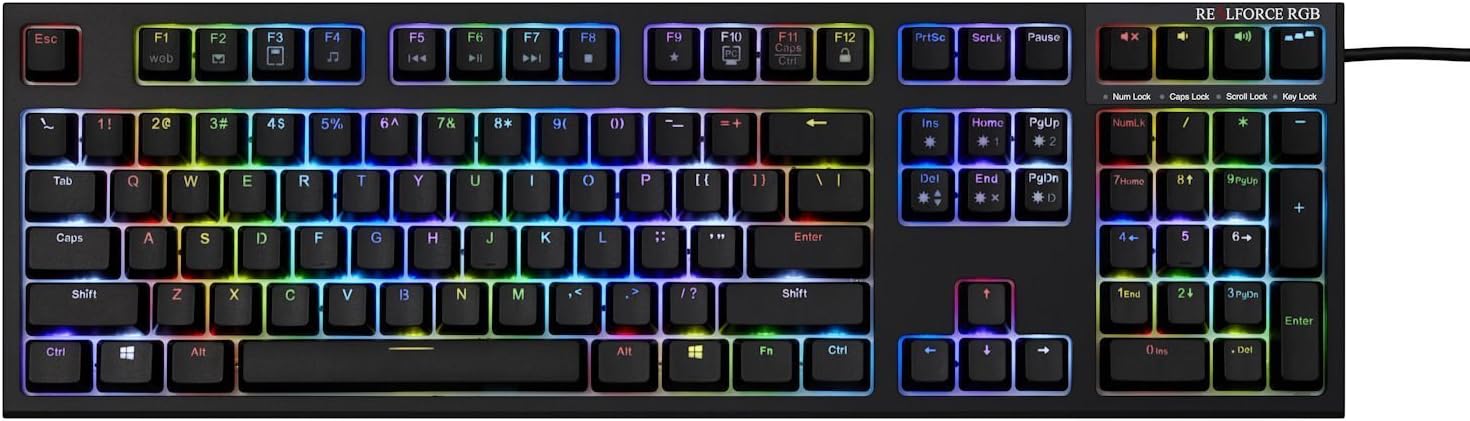
Realforce RGB 108-key Backlit Mechanical Keyboard (Black)
Product ID: 37664014
⚡4mm travel
🌈16.8M colors
🔑108-key layout
💻 Elevate Your Game with Every Keystroke!
The Realforce RGB 108-key Backlit Mechanical Keyboard combines a robust ANSI layout with Cherry MX compatible keycaps, offering exceptional durability and a premium typing experience. With Topre electrostatic capacitive switches featuring a 4mm travel distance and customizable 16.8 million color backlighting, this keyboard is designed for both performance and aesthetics. Weighing 1.4 kg and made in Japan, it’s the perfect addition to any professional workspace.
| ASIN | B01MU1LUQD |
| Additional Features | Travel |
| Antenna Location | Travel |
| Brand | Realforce |
| Button Quantity | 108 |
| Color | Black |
| Compatible Devices | PC, Laptop, Gaming Console |
| Connectivity Technology | usb |
| Customer Reviews | 4.1 out of 5 stars 37 Reviews |
| Enclosure Material | Acrylonitrile Butadiene Styrene |
| Global Trade Identification Number | 00700755679765 |
| Hand Orientation | Ambidextrous |
| Item Dimensions L x W x H | 18"L x 5.5"W x 1.7"H |
| Item Weight | 2.3 Pounds |
| Keyboard Backlighting Color Support | RGB |
| Keyboard Description | Mechanical |
| Keyboard Layout | QWERTY |
| Manufacturer | Topre |
| Mfr Part Number | a17 |
| Model Number | a17 |
| Number of Keys | 108 |
| Power Source | USB Powered |
| Recommended Uses For Product | Travel |
| Special Feature | Travel |
| Style Name | Contemporary |
| Switch Type | Tactile |
| UPC | 700755679765 |
M**2
An extremely solid keyboard
I've only used a few mechanical keyboards, but this is superior to every one I've tried. It is expensive, but a very well-made keyboard. A few important points: - It can use cherry-style keycaps, but does a MUCH better job stabilizing the key. They key motion is solid. A regular cherry switch has a plus sign that goes up and down, and there seems to be more side-to-side play. These switches have a circular hole with a plus sign in the middle. The plus works the same, but the hole centers and stabilizes the up-and-down motion of the keycap. - The keycaps are nice. A nice combination of texture and smoothness. You can't feel the lettering, like with cheaper keycaps. Nice nubs on F and J. Since there are lots of manufacturers of cherry style keycaps, your customization options are much wider than other topre keyboards which are different. - You can change the actuation point, how far you press the key before it registers. I've used other mechanical keyboards where resting my fingers on the keys will generate unintentional keystrokes. You can either change the actuation point for all keys at once, or it seems the software allows you to tune it for each key individually. - the lighting effects are fun (but honestly I turned if off after initially playing with it). You don't really see the keys light up since they are black, you really see light in the space around the keys. Lighting is actually useful when configuring though. For instance, when configuring the activation point, the keyboard lights up blue/green/red for high/medium/low key activation point. - I use it on a mac. I swapped Command and Option in System Preferences > Keyboard > Modifier Keys. I also pried the keys loose and swapped them on the keyboard. (windows key is command/apple key) - on mac os x el capitan, it works wonderfully with F12 working for eject and ctrl-alt-win+F12 shutting down the system. - on macos sierra, apple pulled out F12 functionality and this keyboard can't do these useful shortcuts (affects all non-apple keyboards). - the software is windows-only. Haven't needed to use it since important things are configurable with Fn+key. It lets you do cool things though, like custom lighting effects and per-key actuation points. Some wishes: - I wish when each key bottomed out, it was softer. My fingers seem to notice the jarring. - When a key is released and returns to the top of travel - it makes noise. It's most noticeable with the space bar. This is really the major source of noise this keyboard makes. - Wouldn't mind having completely standard keycap labels. For example, the 5 key says 5% at the top instead of 5 with % above.
R**Y
Best Keyboard I've ever used, coming from MX Cherry Blues
Feels really, really good to type on. I'm coming from Cherry MX Blues. I've tried Cherry MX Reds but didn't like the linear style for typing and really liked the Blues for their tactile feedback (both sound and feel) when typing. My previous keyboard was the Corsair Vengeance K70 Cherry MX Blues, so that's what I'll be comparing them to. What I liked about the Cherry MX Blues were that it felt good to type on (due to the tactile feedback and partly the sound as well, as opposed to Reds which made me have lots of typos). The Realforce RGB's Topre switches feel even better to type on than the Blues. They are obviously much quieter as well which is less annoying for when you're talking with someone on the phone or over Discord, etc. The one small thing though that doesn't make this all-around perfect and an upgrade over Blues are when spamming a single key. I felt that between the Topre switches and the MX Cherry Blue switches, the Blues are probably better for gaming if you need to spam a single button a lot (e.g. spamming a key in anticipation of it coming off of cooldown). But it's not as though hitting a single key repeatedly on this is bad. The best example I can think of is hitting the Backspace key on this keyboard. It feels so much more different and so much better than my Blues. I feel like the whole deleting-things process is faster as I always hit the Backspace button faster and the exact amount of times I need to. Every time I type on this thing, it just feels so noticeably good (similar to Blues, but even better). I also really liked the Actuation Point Changer, as I didn't know which one I would prefer of the three possible Actuation Points. Being able to find out with this keyboard was a nice big bonus. As for the RGB, I don't care much for it and isn't something that I'll be using. I would have loved a USB pass-through, something that my cheaper Corsair Vengeance keyboard had. You can also disable keys if you download the software and disable them from there (I've disabled both Windows keys and the Actuation Point Changer key since I know which one I like best, the 1.5mm, and won't be changing it). So, for heavy gamers, I probably wouldn't recommend this keyboard because of the slower spamming on top of the price. You should probably go with Reds (but if you can't stand the super smooth and fast linearity/spammability of Reds or the sound of Blues, Brown is a nice middle ground). Would still definitely recommend for anyone who uses a keyboard everyday with light gaming (or if you don't care that it's slightly slower for spamming), as I'm very happy with this keyboard and will still use this even while gaming.
J**E
A great board - love being able to custom set color and actuation for EVERY key.
My first Topre board. Fit and finish is excellent and the backlighting, for me, is just about right, giving the board a clean look without being too obnoxious. I've wanted a good RGB setup for a while and this one hits the mark. Typing feel is smooth with just enough bounce for my personal taste. It does not feel like a typical rubber dome at all. Those usually feel mushy or numb, while the Topre actuates with a satisfying amount of feedback. It doesn't have the clicky-ness of a typical Cherry MX, etc. but the well-known "thock" is definitely there. Pros: Solid build, clean overall design. Keycaps can be replaced with Cherry MX style ones if you want, as they are compatible. With their software, there are several ways you can customize the keys in terms of RGB colors; and three levels of actuation points on every key (this is only possible with the Topre switches) Once set, the preferences are stored on the keyboard internally, so you can take it anywhere and not lose your settings. You can cycle through presets and factory patterns with hotkeys. I love being able to custom set color on each individual key, even have just the ones you want on and the others off, etc. Tons of options. USB cord is nice and long, with its own velcro wrap. Channels underneath the keyboard allow for snugly aligning the cable at three different points: out the back or on either side. Feet are rubberized, giving it a solid footing whether flat or the little leg tabs pulled out. Cons: There is definitely a rattle that happens when the keys bottom out. It doesn't bother me that much and the overall noise doesn't seem louder than Cherry MX Blues which are loud in their own way. But for some, it may be obnoxious, although dampening may help. The unit is built solidly but in the end it is still plastic. I carry it around with me in a neoprene case (i wanted to use it at work, but not leave it there) but I noticed that it got tweaked once where tit wouldn't lie flat, probably when I set it down too hard once or twice. It was easy to snap back into place to fix the warp, but it was disconcerting. I ended up getting a 60% Filco board for traveling, so it's not a big deal and the full size makes it hard to carry anyways. Programming software was PC only at the time of purchase. The unit works fine on a Mac, but be aware you can't program it natively and I couldn't get it to work via VMWare. Function and media keys are all PC-centric but do work on a Mac. You may want to replace the caps with Mac styled ones though.
E**C
Hey, that's pretty good!
What stood out to me about this keyboard was the Topre switch. I do realize there are other cheaper keyboards with Topre, but I wanted to feel what the flagship had to offer. I'm coming from a Kailh blue switch based keyboard, and the feeling is incredible. It's very quiet yet it still retains the tactile feedback you look for in a mechanical. Immediately when I held the keyboard in my hand, it felt very solid and well built, it's hard to describe, but you can FEEL the quality. Pros: Solid and weighty construction (~3 lbs) RGB lighting with software Good tactile feedback Compatible with Cherry MX keycaps N-Key rollover APC allows you to set how far down you need to press to register a keystroke Cable management routes can let the Cable come out the left, right, or back of keyboard 2 Year Warranty Cons: Expensive (Though you are paying for high quality) ABS Keycaps (PBT tends to last longer)
D**E
The Bentley of Keyboards | Topre > Cherry MX [UPDATE: DO NOT BUY OR YOU WILL GET STUCK!]
I've had this keyboard for a few weeks now and it was a huge upgrade over my scissor switches. I haven't used a mechanical keyboard in years since my last one broke and was getting by with any wireless board I had laying around. All in all I think the price tag is just a little overpriced at about $25-75 too high. The LED's are bright and gorgeous but it's really the only weakness of the product. I purchased an ikbc F108 board as a gift for someone and the amount of lighting effects trump this keyboard but that is something Topre could fix with firmware upgrades I think? Other than that this keyboard is easily worth around $200 because of the quality of the keys and I'd pay as much as $25-50 more for the ability to change the actuation points. I personally value this keyboard at about $250 max. On the plus side I personally justified the extra $25 you spend is getting me an extra year warranty when purchased through EliteKeyboards on here and if you have prime you're getting the rapid shipping too. I would not trade this keyboard for anything! I expect it to stand the test of time and overall I do believe you are getting what you pay for. Again my only disappointment was the lack of more lighting effects but for a professional what it has is more than sufficient, it's just hard to explain to others how amazing the keyboard is without making it visually impress. Also on the ikbc keyboard it has this really cool countdown timer that uses the lighting to visually display the timer counting down. It has the ability to change the lighting effect speed on all effects whereas this board you can only do that on a couple effects. I hope Topre adds to this a lot and continues to support this board for awhile. The presentation is amazing, the keys are superb and it's perfect for gaming. I've had to be careful not to rest my fingers too hard on the keys when using the 1.5mm setting as it's very sensitive and I've mistakenly erased text and closed apps and other confusing things pressing keys I didn't realize I was pressing. You could easily switch the sensitivity back after playing a game with a simple keystroke. From what I know you can also use cherry MX keys on this board if you want to; it has the same cross slot that pushes right on which is another nice bonus but the PBT caps are excellence and will probably never shine. At this price you'd expect it to come with a nice keycap puller but I had to purchase that separately. There's a really nice chrome metal handle one that matches it perfectly. This keyboard is a longer term investment so if you want to splurge on yourself and aren't the type to buy twice then go for it, otherwise the other one I mentioned here is prettier, cheaper and totally sufficient based on all my research. Finally I think I should mention that the shipping box it came in was way over sized for the item itself causing the package to slide around so just look out for packaging issues I've already reported it to Amazon. UPDATE 12/26/17: 11 months later and the 2,3,4,6,7, 0 and escape key all have suddenly stopped working (using numpad...good thing it has a 3 year warranty but with issues this soon I have no choice but to knock a star off. If the replacement lasts longer I will bring it back up. UPDATE Moments later: As a last ditch attempt I went into the software utility and did a factory reset. Now the keys work again! For how long I don't know but give this a try before you throw up your hands! UPDATE 12/29/17: Same issue resurfaced only 3 days later while working. Very disappointed that it has failed. Moral of the story, always have a backup especially when dealing with a foreign keyboard company that will put you through crap like this: "No returns for repair service will be accepted without prior e-mail approval and a RMA number. Repairs may be performed in Japan at the Topre or Fujitsu PFU factory wherein repair turn-around is typically 4-8 weeks; loaner boards are not available." Quoted from EliteKeyboards website. I would highly not recommend this keyboard. At 3x the price of a regular one you could buy it 3x while this one breaks in 1 year. Also the seller EliteKeyboards has not responded in over a week to my warranty request. They also claim a 2 year warranty period saying that the manufacturer only offers 1: "2 years, parts, labor, and round-trip repair shipping through EliteKeyboards.com (standard manufacturer warranty is only 1 year). " Yet both the Seasonic manufacturer website and Newegg both say 3 year manufacturer warranty.
Z**C
Pretty good but lacking on standard
The keyboard is well built, less loud than mechanical keyboards, and key presses are indeed quite nice, but not way better than a good mechanical keyboard. The biggest problem for me is that the firmware on the keyboard is not able to "pass through" my KVM. The media keys (volume up/down) for example do not function, as well as the windows lock key. I'm going back to my Das Keyboard, as its media keys etc all work without problem through the KVM. The keyboard in itself is very comparable to a good mechanical keyboard. Marginally better perhaps on the feel than the Das Keyboard 4, but minute difference, definitely not justifying the price difference.
D**G
Realforce is a Real Piece of Junk
First, the keyboard shipped in the original box that it came packaged in, it was fairly well beaten by the time I got it. I opened it up and a bunch of keys fell out of the box. Put the keys back on, lightly tapped the bottom of the keyboard, and even more keys fell off the board. I really wanted to like it......
R**T
Yes, it really is THAT good!
Prior to actually purchasing it, while I was doing research on the Topre Realforce RGB, I read the keyboard was met near universal praise. From headlines like: “The Best Keyboard Ever” to the “Rolls Royce of Mechanical Keyboards,” it seemed like no one out there had anything but great approval for the Realforce RGB. At the same time, I had never purchased a keyboard with Topre switches before, having been a Cherry MX loyalist since I first laid hands on a mechanical keyboard, and was initially a bit hesitant. After all, Cherry switches were the best of the best, weren’t they? Further, being priced at well over two-hundred dollars, the asking price was well above anything I had ever paid before for a mechanical keyboard. Nonetheless, curiosity eventually got the best of me and I made the purchase. I’m here to tell you that . . . yeah, basically, every good thing you hear about this keyboard is true. As I sit here typing up this review, I can only try to convey in words how amazing it feels to type on this thing. It’s a common sentiment, you will see, if you’ve been doing some research on keyboards with Topre switches. While the keyboard boasts a bevy of additional features such as full N-key rollover; completely customizable RGB lighting; and, perhaps most important for some, three adjustable actuation points; it is the switches themselves that are the stars of the show here. As you might have heard, you really need to try the switches yourself to truly understand what makes them so special. The best way I can describe it, both in sound and feel, is sort of like an IBM model M with buckling switches and a Cherry MX Red keyboard. The double shot ABS keycaps on the Realforce feel thick and satisfying under the fingers, while simultaneously providing a unique “clack” sound on the upstroke. I imagine the sound of Topre vs Cherry switches will come down to personal preference, but I for one greatly prefer the Topre. As for the feel, I imagine the vast majority would pick the Topre if given the choice. Aesthetically, the Realforce RGB keeps it simple. Aside from the different LED color profiles, there isn’t much that sets the keyboard apart from others like it. Matte black is the color of choice here, aside from the tiny area at the upper right where glossy plastic surrounds the company branding. It goes without saying that the keyboard is solidly built, and having owned several mechanical keyboards from the likes of Razer, Max Keyboards, and Cooler Master, among others, I can say without hesitation that the Realforce is the most solidly built. As I mentioned earlier, a big draw with this keyboard for many people will be the custom actuation points. Unfortunately, while I do play my fair share of PC games, I am not as competitive as many others out there, and so I can’t provide a great deal of insight in this area. To be completely honest, whether I am typing or gaming, I can’t really detect too much of a difference between the three different actuation points. I will say, though, that each key is completely customizable through the Windows software, so if, for example, you’d like to have the WASD keys set at one level and the surrounding keys at another, you’re free to do that. Also, should you want to change the actuation point of all the keys, all it takes is a single keypress. I’m sure most gamers can find great uses for this feature, but since I myself purchased the keyboard primarily for typing, I will leave it at that. Oh, and a quick caveat about the software: if you’re using the keyboard on a Mac, there is none. You are still provided with the preinstalled color schemes and custom actuation points, as these profiles are built into the keyboard, but if you’re looking for customization beyond that, you’re out of luck. Granted, what comes preinstalled is probably more than enough for most users, but it would have been nice to have something for Mac users to toy around with. Perhaps down the line Topre will implement something. If you, like me, were on the fence about getting one of these things, I suggest you give it a shot. Do I think the keyboard was worth the asking price? Honestly, now that I’ve had some time to dig into it, yes. If you’re a typing enthusiast—or even if you hate typing but need to type a lot for whatever reason—I strongly urge you to give a keyboard with Topre switches a try. I doubt you’ll want to go back after you do.
Trustpilot
2 weeks ago
2 months ago