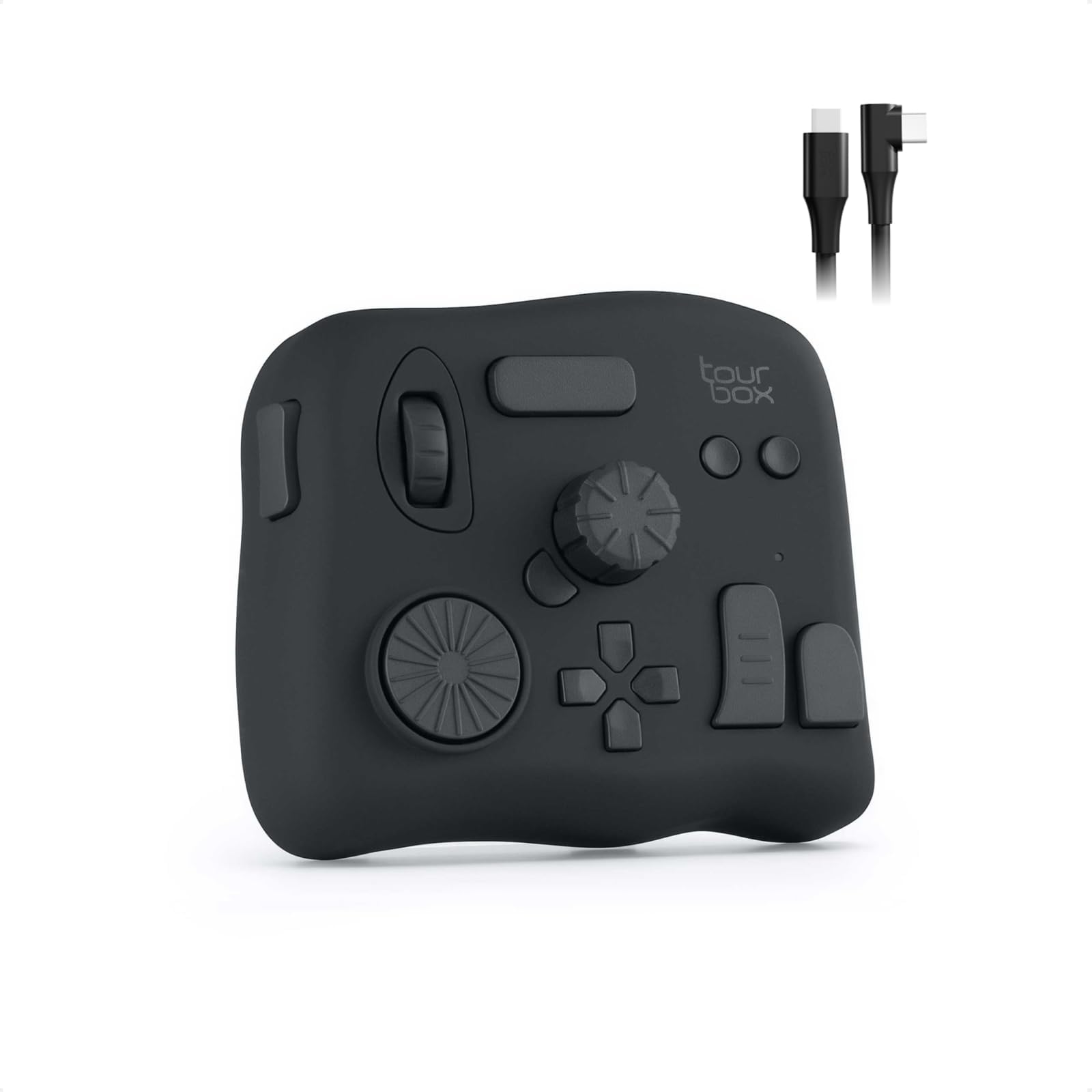
🎨 Elevate your creative flow — shortcut your way to brilliance with TourBox NEO!
The TourBox NEO is a compact, one-handed controller featuring 14 customizable shortcut keys and over 100 software compatibility options. Designed for creators in image, audio, drawing, and video editing, it offers macro-enabled keys and ergonomic controls for seamless, efficient workflows across major creative platforms. Trusted by over 100K illustrators, it enhances productivity with intuitive, eye-free operation and comes with a one-year warranty and lifetime support.


| ASIN | B08HCV1JGB |
| Are Batteries Included | No |
| Best Sellers Rank | #121,306 in Computers & Accessories ( See Top 100 in Computers & Accessories ) #609 in Graphic Tablets |
| Brand | TOUR BOX |
| Colour | Black |
| Customer Reviews | 4.5 4.5 out of 5 stars (889) |
| Date First Available | 5 October 2020 |
| Generic Name | Graphic Tablet Controller |
| Hardware Platform | Windows, MacOS |
| Importer | Green Terrace Building, Lane Number 5, South Koregaon Park, Pune 411001, MH, India., Email ID:- [email protected]., Number:18002668571 |
| Included Components | TourBox NEO Controller, USB Type-C Cable |
| Item Dimensions LxWxH | 17 x 4 x 14 Centimeters |
| Item Height | 14 Centimeters |
| Item Weight | 370 g |
| Item Width | 40 Millimeters |
| Item model number | TourBox NEO AMTBG_H_L_N |
| Manufacturer | Tour Box tech INC. |
| Net Quantity | 1 Piece |
| Operating System | Windows |
| Packer | Green Terrace Building, Lane Number 5, South Koregaon Park, Pune 411001, MH, India., Email ID:- [email protected]., Number:18002668571 |
| Product Dimensions | 17 x 4 x 14 cm; 370 g |
| Screen Resolution | 2560x1440 |
| Series | NEO |
A**9
"TourBox NEO Quick Key Tools: A Helpful Shortcut Device for Creators, but with a Few Cons"
I recently purchased the TourBox NEO Quick Key Tools for Creators and I am blown away by how much it has improved my workflow. With its 14 customizable shortcut keys, I can easily access my most-used tools and functions, saving me time and increasing my productivity. The TourBox NEO also offers over 100 customization options, allowing me to fine-tune the device to fit my specific needs. The software interface is user-friendly and intuitive, making it easy to set up and customize. One of the things I love most about the TourBox NEO is its compact size. It's small enough to fit comfortably on my desk without taking up too much space, but still provides all the functionality I need as a content creator. Overall, I highly recommend the TourBox NEO Quick Key Tools for Creators to anyone looking for a reliable and efficient way to streamline their workflow. It's a game-changer for anyone who wants to work faster and more efficiently. Cons - While the TourBox NEO offers a lot of customization options for creators, there are some cons that potential buyers should be aware of before making a purchase. Firstly, the device can take some time to set up and get used to. The customization options are extensive, but this can also make it overwhelming for some users. The device can also be bulky and take up a significant amount of desk space, which may be an issue for those with limited workspace. Additionally, the TourBox NEO may not be compatible with all software programs, which limits its versatility for certain creators. Some users have also reported issues with the device not functioning properly or disconnecting from the computer. Overall, while the TourBox NEO offers many customization options for creators, it may not be the best fit for everyone. Potential buyers should consider their workspace limitations and software compatibility before making a purchase.
S**P
Productive
Useful and productive.
M**Y
Photoshop raw filter dos not working
Waste of mony
E**I
منتج جبار للمحترفين
افظل جهاز تحكمي ومريح عملا هو هذا الجهاز الجبار ، افادني كبرامج الرسم ، اشترها ولا تترددوا
B**Z
Superou minhas expectativas
Comprei o TourBox Neo como uma alternativa mais barata ao SpeedEditor do Davinci Resolve. Mas estava preocupado se ele seria capaz de cumprir bem essa tarefa. E depois que consegui configurá-lo corretamente, ele não só conseguiu, como superou minhas expectativas! Ele é altamente personalizável através do software TourBox Console, permitindo a configuração de atalhos simples (com 4 opções de atuação) e também a combinação de teclas, mas principalmente possibilitando um ajuste fino (com 3 níveis de intensidade do Scroll, do Knob e do Dial), funcionando muito bem no Davinci Resolve, seja para navegar nas Timelines frame a frame ou um para um movimento mais acelerado, e ele consegue fazer isso de maneira fluida e natural. Ele também é capaz de exibir um HUD em overlay exibindo os atalhos configurados caso seja necessário. O tamanho é compacto, e o design é versátil, e o acabamento é agradável, podendo ser utilizado tanto com a mão esquerda quanto com a direita conforme a preferência. Além disso ele tem a vantagem de poder ser utilizado em diversos cenários não se limitando ao programa A, B ou C, e ainda tem a opção de alternar entre perfis automaticamente. Recomendo utilizar com um apoio de pulso para ficar nivelado e mais confortável para longos períodos de uso. Obs: estou utilizando no Win11 v.24H2 e a versão do TourBox Console é a v5.7.4 Pontos Negativos: os cliques não são silenciosos e são um pouco duros, mas nada demais. esse modelo não possui Bluetooth, ficando limitado a utilização com fio.
S**G
Hervorragend geeignet für DCS Flugsimulator
Habe mir das Teil gekauft, weil ich weder an der Tastatur, noch am Hotas Warthog (Joystick/Schubregler) Drehregler habe. Installieren ist problemlos und das Programm öffnet sofort in Deutsch. Die Belegung der Drehregler und Tasten ist simpel und selbsterklärend. Einsatzmöglichkeiten nahezu unbegrenzt: Höhenmesser einstellen, Beleuchtung des Cockpits, Lautstärke der Funkgeräte, Reichweite des Radars etc. Es gibt 3 Einstellungen für die Feinheit Drehregler. Falls man eine feinere oder gröbere Einstellung wünscht. Für die Höhenmesser in der A-10 und Hornet lässt sich der Luftdruck so präzise einstellen. Durch unterschiedliche Formen der Drehregler und Tasten ist das Gerät auch blind zu bedienen. Also ideal geeignet, wenn man den Feind nicht aus den Augen verlieren darf….. Eine ideale Ergänzung zum Elgato Stream Deck!
J**S
Buenisimo!
Te adaptas super rápido! Los materiales son de muy buena calidad, ya he dejado mi teclado fuera de mi alcance, con el tourbox puedo usar el photoshop sin problemas (lo uso para lustración digital) y mi mano que antes era del teclado ahora esta mas relajada, me llegaban a doler los dedos por la postura en el teclado, con el tourbox ya no pasa eso.
W**T
I love this thing!
The tourbox is a solid device that helps me save time during video editing in Adobe Premier Pro. Once you get the muscle memory down basic functions like zooming in and out of the time line etc is efficient and effortless. I’m very satisfied with the overall quality of the device, the buttons and wheels functions as you would expect and after thousands of clicks and spins it still operates flawlessly. The software is easy to use and you can edit how you want each button to function or you can just use the pre made button configurations for several of the popular editing programs out there. Yes it came with a pre made setup for Adobe Premier Pro. The soft ware will also place a little widget (clickable area) that emulates the 4 of the buttons on the device. Neat. I love this device, I usually release 5 videos per week on YouTube each of whic are typically 10 to 15 minutes. That’s tons of scrolling, trimming etc I can’t imagine editing without this device. I would purchase another without hesitation if I needed to. The tourbox doesn’t have all the fancy buttons and appearance of some of its competitors devices, I can confirm it won’t make you a cup of coffee, but It will make your work flow more efficient and is a joy to use because it works! I love it!
Trustpilot
1 month ago
1 month ago