Buy anything from 5,000+ international stores. One checkout price. No surprise fees. Join 2M+ shoppers on Desertcart.
Desertcart purchases this item on your behalf and handles shipping, customs, and support to Senegal.
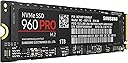
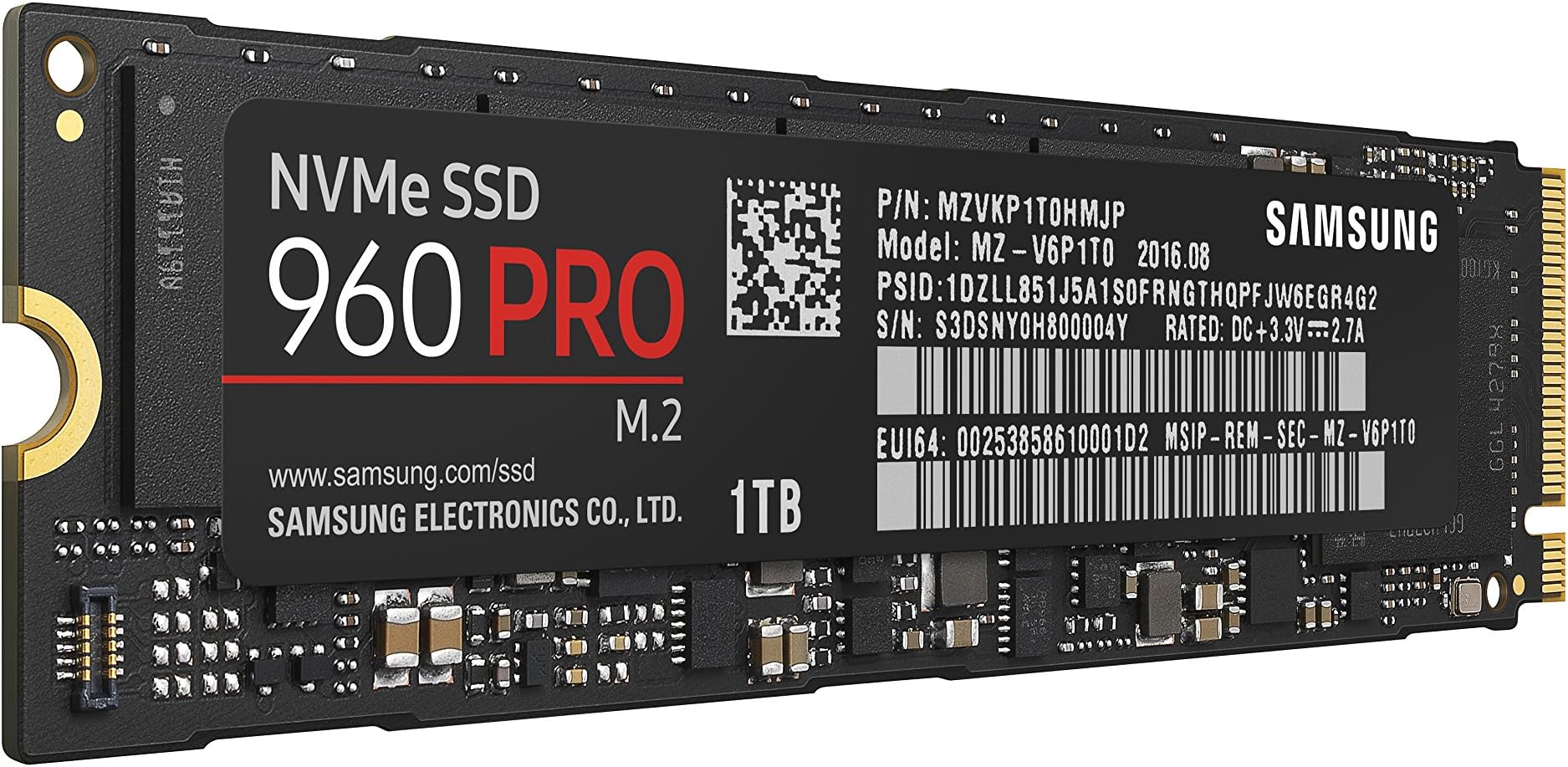
🚀 Upgrade to the Samsung 960 PRO — where speed meets power for the driven professional.
The Samsung 960 PRO 1TB NVMe M.2 SSD delivers top-tier PCIe Gen 3 x4 performance with blazing sequential read speeds up to 3,500 MB/s and random IOPS exceeding 400,000. Designed for demanding professionals and gamers, it combines massive storage capacity with cutting-edge technology, backed by a 5-year warranty and Samsung's intuitive Magician software for effortless maintenance and firmware updates.


| ASIN | B01LYRCIPG |
| Additional Features | Portable |
| Best Sellers Rank | #1,428 in Internal Solid State Drives #47,382 in Computer Internal Components |
| Brand | Samsung |
| Built-In Media | NVMe M.2 (2280) SSD & User Manual (All Other Cables, Screws, Brackets Not Included) |
| Cache Memory Installed Size | 1 |
| Color | Black |
| Compatible Devices | Desktop |
| Connectivity Technology | PCIe Gen 3 x4 lanes |
| Customer Package Type | Standard Packaging |
| Customer Reviews | 4.7 out of 5 stars 820 Reviews |
| Data Transfer Rate | 2100 Megabits Per Second |
| Digital Storage Capacity | 1 TB |
| Enclosure Material | Nand Flash |
| Form Factor | small form factor, tower |
| Global Trade Identification Number | 00887276185323 |
| Hard Disk Description | Solid State Hard Drive |
| Hard Disk Form Factor | 2 Inches |
| Hard Disk Interface | NVMe |
| Hard-Drive Size | 1 TB |
| Hardware Connectivity | PCIE x 4 |
| Hardware Platform | PC |
| Installation Type | Internal Hard Drive |
| Item Type Name | MZ-V6P1T0BW |
| Item Weight | 0.12 Pounds |
| Manufacturer | Samsung |
| Media Speed | 2100 megabits_per_second |
| Mfr Part Number | MZ-V6P1T0BW |
| Model Name | 960 Pro |
| Model Number | MZ-V6P1T0BW |
| Number of Items | 1 |
| Special Feature | Portable |
| Specific Uses For Product | personal, gaming, business |
| UPC | 887276185323 |
| Warranty Description | 5 Years/800TBW |
C**Z
Absolutely amazing !!!
PROS: • Unbelievably fast read AND write speeds • Noticeable difference in program startup times • Easy physical install • Samsung Magician and Data Migration software are worth using • 5 year warranty CONS: • Very expensive • Full performance may be limited on some systems or require workarounds to achieve max performance • Heat and power may be an issue for laptop systems I love the size and speed of my card. Windows boots up from a restart in just a few seconds, it's fantastic. HOWEVER, be sure that your motherboard isn't a dud at supporting NVMe. I bought a $200 board from Gigabyte, a gaming board, that occasionally decides that it doesn't detect any NVMe drives. I re-flash the board, and suddenly it recognizes the drive and boots up like usual. I've got 2 M.2 slots and it behaved the same way on both. It can't be the card if a re-flash solves the issue. Moral of the story: be sure you've got solid NVMe support before buying. Used as ZFS ZIL/ARC on home file server and as primary disk for workstation. That SSD rocks, except that even Pro series have not so good endurance (only 400TB lifetime writes). Good enough - all I/O intensive workload is at ramdisk. So, perfect for workstations with optimized I/O. Can't recomment it for enterprise servers. For high workloads there are relatively cheap SAS3 (12Gb/s) SSDs with 5 WPD (5 full rewrites per day) and 5 years warranty - that is 0.5*5*365*5=4562 TB. And it's not a high-end SSD - high end SSDs have about 15 PB lifetime writes for half-TB drive (30+ times higher endurance and only 3 times more expensive than 960 Pro).
R**L
If you have the correct M.2 slot on your motherboard, this is a great choice for screaming disk performance!
I was one of the folks that jumped into Solid State Drives (SSD) way back in the earliest days, and the M.2 "NvMe" devices (like this one) are the top-echelon of current SSD tech. NOT ALL MOTHERBOARDS have an M.2 connector, and NOT ALL M.2 connectors support the slower SATA M.2 speed PLUS the much faster NvMe (Non-Volatile Memory Express) standard that this product uses. The slower SATA versions of this product are the Samsung 850 EVO or 850 PRO models. If you purchase an M.2 SATA unit, the only thing you gain over the old-school playing card shaped SATA SSD is you lose the SATA CONNECTORS AND CABLES for a cleaner build. But you buy SSD for SPEED, so the NvMe drive is the call. Also the PRO model versus EVO uses better technology to maximize speed, while the EVO uses a software workaround to 'emulate' the Pro model performance. The 960 Pro is PCIe bus connected and bypasses the much slower SATA bus. This results in a vast difference in data throughput speeds, in my case is TRIPLE the data speed. Some (not all) M.2 connectors can accommodate both types of M.2 drives, check with your system manufacturer to ensure compatibility. You get what you pay for... when speed matters THIS MODEL is definitely the call. The two photos attached to this review show the HUGE speed difference between a pci-e SSD (Drive C: in photo) and a SATA SSD (Drive D: in photo). The drives are C: drive Samsung 960 Pro NvMe Pci-e and D: drive Samsung 860 EVO conventional SATA notebook SSD. Photo on LEFT is high speed test results, photo on RIGHT is slower speed conventional notebook SSD results. Pictures worth 1,000 words? Edit: After installing, be sure to pop by Samung.com and download their free Magician Software which will auto update your FIRMWARE for the device if needed. My SATA Samsung SSD (the very nice 860 EVO did NOT require updating, but the 960 PRO (NVMe drive the subject of this review, BADLY needed a firmware update to resolve some squirrelly behavior which was happening when closing certain apps, but appears to be a dim memory post-firmware update. The firmware updated from within Windows 10 Creator's Edition using Samsung Magician software, very easy and intuitive.
M**1
Works well, extremely fast, buy heatsinks for it immediately
Working perfectly several months later (just DO NOT update the firmware). I have it installed in a Linux system where it serves the dual role of root partition as well as VM backing storage for several heavily used VMs. It's so fast there's no way to tell that the drive is being shared, no VM pauses, no compiler slowdowns. The downside of all that speed, if you want to consider it a downside, is that I managed to eat through 1% of the drives rated lifetime (4TB of 400TBW) within 24 hours before stopping the poorly written process that was causing all the write traffic. Samsung drives are known for surviving well beyond their rated life, but that's also where the warranty ends, regardless of how long you've owned the drive, so be careful. The drive gets so hot it requires a heatsink, it's really not optional. Sure, it'll throttle itself to avoid overheating, but so would the main CPU if you left it in open air. Anything that makes this much heat needs a way to get rid of it, and SSDs tend to have shorter lives or die unexpectedly when the heat isn't properly handled. I bought some small pure copper heatsinks from Enzotech here (BMR-C1) and lined them up all the way down the entire stick, covering every chip, then I put a small fan inside the case positioned so that the airflow goes through the heatsink bars. It no longer throttles itself under load, and S.M.A.R.T. shows the temperature remaining well below the previous high points I was seeing, even when writing at the maximum speed. Note that there is a firmware update available that you absolutely do not want, the 3B6QCXP7 firmware has very serious problems and cannot be removed or reverted once the update is done. If you get a new stick with the 3B6QCXP7 firmware, you should return it immediately or contact Samsung customer support.
C**Y
AWESOME M.2 SSD, it's the BEST one to buy!!!
$629 is a LOT of money to me, so I consider this as an expensive item, too expensive. Having said that, it is also exactly what I needed, and it is SUPER FAST!!! I couldn't be happier with this purchase and when I build up enough money I will be ordering one more. If you are like me you will be searching all over the internet and visiting all the review sites for M.2 SSD vs SSD vs HDD vs BYOB vs WHOCARES. . . The bottom line is that after all the reading I did, trying to decipher all the graphs and charts on which drive is the best, whether or not this particular drive is worth the money, blah blah blah. It is worth every penny. Yes it's expensive, yes the reviews say the differences between this M.2 SSD and others is marginal, but in the end it is worth it. I run CAD programs and also all the new cool games out there, I have 64G Dominator RAM, and SLI'ed GTX 1080 graphic cards, and even with all that good stuff the biggest difference I noticed in performance was when I installed this 960 Pro. My boot is extremely fast, I don't have extra cables to manage, and it just works great. I would recommend this M.2 SSD to anyone that can afford it.
J**W
A premium NVMe drive for sure
I have been using 960 Evo's (non Pro) in my last three builds as the boot disk and man are they fast - Yes, noticeably faster than SATA SSD. This is my first "Pro" and its a bit faster yet in booting but, where it really shines is in workload usage doing large copy and writes. I am not a content creator and really don't have a "need" for the Pro version other than I like having the best. I do notice a upgrade in performance over the 960 non pro version but I am not sure that alone for me warrants the extra $100.00 in cost but, the extra uplift in amount of total writes it can do (lasts longer) does have value enough to justify the cost. I would say unless you are doing a workstation build or do a lot of content creation and video editing that you can enjoy pretty much the same speeds and performance daily driving from the non pro version and save the $100.00 up charge. However, if you simply want the best to have the best or, do a lot of serious disk intensive and large file copy workloads the Pro is a beast and will improve productivity, no doubt.
A**L
Trophy wife or PCIe SSD who needs one?
I had this drive installed in a Dell XPS. The Toshiba PCIe drive was fast about (1100mbs and ~600 on the write ) which is much faster than a mechanical and 2x faster than a SATA ssd. This drive is remarkable.... It's 3200mbs read and 2300write is blazing fast. I have a SATA 850 EVO (read write ~500mbs) in my other computer. Boot times are similar. The real power comes when reading or transferring very large files. With very large files or gaming, it's worth every penny. Is it needed for most? No, but neither is a lifted truck, a Harley Davison, a beautiful home, or a spouse who looks stunning but doesn't talk. Do we all want them, yes! Do we "need" them, nope. Apply the same rules here. One thing is certain. It's a lot less expensive than a divorce! Yes, a little tongue and cheek, but you get the idea 🤣
M**I
689 MB/s read and (I am not sure why my benchmarks are lower than others but anyway I am satisfied with the real life speed so it's fine with ...
Performance wise it is 5Stars.... I only gave it a 4 star because of the price I had to pay.... I purchased it last Jan 2017 for $1,495.17 (2TB) including taxes from US... then shipped it here in colombia and I had additional 330USD tax...+shipping to from US to colombia 40 USD total of 1,865USD. My Laptop Thinkpad P50 with Intel Xeon E3-1505M and 64GB DDR4 ram only costs me 1,600USD-Tax and shipping included(Black friday sale 2016). Total of my current laptop price = 1,865 + 1,600 = 3465USD -Performance Review: -It is insanely fast. I am an Engineer who deals with a lot of data,spread sheets,Excel,Access,SQL , MapInfo ,macro and scripts, Unrar/Unzip is a daily task. Running Microsoft access tools and Microsoft SQL Server is time consuming (Database alreday in 60gb filesize and increasing daily by 300MB). -Running all my access macro and SQL queries are much faster now. -A script that usually finished in 50minutes now only in 20 minutes -Loading google map with thousands of kml objects is now very fast -loading Map info with multiple layers and many tabfiles is not a problem anymore -20 excel files with csv files with 200mb file size is not a problem anymore. -Unzipping and Unrar is faster now(but not that much i but it is faster) BenchMark: Using Samsung Magician: 2,921 MB/s read and 2,008 MB/s write DiskMark64.exe: 2,689 MB/s read and (I am not sure why my benchmarks are lower than others but anyway I am satisfied with the real life speed so it's fine with me) If someone from samsung/anyone can help me make this benchmark higher please let me know.
M**T
In a word: FAST.
Samsung drives are the top of the market for NVMe drives. They are extremely fast, have high endurance, a long warranty, and a very excellent reliability record. Attached are two screenshots from AS SSD, a benchmarking program. The first is of this drive, the second is of a 1TB Samsung 850 Evo. I already had the 512GB model for my OS, but when Amazon had the 1TB on an excellent sale during the 12 Days Of Deals, I jumped at it. Now, there is a debate as to how much real world improvement most people will see from an NVMe drive, and the answer is that most will not experience much, if any, benefit over a SATA SSD. These high performance NVMe drives are aimed at professionals who will hammer them with gigabytes per second of I/O operations. However, NVMe drives connect directly to the motherboard, either via integrated slot or adapter card, so for small cases the lack of cables is a great asset.
B**N
FAST!
Brilliant drive, can't fault Samsung. If only I'd held on a couple of months, I would get the new 970 Pro instead but don't let that distract from the quality of these drives. Recommended to use a motherboard with the PCI lanes direct to the CPU, and an M.2 heatsink if the board has one.
U**L
von Warehouse Deals gekauft
Dieser Stick läuft wahnsinnig gut unter Ubuntu 16.04 ohne Treiber zu installieren. Habs im NAS, das hängt über 10G-SFP+ an einem Switch. Habe von 8 Rechnern gleichzeitig jeweils über 1000-BaseT 113MB/S geschrieben. Die 960Pro schreibt es ohne Murren weg. 4K Dateien in Dauerschreibleistung: 330MB/s !!! Achtung: Wenn sie nicht gekühlt wird lässt die Schreibleistung nach einiger Zeit nach! Darum ein Stern Abzug. Ich hab das Problem gelöst in dem ich den direkt benachbarten CPU Lüfter um 90 Grad gedreht habe, so das er die Kaltluft direkt über der SSD ansaugt.
J**G
Simplemente el mejor….
A primera vista el SSD NVME M.2 960 PRO 512GB de SAMSUNG luce muy bien en cualquier configuración con su color negro mate da la sensación de ser un producto Premium, las velocidades de lectura y escritura son muy superiores a los SSD tradicionales, es importante leer la documentación y descargar los componentes de la página oficial del fabricante, dependiendo en qué equipo lo instales puede ser muy fácil o requerirá de paciencia y conocimientos, instalar Win10 fue muy fácil aunque por lo menos en mi caso al momento de reiniciar para terminar la instalación el equipo no reconocía el disco, cosa que tuve que solucionar entrando nuevamente a la BIOS, como dije es para verdaderos entusiastas del performance que le dedicarán tiempo hasta que se instale todo correctamente. Definitivamente lo recomiendo es el mejor en su categoría por precio y beneficios.
F**O
Super
Super, guarda gli altri componenti. Gira ininterrottamente dal 2017 senza aver mai perso nemmeno un bit!
R**S
高速ですが、今のところ再起動ができません。
Intel 750 400GBからの換装です。 シーケンシャルリードが3500ということで、DMI帯域を考慮し、玄人志向 STANDARDシリーズでPCIeに変換して使用しております。 論理速度としては十分なはずですが、750から劇的に変わったとは言い辛い。 ただマザー(R5E)との相性なのか、それとも玄人志向の返還アダプタとの相性なのか、再起動するとこのデバイスを認識しなくなる症状がでています。(一度シャットダウンし、電源を入れるとなぜか認識する)違うメーカー変換アダプタは既にポチってあるので、もしこの不具合が改善すれば追って報告いたします。 問題視されている発熱ですが、言うほどでもない温度でした。ただし、わたしは暖房器具を持っていないので室温は冬の外気温+α程度ですが(苦笑)
Trustpilot
5 days ago
1 month ago