Buy anything from 5,000+ international stores. One checkout price. No surprise fees. Join 2M+ shoppers on Desertcart.
Desertcart purchases this item on your behalf and handles shipping, customs, and support to Senegal.
🎵 Preserve your analog treasures effortlessly—digitize your soundtrack to the future!
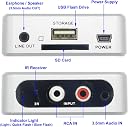
The HopCentury Music Digitizer CD Recorder converts analog audio from cassettes, CDs, and other devices into MP3 files saved directly to USB or SD cards without a computer. Featuring 3.5mm and RCA inputs, remote control operation, and robust power-failure file protection, it offers a user-friendly, versatile solution for preserving and sharing your vintage audio collection.


| ASIN | B01NCLFCYV |
| Audio Output Mode | Stereo |
| Best Sellers Rank | #11 in MP3 Cassette Player Adapters |
| Brand | HopCentury |
| Brand Name | HopCentury |
| Compatible Devices | Cellphones |
| Customer Reviews | 4.0 out of 5 stars 590 Reviews |
| Interface | USB |
| Interface Type | USB |
| Item Dimensions L x W | 2.44"L x 2.59"W |
| Item Weight | 1.76 ounces |
| Manufacturer | HopCentury Electronic Co.,Ltd |
| Material Type | Plastic |
| Maximum Supply Voltage | 5 Volts |
| Minimum Supply Voltage | 5 Volts (DC) |
| Model | 241B |
| Number of Channels | 2 |
| Number of Pins | 4 |
| Part Number | Audio-Cassette-Converter |
| Smart Home Compatibility | Not Smart Home Compatible |
| Unit Count | 1 Count |
A**R
Audio quality is just okay but it is very user friendly.
I order this unit to use for a commercial PA system installation to record the 8 microphone mixer output in a board meeting room. I permanently installed it by the recording secretary's desk and used a flash drive that has a big red read/write activity LED so that there is no mistaking as to when it is recording, or not. I did not need to use the IR remote in this application, but can confirm that it worked for all the functions it provides. However, it did seem very direction sensitive. Instead, the front mounted push button worked perfectly for her to "push once" to start recording and "push again" to stop recording. Which is all she needs to record the meetings. I have not tested it for music recordings, so I can not attest to the recording audio quality. It does fine on the voice grade recording application that I am using it for in this project. The best, and most unexpected feature, was when I tested it for power failure behavior. Since the board meetings can last as long a 6 hours, I feared that the Mp3 audio file would get corrupted if interrupted by a commercial power failure. As it turns out, when its power gets disconnected, it stops recording and automatically "closes" the session with only loosing the last 2 seconds of the audio recording. When power is restored, just push the start/stop button to resume recording as normal. There are not even any formatting issues caused to the flash drive by the power disconnect. That was critical for my application. I could not afford for the audio file to get corrupted by a power outage five hours into the meeting and loose everything up to that point. Upon the first recording on a new flash drive, it creates a new folder. Thereafter, it creates new Mp3 files inside that folder for every subsequent recording session which of course, can be renamed later. However, this unit requires the flash drive to be formatted in FAT 32 only. It will even create its new folder and files even if there are other existing files on the drive you are using without disturbing them. They do recommend to use a high level line output to drive their audio input jacks. I first tried to use the "recod out" line level from my PA amp and got recordings that were 15 db below normal. I then switched to a spare headphone output I had availible on the mixer and that worked great at about a 70% volume level. This unit worked perfectly for my application, is very inexpensive for what it does and is very user friendly. I would highly recommend it for any voice grade simple start/stop idiot proof recording applications.
V**.
Quick and easy way to convert cassettes, records, and CDs into stereo digital MP3 files
I had been searching all over the web for a way to convert all my cassettes to digital MP3 files, and all I could find were cheap cassette player-converters, most of which required a connection to a computer and conversion software. I didn't want to tie up my computer and my time with these. I ordered the HopCentury digitizer for a try. It works great and with little effort. Just run the output line or lines from your cassette, CD, or record player to the digitizer, and insert a USB flash drive. Start the player and click the button on the converter. That's it, and walk away if you're doing a long recording. I press the button again on the box to stop the recording, and my thumb drive is ready to transfer the audio file to my computer or MP3 player for playback. Not sure what the manufacturer meant by a "duo-mono" output, but I am getting full stereo in my new MP3 files with left and right channels. With this small converter box, I can use my own high quality player instead of a cheap converter player. If you have many hours of old cassette recordings, records, and/or CDs that you want to be digitized, this is a highly recommended way to do it. UPDATE: I noticed that my record turntable when hooked up to the digitizer creates an electromagnetic buzzing noise. I unplugged a peripheral speaker connected to the turntable, and now no buzz. Meanwhile, my cassette deck works fine.
T**Y
Gets the Job Done in a Pinch
I'm not a big audio guy. I bought this to capture some audio off my phone to make some mixed cassette tapes. The paperwork says that in captures sound at 128Kbps @ 44.1KHz which is the top out point for cassettes, but it's mono sound not stereo and sounds hollow and a bit tinty upon playback. This thing needs power to operate and when you're listen to the music or whatever thru the headphones before you start recording sound you hear a buzz. It goes away once you start recording, but I believe that the audio circuitry could use some shielding front the power supply. In the end, I don't regret my purchase for the price, but I get better results just plugging an aux cord from my phone into the mic port on my cassette player and hitting record.
C**Y
Pleasantly Surprised!
I brought this with the intent to record certain songs on on-line mixes that I like. Without having to download the whole mix. I read some of the mixed reviews so I didn't have a lot confidence in this doing what I wanted it to do. I'm happy to say other than recording at a little lower volume than I would like, it did exactly what I needed. Recorded certain songs on off the online mix that I like. Which in turn, I was able to upload these songs into my harddrive. If it recorded at a little higher volume it would get 5 stars.
R**R
Works Great
This met all expectations. One thing I would note however is that although the instructions recommend setting the CD player to full volume that resulted in some slight distortion on some of the treble, however recording with the volume set at around 80%-90% (eg 25 out of 30 on volume control) the recorded sound was crisp and clear as a bell. My car CD stopped working but now I can play my music off flash drives using the aux port. The sound quality was exactly the same as if I was playing the CD. Very happy with this converter.
J**K
Switches to playback mode after about 4-1/2 minutes of recording.
Very easy to use, and the quality of the recording is much better than a cassette tape player to MP3 converter that I had also tried. But when in use for recording an analog input, the music digitizer transfers itself from recording mode to playback mode after about 4-1/2 minutes of recording. So it is not useful to me. I want something that can transfer a full CD disc of music to a flashdrive or SD card. I don't know if all of these do this, or if I just got a bad one. I would send it back, but I waited too long to try it out, and my return time ran out.
E**D
functionality
For the price - excellent product. Versatile, easy to use.
N**E
This takes a little experimenting.
There are a few tricks to using this. The last review I gave was a bad one because I hadn't figured it out yet. Once you figure it out, it's amazing. The only downfall is that you have to record the old-fashioned way, one song at a time, and played all of the way through.
F**I
Buen precio, buena calidad y es fácil de usar.
Buen precio, buena calidad, cumple mis expectativas, sobre todo en modo manual y a control remoto. Aunque no esperaba que tuviera modo automático, no he logrado que grabe bien y de cortido,me corta las camciones o no las guarda todas.
E**O
Excellent to listen to your home music in your car
It works excellent for listening music in the car. I use a separate usb drive to do the recording. Once I am done, I copy the files into another usb device. Then I reformat the usb drive to have it ready for the next recording session. Remember to not to delete the files. Reformat the device instead! I learned this the hard way. 5 stars because this solved my need to have copies of my vinyls, my CDs, or any other music source, to play while driving.
A**7
يجب اتباع التعليملت الخاصه بالتسجيل
جهاز رائع وسهل الاستخدام
C**N
QUALITÀ PREZZO, FA IL SUO LAVORO.
NON MI ASPETTAVO NIENTE DI PIÙ. QUALITÀ PREZZO; FA BENE IL SUO LAVORO.
B**R
Traumhaft gut!
Lange habe ich danach gesucht. Ein quasi Gegenstück zum Kassettendeck, um den Ton vom DVD Player/Recorder als MP3 aufnehmen zu können OHNE den PC dazu nutzen zu müssen. Das kleine unscheinbare Kästchen ist exakt das, was ich lange, sehr lange gesucht habe. Aber nun zum Gerät selbst... Dieses kommt fein verpackt aus Hongkong - STOP, wer jetzt sagt "Oh Gott Chinaschrott" liegt hier völlig falsch!!! Die Lieferung beinhaltet den Audiograbber, ein USB Kabel, sowie eine Klinkenverbindung und eine Fernbedienung. Klar, dasss auch eine Bedienungsanleitung dabei ist. Die ist allerdings nur in Englisch und Chinesisch. Das Gerät selbst ist - na klar aus Plastik - aber sehr gut verarbeitet. Ein USB Netzteil mit 1.000 mA Leistung fehlt ist aber zum Betrieb nötig. Ebenso ist kein Chinchkabel, SD Karte und/oder USB Speicherstick mit dabei. Diese Teile sind, sofern noch nicht zu Hause vorrätig, gleich mitzubestellen. Am Gerät selbst: Audiosignal Eingang (INPUT) über 3,6 mm Klinkenbuchse und Chinch Audiosignal Ausgang (OUTPUT) - Speicherung als MP3 Datei mit SD-Karte oder USB-Stick. Leider ist nicht erkenntlich, wie gross die maximale Speicherkapazität der Speichermedien sein darf. Ich hab's mit einem 16GB USB-Stick und einer SD Karte mit gleicher Kapazität probiert und die wurden problemlos akzeptiert und beschrieben. GANZ WICHTIG! Vor Nutzung der Speichermedien (auch wenn diese schon vorformatiert sind vom jeweiligen Hersteller) erst formatieren mit FAT32, sonst erfolgt keine Aufnahme. So, jetzt SD Karte oder USB Stick am Audiograbber einstöpseln. Danach den Audiograbber mit Strom versorgen (5V - 1.000 mA). Jetzt noch per Chinchkabel oder Klinkenbuchse das Toneingangssignal der gewünschen Quelle (CD/DVD Player) einspeisen. Sobald der Audiograbber mit Strom versorgt wird, leuchtet eine grüne LED permanent auf. Zum Starten der Aufnahme entweder den roten Knopf auf der Fernbedienung drücken oder direkt den am Audiograbber, dann blinkt die grüne LED und die Aufnahme beginnt. Soll die Aufnahme beendet werden, einfach nochmals den Knopf am Audiograbber selbst oder den roten auf der Fernbedienung drücken - die grüne LED hört dann auf zu blinken. FERTIG. Sind alle Aufnahmen wie gewünscht erledigt, kann die SD-Karte oder der USB Stick entnommen werden und die erzeugten MP3 Dateien mit einem entsprechenden Player wiedergegeben oder am PC nachbearbeitet werden. Sehr schön ist auch die Monitorfunktion, mit der der Grabber ausgestattet ist. Das heißt, man kann einen Kopfhörer am Grabber anschließen und während der Aufnahme mithören, was gerade aufgenommen wird. FAZIT: Verhältnis Preis / Leistung absolut TOP! Wer gerne Soundtracks von DVD & Co als MP3 Datei haben will, bekommt sie hier ganz einfach, unkompliziert und zu einem TOP-Preis. Für mich eine absolute Kaufempfehlung!
Trustpilot
2 months ago
2 weeks ago