Desertcart purchases this item on your behalf and handles shipping, customs, and support to Senegal.
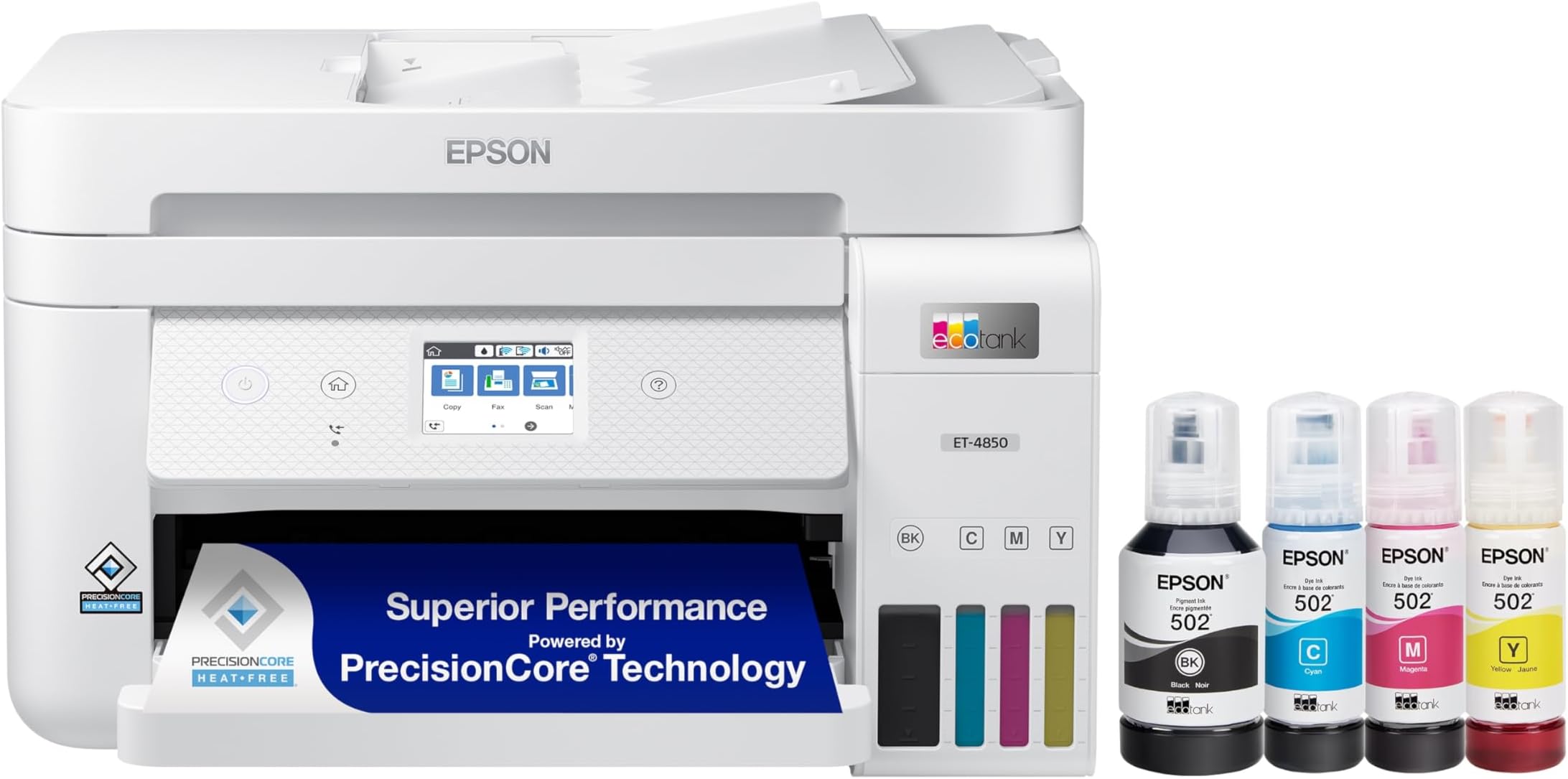
🖨️ Print smarter, save bigger — the EcoTank ET-4850 is your office’s new MVP!
The Epson EcoTank ET-4850 is a wireless all-in-one inkjet printer designed for home and small office use. Featuring cartridge-free refillable ink tanks, it delivers up to 15.5 pages per minute in black and 8.5 ppm in color at a high 4800x1200 dpi resolution. With automatic duplex printing, a 250-sheet capacity, and versatile connectivity options including Wi-Fi, Ethernet, and mobile apps, it combines cost-efficiency with professional-quality output and multifunction capabilities like scanning, copying, and faxing.


| ASIN | B096N9JMXF |
| Additional Printer Functions | Copy, Scan |
| B&W Pages per Minute | 15.5 |
| Best Sellers Rank | #41,965 in Office Products ( See Top 100 in Office Products ) #51 in Ink Tank Printers |
| Brand | Epson |
| Built-In Media | EcoTank ET-4850 all-in-one, manual, power cord, 1 bottle of 502 Black (127 mL) and 1 bottle each of 502 Cyan, Magenta, Yellow (70 mL) (2) |
| Color | White |
| Color Depth | 24 bpp |
| Color Pages per Minute | 8.5 pages_per_minute |
| Compatible Devices | Devices with Wi-Fi or Ethernet capabilities |
| Connectivity Technology | Ethernet, Wi-Fi |
| Control Method | Voice |
| Controller Type | Android |
| Customer Reviews | 4.1 out of 5 stars 1,199 Reviews |
| Duplex | auto |
| Hardware Interface | Ethernet |
| Ink Color | CMYK |
| Item Dimensions D x W x H | 16.4"D x 19.8"W x 10"H |
| Item Type Name | Inkjet Printer |
| Item Weight | 14.8 pounds |
| Manufacturer | Epson |
| Maximum Copy Resolution Black and White | 600 |
| Maximum Copy Resolution Color | 600 x 2400 dpi |
| Maximum Copy Speed Black and White | 15.5 pages_per_minute |
| Maximum Media Size | 8.5 x 14 inch |
| Maximum Print Resolution Black and White | 600 x 2400 dpi |
| Maximum Sheet Capacity | 250 |
| Maximum print Resolution Color | 600 x 2400 dpi |
| Model Name | EcoTank ET-4850-W |
| Model Number | ET-4850 White |
| Model Series | EcoTank |
| Number of Ethernet Ports | 1 |
| Number of Trays | 1 |
| Other Special Features of the Product | Auto Document Feeder, Network-Ready, Refillable Ink Tank, Touch Screen |
| Output sheet capacity | 250 |
| Paper Size | 3.5" x 5", 4" x 6", 5" x 7", 8" x 10", 8.5" x 11", 8.5" x 14", A4, A6, half letter, executive, user definable (3.5" x 5" – 8.5" x 47") inches |
| Print media | Envelopes, Glossy photo paper, Paper (plain) |
| Printer Connectivity Type | Ethernet, Wi-Fi |
| Printer Output Type | Color |
| Printer Type | Inkjet |
| Printing Technology | Inkjet |
| Processor Count | 1 |
| Resolution | 4800 x 1200 |
| Scanner Type | Flatbed |
| Series Number | 4850 |
| Special Feature | Auto Document Feeder , Network-Ready, Refillable Ink Tank, Touch Screen |
| Specific Uses For Product | Office |
| UPC | 010343957794 |
| Unit Count | 1 Count |
| Warranty Description | 1-year limited warranty |
| Warranty Type | limited warranty |
A**S
10 Million Stars - Buy this one NOT HP for Macbooks
This is my first Epson. And I want to share the full story of how we semi-accidentally ended up with this awesome brand of printer. It's pricey but so worth it. I waited about a month to write this review. Backstory: Originally, we had an HP 2540 inkjet printer that was supposed to be compatible with airplay but was plagued with connection issues for most of its usable life. It was probably about 10 years old by the time we replaced it, but the issues began about a year or two after owning it. And the issues got worse when 5g was rolled out. It seemed like it was only compatible with 2g. Why HP Sucks: I work from home and normally directly connect to ethernet to ensure that my speeds are as high as possible. However, to use the old HP Inkjet, I had to turn on wifi from my Macbook (on top of ethernet) and use stupid HP apps as a go-between to bridge the connection. I'm no computer scientist, but even I can recognize poor design and a technological bandaid when I see it. And don't even get me started on how fast it blew through expensive ink cartridges. $50-60 for black $50-60 for tri-color. You print 20 pages of normal printing and it starts saying you are low on ink. That's way too much, mkay? Eventually, it got to the point where I had to do factory resets nearly every time I wanted to use it. Also, the paper feed tray hinge hooks had broken, and the tray was literally being held together with duct tape. It was stored in one place, rarely moved, and when it was moved, it was done so gently. I think the hinge broke because the plastic just got old, cracked, and dried out. Why Bought another HP and Then Returned it, Before Buying this Epson: I am a longtime Apple person. Tend to default to buying items that are vetted/sold by Apple when they are connecting to other Apple products. And, unfortunately, the Apple store recommended the HP Envy. Literally the day I unboxed the HP Envy, it was giving me the same connection issues as the old HP inkjet. That's when I realized it wasn't the wifi compatibility. Nope. HP is just poorly-designed, ink-guzzling garbage. Research Methods // Pros and Cons: I discovered it with internet research (ranking criteria: NOT HP, compatible with PC and Mac, customer ratings, and price per print). It came down to a few different Epsons and a Cannon, but the reason this Epson won was that it has affordable ink and the ink lasts a long time. Why this Printer Rocks: 1) Ink is relatively cheap by competitor comparison 2) Ink lasts a really long time 3) it automatically prints double-sided. This blew my mind, because I didn't need or pay attention to this feature, but now I can't imagine not having it. It's saving so much paper!!! 4) Print quality is effective for basic print needs. Prints text without white lines. 5) Installation was easy and it worked as expected from day one. 6) It receives print jobs without me needing wifi on my macbook 7) it prints easily from my iphone 8) Print speeds are much faster than Inkjet 2540 9) Paper tray location is under the printer, which means you are not leaning a paper tray against a wall. And it probably won't crack apart like the plastic hinges did on my old printer. 10) Replacement Ink is easy to install in the reservoirs. Because you get a reservoir for each tri-color, your color printing will implicitly last longer. And there are aftermarket options for ink. 11) You will save so much paper. Good for the environment and your budget. Possible Negatives: 1) The initial setup was long (plan on at least 30 minutes to install firmware and test print quality). You are warned not interrupt the setup process, because it could mess things up. Follow directions and you will be fine. 2) The print quality test print will test your patience, especially if you have a hard time seeing. This is because it will generate a list of shapes and ask you which ones printed correctly. You then punch in the number on the printer to confirm alignment. The messed up shapes are only messed up by a millimeter of difference. So it can be hard to see the differences. 3) Photo-quality printing does not appear to be its strong suit. However, printing at pharmacies or online is so cheap. Just do it there. 3) It's a little bulky height-wise, but fits on top of a standard bookshelf. 4) Price is high/prohibitive. But you get what you pay for. I truly believe this is a quality product and you will save money over time because of the efficiency of ink use, low cost of replacement ink and efficient use of paper through automatic duplex printing.
D**.
“Excellent all-in-one printer — low ink cost, solid performance”
I purchased the Epson EcoTank ET-4850 to replace my old cartridge printer, hoping to save on ink costs and get reliable all-in-one functionality. After several months of use, here’s what I’ve found: Pros: • The EcoTank system really delivers: I’ve printed a lot of pages, and I haven’t had to refill the ink yet—this is saving me a ton compared to cartridges. • Good print quality for documents: text is sharp and clean even at small font sizes. • Versatile machine: it can print, scan, copy, and fax, and includes an ADF (automatic document feeder) which is very handy. • Strong connectivity: WiFi, Ethernet, and USB — and the Epson Smart Panel app works well for printing from my phone. • User interface and ink tank visibility are convenient: I can see the ink levels easily and the touchscreen is responsive. Cons: • Photo printing is decent but not as exceptional as a dedicated photo printer — some color hues look slightly off or saturated. • No automatic duplex scanning (i.e. scanning both sides of a sheet in one pass) — you have to manually flip pages for two-sided docs. • It’s a bit on the heavy side, and initial setup requires care to ensure ink lines and alignment are correct. • The startup from sleep mode can be slow before the first page prints. This printer is a fantastic choice if you want to cut down on ink costs, and need reliable all-in-one functionality. It’s not perfect for high-end photo tasks, but for general office and home use, it more than delivers.
J**.
Good home office printer
It came well packaged and in good order. A lot of packaging tape to remove but not a big deal. The set up takes a little while but is straight forward if you scan the QR code on the Set-up instruction sheet. It will guide you step by step on your phone. Filling the ink tanks was easy and the system to perform it is good (no mess) since not one drop was spilled anywhere. After completing the set up, it will ask you to perform the printing alignment, which takes another few minutes, but is critical if you want quality print outs. If you are setting up with WiFi functions through your network, it is critical to then go to your router settings and set up an isolated, static IP Address (DHCP IP reservation) for the printer. If not, you may have periodic interruptions of connectivity causing frustration and constant re-booting your pc and router. You can find out how to do it by researching online. The feeder is kind of touch and go, but once you figure how to best set up the sheets, it works ok. Yes, it is a little bit noisier than I’d prefer, but that doesn’t bother me too much. I’m more concerned about the quality… which is good, again, if you set the alignment process per instructions. The ink appears to last a good while. I’m sure I’ll save money over time vs the costly cartridges on my “retired” unit. I will use only Epson oem ink since it’s not too costly and I don’t want clogged nozzles, and/or cheap ink runs on my documents. The Epson ink dries instantly and is good quality. The printer functions work perfectly, as well, from my iPhone when connected to the home network.
P**S
The bottom paper tray feeder on the ET-4850 will eventually fail to load paper
The EcoTank ET-4850 bottom paper tray feeder style printers are good printers, but won't last that long. Why? Because the bottom paper tray feeding system is flimsy and will eventually fail to feed the paper to print. I went through two of these printers within two years and this problem occurred on both printers essentially making the printer useless. After so many prints the paper from the bottom tray will stop feeding through the printer and will jam every single time. I've tried solutions like cleaning the rollers and nothing solved the issue. I find that this is a major flaw in the design of this model of Epson EcoTank printers. I also assume that the ET-3850 model, which is the non-touch screen version of the ET-4850, has the same paper feed fail flaw. If I weren't to encounter this eventual paper jam problem of these printers, I would probably have given it a five star review. They are good printers overall. It's just when the paper fails to feed, the printers can't be used. I use this printer to make stickers and buttons. The sticker paper is expensive. When the paper keeps jamming, it ruins my sticker paper and that's money down the drain. Also, when the pages fail to feed, it's time to get a new printer which means more money wasted.
K**R
Easy Setup
I just got my printer today. I was a little concerned about setting it up because of a review I read. But I have never had a printer that was so easy to setup. I followed the instructions that came with the printer. Then I downloaded the Epson Smart Panel on my phone and it walked me through everything. I even printed from my phone. I only have two things that I would have changed. When printing, there are not a lot of options on paper. I print on card stock paper a lot and this printer does not have that option that I have found. But it does print nice on the card stock. The other thing is when I go to print a document or picture on my phone I could not find an option to size the picture so it will print. It tells me that the document or picture does not match the paper in my printer. Other than those two items and they are not deal breakers for sure, I satisfied. If anyone has help for me on these issues, I would like to know. I like it so far. I like that it is a little smaller than my previous one. Filling the ink was easy and not messy like my other printer was. I was used to having the paper load from the back but I like that on this machine it loads in the front called the Cassette. It also holds more paper than my precious one. So over all, I like it. I have done some printing on it and have had no problems. I would definitely recommend it to others.
R**K
So far, vastly superior to the Canon Pixma it replaced.
Set up: The biggest problem I had was expecting it to be much harder than it was—"This seems to simple and easy. What is the documentation not telling me?" The documentation was also written by someone who knows English. It's only shortcoming is that it's a PDF file. However, it's well enough put together that cross-referencing is easy. Unit has a nice, small footprint considering everything it does. ONE (YAY!) paper tray with plenty of capacity. The touch screen can swing out and up if the printer is below eye level, but it also works perfectly if left flush with the front of the printer. For us, this is great, as the printer sits on a rack at about eye level. The touch screen is small, but easy to read and very well designed. Ink filling is very different if you are accustomed to ink cartridge printers—and frankly, easier with less mess! The only problem we foresee is buying more Epson branded ink. The Epson web site may just not like our browser. We have plenty of time to resolve the issue—the ink reservoirs are ENORMOUS compared to cartridges. It will be quite a while before we need more. We haven't tried printing on high quality paper or glossy photo paper, but the print quality is still quite good, more than adequate for our needs. Extrapolating to better paper from the print quality so far, it might well be adequate for most DTP. Online reviews we've seen indicate that photo print quality is quite good. The only thing we don't like about it is that it won't automatically turn on when a network computer sends it a document.
L**.
Review of Epson ET4850, install, WiFi, succeeded first try. Aligning print heads was a challenge
This November 2023 purchase of an Eco Tank 4850 was our second EcoTank having purchased the first shortly after these printers hit the market. I was replacing a finicky Canon printer that had a lot of difficulty in staying connected to WiFi. The overall installation process was both quick with only a couple of hiccups in getting the printer to connect to my HP Envy laptop. Initially the laptop found and installed the Eco Tank fax printer that I promptly deleted. Once I did that the paper printer was located on our network and installed. Making the necessary WiFi connection needed to facilitate AirPrint from iPads and iPhones also succeeded but with a bit more effort due to the difficulty in choosing the best configuration of images on the test print because they were all pretty close to “good” at the start. I have printed documents and photographs on regular and premium paper along with card stock and photo paper with satisfactory results. While this particular model appeared to hit the sweet spot between function (touchscreen controls, auto 2-sided printing, sheet capacity) and price and there are versions that cost and do less as well as versions that cost and do more, I am quite happy -so far. My only disappointment is that printer throughput seems slower than the speed of the Canon printer that it replaced. It is also noteworthy that the biggest drawback to the first Eco Tank we bought relates to our being away from our home during the summer months when that printer is unused. The “Genuine” Epson ink in that printer dries up requiring quite a bit, time and wasted test paper to get the original Eco Tank to again print properly. At this early point, I am hoping by now Epson has fixed that problem by modifying the ink, automatically printing test pages before ink has dried or something else. Lastly, compared to my old Canon printer, the per-page cost for a color print is minimal. Should you decide to give a tank printer a try be sure that what you order has all of the functions and features that you need. Less expensive models have fewer functions. I have now used this printer for quite a while since I first put it in service. I have a similarly aged HP printer in an office in a mountain cabin and recently had to pay about $100 to replace some short-lived printer cartridges after a nefarious HP firmware update killed off the ability to use better and less expensive third party ink cartridges - so, I took advantage of the recent Amazon days and bought another Epson ET 4850. I love that printer and its almost endless inexpensive ink bottles.
R**G
Great Desk Top Printer
I used to have the ET-3850 printer for several years. After thousands of sheets passing through the system it finally quit. I bought the next generation of this model, the ET-4850 and it continues in the tradition of a great desk top printer that spits out quality prints. I like the fact the black ink is highly pigmented and the copies of my pen and ink works look great and so far seem to handle being hung on the wall and occasionally subjected to sunlight. I have already run several reams of paper through the printer and have yet to have an issue with feeding, paper crimping, failure to accept the inks, or any other issue. I have found this to be an excellent printer for my needs and the cost was better than several other brands I looked at.
J**F
Love it
I love my new printer. I waited till it came on sale after Christmas and I got an awesome deal on it. I love that there are no cartridges and when filling the ink tanks it stops all by its self when the ink is full. I like the fact it holds 250 sheets of paper. It prints way better than any other printer I’ve ever bought before.
S**S
Excellent
Item came on time, secured and well packaged. This was my first epson printer and it’s easy to set up, there’s a little of getting used to this printer but as soon as I’ve been using it 1-2 times everything get’s easy.
R**Y
Awesome printer
Finally a printer with no ink cartridges! I downloaded the installation app on my iPhone and followed the step by step “chat” style directions and bam!… installation was flawless. The only issue was wifi connection with my 5g router. It’s didn’t work so I switched to 2.4g and when smooth after. Filling up the ink in the printer was really slick. No mess. The printer even controlled how much ink was poorer in. Just like gassing you car at the gas tank, when is was full, the ink stopped flowing. Very cool. Printing is a bit slow for full colour images but for the price of this printer is well worth the wait. Installing on our Macs was very easy. It came with a CD for Windows (so 1990s!). Just get a Mac! Anyway, I love my Epson. This is how consumer electronics experience should be like.
K**S
Received Open Box with Empty Ink – Printer Would Not Work at All
I was really looking forward to using the Epson EcoTank ET-4850, but unfortunately the experience was disappointing right from the start. The unit I received appeared to be an open-box item, and the ink bottles were completely empty or missing. When I tried setting it up, the printer would not function and kept showing an error message asking to contact support. I went through the setup process carefully, but it still wouldn’t print at all. For a new purchase, this was very frustrating, especially for a printer in this price range. I had to contact support for the first time and ultimately return the product. Very disappointing experience and not what I expected from Epson.
K**.
a good printer for home use
First impression from this printer is "wow that thing is small!" This must be the smallest office printer in existence. It is smaller even than my current printer, a Canon MX870 which is a home-use printer. Here's the summary: this is not an office printer. It is way too small, it is way too slow, way too difficult to use via the tiny touch-screen display, and it doesn't do double-side scanning/copying. Also, there is no manual-feed paper tray. And it is way too expensive for what it is. It does, however, work well as home-use printer and maybe a home office printer for light duty, provided you can afford it. My current printer is a Canon MX870: I bought that thing almost 15 years ago for about $200 and it has been printing all this time. It is still printing, and well, but all drivers for it are either long-since defunct or about to become so, and it is increasingly difficult to find cartridges for it at a reasonable price: the Canon ones are long since discontinued, and the third-party ones are twice the price they should be when they can even be found. The Epson ET-4850 is meant to be a direct replacement for the Canon. Imagine my surprise when this printer costs almost 3x as much while providing roughly the same features. Also, I was quite surprised to see that a supposedly "office use printer" can't print from or scan to a thumb drive. This one had me scratching my head: why? With this printer it's The Cloud or nothing. Also, its ADF cannot do duplex scanning, which the Canon was perfectly able to do as a home-use printer. That's a bummer, but any other current generation printer in this category and price range, including from Canon, is equally unable to do double-side ADF scanning. And don't get me even started on the lack of manual-feed paper tray: I am guessing offices nowadays don't print envelopes anymore? So while the printer is really nice and is faster than my Canon, especially in duplex printing, it is part of a trend I've been observing with a lot of electronics: things are getting more expensive for the features they deliver. I enjoy printing and scanning from the cloud, mostly because I hated running around with a thumb drive to do so with the Canon (since its scanner driver is dead), but I am surprised I now need a second device to do that. I am hoping against hope of a similar longevity from the Epson, but something tells me the Canon would outlive it too. This one is way too dependent on cloud-based services which Epson Connect integrates for you. In other words, this printer becomes a brick when Epson decides to drop it. EDIT: Double-side scanning and copying is possible from the glass, but not the ADF. Printing envelopes is possible from the paper tray once you remove all the paper. The printer only has a radio for the 2.4Ghz band, which doesn't like sharing it with 802.11G devices, such as my Canon. Also, it doesn't like the beamforming feature on the current crop of Wifi access points/routers: it thinks it is getting a poor Wifi signal when no one is talking to it. Like many people, I justified the high price for this printer with the ability to take ink from bottles, which puts original Epson ink on par with the off-brand cartridges I was getting for the Canon, but that's not quite correct: the Epson printer has something called "a maintenance box", which is a consumable item apparently and has to be replaced periodically. Not sure what that is, or why it is a consumable item. Bottom line is even after all this money we are not quite doing away with the expensive proprietary consumables here, begging the question why buy this printer to begin with. There are significantly cheaper printers out there with almost identical specs that work with traditional cartridges. You may want to look at those first, then look into adding an aftermarket CISS if you really insist on having one for some reason. Don't get me wrong, printer works, printer is awesome, but you can get more bang for buck with something else. EDIT 2: I am giving up on this printer's Wifi capabilities. It just won't stay connected. Every few weeks it would silently drop off from the Wifi and would not even attempt to reconnect. All I can do to get it working again is restart it, until the next time this happens. I just hardwired it so hoping this would make a difference.
Trustpilot
1 month ago
2 days ago