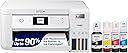
Desertcart purchases this item on your behalf and handles shipping, customs, and support to Senegal.
♻️ Print smarter, save bigger, and lead the eco-revolution!
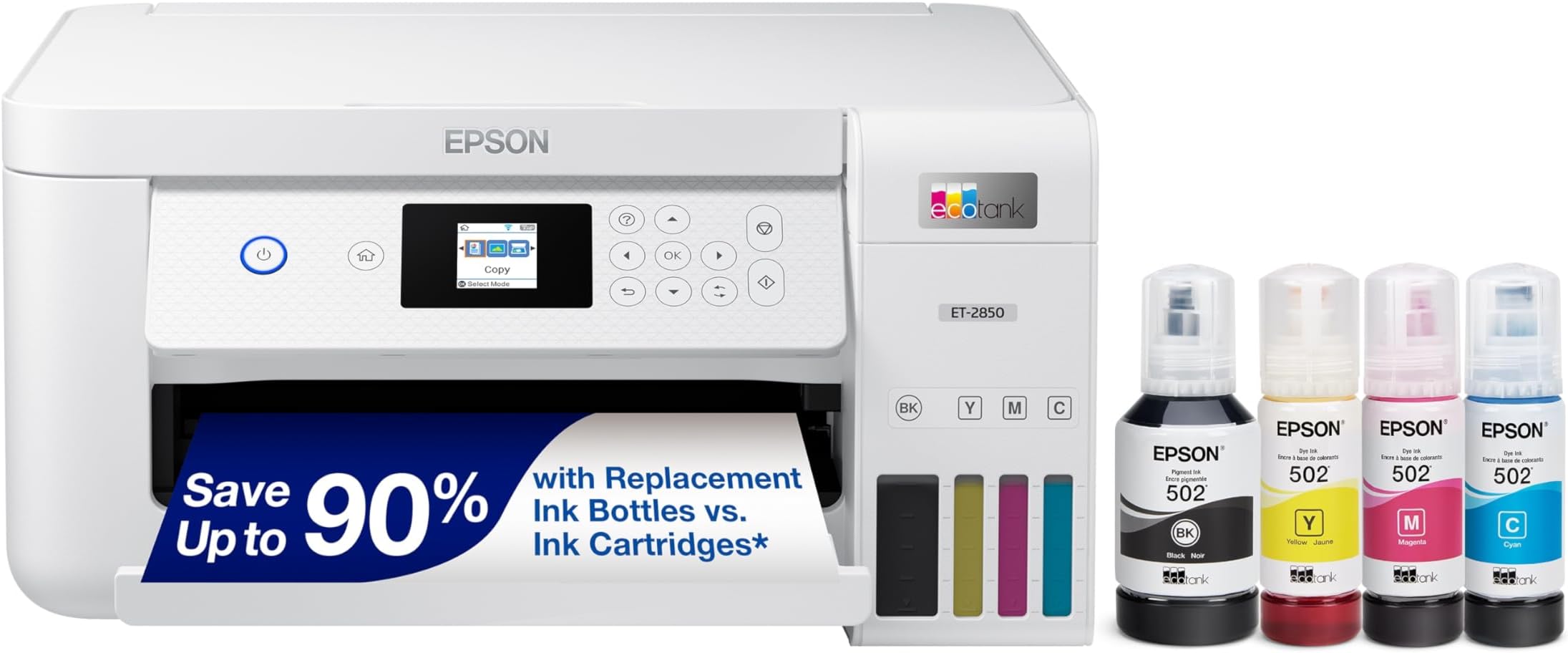
The Epson EcoTank ET-2850 is a wireless all-in-one inkjet printer featuring cartridge-free EcoTank technology that delivers up to 7,500 black and 6,000 color pages per refill. It offers high-resolution printing (4800 x 1200 dpi), auto duplex printing, a flatbed scanner, and voice-activated printing via the Epson Smart Panel app. Designed for home and office use, it combines cost-efficiency, sustainability, and professional-quality output in a compact, user-friendly package.


| Additional Printer Functions | All In One |
| Asin | B096N85ZHW |
| B W Pages Per Minute | 10.5 |
| Best Sellers Rank | #16,365 in Office Products (See Top 100 in Office Products) #27 in Ink Tank Printers |
| Brand | Epson |
| Built In Media | EcoTank ET-2850 all-in-one,manual,power cord,1 bottle of 502 Black (127 mL) and 1 bottle each of 502 Cyan,Magenta,Yellow (70 mL) (2) |
| Color | White |
| Color Depth | 8 bpp |
| Color Pages Per Minute | 5 pages_per_minute |
| Compatible Devices | Laptops |
| Control Method | Voice |
| Controller Type | Android |
| Customer Reviews | 4.2 4.2 out of 5 stars (4,456) 4.2 out of 5 stars |
| Display Type | LCD |
| Duplex | auto |
| Hardware Interface | USB |
| Ink Color | White |
| Item Dimensions D X W X H | 14.8"D x 22.3"W x 10.2"H |
| Item Type Name | Inkjet Printer |
| Item Weight | 11.9 pounds |
| Manufacturer | Epson |
| Maximum Copies Per Run | 100 |
| Maximum Copy Resolution Black And White | 600 dpi |
| Maximum Copy Resolution Color | 1200 x 2400 dpi |
| Maximum Copy Speed Black And White | 10.5 pages_per_minute |
| Maximum Media Size | 8.5 x 14 inch |
| Maximum Print Resolution Black And White | 4800 x 1200 dpi |
| Maximum Print Resolution Color | 4800 x 1200 dpi |
| Maximum Sheet Capacity | 100 |
| Model Name | EcoTank ET-2850-W |
| Model Number | ET-2850 White |
| Model Series | ET |
| Number Of Trays | 1 |
| Other Special Features Of The Product | Auto 2-sided Printing, Refillable Ink Tank |
| Output Sheet Capacity | 100 |
| Paper Size | 3.5x5 inches,4x6 inches,5x7 inches,8x10 inches,8.5x11 inhces,8.5x14 inches,A4,A6,half letter,executive |
| Print Media | Envelopes, Glossy photo paper, Paper (plain) |
| Printer Connectivity Type | USB, Wi-Fi |
| Printer Output Type | Color |
| Printer Type | Inkjet |
| Processor Count | 1 |
| Resolution | 4800 x 1200 |
| Scanner Type | Flatbed |
| Specific Uses For Product | Home/Office, Personal Use |
| Total Usb Ports | 1 |
| Unit Count | 1 Count |
| Upc | 010343957824 010343965430 |
| Warranty Description | 1-year limited warranty |
| Warranty Type | limited warranty |
User
Great printer, great price
Not disappointed with this printer. I was elated that refill tank printers were back. I had a similar printer over 20 or more years ago. This is very economical. So much cheaper that buying refill cartridges. The quality of the print is great. I am so very happy that I purchased this brand. Highly recommend.
User
Buy this product ! Don't even check the bad reviews.
For years, I have been using HP all-in-one printers with disposable cartridges. This one is incredible. I printed two double-sided, full-sized, color work and activity books (A4-sized pages) for my 8-year-old son, and the ink level is around 3/4. If you keep the heads clean, this printer will serve you well.I read some reviews about the low quality of prints with this printer. Well, my experience was just the opposite. So, their experience does not represent the whole; they should be outliers. These people might need to learn more about the printer's preferences for the basic printing rules. Printers print according to what you feed them with. The higher your raw and paper quality, the better the print you'll get. And remember to check the preferences for better print quality as well.One other complaint I read was about the wifi connection. It does not reflect the reality as well. The wifi card on the printer does not lose connection at all. The units these people have might be faulty. That does not mean these devices lose connection. And if you have a stable 2.4GHZ internet wifi router. This printer will keep its connectivity, unlike multiple HP products that I had previously. I had to turn wifi off and on every time I had to print something.The best part is that even the whole set of inks (black and two colors) is cheaper than the entire set of HP cartridges(Black-color).On the other hand, here are three things that are annoying about this printer:1) the paper feed is from the top.2) the LCD screen is too small.3) generating a printing job outside the local network is crappy and glitchy. They need to fire the whole department of software developers in charge of this part of the software solutions. There is no excuse for an internationally sold product's software solution to be this glitchy.
User
Love it so far
Love this printer. Couldn't be happier with it's easy of setup, ease of use and the ecotank system is amazing after using cartridges for years.So I'll start with setup, I wasn't happy to see that the basic setup uses Epson's fluky and antiquated feeling app, but at least with this setup, everything worked out alright. It takes about 15 minutes or so total to get all the tape off, plug it in, fill the inks and get the printer connected. All of which was nice.Speaking of filling the tanks, the ecotank system is amazing. This printer has an enlarged black tank and so comes with a much larger black fill cartridge. It says it's good for over a thousand pages, which is fine with me, but filling was so easy. Each of the refill tanks has a special nozzle so it will only work on the correct color and you can see what level the tank is at with just a quick glance. You can't overfill the tanks because they shut off when full, and ther's also no chance of leakage since the refill tanks won't dispense unless slotted all the way down onto the refill nozzle. Where has this system been my whole life? I looked up costs for refills and they seem reasonable, especially when compared to all the proprietary cartridges most manufacturers use. Five stars just for the ecotank system alone.Connecting to my home wifi was a bit wonky with the app but it worked on the second try, and thankfully this printer is AirPrint compatible so I was able to print straight from my iPhone and iPad without any issues. A quick check of my laptop and desktop and they both detected this printer without issue and soon I was printing off some needed tax documents. Print clarity was fine, the blacks in particular are nice and dark which is most of what I need anyway. After printing about 20 pages I checked the tank and couldn't see that the ink levels had dropped that much if at all, so I'm pretty excited about how useful this printer will be in the future.Overall, super happy with this printer. If you're tired of dealing with cartridges, give this a shot.
User
Not perfect, but pretty good for a basic ink tank.
We were so tired of the ridiculous price of ink cartridges for our previous printer, and wanted to switch to a tank printer. But we don't print a ton, nor do we print photos. We just needed a basic printer for everyday use. And so far we've been quite satisfied with this one.The colors are just a little dull, so I don't know that this is the printer for someone who will print a lot photos. And because I have it set to Best Quality, it's not as fast as some may want. I haven't tried it at Normal, but I suspect it'll still be a fair bit slower than higher end printers. The touch screen is pretty small, but works fine. We actually only use it to make copies. For everything else, we just use the computer or the phone app, which so far seems to work okay.And the ink usage? As advertised. Loading the ink tanks was simple, and you CAN'T put the ink in the wrong ones, which is nice. I've probably run a hundred or so pages so far, most with full page color pictures, and I can't see that the ink level has even budged on the tanks. This thing is going to print A LOT of pages. And when it does come time to buy more ink (probably sometime in late 2025), it'll still be cheaper than cartridges are. I've seen people online say an ink tank isn't for someone who doesn't print a lot because it will clog the print heads. I'm hoping to avoid that issue but just regularly printing SOMETHING. I clearly won't have to worry about wasting ink.My only disappointment with the purchase wasn't with the printer, but with Amazon. I ordered the printer in white, but received black. But the color of the printer wasn't a deal breaker, and once we had it in the house, we didn't feel like jumping through the hoops of trying to exchange it.So for us, four stars. It's not perfect at anything, but it's pretty solid at most things. And we won't have to put another penny into our printer for at least a year and a half.UPDATE - 6/17/24Three months since my original review. Something unexpected has happened. Apparently freed from the burden of paying for ink, we've gone a little crazy printing things. I'd estimate we've printed maybe another 400 pages over the past three months. All full page and color. All at highest quality setting. And I STILL can't tell that the ink level has budged from the initial fill. This leaves me with two conclusions:1- Holy cow, this thing's going to print a LOT of pages at a tiny cost.2- Holy cow, ink cartridges are a scam. If you're still using a cartridge printer, get out now. Tank printers may cost a little more up front, but you'll make that money back very quickly.One other thing: I've seen several reviews that comment that the printer seems to lose the wifi connection. Ours hasn't lost it even once so far. In fairness, it IS sitting approximately 24" from my router. But still, so far, so good.I'm going to leave my ranking at four stars, because it's not 'perfect' quality. But I'd probably go to 4½ stars if it were an option.
User
DON’T WASTE YOUR MONEY! What you save in ink you waste in paper!
UPDATE 26 June 2023It is very good on ink, but it misdeeds EVERY SHEET OF PAPER and damages each sheet, at the top, to make it unusable. I have wasted one to three sheets of paper for each sheet it prints. Until Epson gets their heads out of their backsides and fixes the feed jamming issue DON’T WASTE YOUR MONEY! I have gone a year without refilling but every sheet I print costs me several sheets to get a sheet to feed correctly!UPDATE: 1 May 2022This printer should not be purchased! Watch the video. It ruins 5+ sheets of paper for every sheet it successfully prints! The image is the ruined paper trying to print four sheets.Until they fix the paper jam on feed issue, DO NOT BUY! What you save in ink you waste on paper ruined. MOUNTAINS OF IT!UPDATE: 3 April 2022I have lowered my star rating because the jamming issue continues. This time I put fresh paper in it and it jammed twice trying to print one sheet! There is a definite jamming issue with the feeding of paper in on this printer. It would have been better to have a flat tray feed. If it continues to waste 1-2 sheets of paper for each sheet I print, I will lower my rating again!Epson needs to figure out why it jams and fix it, especially for the price they are charging! What good is lots of ink if you go through a team of paper to print 6 sheets?I have recently purchased and installed. Initially, it printed great, quiet, and well. It has been in place for about two weeks. Today I tried remote printing from my phone (I was in one room it was in another). It printed one or two pages then sounded like it was grinding gears. Come to find out, the paper jammed feeding in. 12 ruined, jammed sheets later, I have learned to keep the back door flap over the paper open. If you put it back on the paper, it jams feeding it in. It also jams with it open. Pathetic it is jamming so fast. I am supposed to be able to print on it from the phone anytime, but not if it jams. It just jammed again with the door open while writing. 13 and counting sheets printing less than that.The prints are coming out good. I am printing photos and it prints to the edges and prints exactly what the photo looks like. Just wish it would stop jamming and wasting so much paper when it is loaded correctly.
User
Reliable, Efficient, and User-Friendly Printer
I’ve been using this Epson EcoTank printer for a few days now, and it’s been fantastic! The wireless setup was really quick and easy (I did it through the Epson Smart Panel app which provided step-by-step guidelines on what to do).The print quality is very sharp. I have also printed a couple photos with the printer (on an A4 paper), and the color accuracy is also fairly neat. The best part is definitely the ink-tanks. At first, I thought filling the tank would be tough, but it was super easy (literally anyone can do it). You simply do not squeeze the bottle and the ink flows into the tank and stops automatically when the ink is filled to the upper line (amazing).The screen is definitely on the smaller end. BUT, it's not really a problem, I have preferred it over some touch-screen ones I have had in the past simply because it more user-friendly and has better instructions on how to manually adjust things in case something happens (like a paper jam).Overall, if you’re tired of constantly replacing cartridges and want a budget-friendly printer, this is a great pick. Plus, the ink lasts so long, you might forget it’s even there - until you need it of course!
User
Best printer out there
Best printer ever.I have had this one for 14 months. I’m still on the original ink that came with the printer. My black is practically fill and the color is halfway. I have printed about 4500 pages. That’s speaks for how amazing it is in itself. You’d never print that much on one set of ink cartridges. I had to do a “head cleaning” around 3000 pages because there started to be a line printing halfway through the page. It was as simple as pressing a button on the printer and it doing the cleaning itself. I feel like if it died tomo I wouldnt have room to be mad. This printer is truly amazing! Epson forever.
User
Better than expected. Smaller, lighter, faster than expected.
UPDATE 12/18/2023Still loving this printer. Great performance, never runs out of ink, ink tank is the only way to go.Churning out my Christmas cards bing bang boom.UPDATE 10/19/2023I LOVE THIS PRINTER. Soooo much more dependableI than my expensive HP. When sending a print job to the printer it wakes up immediately and prints. Connected via WiFi. In the past my expensive HP printer would pause and pause then had some issue with connection. But not with this Epson. it connects and prints like a charm. Just wish this Epson was not a top loader. Maybe Epson will fix this with the next model?I don't know about others experience and there are a wide range out there, but my experience has been a huge positive. The ET-2850 printer is smaller than I was lead to expect. The printer is lighter weight than I was lead to expect. The print speed is very good and prints much faster than I was lead to believe from those "other" reviewers. The ET-2850 connects to my WiFi easily HOWEVER could not find my 5G Wifi, only the 24G of the home network. However, my iMac is connected to the 5G home network and the printer still works fine even though the printer is on 24G side of the network. When a print file is sent from my iMac, the ET-2850 the printer wakes up right away and begins to print. The ink tanks filled fast and easily following setup instructions. ONE PROBLEM, using the phone-app for the initial setup process the app hung and appeared to have stopped during the "INITIATING PRINTER" process. So I ended up doing the installation using the printer screen itself. That went smoothly. I just wish this printer was NOT a paper top-loader. But with the hopeful $$$ savings on ink I can tolerate a top-loader.
User
This printer exceeded my expectations!
I operate a small home office and print about 300 pages per month, with approx 10% using various levels of colour. Before this, I used an Epson toner printer sitting next to an HP colour printer. The reason for this was to minimize the cost of constantly printing with expensive colour cartridges. The Toner unit served me well for several years, but it was just time to replace it. I committed to order the ET 2850 on behalf of two respected colleagues. Two aspects caught my attention, one of which was dual-sided printing, and the second was the cost of maintaining an ink supply. Admittedly, I was skeptical about the latter. Amazon delivered as usual (always great to deal with!), and everything exceeded my expectations! I donated the other two printers to a charity. The 2850 is robust, easy to set up, seems to have an endless supply of ink, and the print quality is better than the other two units! I found the WIFI print spooling a little slow, 10-15 seconds, so I cabled it and solved that slight lag. As a sidenote, it had not occurred to me that this printer now sits next to my Epson 400 scanner, my next favourite device! I highly recommend both of these Epson products! Paul
User
Finally a great printer!
This is hands down the best printer I've had in 35+ years of computing. Everything about this printer is great. From the out of box & setup experience, to getting it on a wireless network for PC (Windows) and phone (Android), it was straightforward, and has excellent intuitive wireless printing. See my picture here to see how little ink I've used in 8 months of light / moderate printing. But the absolute best thing about this printer is that it just works when you go to print when you haven't used it for weeks. I've had to run a head cleaning cycle twice, but even that uses barely any ink.
User
Belle imprimante.
C'est un beau format d'imprimante. Elle est asser compacte et légère. Elle n'a pas de boîtier pour mettre du papier. Elle a eu un bourrage une fois et même après avoir corriger cela il a été impossible de poursivre. Obligé de faire un arrêt/départ. Un point très négatif est l'écran qui est minuscule mais les touches a droite de celui-ci sont d'une dimensions convenable. Il n'a pas d'emplacement pour une clé USB. Quand même facile pour faire le démarrage avec la configuration. Pour le prix s'aurait pu être un peu mieux. Plus de cartouches d'encre mais plutôt bouteilles liquide d'encre. Espérant que ça va être mieux. La qualité d'impression est bonne. A vous de voir si cela est ok pour vous pour le prix.
User
Good printer to print with.
I got this printer as I was going to start homeschooling the kids. I have had some troubles with printers in the past and researched long and hard. I decided on the Ecotanks. There were so many varieties I had a hard time picking. Also being in Canada you have less to choose from. I decided on this one the Et-2850. So far I have really like the printer. The ink lasts forever. It prints double sided and at a decent speed. I will say the only downside is that you have to clean it often. I am not sure how but dust seems to get into the nozzles easily and it makes lines on the page. Once you clean it, it seems to alleviate that problem. Overall out all of the printers I have used in the past, this one is the best.
User
Love the EcoTank - Hate the Printing
I've given this printer a year to change my mind - now it's time for an honest review. I love the concept of the eco tank - I want to minimize the number of ink cartridges I buy, but this printer has been nothing but poor printing since I bought it. My old crappy Canon printed better than this printer.It's got marks all over the papers when they come out - I've tried to print an envelope a dozen times today and each time it comes out crooked or splotchy or off center, or the margins are messed up - every time it looked fine on the computer, but it comes out bad every time. I would never buy this printer again. I don't even know if I would go with an ecotank again. I run my own business and I purchased a printer so I could do all my office work and professional printing at home - well it doesn't work and I end up having to order from Canva anyway to get anything close to presentable. DO NOT BUY!!
Trustpilot
5 days ago
3 days ago