


🚀 Elevate Your Internet Experience!
The Linksys Atlas Pro 6 WiFi Router is a cutting-edge AX5400 WiFi 6 mesh system designed to deliver exceptional speed and coverage. With the ability to connect over 90 devices and cover up to 8,100 sq ft, it ensures stable streaming and low latency, making it perfect for gaming and smart home setups. The easy-to-use Linksys App allows for quick setup and management, while built-in security features keep your network safe.
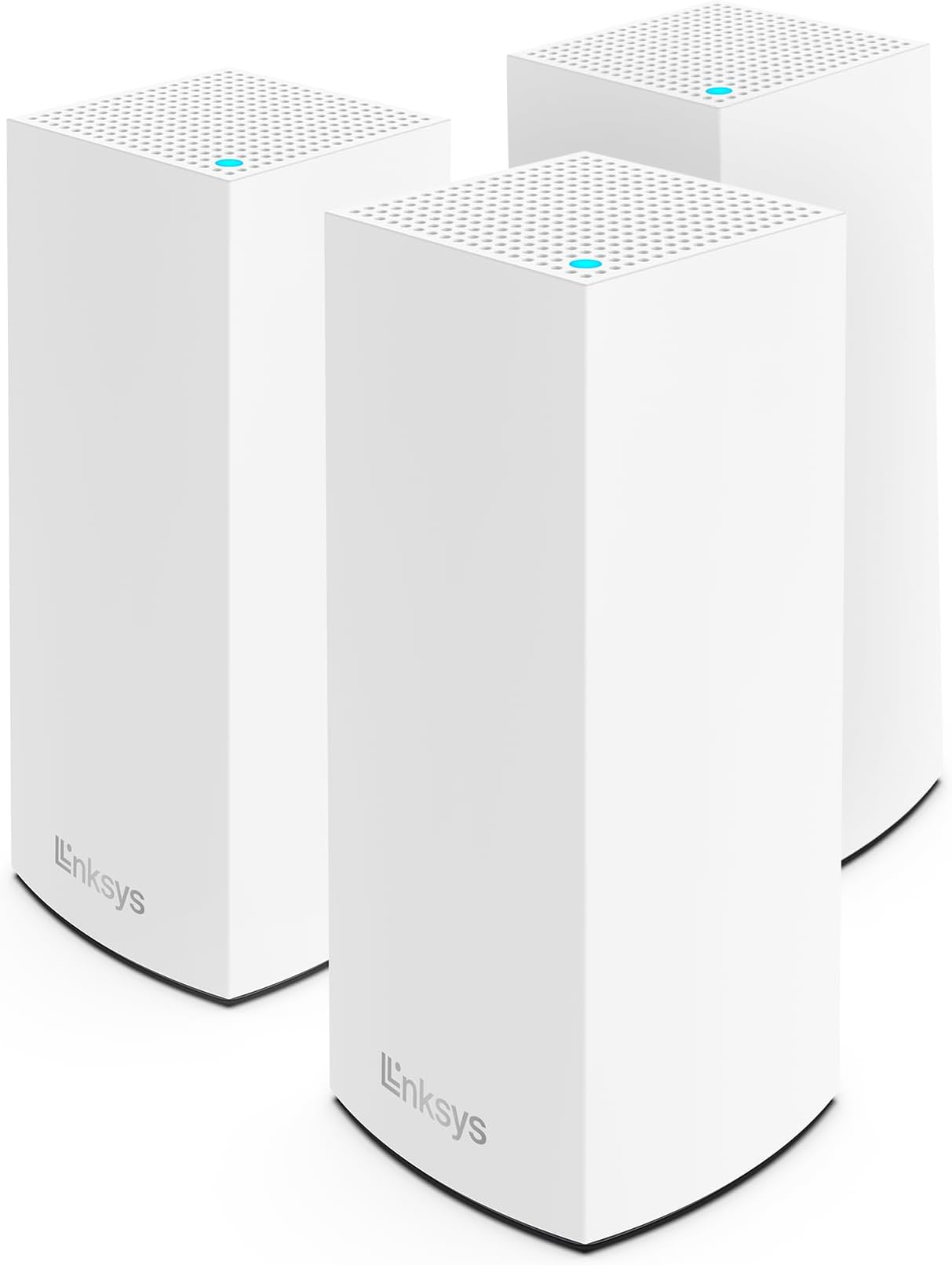


| ASIN | B099FHWNSF |
| Antenna Location | Home |
| Antenna Type | Internal |
| Best Sellers Rank | #36,366 in Computers & Accessories ( See Top 100 in Computers & Accessories ) #431 in Whole Home & Mesh Wi-Fi Systems |
| Brand | Linksys |
| Built-In Media | Power Supply, Install Guide |
| Color | White |
| Compatible Devices | Iphone, Television, Gaming System, Xbox, Playstation, Tablets, |
| Connectivity Protocol | Wi-Fi |
| Connectivity Technology | Wi-Fi |
| Control Method | App |
| Controller Type | App Control |
| Coverage | 2700 square feet |
| Customer Reviews | 4.2 out of 5 stars 268 Reviews |
| Data Transfer Rate | 5400 Gigabits Per Second |
| Frequency | 6 GHz |
| Frequency Band Class | Dual-Band |
| Global Trade Identification Number | 00745883834921 |
| Is Modem Compatible | Yes |
| Item Dimensions L x W x H | 3.39"L x 3.39"W x 11.22"H |
| Item Weight | 4.5 Pounds |
| LAN Port Bandwidth | Gigabit Ethernet |
| Manufacturer | Linksys |
| Maximum Upstream Data Transfer Rate | 5400 Megabits Per Second |
| Mfr Part Number | MX5503-AMZ |
| Model Name | AX5400 - Speed |
| Model Number | MX5503-AMZ |
| Number of Antennas | 5 |
| Number of Ports | 1 |
| Operating System | RouterOS |
| Other Special Features of the Product | Guest Mode, WPS |
| RAM Memory Installed | 512 MB |
| Security Protocol | WPA2, WPA3 |
| Smart Home Compatibility | Smart Home Compatible |
| Special Feature | Guest Mode , WPS |
| UPC | 745883834921 |
| Unit Count | 3.0 Count |
| Voltage | 240 Volts |
| Warranty Description | 3.5 year manufacturer |
| Wi-Fi Generation | Wi-Fi 6 |
| Wireless Communication Standard | 802.11ax |
| Wireless Compability | 802.11ax |
M**T
Excellent home network upgrade
With a few dead zones in my second story and struggling with extenders and repeaters that don't seem to work, I decided to finally dip my toes into a mesh system. With many options to choose from - actually, not that much to be honest as there's only a few brands - I decided on Linksys as they're one of the top tier brands in networking solutions. Netgears were my second choice but I found their systems to be fairly pricey. TP-Link seems to be Amazon's choice but I'm intentionally avoiding them as they have security issues and potential backdoors for nefarious actors. This particular Linksys model seems to tick off all the boxes in terms of price point (picked it up during Prime Day) and features. Setting it up was a breeze. Everything happens through the Linksys app, which to be fair, is not the best app out there as its slow and laggy. On the upside, you don't need to access the app too much once you're set up. From the app, you connect the main router to your modem and then set up the two additional child nodes. From what it looks like, it seems that you can continually add more nodes if needed. For my square footage, 2 child nodes offered more than enough coverage. When the child nodes are connected, you can start moving them to other areas of the home. The app lets you know the signal strength and if you need to reposition them. Like I said, everything happens though the app, from setting up the WiFi name and password and managing your devices, as well as updating the router's firmware. I wish there were more granular controls to manage the home network but it seems that most mesh systems are controlled through an app nowadays. Linksys should really work on their app so its faster and less buggy to use. Nevertheless, it works...albeit a bit slow. What's NOT slow is the speed. Immediately, not only did my coverage increase, but overall speeds as well. My previous router was a Nighthawk and I thought it was doing pretty well pulling in 250Mbps+. With this Linksys mesh, my speeds increased drastically, reaching upwards of 380Mbps and even seeing 500Mbps. All of the dead zone's are resolved as well...my upstairs on good days reached 60Mbps with my old setup. With this Linksys, I'm pulling 280Mbps consistently. Extremely happy with this purchase. Since both of us work from home, with multiple Zoom calls daily, this was a spectacular upgrade. Sure its not the latest WiFi 7 tech but for my simple home network, the performance exceeds my expectations. Note: This mesh system combines your 2.4 and 5 GHz signals together into one SSID. I was a bit hesitant at first as I typically like to keep them apart for some of my dumber smart devices but the router does a pretty great job at auto-assigning and I have not encountered any issues at all.
S**Y
Greasy Fast Speed! But App Needs Work
Bought to replace a very reliable and highly user friendly AmplifiHD - great system but capped out at around 100mbps on my Xfinity 400mbps account. Consistently hitting 350-475mbps throughout the house now! Very pleased with speed and installation. The Linksys App is sort of mediocre - for anything other than the basic installation (cable modem -> Velop main node, everything else wireless), expect some trial and error and very little guidance. For my install (system configured in Bridge mode behind an EdgeRouter) I had some false starts and confusion; everything worked out eventually but could be more helpful. One quirk that is not reflected anywhere that I could find: when in bridge mode the status indicator lights on all nodes turn red - the app says that means "no internet access" but everything works fine. Bottom line - powerful system,great coverage across my 2 floors and 4200 square feet; if you are using a non-baseline configuration and are not familiar with networking fundamentals, expect some challenges.
C**Y
Great addition. Works!
Recently upgraded to Linksys hydra pro 6 router. Had a Linksys wifi extender. Replaced extender with these. Setup was very easy using the app. Just added new equipment and app detected the child nodes. App is slow setting up the mesh routers but works flawlessly. Would recommend. I had places in my house that had weak signal. This solved the problem. I also have a room over the garage that had poor signal. I placed one of the nodes upstairs and it work great. My Roku tv no longer has weak wifi. Very happy with purchase. Got on sale but would still recommend if not on sale. I have had Linksys routers for many years and continue to be satisfied. Once setup you can check the signal strength of each node and make adjustments. I had to move a few around to get best signal.
S**E
Does not work with iPhone.
Update: After several adjustments and perhaps an update? It has been working flawlessly for two+ months. iPhones keep getting disconnected. Apparently an unsolved, known issue. Worked well for a bit, but as soon as you move to a different node it gets tricky, sometimes it keeps connecting/disconnecting and it once kept saying that the password was wrong. Looking for potential solutions found threads talking about this issue and sadly no solutions. Unfortunate situation for an otherwise pretty slick product.
M**N
A FLAWLESS WI-FI Solution
The product and its app worked right out of the box. No fuss, no fiddling, no headaches. Connected immediately and provided us with whole house coverage (3,200 sf) and most of our property (12,500 sf). The easiest installation ever, even easier than the Google Mesh, which, by the way, won't work with Wi-Fi6 or higher as well as bandwidth greater than 100Mbps. Don't waste your time testing other products. Buy this one and start streaming and working faster.
M**5
Junk. 100% Junk. Stay away from this system.
I purchaed the system in April of 2024. I had a four node system. I replaced an Orbi system because I wanted to get the most up to date technology to protect my online security. The Linksys sytem came very highly recommended by Consumer Reports and the other online reviews. After installing, the system worked fine. But then I started having glitches. I called my internet provider and spent a lot of time on the phone with them. They said it was the router. I called Linksys tonight. I was on the phone with them for over two hours. We needed to reset all the nodes and isolate the original parent node. I cannot tell you how frustrating this was!!! A total waste of time talking to the Philipines. Eventually we isolated the bad node. At the same time customer support said I should update the parent router to a new Pro 7 for $339. I agreed and placed the order. But then they would not replace the bad router from the previous order. They wanted me to do further diagnostics.!!!! The woman was very nice, but after two hours on the phone with her she said "I am just following orders." It is 11:30pm. That was the last straw. I was talking to a home A/V tech and he said the Eeros system for Amazon is much better. Therefore, I am throwing the Linksys system in the garbage and getting an Eeros system tomorrow. Hopefully that system will not be as awful. DO NOT BUY LINKSYS MESH !!!!!!!!!!
A**L
Frustrating product - connectivity issues with iPhone - do not buy
I rarely write reviews but my frustration with this device was so high that I just had to. First off, I am not giving it one star because the original setup process was pretty easy and the throughput between nodes is pretty quick - if you get everything set up right. But it's only getting two stars because it it has issues, took a long time with multiple unhelpful calls to customer support to get it set up as ideal as possible and continues to have connectivity issues especially with Apple iPhones. My first issue with this mesh system was that connectivity in rooms away from the main/internet connective box was slow. I'm in a 1,500 sq ft wood construction house. So it's not like I was exceeding it's capacity or the design of the house was hindering it's ability. I called customer support and their suggestion was to create dedicated 2.4ghz and 5ghz networks. I thought this was silly. Did not need to do this with my prior NetGear Orbi Wifi 5 Mesh. They also said that if the nodes were more than 15 feet away from each other, speeds would be cut in half. That was absolute garbage and not correct. I did what they suggested anyways, and it helped for a while but then went back to it's old self. I called again and this time they suggested swapping the nodes between rooms. Again, why would this even be needed? But it actually did work. It's not like I changed the placement of the nodes, I simply moved room 1 to room 2 and vice versa. Why should that change things? Just seems absolutely backwards. But I do now have a solid connection between nodes and laptops and computers connected to it are solidly fast. However, I continue to have issues with our Apple iPhones (15 and 16) wifi connections in the house. I'll come home and it just won't ever connect on it's own. I have to force it. And then when it's connected, and I'm streaming videos on Facebook, Instagram, Youtube, etc., it will continuously bounce between Wifi and LTE. It's as if it just can't keep up when on an iPhone. This also isn't great when using call over wifi on your phone. We would also have connectivity issues with our TCL/Roku TV and Google Nest Hub. Sometimes it just drops it and I have to wait for it to automatically reconnect or force the connection. These aren't complicated things to get right, I have a set up like most other normal people. And with my prior Orbi, I have ZERO of these problems. I could probably call customer service again but then will likely get stuck on a 2 hour call that is unhelpful. I really wanted it replaced but they would not do so because to them, everything seems to be working - even if slow and even if some items continue to bounce on and off (which they cannot easily verify). I wish I had unboxed and installed this mesh within the first month of purchase because I would have known sooner that it didn't work right and I could have returned it. So, I'm stuck with these units but I'm still so annoyed with them that I am boxing them back up and reverting back to my old but absolutely solid Orbi mesh. I do not suggest this product to anyone. And it I would heavily reconsider ever buying this brand again. It was an expensive purchase and to preform worse than my 7 year old Orbi is just embarrassing.
L**.
I have an old house and a guest suite
So, my old house had a late model Linksys router. I couldn't get a strong signal in my guest suite. The new Linksys mesh system passes my WiFi through the concrete stucco to my room (an addition) and across the back yard to the guest suite. Now I can watch Roku TV in there, use a laptop, all the connected stuff. Set up was easy for 2 Boomers! Didn't even have to call my kid. You can't possibly know how proud I am!
H**N
Buen producto
Buen pruducto, muy funcional
G**O
Excelente artículo
Excelente artículo
B**R
Linksys
Este producto es muy bueno yo tenía muchos problemas con mi internet por que era de 5 mg y no podía ver televisión y los compré y los conecte y ahora puedo mirar asta 4 televisores al mismo tiempo y no tengo problemas porque este producto uso más rápido mi internet estoy contento se los recomiendo
S**N
Increíble
Increíble 😊
M**Z
Ruteadores
Excelente, llega a todas las habitaciones. Es una marca de lo mejor. Muy contentos todos en casa
Trustpilot
1 month ago
2 weeks ago