๐ Elevate your projects with pinpoint motion precision!
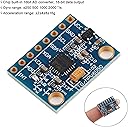
The Gy-521 MPU-6050 module combines a 3-axis analog gyroscope and 3-axis accelerometer with a built-in 16-bit ADC, delivering high-accuracy digital output via I2C communication. Powered by a 3-5V supply with an internal low dropout regulator, it supports multiple gyro ranges (ยฑ250 to ยฑ2000 ยฐ/s) and accelerometer scales, making it ideal for Arduino-based robotics, drones, and motion sensing applications. Compact, lightweight, and backed by a strong user community, this module is a must-have for precision motion tracking.
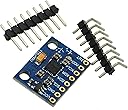
| ASIN | B008BOPN40 |
| Best Sellers Rank | #9,081 in Computer Internal Components |
| Brand | REES52 |
| Brand Name | REES52 |
| Customer Reviews | 4.5 out of 5 stars 842 Reviews |
| Global Trade Identification Number | 00692011914492 |
| Item Dimensions | 1 x 1 x 1 inches |
| Item Weight | 18.14 g |
| Item dimensions L x W x H | 1 x 1 x 1 inches |
| Manufacturer | BlastCase |
| Material | Silicon |
| Material Type | Silicon |
| Maximum Supply Voltage | 5 Volts (DC) |
| Measurement Accuracy | High |
| Measuring Range | Gyroscope: ยฑ 250, 500, 1000, 2000 ยฐ/s; Accelerometer: ยฑ 2, ยฑ 4, ยฑ 8, ยฑ 16g |
| Model | REES-01 |
| Mounting Type | Flange Mount |
| Output Type | Digital |
| Part Number | GY-521 |
| Specific Uses For Product | personal |
| Style | Modern |
| Style Name | Modern |
| UPC | 692011914492 |
| Upper Temperature Rating | 85 Degrees Celsius |
| Warranty Description | 30 Day Warranty |
A**W
Good unit for the right price.
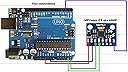
I am fairly new to Arduino projects, so this was a perfect breakout board to get my feet wet. The major down side to this product is that its difficult to find info on it (as said by other users). After finding some code, the unit seems to work pretty well... I used this board on a quadcopter to help with the inherent stability issues. Hopefully I'll save some people the time to dig up this information. Here is a link for those doing arduino projects: [...] --> See first comment on this post here's the source code for the I2C library I used: [...] --> See first comment on this post This library contains two helpful examples; one that allows the raw accelerometer and gyroscope values to be accessed, and the other calculates Euler angles, yaw pitch roll, world accelerations, and quaternions. If you using this with an arduino, make sure that the I2C library and a MPU6050 library are in the Arduino sketch folder, this will allow it to compile correctly. This was also difficult to find: The GY-521 breakout board is wired to the Arduino Mega as followed: Vcc - 3.3V GND - GND SCL - SCL (pin 21) SDA - SDA (pin 20) ADO - GND INT - D2 The GY-521 breakout board is wired to the Arduino Uno as followed: Vcc - 3.3V GND - GND SCL - D5 SDA - D4 ADO - GND INT - D2
E**E
Fantastic chip, inexpensive but powerful
Chip worked very well with my Arduino. I've used analog accel/gyro sensors before (Razor 6dof), so this was my first encounter with digital. Getting it up and running took a little bit of digging, but there is plenty of information out there to guide you. The best tips I can offer you is to first find code to calibrate this thing. They HAVE to be calibrated to work properly. Jeff Rowberg is a name that will come up, he's written a lot of code for it, but the actual calibration script I found was by Luis Rรณdenas. You'll need to include the library file, MPU6050.h, but that should be all together. This calibration script will produce 6 calibration offset values... 3 for each of axis for both chips (3*2=6). From that point on you'll need to write those offset values to the chip at the beginning of your code using the function similar to, "accelgyro.setXGyroOffset(30)". So bottom line is, this is an excellent board, it seems very accurate (within tenths of a degree), and works quite well once it's calibrated. Best of luck!
E**F
Great breakout board and amazing price!
I've picked up a few of these breakout boards for a senior design project. This 6 DOF ARG breakout is slick. There is a lot of open source libraries for this device around, and the data sheet is very easy to read if you want to write your own. This chip has a built in digital motion processor library that you can pull fused data from a FIFO buffer or just read the raw values. The MPU6050 is very easy to use and supports high speed I2C (400 Hz)!
N**N
Want a cheap 3 axis accelerometer/gyroscope that works? Here it is
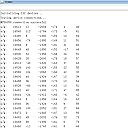
Well, its cheap, it works, and its fairly accurate (at least with the accelerometer and temperature, I have yet to touch the gyroscopic values), jumping values of 20-80 every cycle on the X and Y accelerometer values (from a range of -16500 to 16500, so its practically nothing) which are all that I have used so far. It's $5 for a 3 axis gyroscope, acceleromter, and temperatures sensor, and for that price, it's definitely worth at five stars. It would be nice if I didn't have to search the internet to find how to hook this up or figure out how it works, though
A**X
Great
Works just as it should. You'll need to do your research on how to use it. Comes with no documentation at all. Lots of guides online on instructable type places. I used with an arduino in building a Segway clone and it works perfectly. I did an all welded chassis and get compliments everywhere on the function and design. I use a backup accelerometer to double check my angles for safety, but my code only uses those values at the beginning and every thousand cycles to compensate for drift (which is under 0.06%, so around a half hour of use and I would hardly be a degree off or so... And I'm sure my code isn't perfect)
J**K
Very good sensor
After working with this thing for a day or two, I got it to work. I wrote these instructions for the complete beginner to follow. The pinout goes Arduino 5v to Vcc, ground to ground, A4 to SDA, A5 to SCL, XDA and XCL are not connected, AD0 to ground, and finally digital pin 2 to INT. Note, SCL and SDA pins may be moved around between Arduino boards. Next, go grab the I2Cdevlib. Just do a google search to find the main website, then the download is on github. Head to the highest level directory and there will be a download zip button on the right. Download, extract the file. The file should have the path i2cdevlib->Arduino-> LOTS of sensor boards. Copy I2Cdev and MPU6050 into your Arduino library folder (Arduino->library) (You can copy all of the sensors to the library if you wish). Restart Arduino IDE if it is running and try out the MPU6050_raw sketch. Overall, $5 isn't that bad for a 3 axis gyro and accelerometer. It is a bit of a pain to find documentation for but there is a page for the GY521 / MPU6050 on the Arduino website. Hope this helps. Edit! I started playing around with this chip again and was able to get it work 100%. It turns out, there is plenty of documentation for this chip, you just need to know where to look (Nearly every hobby level multicopter uses this same sensor). It really is just a standard 3v I2C device. Within the MPU6050_DMP6 sketch, at about line 90-120ish, there are a few #define's. Turns out you can select what type of output gets spat to the serial port. If you want to use the teapot demo, you need to comment out #define OUTPUT_READABLE_YAWPITCHROLL then uncomment #define OUTPUT_TEAPOT to make it work.
P**E
Amazing how accurate this thing is for the money (A Few Tips Within Review - Also Important note)
It's amazing how accurate this thing is for the money. After writing the code necessary to read in the gyro and accelerometer values the angles it measured were extremly accurate. It accurate enough to use for a quadcopter. I used a complimentary filter to find the angle values. The complimentary filter is simple and is as follows. angle = Filter_gain*angle_gyro+(1-Filter_gain)*angle_accel. I used a filter gain of .98 becuase the acceleromoter values can be very noisey. Tips: -Write some code to find the zeros for the accelorometer gyro in the beginning of the code before the main loop. Then use the calibrated values in your main loop. -Buy a soldering iron to attach this to the pin headers -figure out the angle measurment from the accelerometer and gyro by finding the sensitity for the setting you have. -For basic angle calc like I did on the arduino uno you only need to attach vcc to 5 or 3 volts, GND to ground, SCL to A5 pin, SDA to A4 pin Another note Important note that drove me crazy: When I read in the gyros over i2c I found that the gyro y addresses were actually the -gyro x value and the gyro x addresses were the gyro y value. Not sure if that's specific to the one I received or if all are like this. (maybe the MPU chip itself was mounted wrong). Once I figured this out it was an easy fix so this still gets 5 stars.
K**N
Ships fast and no issues!
T**A
่ฉไพกๅคๆด
่ฉไพกใๅคๆดใใใฆ้ ใใพใใๅๅฟ่ ใงใใใใญใฐใฉใ ใซใฟใใใใใพใใใ
C**.
It really is tiny!
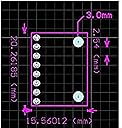
Very good device, behaves 100% as expected. I was very startled by the small size (because the images do not give a clear reference sizing) - but has good power efficiency and excellent form-factor. Wiring it up is a little tricky as that depends upon your microcontroller (for my arduino, had to use Analog pings 4 & 5). Other than that all cool!
R**O
Funciona sin problemas
Funciona perfectamente
V**N
If you're a student, go for it.
I have been using this for about a month and this product works as expected. Its good for what i paid (250 rs in my case) but you can find it for cheaper in local market(-1 star for price). Works fine with my arduino uno, and i expect this to perform similarly on other development boards. I expected this to be bigger looking at the pictures but iys actually quite small. Also, you get header pins with this so you can directly solder if you want to. Go for it if you're a student and are looking for an accelerometer for making self balancing robot and other stuff.
ใน**ใฅ
ๅฎใ
ADDใฎ้จๅใ็ฆใใฆ้ปใใชใฃใฆใใ ใพใใใใใฏๅฅใฎๅ้กใฎๅฏ่ฝๆงใ้ซใใใDCใขใผใฟ(+ใใฉใคใ)ใจใใฃใใใซๅใใใจ้ไฟกใๅใใใใจใใใฃใ
Trustpilot
3 weeks ago
1 month ago