Buy anything from 5,000+ international stores. One checkout price. No surprise fees. Join 2M+ shoppers on Desertcart.
Desertcart purchases this item on your behalf and handles shipping, customs, and support to Senegal.
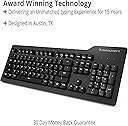
⌨️ Elevate your desk game with the Prime 13 — where minimalist design meets mechanical mastery.
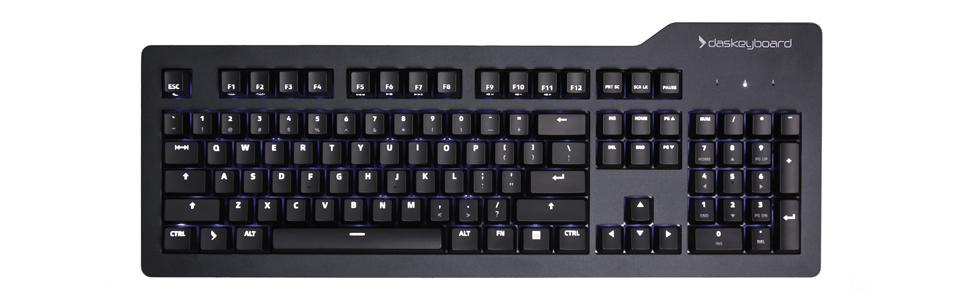
The Das Keyboard Prime 13 is a premium mechanical keyboard featuring Cherry MX Brown tactile switches, durable laser-etched keycaps rated for 50 million keystrokes, and a sleek anodized aluminum top panel. Designed for professionals seeking a distraction-free, high-precision typing experience, it includes full N-Key Rollover over USB, a built-in 2-port USB 2.0 hub, and subtle white LED backlighting. Its minimalist aesthetic and robust build quality make it a top choice for millennial managers who demand both style and substance in their workspace.


| ASIN | B01L9X1TRE |
| Additional Features | Lighting |
| Antenna Location | Professional |
| Best Sellers Rank | #8,000 in Video Games ( See Top 100 in Video Games ) #594 in PC Gaming Keyboards |
| Brand | Das Keyboard |
| Built-In Media | Prime 13 Mechanical Keyboard, Keycap Puller |
| Color | Soft Tactile - Cherry MX Brown Switches |
| Compatible Devices | Gaming Console |
| Compatible Operating System Family | ChromeOS, Linux, MacOS, Windows |
| Connectivity Technology | USB, USB 2.0 |
| Customer Reviews | 4.4 out of 5 stars 413 Reviews |
| Enclosure Material | Anodized aluminum top housting with injection molded plastic bottom |
| Generation | 1st Generation |
| Global Trade Identification Number | 00859285005404 |
| Hand Orientation | Ambidextrous |
| Is Electric | Yes |
| Item Dimensions L x W x H | 18.03"L x 6.77"W x 1.22"H |
| Item Type Name | Das Keyboard Prime 13 White LED Backlit Soft Tactile MX Brown Mechanical Keyboard (DKP13-PRMXT00-US) |
| Item Weight | 2.9 Pounds |
| Keyboard Backlighting Color Support | Single Color |
| Keyboard Description | Professional |
| Keyboard Layout | QWERTY |
| Manufacturer | Das Keyboard |
| Mechanical Keyboard Switch Model | Cherry MX Brown |
| Mfr Part Number | DKP13-PRMXT00-US |
| Model Name | Prime 13 |
| Model Number | DKP13-PRMXT00-US |
| Number of Keys | 104 |
| Number of Sections | 5 |
| Power Source | Corded Electric |
| Recommended Uses For Product | Professional |
| Special Feature | Lighting |
| Style Name | Prime 13 |
| Switch Type | Tactile |
| Theme | minimalist, typing efficiency |
| Total USB 2.0 Ports | 1 |
| UPC | 859285005404 |
| Unit Count | 1.0 Count |
| Warranty Description | 1 year limited manufacturer warranty |
M**.
Excellent, high quality mechanical for a professional setting
My first mechanical keyboard with modern switches (instead of the older buckling-spring assemblies) was a Velocifire VM01. It served me well, but I decided recently to splurge and go for a more premium deck – in this case the Das Keyboard Prime 13 with Cherry MX Brown keyswitches. It does, I must admit, have a very different feel to my significantly cheaper VM01 Keyboard. It’s not unpleasant. The switches feel very similar to the way my old Unicomp Model M buckling spring keyboard felt. There’s a very satisfying buoyancy to the keys (for lack of a better word). It’s a genuine joy to type on. I look forward to using this keyboard for National Novel Writing Month. The backlighting is even and strong – much more so than the VM01. The steel faceplate is cool to the touch and very solid. There’s no noticeable flex, even when I press very hard down on the center of the keyboard or pick it up and twist the corners away from each other. The keycaps feel nice, have a clear and professional-looking font to them, and have very little wiggle which is a nice change from my VM01. That’s a difference that $75 will get you. I may still need to put O-ring dampeners on the keys. We’ll see how loud the keyboard actually sounds once I get it set up in my office. I don’t notice the audible “PING!” when releasing larger keys such as the space bar and backspace buttons that annoyed me with the VM01. That’s a level of quality I expected – but it’s nice to see that my trust in the Das company wasn’t unfounded. This is definitely one of the nicest premium keyboards I’ve ever used – if not the best period. One very minor criticism – on keys that have two legends on them (like the number/symbol keys along the top and the bracket/curly brace keys on the side) the backlight only illuminates the top symbol and not the bottom. This is probably due to the fact that Cherry switches have their LED on the top of the switch…but it would have been nice to have both light up still. I don’t know if it’s just my unfamiliarity with the Cherry MX Brown switches, but I notice myself adding a lot of extra spaces in my writing. I’ll have to see if that goes away with more regular use. It could be that the space bar on my old Velocifire VM01 was just less sensitive and I’m used to really banging it to get it to actuate. Haha. The large buttons on this keyboard do require what seems like a lot less pressure to register than I’m used to on the VM01. I’m not sure if that’s real or imagined. Although I was assured when I bought the VM01 that the OUTEMU off-brand brown switches were comparable to Cherry MX Browns – I’m going to have to disagree. There’s a decidedly different feel to these branded Cherries on the Das. Again, this may just be confirmation bias since I paid almost twice as much for this keyboard as the VM01 – but I feel like the Cherry switches are just smoother, and require less actuation force. This is the closest feel I’ve found in a post-Model-M keyboard to the buckling spring monster I used back in the day. The keys pop back up in a satisfying and strong way. The sound is nice and clacky without being *completely* over the top. The overall look and feel of the keyboard itself is very high-end and professional looking. I see some of my coworkers bringing in high-end VGA keyboards and realize that the “gamer” aesthetic isn’t really for me. I would feel juvenile using a board with multi-colored lights on it like some twenty-something’s sports car. The cord is braided, which you’ll either love or hate. I personally like the look and feel of it myself. It terminates in 2 USB 2.0 plugs – one for the keyboard and one for the USB pass-through port on the top right of the keyboard. I like to use this for my wireless mouse receiver. It’s discreet and keeps it out of my way. This was my first purchase from Das, and I don’t believe it will be the last. It took me a long time to be able to justify the price to myself but now that I’ve used it first hand I don’t know that I’ll be willing to go back to squishy ten dollar membrane keyboards again. Das may well have ruined me for them.
R**R
A nice functioning and overall sturdy basic keyboard. Updated 2021.08.09!
Updated 2021.08.09, see notes at bottom! A nice functioning and overall sturdy basic keyboard. This is my second DAS mechanical keyboard, and fourth/fifth mechanical keyboard purchase. This is my first lit key cap keyboard, as I'm typically frightened by distractor' such as overly bright or flashing LED lights. PROS 1) Nice soft (brown) key switch actuation, noticeably softer than the blue key switches. (I well notice I can type more characters in a day using the brown versus blue key switches.) 3) No more gimmick magnetized ruler on the underside of the keyboard for elevating and angling the rear of the keyboard. 4) No volume control knob, I rarely use as I and most other power users are connected to home stereo audio system via digital S/PDIF or HDMI cabling. The keyboard does have volume controls, using the FN key + Function keys. (Keyboard volume controls are likely intended for laptops and computers having all-in-one sound card with included amplifier.) 5) Long USB cable. NOTE: This keyboard has two USB cables, one for the keyboard and the other for USB ports. CONS 1) They reversed the positions of the shifted characters labeled on the key caps for the keyboard! Example, instead of the number one "1" on the bottom row of the key cap, the number one character is labeled on top with the exclamation mark on the bottom row. This key cap is entirely backwards and somewhat assume the engineers had to do so, in order to make the key cap lighting work? I sympathize with those just learning to type, and note the number pad are the only key caps not having this shifted lettering character anomaly or reversal. 2) The key cap lighting does apparently have an adequate lowest lighting level setting, so that I'm not distracted by bright flickering LED lights. However at night or within dark rooms, the lowest LED lighting level is still too bright and does somewhat still flicker. I'm betting if the current lowest lighting level were halved or were a 50% level of the lowest current light setting, then the resulting light level would then be more than likely adequate for use within dark rooms or at night. But dimming LED lights tends to further induce flicker. Few LED lights are currently on the market with dimming features, while boasting stress free reading light. (Remember, the LED lighting around the keyboard is within the field of vision of the user while typing.) 2) The shifted characters (eg. !, @, #, cursor number pad keys, ...) are not lit. 3) Some different icons are used for key cap lettering, such as a double-ended arrow for the TAB key lettering, upward pointing arrow instead of CAPS LOCK lettering. If you're half blind and just learning how to touch type while looking at the keys, it might be a better system. But for children or those with eye sight, learning a keyboard will likely be far more easier seeing/reading "Enter", "Caps Lock", "Shift" on the key caps. The remainder of the less commonly utilized keys (eg. CTRL, INS, HOME, DEL, END, ...) are spelled-out, likely due to not having a common icon. I remember when the power icon first arrived within software several years ago, it took me several years to learn what the circle with slash really stood for as this power icon was rarely seen prior within software and far less likely hardware. One would rationally think, fewer and fewer non-typing older people with poor eye site will exist within future years, while commonly children typically see extremely well and are more apt to learn to type nowadays. Since I can type, this becomes a moot point, but if you're learning to type, you're likely going to want to study a keyboard layout with these keys spelled-out instead of attempting to comprehend these new icons. So far, the only time these reversed unshifted/shifted lettering and unusual icons become distracting, is when I look down at the keyboard rather than typing without looking. For a second, I'm stumped as this looks extremely odd, then I just switch to typing from memory rather than trying to discern what I am typing. (eg. "Use the force Luke!") 2021.08.09: Still using this keyboard 4+ years after purchasing, and especially now after recently shopping around the past day or so trying to find a better typist specific typing keyboard. Nothing even comes close to this DAS keyboard, having a standard full-sized non-wireless/USB keyboard with gentle back-lighting. As of 2021, everything on the market is still not geared to the typing profession, but to playing games! My keyboard is primarily used on Linux based operating systems. Nothing has broken on this keyboard and has recently survived being washed in the bathtub after a milk-based drink spill into the key areas. Just wish they had a sensitive scissored key switch model, or something similar to an electronic typewriting experience!
N**Y
Das Mechanical Keyboard: A Joy to Type On, But Mind the Sound
The Das Mechanical Keyboard impresses with its responsive keys, making typing a true pleasure. Each key requires a moderate touch, eliminating the need to press down fully, which significantly reduces finger fatigue during long typing sessions. This feature is particularly beneficial for those who spend hours working at their desks. In terms of construction, the keyboard is notably sturdy and well-made, reflecting a level of quality that instills confidence in its durability. The solid build ensures that it can withstand the rigors of daily use without compromising performance. However, it's important to mention the keyboard's distinct clattering sound. While I personally enjoy the audible feedback it provides, enhancing the tactile experience, it may not be ideal for every setting. Those in quiet offices or shared spaces might find the noise disruptive to colleagues. Overall, the Das Mechanical Keyboard is an excellent investment for anyone looking for a high-quality, enjoyable typing experience. Its responsive keys and robust construction make it a standout choice, though potential buyers should consider their environment regarding the sound it produces.
L**R
Very Nice Minimalist Mechanical Keyboard
Das Keyboard Prime 13 Amazon Price: $129 + tax This is a sturdy, heavy keyboard (anodized aluminum top panel) that feels well built. The Cherry MX Brown switches provide a good tactile feel and satisfying click. Requiring no driver, it still offers many features accessed via key combinations. For example, it has six levels of white backlighting, controlled using the Fn key with F2 & F3. The first photo shows no backlighting, the second setting 1, the third setting 3, and the last the highest setting. And although the keyboard is not targeted specifically at gamers, it does provide FULL NKRO, switchable by pressing Fn+F12. There are two USB 2.0 cables wrapped in a braided nylon sleeve for connecting to your computer. One is for the keyboard, whilst the other is a pass-through for the single USB 2.0 slot on the upper right-hand side of the keyboard. This is good for plugging in a mouse dongle or headset. Unusually, the layout of the numeral key row displays the shifted symbols below the numerals. This is not a real bother, except that the shifted symbols do not get well highlighted. I use a higher setting to see them. This could be down to my age though. There are media control keys, again, controlled via the Fn key, but no big knobs or jacks. The price was right for me at $129, compared to the $169 I was considering shelling out for the Das Keyboard 4 Professional. I decided I did not need the wonderful but unneeded extras. I wanted a minimalist unit. The Das Keyboard Prime 13 is ideal for my purposes. If you are looking for a comfortable, sturdy, no-nonsense typing keyboard, it's a good choice.
S**K
Prime 13 lives up to DAS quality
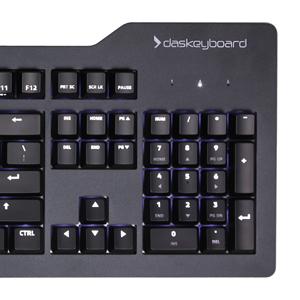
The DAS Prime 13 keyboard lives up to the DAS quality standards. I was on the fence having read some of the negative reviews on amazon but having received and used the Prime 13 keybd, I'm glad I bought it. The keyboard I'm replacing is a DAS keyboard with Cherry brown switches so I wanted a keyboard with Cherry brown switches. Plus in a youtube video with a blind test of many different mechanical switches, the popular choice for switches with tactile feedback was the Cherry brown switches. The Cherry brown switches in the Prime 13 are quiet and there's no problem using it in an office environment, though I'm using mine at home. One amazon review complained about strobing of the back lit keys using lower light levels. But that's not true on the keyboard I received. There's zero strobing of the back llighting and it is constant and steady. Holding down the FN key and pressing F1 or F2 lowers or raises the back lighting intensity. It works perfectly. I love that the back lighting under the keys cannot be seen at all using the lowest lighting level. The symbols on the keys show through nicely without any distracting back lighting under the keys. However since the LED on the function keys are facing the user, they can be seen. With the lowest light intensity, that's a minor thing. The LEDs on the function keys face the user to be able to illuminate the symbols of the side of the keycaps facing the user. There is one USB2 port on the upper right end of the keyboard and that's perfect for connecting the 2nd USB numeric keypad that I use for AutoHotKey macros on the left side of the keyboard. Mouse with right hand, numeric keys with left hand. I'm loving being able to see the symbols on the keycaps compared to my old DAS keyboard that didn't have back lighting. Please note that the symbols on keycaps that have two symbols on them have the symbols reversed. IOW, the 2 key has 2 on the top and @ on the bottom. Dual symbols keycaps are all reversed so that the primary un-shifted symbol is the one that is brightly illuminated. This is really a non issue as I immediately got used to that arrangement just by making a mental shift in thinking. Other brand of keyboards that use back lit Cherry keys also have the dual symbols reversed. So this is not just a DAS thing. I like the arrangement for back lighting. I like minimalist keyboards and don't want one with dynamic lighting effects. I just want back lighting to show the symbols on the keys and that's all with minimal distractions. The DAS Prime 13 is that keyboard.
W**L
Good keyboard, somewhat questionable workmanship
I needed to replace a mechanical keyboard that was no longer allowed at my job (I am a 911 dispatcher, and we work with antiquated dispatch software). Mechanical keyboards reduce the stress and strain of the repetitive nature of typing over a 10-hour shift. This model of Das Keyboard was approved by management for those who wished to bring their own mechanical keyboards to work. This keyboard works great. It’s is less “clicky” that the one it replaced and that took some getting used to. My only gripe is that less than two months into use, it is losing screws. The one that I noticed landed on the desk and I was able to put it back in. In the process, I discovered that two others fell out somewhere (gone forever) and the rest were loose and required tightening. This makes me question the workmanship. I will be reaching out to the company with this issue. Several coworkers have already bought this keyboard, and I’d imagine many more will. Let’s hope that Das makes this right and sends me some spare screws.
M**M
A fine intermediate priced keyboard
First to state what I wanted in a premium keyboard as a senior with modest typing skills: A. Sturdy construction B. High quality Clicky keys requiring significant pressure to actuate in order to prevent misfires, specifically Cherry MX Green 80 cN or Blue 60 cN. C. Full size 104 key layout with key character legends brightly backlit in white or yellow for optimal legibility, ideally with multiple brightness control settings. D. Volume/Mute and Multimedia controls. E. Flexible USB cable to computer F. USB socket for wired mouse My previous premium keyboard is a Das Keyboard 4 Pro which is significantly more expensive than the Prime 13. That kbd met all of my criteria except for absence of backlighting, and the key character legends (visible notations) have gradually become too indistinct over the years. In contrast, the Das Keyboard Prime 13 is rated according to my preferences as follows (and allowing for the fact that this is intended to be an intermediate cost utility keyboard): A. Sturdy construction: Yes, 5* B. High quality Clicky etc.: No, Cherry MX Brown was chosen by the mfr, rather squishy, no click and minimal tactile feedback, medium 55 cN force to actuate: 3* C. Full size 104 key layout with key character legends brightly backlit etc.: Exceptionally good (except that lower characters are not illuminated), still 5* Volume/Mute and Multimedia controls: Not quite as elegant as DK 4 Pro but perfectly satisfactory: 5* Flexible USB cable to computer: A bit rigid and clunky, bifurcated passthrough USB, 4* USB socket for wired mouse: Present but requires a second USB cable connection from computer, OK for desktop computer but not optimal for my MS Surface Pro 3 with only 1 USB port, I thus have to use a USB splitter, USB hub, or bluetooth mouse, 2* Altogether, because I like the mfr based in the US and appreciate the overall quality of construction and especially the outstanding backlighting, especially in a reduced price model, I give this keyboard 5*. Mike M.
C**S
Simple. Elegant. Perfect.
I wanted a high-quality mechanical keyboard with a simple, elegant look. This fit the bill exactly. At first I was a bit gun-shy because of the price, but after receiving it I feel it's absolutely worth it. This thing is solid, well-designed and has a nice feel while typing; the MX brown switches aren't too noisy. In addition to just the overall build quality, here are some features/details that I appreciate: 1) I use a KVM switch, and the USB extension wire that forks off the main cable is long enough that it can still reach the PC without me having to move things around (it's ~2 ft. away from the switch). 2) The media keys are easy to reach but virtually impossible to hit accidentally. 3) The (metal!) legs underneath are sturdy and tilt the keyboard at the perfect angle for me. They're not going to fold up from moving the keyboard around. 4) The dimmable backlight is fantastic. It's easy to set the level you want no matter what the ambient light is like in the room. I really have to nitpick to find any "cons": - The Num Lock indicator doesn't dim with the rest of the backlights (clearly by design, but if you want it perfectly dark you'll just have to turn off num lock). - The shifted character is printed on the lower part of each key. Not an issue 95% of the time because I'm usually touch-typing, but in the unusual case where I'm absent-mindedly looking down at the keys while typing, it does throw me a little bit. Again, not really a con as I'm sure I'll get used to it. - Um... I wanted to get custom keycaps, but the stock keys look so good it would be a shame to replace them. So yeah... overall, it's hard for me to imagine a better keyboard. I haven't really gamed with it yet; I'll update this review in a few months if I change my mind after using more broadly.
F**L
Great keyboard
Simple and functional keyboard, no extra frills and far more durable compared to gaming keyboards.
A**R
The keyboard has exceeded my expectations. It is a ...
The keyboard has exceeded my expectations. It is a pleasure to use it. At first, I was wondering wether to invest so much, but I have to say, every penny is worth it and the experience is fab.
K**S
You definitely need this
This is the best mechanical keyboard on the market. I love the illuminated white lights, allows you to type easily in the pitch dark. The prime 13 is far better than the 4 professional since it comes equipped with rubber feet instead of that stupid useless ruler that would make your keyboard slide all over the place. The only downside I could think of is that it no longer comes with the volume knob, but that's not a real deal breaker for me cause I normally use my mouse to control the volume. I had issues with the 4 professional and that's why I upgraded to this model instead. I remember sometimes the blue led lights for the num lock wouldn't always work properly which was really annoying. The prime keyboard, on the other hand, works flawlessly. Feels fantastic while typing and you could use as much force when typing, the keys are super durable. It seems like you can't break this keyboard no matter how hard you type. It comes with a usb pass-through which is great if you have a wireless mouse, you simply attach the usb dongle to it and voila you save yourself a usb slot on your PC. Plus your wireless mouse works better since the usb dongle for your mouse if literally less than a foot away. Another downside to this keyboard, is that you require two usb slots for the keyboard to function properly since it comes equipped with two usb connectors. All in all, this is my favorite keyboard I've ever owned. Das has released a couple of newer keyboards recently and I think they look fantastic with ample functionalities. Das never ceases to amaze me. What a fantastic company.
A**A
Spacebar chatter
Looks smart and the keypresses feel nice enough but it's a bit loud, especially with the stands up, and there is very frequent chatter from the spacebar. So my sentences s tart to r ead like this more often t han not.
F**O
Alto precio alta calidad
El precio se me hizo elevado, pero una vez lo tuve en mis manos entendí porque. Los materiales son excelentes y la calidad es alta. Es pesado y robusto. La iluminación me gusto mucho pues tiene varios niveles y es blanca. Las teclas se sienten super cómodas y la disposición de estas sobre todo el teclado fueron pensados con la ergonómica como primer lugar, es decir, esta muy bien diseñado. En cuanto los switch son cómodos, este es mi primer teclado mecánico y nunca pensé que fuera tan como uno de esta clase, mi intención de compra no son los vídeojuegos sino la programación (teclear). Me gusto que no parece "nave extraterrestre" y su apariencia es muy profesional. En cuanto al ruido ni hablar, si que es muy ruidoso no lo recomendaría si esto es un factor de alta importancia. En términos generales, el precio justifica su calidad.
Trustpilot
1 week ago
1 day ago