Desertcart purchases this item on your behalf and handles shipping, customs, and support to Senegal.
🖥️ Elevate Your Workspace, Dominate Your Day!
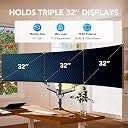
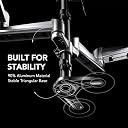
The HUANUO Gaming Triple Monitor Stand is a robust, full-motion mount designed to hold three 17 to 32 inch flat or curved monitors. Featuring versatile tilt, swivel, and rotation capabilities, it offers ergonomic customization to optimize comfort and productivity. With dual mounting options (clamp and grommet), it securely frees up desk space, making it ideal for professionals seeking a clutter-free, efficient multi-monitor setup.


| ASIN | B08DH81TS3 |
| Best Sellers Rank | #33 in Computer Monitor Arms |
| Brand | HUANUO |
| Color | Silver |
| Compatible Devices | Monitor |
| Customer Reviews | 4.3 out of 5 stars 7,277 Reviews |
| Enclosure Material | Alloy Steel |
| Item Type Name | / |
| Item Weight | 7.56 kg |
| Manufacturer | BESTQI INNOVATION (HONGKONG) TECHNOLOGY CO., LIMITED |
| Material | Alloy Steel |
| Maximum Tilt Angle | 90 degrees |
| Maximum-Supported Screen Size | 32 inches |
| Mfr Part Number | HNTS3S |
| Minimum-Supported Screen Size | 13 inches |
| Model Number | HNTS3S |
| Mounting Type | Tabletop Mount |
| Movement Type | Tilt, Swivel , Rotate, Articulating |
| Number of Items | 1 |
| Number of Packs | 1 |
J**L
Best mount ever with in depth explanation as to why.
I originally posted a 2 star review and said the mount could not fit 3 32" monitors. That review was meant for another brand, which was the case. I replaced that brand with this Huanuo and it was a night/day difference. The initial setup may be daunting for those who, much like the entitled Veruca Salt, want everything NOW, and proceed to kick and scream when they don't get it. If you have a little patience, and the most basic understanding if mechanics and physics, this stand is amazing. I am housing 3 32" LG ULtragear curved 180hz monitors with this mount, with ease. For those complaining about sag, if you tale two minutes to read the 2 pages of instructions, you'd see there's a set screw on the top of the piston arm to increase and decrease the upward force of said arm. Mine sagged too, as the arms came a little loose from the manufacturer, but low and behold, 4 or 5 revolutions of the screw, and, as if by magic, problem solved. One of the great things about this mount is that there is a separate mounting system for the center monitor, separate if course from the arms that have their own shared mounting system. This is clutch when you're trying to get all 3 monitors to perfectly align with no gaps between the bezels. It's also clutch to keep the center monitor square with the back wall, as one can loosen just the center, square it, adjust height, and then adjust the swing arm heights to it and be good to go. I built the wntire setup first, with no monitors, which seems common sense. I then installed the center monitor and got it to precisely where I wanted it. The last step was the adjust the height of the arms, I did this before installing the two outer monitors, again this should be obvious. I simply used the monitor mounting plates on the center as a guide. I lined up the outer arm mounting plates to it, keeping the arms as straight out as possible to allow maximum movement in both up and down travel. Once I got all the mourning plates pretty even by eye, I installed one monitor at a time to the arms, and positioned the monitors accordingly. Doing it this way, you can semi tighten all the set screws that you never have to use again BEFORE the monitors are installed, again, common sense, I know, it's difficult, and the only screw left to adjust is the arm piston screw which is on top amd insanely easy to fet to after the monitors are installed. This mount is crafted like a brick poop house and it's easy enough for a child to put together successfully, quite honestly. In comparison to its competition, in which I have been very courteous as to not mention names, this Huanuo mount is easily a clear winner. Have a little patience and, more importantly, be smarter than the thing you're working on.
C**Z
Great 👍🏼
My husband has had this for a while and he loves it, is not hard to put together and it is very stable considering the weight of the monitors he uses
F**N
A Triple-Threat Solution for Ultimate Productivity and Ergonomic Bliss
Welcome to a review that will completely change the way you think about your workspace setup. Today, I will take you on a journey through my personal experience with the HUANUO Triple Monitor Stand, a game-changer that has transformed my productivity and comfort levels. If you're tired of the cluttered mess on your desk and the strain on your neck and eyes, read on to discover how this innovative monitor stand can bring your work or gaming setup to the next level. When it comes to monitor stands, the HUANUO Triple Monitor Stand takes the cake with its outstanding design. Equipped with gas spring arms, this stand offers smooth and effortless adjustments that will make you feel like you're in a sci-fi movie. The sturdy construction ensures stability even with three 17 to 32-inch flat or curved LCD computer screens, giving you the freedom to create an immersive visual experience. The sleek black finish adds a touch of elegance to any workspace, making it a perfect fit for both professional and gaming environments. Let's be honest; no one wants to spend hours fumbling with complicated installation processes. With the HUANUO Triple Monitor Stand, the setup is a breeze. The package includes both a clamp and grommet kit, providing versatile options to suit your desk configuration. As someone who often struggles with assembling furniture, I was pleasantly surprised by the clear instructions and user-friendly design. In less than 30 minutes, I had my three monitors securely mounted and ready to go. Say goodbye to neck strain and eye fatigue! The HUANUO Triple Monitor Stand is a lifesaver when it comes to ergonomics. Its adjustable gas spring arms allow you to position your screens at the perfect height, tilt, and angle, ensuring optimal viewing comfort. I found that this improved my posture and significantly reduced the discomfort I used to experience during long working or gaming sessions. It's like having a personal ergonomic assistant right on your desk. If you're anything like me, productivity is a top priority. The HUANUO Triple Monitor Stand is a game-changer in this department. With three screens seamlessly integrated into a single setup, multitasking becomes a breeze. Whether you're a content creator, programmer, or stock trader, having multiple monitors allows you to effortlessly manage different applications, documents, and windows simultaneously. The increased screen real estate provides a panoramic view, enhancing your workflow and enabling you to tackle complex tasks with ease. Let's face it, a cluttered desk is a distraction. The HUANUO Triple Monitor Stand helps you reclaim your workspace by eliminating the mess of individual monitor stands. The cable management system keeps your cables neatly organized and out of sight, giving your setup a clean and professional appearance. This not only enhances the overall aesthetics of your workspace but also promotes a clear and focused mind. Say goodbye to the tangled mess of wires and hello to a tidy and zen-like environment. Who says work can't be fun? The HUANUO Triple Monitor Stand adds a touch of entertainment to your workspace. Whether you're indulging in a gaming session or binge-watching your favorite series, the immersive experience created by the triple monitor setup is nothing short of incredible. I couldn't help but feel like I was transported into the heart of the action, with vibrant visuals and seamless transitions. This added entertainment value is a delightful bonus that brings joy to your work breaks or leisure time. In conclusion, the HUANUO Triple Monitor Stand has revolutionized my workspace and transformed the way I work and play. Its innovative design, easy setup, ergonomic benefits, and productivity-enhancing features make it a must-have for anyone seeking to take their workstation to the next level. Bid farewell to cluttered desks, strained necks, and limited screen real estate, and say hello to a world of productivity and comfort. With the HUANUO Triple Monitor Stand, you'll be well on your way to a head-turning setup that will make your colleagues or friends green with envy. Don't miss out on this game-changing solution – grab yours today and take your workspace to new heights!
T**R
I love this for my 32" monitors but wish the back pole was taller
Overall I love this item and unlike my last purchase, which I had to return, I plan to keep this one. PROS: Has two extension arms, meaning you have the middle part that connects to each side, plus an arm AND an additional arm, most would only have the middle part and one extension arm. This means for guys like me with 3 32" monitors you have the option of having them sit horizontally without having to sacrifice, IE one monitor is partially blocked by the other. As I noted I had to return a different brand and that was because of this. Weight - My monitors are roughly 15 1/2 pounds each and I didn't have any issues moving the arms around with the monitors connected. Says a lot about the stability that I'm talking about this product being able to hold a 15 lb monitor on a second arm extension, as opposed to one. Install time - About 10-15 minutes, 20 if you factor that I'm a moron who didn't check placement before setting everything up, then forced to disassemble and reassemble in the proper area. Bad joke aside was straight-forward setup but use your own screwdriver, the one that comes with this is limited. Range - Similar to what I've used in the past. Easy to lift upwards, downwards, tilt the monitor, rotate to portrait. Standard stuff CONS: Only one. The middle pole is a decent size, but not tall enough for me. If you're like me you want your monitors higher to reduce strain on your eyes (I'm 6' so I prefer not having to look downwards so much). In my situation even when I had the middle area at it's highest my middle monitor was too low. I ended up using a stand for my middle monitor instead of connecting. Checked with the manufacturer and unfortunately there wasn't an option to buy a taller stand or add an extension, so while I give this 5 stars IMO it's really 4.5 and only because of this limitation. TLDR - Great product, no regrets purchasing it. Can hold 3 horizontal 32" monitors but middle might be lower than you prefer.
A**Y
Perfect for what it is.
Great quality for the price. I attached several pics and a video of it mounted to my electric sit/stand desk. I did order a thick metal plate designed for these mounts to sandwich on the desk being that my desktop is particle board I was concerned it would snap the desk where it clamps on at. I’m running 3 older 24" dell IPS monitors that are a bit heavier than most newer monitors and it handles them just fine. The gas powered arms were a little tricky to get adjusted just right and I still have one that needs some tweaks. When I adjust the screen menus with the screen buttons the monitor will slightly raise up on its own. Kinda annoying but I have not found a way to lock the arms in place once you have them setup the way you like. There is also only one screw underneath on the clamp and can be somewhat difficult to get tightened as the entire unit wants to turn. There are other units out there with dual screws that look like they would work better and prevent the headache of turning the entire setup when tightening. Not to mention they seem more secure. The cable management is great as I have two separate inputs going to each monitor and the power cable. All fit nicely in the sleeves and clips. Lastly there are no input plugs on this stand. Not really a con as you can clearly see that in the pictures and not docking any stars for it either. However there are other units out there that have built in USB ports, mic ports, etc that run around this same price point. All in for the price I would absolutely buy again and has been rock solid for a little over a month now with my sit/stand moving up and down multiple times a day with no wobble. Oh and the detachable vesa mounts that just clip into the arms are an amazing thing when installing your monitors. Just buy it. Hahaha
M**E
what is the right number of monitors
originally I had 2 - 32” 4k monitors then 4 (double stacked) but I didn’t like reading the top 2, iso I tried 3 (this one) and I think it’s about right. A lot depends on the size but f your monitor, but when they get double stacked I almost think you are in to a new kind of mount (or at least different from the ones I have seen so the monitors tilt down (almost like you are creating a cockpit. i’ve also noticed that many monitor arms that say they accommodate 32” monitors don’t - it causes awkwardness where they meet and it doesn’t allow for a perfect lineup. This arm was perfect in that respect. I also like the way this is built because the center one is largely captured against the support. the outer monitors have an amazing amount of control over placement - but you really start to get the hemispheric positioning so your head can move and see everything. monitor arms have come a long way, my first arm in the 90’s was basically a shelf, then we transitioned to models that almost required you to have 3 hands, this is among the new style I have seen where you attach a vesa plate to the monitor and then that plate slides into the mount arm, and finally a screw is installed to complete the attachment. it couldn’t be any easier to set up. sometimes I think me needing this much screen real estate is stupid, but it’s when your monitor monitors are all on, the mount has them in perfect alignment that you understand, why I think this might be the best monitor support arm I have ever owned. I highly recommend it.
R**D
Not for the faint of heart
Yes I am giving this item one star to catch your attention of the monumental task your about to place onto yourself. Do not buy this type of triple monitor mount if you are faint of heart. This thing will test you to your very core and bring you to your knees, but it works great once you make it right for you if you can master it and show it whose boss. Yes I realize I may not be using it it in the perfect way, but this thing is an akward nightmare that is almost sentient. I have made it work and am using it to max capacity, but it has been quite the experiment to get it to a stable enough point where I can justify this is better than using the stands my monitors came with. It's been lots of trial and error, multiple busted monitors, lots of experimentation, lots of reinforcement, and lots of fine tuning. I work from home and have attached 3 32 inch monitors to this thing all horizontal. Whitch I do not recommend because while the description says it can support that, it really limits the range of motion of the 2 adjustable swing arms and you have to be careful not to bang the monitors into each other when adjusting or careful not to bust the screen of your middle monitor with the corner of the side monitor or just destroy the inner monitor corners all together. With 3 32 inch monitors this takes up the whole with and then some of 6 feet. And I can not pull the side monitors as far inward as I would like to get more of a half circle effect. Like other reviewers have pointed out, the C clamp really puts a lot of pressure into a very small area of your mounting surface. You can drill a hole in your desk but the hardware seems a bit thin to do this. Hindsight, I would have given more consideration to wall mount options. Because I like lots of surface space, no drawers, and simple solid wood tables are pricey and a dining table as the desk I would need would be ridiculous; l opted for a 6ft plastic folding table as my desk. I made sure to buy some metal C clamp reinforcement plates before setting this up for the first time. There was so much downward force from the C clamp, this contraption would have caved in the table and twisted it in half if I had let go completely. I did a little bit of wood working on a 2x6 scrap for the bottom of the clamp and used a thick plastic cutting board for the top of the clamp. And then added in the metal C clamp reinforcement plates for good measure. Trust me, it actually looks decent and not ugly like it sounds. I also mounted a clamp to the wall to grab the middle pole to keep this from ever falling forward (later on, I made it months ago but never mounted it to the wall until after the events below like an idiot). After using this set up for a few months, I noticed the C clamp was slipping away from the table. Like a moron, I did not remove any of the monitors before readjusting. I had my wife keeping things stable while I was under the desk to readjust the C clamp but the whole assembly fell forward and while she caught it, 2 of my 3 LG 32 inch gaming monitors got busted. I had to purchase replacement monitors but made sure to take a metal handle and run it across the backside of the C clamp and secure it to the 2×6. This way the C clamp cannot back away from my desk without taking the whole 2×6 with it. Then I added my security clamp/mount to the wall as well. This thing comes with plenty of spare hardware and parts to fine tune it to suit your exact needs for what you mount to it. Assembling it is a nightmare and the the directions would do a better job as bird cage lining. Pay attention to each arm segment. While all 4 looked the same, they are not and the directions will have you a bit off kilter. I had to unassemble and reassemble several times to get this thing right. Carrying this thing is about as easy as carrying a lifeless metal robot with heavy metal arms swinging every where ready to destroy anything in your path. Trying to add or remove one of the side monitors is rough as the spring loaded arm will fight you and it about takes 2 people to add or remove a monitor. You mount a versa plate with a plastic block attached to it that slides into the mechanical arm, but the arm moves up and down when trying to get it to lock into place. It's especially fun to remove a monitor as the spring loaded arm will keep popping up and relocking the monitor in place. Hence why I said you need 4 hands. You can adjust the tension on so many diffrent places that it's great for fine tuning. To wrap this up, this thing works well if you have the determination of a warrior but at times it can be like arm wrestling an octopus. I have 2 other mounts made by this brand and they have been fairly easy to work with since I am not pushing them to the make like this hefty boy. It is nice being able to grab a monitor and hoist it up in to the air to demonstrate things on the screen to a bystander. This is also a good option for a standing desk as you would just need an elevated surface for your mouse and key board because the monitors can lift pretty high with a baby's touch. So think long and hard about purchasing this, but it's a good unit and made well. I'm only giving it one star because it's been one **** of a fight making this thing work the way I want it too and using it with 3 32 inch monitors and a plastic table is a fool's errand but I was determined to win this fight.
D**D
Best monitor stand ive used
I really enjoy using this monitor stand as it has different mounting options, I run portrait, landscape, portrait as I game and stream everything is right where I like it but its still adjustable for everyone else.
R**T
You can trust this triple monitor stand!
After doing lots of research on monitor stands and solutions for three monitors, a lot of people recommended using three single monitor arms instead of a triple monitor mount due to stability issues found with a lot of triple monitor arms, especially as I was mounting three 27 inch monitors. I really did not want to go down this path as I wanted my setup to look as clean as possible without too many arms being mounted to my desk. I decided to risk it and order this triple monitor stand after reading some positive reviews. It arrived and it took me between 1-2 hours to set up which I thought was relatively reasonable given I had never set up monitor arms before. Installation went very smoothly, there was a worry that I may damage my Ikea worktop as it is veneer with particleboard (which the instructions for this mount said is not a suitable desk to mount on), but I decided to go ahead anyway. I did add a bit of hardwood between my desk and the clamp to give it a bit more strength and so far it has been perfectly fine. The mount itself is super adjustable and very stable. I've managed to get all three of my 27 inch monitors perfectly aligned, and there is enough space to angle them inwards. You could probably fit 32 inch monitors on here quite easily. I have had it all setup now for about a month and the monitors have not shifted even one bit. The outer monitors do wobble a little bit if my desk is wobbled or when I raise/lower my desk with the sit/stand feature, but its not a lot of wobble, and during normal usage (such as typing on my keyboard) they barely move. When they do wobble, they always return to their set place and do not shift at all. Having switched from using the stands that come with the monitor to this triple monitor arm, I have gained so much more desk space and my setup looks super clean and professional which is exactly the reason why I purchased this mount. If you are in a similar position as me, and are not sure whether this mount will suit you, I am sure you will be very happy with your purchase!
N**N
THIS MONITOR HOLDER IS NOT SUITABLE FOR 3x32".
The arms are to short for 3x32". It's also a really weak construction. Keep away. Rear monitor mount hits the monitor holder so it cant be angled in a proper way.
M**.
solid and as described
Llegó a tiempo, excelente conductor de entrega y el producto funciona bien, paciencia y un poco de tiempo, bastante simple, método de ojal para mí y muy bonito. arrived on time, great delivery driver and product works well, patience and a bit of time, simple enough, grommet method for me and very neat looking
G**E
Simple et efficace
Acheté pour supporter un 32" au milieu et deux 27" de chaque côté. Assez simple à monter, tient super bien dans le temps (en version bureau percé, je ne pouvais pas mettre la pince). Les modifications quelques semaines ou mois après se font sans soucis, sans avoir besoin de ressortir le mode d'emploi
R**J
Good quality product
Great price for a great quality product. Assembly is requires some attention to detail. Adjusting the sensitivity for the up/down pitch as a little challenging. The VESA bracket has a nice feature where you can just clip into the arms. you can maximize the distance of the screen to the edge of the table by rotating the center mount to the side and then mounting the monitor. The monitor center will be a little off center, but you gain a couple of inches in desk space.
Trustpilot
1 day ago
2 weeks ago