Buy anything from 5,000+ international stores. One checkout price. No surprise fees. Join 2M+ shoppers on Desertcart.
Desertcart purchases this item on your behalf and handles shipping, customs, and support to Senegal.
๐ Power, Ports & Productivity โ Dock Like a Pro!
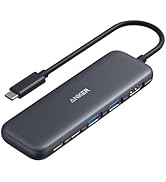
The Anker PowerExpand 9-in-1 USB-C Docking Station is a versatile hub designed for professionals craving expanded connectivity and efficient workspace management. It delivers 60W laptop charging, dual 4K display support via HDMI and DisplayPort, high-speed USB 3.0 data transfer, and reliable Gigabit Ethernet, all packed into a sleek, compact design with an 18-month warranty. Perfect for multitasking millennials who demand power and performance without clutter.


| ASIN | B095YKQBHM |
| Best Sellers Rank | #22,184 in Electronics ( See Top 100 in Electronics ) #339 in Laptop Docking Stations |
| Brand | Anker |
| Color | Gray |
| Compatible Devices | Laptop |
| Customer Reviews | 3.6 out of 5 stars 496 Reviews |
| Hardware Interface | USB |
| Item Dimensions L x W x H | 5.69"L x 2.56"W x 0.96"H |
| Item Weight | 0.41 Pounds |
| Manufacturer | Anker |
| Mfr Part Number | A83941A1 |
| Model Number | A8394 |
| Number of Ports | 9 |
| Product Dimensions | 5.69"L x 2.56"W x 0.96"H |
| Total Number of HDMI Ports | 1 |
| Total USB Ports | 5 |
| Total Usb Ports | 5 |
| UPC | 194644069940 |
| Warranty Description | 18 month warranty |
| Wattage | 60 watts |
D**E
Works for different models of DELL laptops
9 months of use review: I have used this for DELL laptops without its accompanied power brick whose models are 5 years apart and the dock continues to work, howbeit I would get a USB port under powered complaint from Windows 10 and 11. It would still charge till 100%. I figured I would not get this error if I use DELL's docking station which would cost twice as much. I have also used it to connect to a SAMSUNG 13" laptop that is non-EVO so the SAMSUNG power brick is connected and it is smart enough to not cause power problem. Both back USB ports I am using for a RAZER RGB keyboard and its mouse. I also have a DELL 38" curve monitor connected via DisplayPort. The PD is used to charge my phone while I am at my desk. All these devices are connected simultaneously, no issues. What I don't like: The USB error from Windows. That is my only annoyance.
C**N
Bought two, first failed in two weeks, other failed this morning. Update: replacement also failed.
I'm updating my review to say one of the replacements has now failed in the same way the first two failed. No power supplied to laptop. Connect a USB-C PD tester, and sure enough: no voltage on the upstream "laptop" port, and no PD signaling. Mains power supply functioning fine at 20.2V. Not going to even bother replacing this. Anker/Amazon know there's a problem with the device, as they've made it hard to find with search, so I'm guessing I'm not the only one. Avoid avoid avoid this device, particularly second hand. --- Original review --- I chalked up the first failure to chance. I reached out to Anker and they were very kind (Ticket 86092346) but required me to ship back the failed unit before they'd ship me a replacement. I sent the initial failed unit out September 17 2021, and received the replacement 11 days later(!!) on September 28th. Oof. But time went on and the second unit, as well as the replacement, both kept going. Until this morning; the second unit has failed in precisely the same way as the first. I'm not waiting two weeks for a new unit this time. Note that if you are reading this and decide to buy it anyway, the power button on the dock is worse than useless. On applying power (say, from a power interruption or a switch on a power strip) the dock defaults to "off". That means no USB, no power to your computer. You need to find that power button and press it to turn on the dock! Why?? This is such a crummy design and is very un-Anker. This product ultimately feels like a bad OEM market grab. Extremely disappointed. The two docks didn't make it through one school year and between the failures and needing to randomly turn the docks back on (I cannot emphasize enough how weird and bad this is) I really wish I had purchased something else... and after writing this review, I am.
C**R
Works great for those who had issues with USB4
I have tried THREE thunderbolt docks. I have a laptop that I use a dock with to connect to my monitors (1440p 60hz and a 1440p 144hz). No real issues UNTIL I try to play games and I get flickering and black screens. I think this is a USB4 issue (still fairly new so drivers are iffy). Anyways, this was my answer! I get no more flickering/black screen while gaming! Also, they say it won't support 1440p 144hz but Im running two monitors 1440p 60hz and 1440p 144hz, soooo guess it does work? Keep in mind my laptop supports USB DP Alt mode 1.4. Anyways so far so good it works great. Wake from sleep still doesn't work but it didn't work with the thunderbolt dock either. Laptop specs: AMD Ryzen 7 7735HS RTX 3050 16Gb DDR5 RAM
M**S
Love this unit, just one issue still trying to resolve.
We have 100+ of the Anker 13-in-1 units, and have had fairly good success with them. We were excited to see this model when it launched because it is smaller, gave us a better port selection and less expensive. The first one came with USB3.0 drivers installed and works flawlessly. The next two we ordered came with USB3.2 drivers and our users are losing their network connection multiple times a day, all day long. Requires either a reset through the Microsoft troubleshooter or a reboot to fix the issue. Laptops have 3.0 ports and are only 1-year old. So we're trying rolling back the ASIX driver to 3.0 and see if that helps. I'll update this later once we know more.
T**Y
It just works โฆ and thatโs a good thing!!!
I think we can all sympathize with the fact that todays laptops do not have enough ports, unless your just checking your email and watching cat videos. I really didnโt want one of those porta-hubs with the 6 inch USB connectors. They are the worst . I had this mini hub dangling from my laptop with wires streaming from it. It looks like someone shot a confetti gun from my usb port. Anyway I began my noble quest for fireโฆ umโฆ I mean a cool stationary dock. There were 100s of choicesโฆ.. that were hundreds of dollars, so that was a deal breaker since Iโm pretty cheap. I started with the Anker 651 USB-C Dock, 8-in-1 Docking Station. It was inexpensive and seemed like it might do the job. Well, it was great in theory, not so much in practice. There was something funky with the hdmi port. I couldnโt get it to work with one laptop and i couldnโt get the hub to power a different laptop. Iโm sure it had something to do with my stone aged equipment, but. I didnโt have the time or patience to troubleshoot the dozens of things that could be messing things up. So after I sent it back to the old warehouse in the sky, I spent what seemed like 30 or so minutes of searchingโฆ. Give or take 20 minutes, I ran across this little gem. It doesnโt promise to daisy chain 12 monitors, or cause rifts in time and space. It did however, promise to add ports, power your laptop and work with windows and Mac. Guess what??? It did just that. In the grand scheme of things, itโs a product that works. Also, it was reasonably priced( I did mention Iโm cheap). So, hereโs the deal. The build quality is pretty good. It has a solid power supply (it is an Anker product), and. It works without any fuss. If you like it when things do what theyโre supposed to, without paying a small fortune for that privilege , then this is a pretty good bet.
M**.
Power button, inconsistent connections, maybe mine is defective?
I purchased this for my MacBook Air M1, and it worked well enough when I received it. Having a power button on the device to turn it on and off is a little awkward, especially since I have a standing desk. The power button prevented me from hiding the dock under the desk. For the price, it is an excellent dock option for a MacBook. But, I immediately noticed that after waking my MacBook from sleep, the connection to my external display would not always come back on. When the external display did come back on, it would periodically blank the display even though the laptop still believed it was connected. I was using the HDMI port for the external display. Today, the entire dock randomly disconnects from the MacBook. I lose the display and peripheral connections, such as my webcam. It keeps flapping the link. I tried swapping the HDMI and USB-C cables between the dock and MacBook, disconnecting most peripherals, etc. The dock is unstable, and I may have a defective one. I wanted to like the dock because it feels solid, has the ports I need, and doesn't cost over $200. But it's not usable. I am going to have to try something else. I still believe Anker makes quality products, but this experience could be better, and, unfortunately, I will be more careful choosing their products. EDIT (2023-04-03): Anker's support was excellent! The rep I spoke to found my order, acknowledged the dock was still under warranty, and sent a replacement before I had to ship my dock back. I'm adding a third start to the review for Anker coming through on customer service. It will take some time to see if the product holds up or if I continue to experience the same struggles, power button inconvenience aside.
A**R
Good product
I like this product because it allows me to project my computer screen onto the TV. And since my Dell only has 2 usb C ports, it allows me to have extra peripherals with my computer. My first docking station ended up failing. Starting at about 3 weeks, the usb A slots wouldn't work, then by 6 weeks everything failed. Amazon promptly replaced it for free, and I've been enjoying the product again.
C**S
Cheap glitchy garbage that killed two brand new laptops
Please do not buy this item. I purchased two of them. The primary issue is that one has now killed two of my brand-new LG Gram laptops. First one it fried so hard it wouldn't even boot up anymore when I absent mindedly unplugged the docking station while it was running with the computer attached. Second time we had an electrical storm which interrupted power and despite being plugged into a surge protector the docking station again fried the USBC ports (both somehow) which disabled the laptop from being able to be linked to a docking station or charge. Less importantly but still annoyingly is they simply just don't work well. For $150 you can get a WAY better docking station than this. The display connection is super glitchy and unreliable. The audio jack gives feedback constantly to the point where I had to turn off my speakers when the computer is turned off otherwise there is a constant buzzing sound. After it killed my second computer, I went to my local office supply store and bought one for $100 that works WAY better in every way. Don't buy this cheap junk. The fact that they want to charge a premium price for a cheap garbage docking station is insane. I would expect these kinds of issues from a $50 docking station, but I paid the extra money because I thought I was getting a better product. Instead, I was charged a premium price and got a crap product. Please do yourself a favor and do not waste your money on this cheap crap.
G**R
works well, fair price
have two setups home and office, this way only need to carry laptop around and one cable to set everything up. need to hit power button to restart if there is a power outage
A**X
No longetivity
I've bought one of those a little over 2 years ago. I really enjoy Anker for multiple other product but this was a bust. From the get-go, the aux wasn't working for my headset. A few months later, I decided to contact Anker because I was getting tired of not being able to use my device completely. After receiving the new unit, everything worked fine for another few months and it's been degrading rapidly ever since. Aux not working again, the front usb 3.0 stopped working not too long after, HDMI stopped working and now the entire thing won't connect. If you need something to use once a month, it might be a good deal, but for daily use, you'll have to plan a budget to replace it shortly after owning it.
D**S
Excellent
Runs a Samsung G9 at 5120x1440 120Hz right out of the box with simultaneously charging ThinkPad Nano X1 (that requires 65W) through the same thunderbolt cable. Didn't try it as dual.
A**R
Good quality for a good price
This dock works well for the price; I have a Dell Latitude connected to the dock running a 4K monitor without issues. My previous dock had flickering issues, and this one has had none so far. Removed a star because 60W charging is a bit slow for my laptop; not a big concern, but something to note. Further, the USB on the back of the dock is only 2.0, would be nice to see a more modern standard on a dock like this.
J**S
Works great
Itโs hard to find a dock that will give you full speeds on the Ethernet port. This one does! Works great with a usb 3.2 Gen 2 extension cable as well
Trustpilot
1 month ago
3 weeks ago