Buy anything from 5,000+ international stores. One checkout price. No surprise fees. Join 2M+ shoppers on Desertcart.
Desertcart purchases this item on your behalf and handles shipping, customs, and support to Senegal.
๐ Upgrade your garage security & convenience with a single touch!
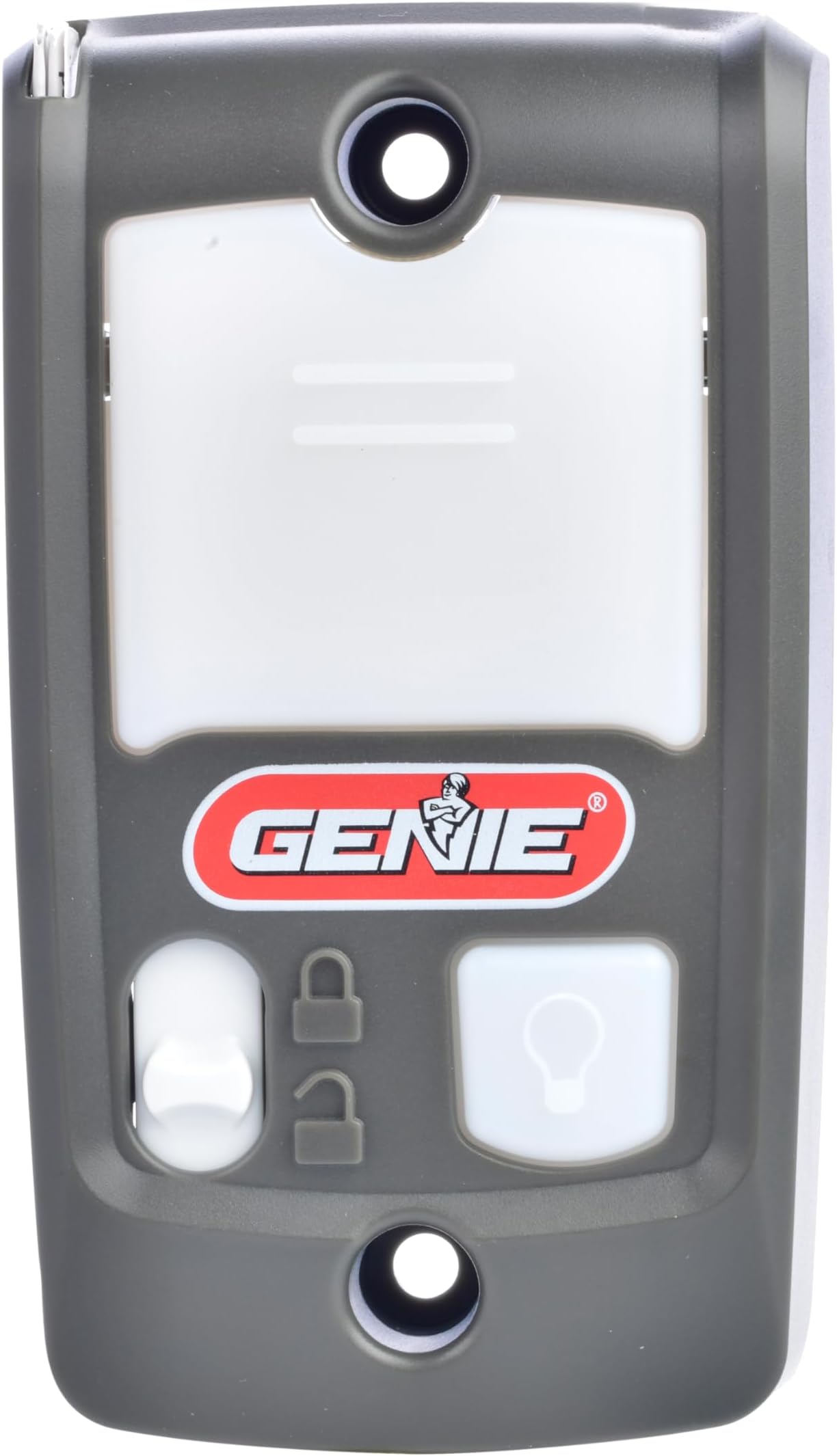
The Genie Series II Garage Door Opener Wall Console (Model GBWCSL2-BX) is a wired, backlit control panel designed for seamless compatibility with all Genie Series II garage door openers made since 1995. Featuring a Sure-Lock vacation lock to disable remote/keypad access for enhanced security, it also offers independent light control and installs easily with just two screws and two wires. This durable, plastic console is a trusted, user-friendly upgrade that transforms your garage entry experience.


User
Easy to install and a nice replacement for the old original
After she pushed it for the first time, my wife said "thank you, thank you!" This was of course followed by "why did you wait so long to replace the old one if this was so easy to do?" "Umm, because I was waiting for the price to drop?" or "It seemed like it was going to be a lot harder to do and I just hadn't found the time on my Honey-do list." Anyway, now that this is installed and all done, my wife thanks me every time she uses it instead of cursing the old button every time it didn't work correctly. Which was pretty often.Anyway, on to the "Wall Console," hereafter referred to as the button. The old one was installed when the house was built in 1996, and had been sticking for several years. Sometimes it would double-click, which would mean you'd have to push twice. Once to close the door that had opened 1" and then stopped, and once again to open. And hope that it didn't double-click again (which it did on more than one occasion). The other neat trick the old button would do was to get stuck in the depressed position, which rendered the whole system inoperable. All pretty annoying. If you wonder why it took so long for me to replace it: My wife parks her car in the garage, while mine parks in the driveway and I use the front door. :)The new button works great. It is huge compared to the old button, and all alone, so you don't have to worry about turning on the opener light when you meant to open the door (or vice versa). And the light inside it is pretty bright. If you didn't notice the big black box all by itself on the wall, you'd certainly notice the red light.(And in case you are wondering from the picture, the green painters tape on the grab bar was to provide some contrast in a field of white for the person using it, who due to glaucoma has a limited field of vision).And, now on to the installation.(I am going to first assume that this is a replacement button and not a first time install. For that, you'd also need to run a two-conductor wire from the button to the garage door opener)Installing this button as a direct replacement couldn't be easier. At least if you have a short garage ceiling. Mine is a little over 10 feet tall, meaning I had to get the ladder out of its hiding place behind piles of junk in order to reach the plug to unplug the garage door opener (step number 1 in replacing the button). Why didn't I just turn off the breaker? Because the genius that built my house wired the garage lights in with the same outlet the opener is plugged in to. And I didn't open the garage door because it was nighttime when I was working. Also during late fall. And the garage faces to the Northwest, so all the cold wind blows right in.That squirrel put to bed, after you have unpacked the box the button came with and have all the tools mentioned in the box (if you are replacing an existing Genie button, you may only need a #2 Philips screwdriver), step 1 of the installation is to unplug your garage door opener (or flip the circuit breaker). Step 2 is to unscrew the old button. Once off the wall, there should be two wires leading into the back of the existing button. Do not disconnect them yet. Take the new button and check to see that the screw holes line up. If they line up, you can skip the next few paragraphs.Tools need for this step(s): Pencil or thin-bodied pen, Philips screwdriver, a tape measure at least 5 feet long, a power drill with various bits <1/4", Small hammer (or very big thumb). Optional equipment would be a stud-detector.If you need to drill new holes for the new button, there are instructions in the box, but you will need a small drill (I don't remember the exact size, but it is less than 1/4"). Once you have found a spot on the wall next to the door where you would like to have the button, mark the locations for the screws by inserting your pencil or pen through the screw holes on the from of the new button and drawing around the outside of the hole. (And per many building codes, they should ideally be 50" up from the floor or step, to keep small children from playing with the garage door and getting hurt). The optional step of looking for a stud, so that you don't need to use the plastic anchors requires the use of a stud-detector, and is outlined a following paragraph. I always start by first drilling a small pilot hole, usually with a 3/32" drill bit to make sure I'm not over a stud. In order to do that, the drill bit has to stick out at least 1" from the drill to get through the drywall. Your drill should go easily through drywall, but less so through wood. The other thing to look for is wood on the end of the drill bit. The 3rd test is to not drill to the full depth of the drill. After you are done drilling and the drill is off, push the drill bit back in the hole. If you are over a stud, you won't be able to push any farther. If there is no stud behind the wall, there will be no resistance felt. If you had drilled a 1/4" hole and gone into a stud too far, you then would have trouble using either type of fastener (screwing directly into the stud, or the plastic inserts). Once you have determined whether you are into a stud or in just drywall, you can then either move on (stud) or pull out the larger drill bit (drywall) and drill the holes to the larger size. After you've done that, now is where the small hammer or big thumb comes in. You need to push/lightly tap the plastic inserts into the holes, flush with the drywall. I like to try putting the screws in now, either into the studs or into the inserts once the inserts are in the wall, just not all the way in, to make sure they will work. If you have difficulty screwing into the stud, you may need a slightly larger pilot hole. Now is the time to find out, not when you have the button halfway mounted on the wall. If the inserts spin when you are just starting the screw, you may need a bigger size or different type of fastener (unfortunately, drywall comes in different thicknesses and grades, and also gets more brittle with age, so what works in a 20 year old house may not work in a 50 year old house. )For help finding studs next to doorways, most doors will have two studs against either side of the door, which may or may not be touching. You can often find the location of the outermost stud by looking at the location of the light switches next to the door, as they will (usually) be attached to that stud. The next stud may be 16" center to center, or the inside and outside edges of the stud will be about 14.5" and 16" from the door side edge of the switch plate. The reason I say may is that while (most) wall studs are placed on 16" centers, doors usually don't fit in those dimensions, so the gap on either side of the door is likely to be smaller. In the case of my door, the light switch pictured is on the inside of a stud and the button is over the next stud (but off to one side enough to cover the hole where the wire comes through the drywall, so the center to center distance is about 6" instead of 16?). But using a stud detector often starts with a tape measure and knowing where a stud "should" be, so you will know what your detector signal looks like when it finds one. Also, since studs generally are on 16" centers, finding one will usually help in finding others.After you are ready to mount the button to the wall (but before you actually mount it), turn over the button and you will notice two screws on the bottom of the button. These correspond to the two screws on the old button. You simply need to unscrew one wire from the old button and transfer the wire to a terminal (screw) on the new button, and then do the same thing with the second wire. Having done this, turn the new button over, place it against the wall, making sure you aren't pinching the wires (there is a little slot for surface mounted wires to exit) and insert the previously started screws (you did remember to take them out?) and tighten them down. Now all you have to do is plug your garage door back in (or turn on the circuit breaker) and your new button should work like a charm.In fact, it probably took me far longer to type this out than it did to install the button. Of course, I had holes that mostly lined up (I think I actually had to drill a new hole for one of the screws, thinking back now).
User
Great replacement opener for Genie Door Opener
Great replacement and easy install wires with the 2 screws on the back of the unit, Worked perfectly after install.
User
Genuin Genie Series II Garage door opener. High quality
Genuin Genie Series II Garage door opener.Great product.Simple and easy installation instructions.Simple installation.Works great.Very happy with the product.Excellent quality.Great price too
User
Exact replacement
Great replacement to the original wall opener that came with the house. Original opener stopped registering the button press and after troubleshooting concluded the opener went bad. Replaced with this one and it works on the first click again. Easy to replace.
User
Ordered two and quality varied
We ordered two Openers for our Genie doors, and installation was a bit tricky with the second unit. We found that when tightening the screws to mount the unit securely to the wall that it apparently put pressure on the PCB (printed circuit board) inside, and the door would activate uncommanded. For this reason we could not tighten it as much as we would have liked. Otherwise, door, light, and lock functions work as expected. As for the First unit, it mounted without any issues or surprises. Very much like the ability to disable them when away. Recommended
User
Very easy to install and works well
Bought this to replace an older one that went out and it works really well and it was very easy to install. Screw holes matched up perfectly with the one we replaced. Seems that they actually thought about making sure how easy they could make it to replace.
User
Works with 2024 pro series
You have to make sure you have a series 2 opener but I have a โgenie 2024 professional seriesโ but it didnโt say if it was series 2 or not, I went to genie.com and they have a list of which models are which. After confirming this was compatible, I ordered and this was perfect. My previous opener wasnโt working and it was just this button, not the whole unit, great safe and works as expected. Installation is 2 screws to mount it and 2 screws for the electrical connection. This is low voltage so itโs wonโt hurt you if you donโt kill the power to it but always be safe and if possible , throw your breaker fuse for the garage for electrical safety just in case that wire is not the wire you think it is.Product looked exactly like it should and works good.
User
Exact replacement, quick installation
Exact replacement, less than a 5 minute installation/replacement. Works as it should, flawlessly and buttons are crisp again.
User
Totalmete recomendable
Cambiรฉ un Genie Serie II antiguo (20 aรฑos) por este nuevo dispositivo tb Serie II. Tan solo tuve que quitar el antiguo y conectar los cables al nuevo y funcionรณ perfectamente. Totalmente recomendable.
User
Perfect replacement part.
Super replacement for original wall unit. 5 minutes to install. Works great.
User
Awesome
Works great with my garage door opener and easy to wire up to the system.
User
Product came as advertised and meets my needs
Good replacement for my old opener
User
This device worked perfectly for my Series II Genie garage door opener.
Although it is suggested in its description that this is a Series III model, it is in fact, as noted by its part number, for a Series II Genie garage door opener. I advise that the online description be changed to Series II in order to avoid confusion.
Trustpilot
2 weeks ago
4 days ago