Desertcart purchases this item on your behalf and handles shipping, customs, and support to Senegal.
🎮 Capture Every Frame, Stream Like a Pro!
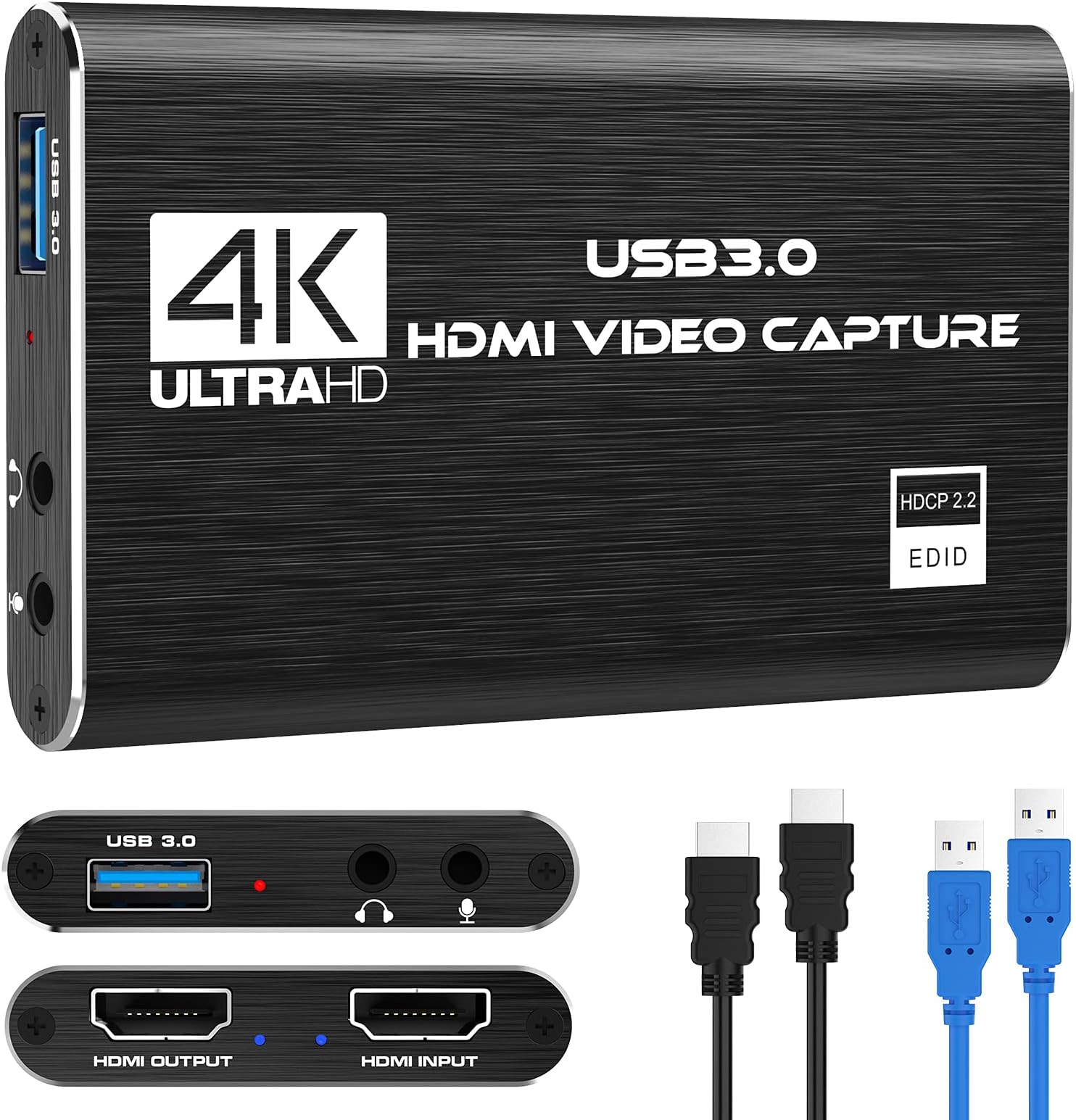
The Rybozen V316B-FR Capture Card delivers professional-grade 1080p60FPS video capture with 4K30/60Hz input support, USB 3.0 plug-and-play convenience, and HDMI loop-out for zero-latency gameplay streaming. Compatible with major consoles and PCs, it’s designed for seamless live streaming and content creation with built-in mic input for real-time commentary.


| ASIN | B097DKNS1M |
| AV Output | MPEG-4 |
| Antenna Location | Live streaming, streaming |
| Best Sellers Rank | #1 in External TV Tuners |
| Brand | Rybozen |
| Built-In Media | Capture Card |
| Compatible Devices | xbox one |
| Customer Reviews | 4.3 out of 5 stars 2,301 Reviews |
| Hardware Interface | USB |
| Item Dimensions | 3 x 2 x 1 inches |
| Item Weight | 0.18 Kilograms |
| Manufacturer | Rybozen |
| Mfr Part Number | V316-Black |
| Minimum System Requirements | Minimum system requirements: Windows operating system, USB 3.0 port, system compatible with 1080p video processing |
| Model Name | V316B-FR |
| Model Number | V316B-FR |
| Operating System | Windows |
| Other Special Features of the Product | hd |
| Platform | Windows |
| Recommended Uses For Product | Live streaming, streaming |
| Special Feature | hd |
| UPC | 711379826695 |
| Unit Count | 1.0 Count |
| Video Capture Resolution | 4K up to 60Hz |
| Warranty Description | 60 Days |
A**R
Better than expected, 4K pass through (only 60fps) but full 4k streaming, No drivers needed. 10/10
Overall best bang for the buck. READ THIS REVIEW! So I couldnt find any info on what hz this could run at and that was important to me. I run 4k displays and wanted to record things from time to time. For my girlfriend this works great, and for many tasks it works fantastic. Read until the end for my view. Facts: Using numerous cables I got the same results on pass through: 4K 60F HZ / FPS, no noticeable latency (did not measure), also I dont believe HRD passed through I will verify and update my review. 1080P HZ / FPS. This is sufficient for most higher end gaming if you are doing a live broadcast. Which I will address below. I personally just use an OBS with a remote stream typically but I wanted any easy to plug in, low work, low effort solution when I needed to plug in fast. This product did EXACTLY that. For simply making a video tutorial, recording my screen for desktop use, server use, etc. This was amazing. And not only that at this price point it is cheap enough to use this to remotely manage video out on my servers. +2 points right there. I wish it would handle 4K pass through (not record I dont care about getting over 30-60FPS which I was able to get) to my main display when I play a game for when friends want to watch. But thats fine I can do a remote stream for them if it is important for me to get 4k @ 120-240hz which most cards barely handle anyway. Now the best part. I plugged this into my pc, multiple Mac machines. No setup, no drivers needed. My obs 100% picked it up immediately. From opening the box to streaming I was setup within 5 minutes. Cables were supplied. I wish they had a newer one (which they might already have) with USB c or at least a higher HDMI pass through. Due to how cheap these were and how reliable / easy it was for compatibility I actually plan to buy some for remote sever management uses instead of using long HDMI cables when I needed to do bare metal work for servers without network based management. Overall everyone told me to not buy this. Wrong, buy it until you are ready to commit to a higher priced product if you need the resolution / Frame rate. The recording quality was 100% spot on of what I saw on my gaming computer, connection was easy as can be, streaming was the easiest thing I have done yet.
H**;
Does what it says at a great price
The one thing I'd point out is the USB cable included is very short, so you might need to get an extension to reach your computer. But it's easy to use and works amazingly well. I use it with a HDMI switcher that my game systems go into and it works perfectly. The visuals are clean. Not had a lot of luck with audio though. It can do a number of things without too much difficulty in setup.
T**Z
Great! Mac Users!
Works as intended! I’m not crazy about NEEDING to have it 4k or anything like that. I just want to capture myself playing my PS5 games. The video looks great and I don’t feel any crazy lag from the PS5 to the OBS capture. I’m very satisfied with the results. Now, I’m on a Mac Mini and being new to this I was confused as heyull to get the PS5 audio in my videos. I got the mic audio and camera going though. I tried to follow the instructions, watched YouTube tutorials, etc. Still couldn’t. Figured out to go to Settings (in the Mac, not OBS), go to Sound, and on Input choose USB3.0 Audio. Now in OBS, in your Sources, click on the + icon and choose Audio Input Capture, Label it whatever you want, click ok, and in the drop-down menu choose USB 3.0 Audio. The PS5 audio should now be in the video and you can confirm on the Audio Mixer on the right in OBS to see the bar moving. NOTICE: If you don’t hear anything, make sure to open the menu on your PS5 from the PS5 controller by pressing the PS button, go to the speaker icon, press Output Device and choose HDMI Device (TV). If you have anything else chosen like your headset, you won’t hear any sound. Now, great! Got that going. How do I listen to my PS5 audio from my speakers or headphones with all that going? I don’t want to connect headphones to the capture card. Remember the Audio Input Capture you added in your Sources that you relabeled to get the PS5 audio in your videos? Yeah, that’s the capture card audio. In OBS, to the right of Sources there’s the Audio Mixer where you see all your audio devices working. Click on the 3 dots on the capture card one that you relabeled that brings the PS5 audio in. Then click on Advanced Audio Properties. A window will pop up, find the capture card device you relabeled, and under Audio Monitoring click on the dropdown and choose Monitor and Output. Now you can hear your PS5 coming from your speakers or whatever is connected to your computer instead of having to connect a headset to the capture card itself. On my Mac I have a pretty cool set up. I don’t have two monitors but I have an iPad. I connected my iPad as the second monitor, made it the main screen under Mac settings > Displays, and then switched my main monitor to PS5. Now I’m controlling OBS through my iPad and can see what I’m doing since I only have one gaming monitor. For sound I’m using my AirPods to connect to the Mac and my PS5 sound is there! Now I can record my gameplay, my voice, and capture it all. Thanks all!
O**R
good for the price point
It's a cheap solution that works. but it cannot be used on more than one streaming software, so if you're using OBS for example, you will need to use a stream mirror like restream.io to stream to multiple platforms, if you try using to streaming apps it will only feed to one. device runs cool. compatible with everything even if you use a thunderbolt cable (hdmi or dp to micro usb c. streams at 50fps 1080p, cannot be pushed to 60fps. easy set up.
Z**O
Budget friendly without compromising quality
The capture card delivers an impressive balance of simplicity, performance, and affordability, making it an ideal choice for gamers and streamers who want high quality recording without the complexity or cost of premium devices. While many capture cards on the market require driver installations, software bundles, or extensive configuration, this model stands out with its true plug and play design. Connect it to your PC, attach your HDMI input and output, and you’re ready to record within seconds. Its built in headphone and microphone jacks provide clean, direct audio input and monitoring, a feature often missing in similarly priced alternatives. Compatibility is another strong point: the device worked seamlessly across every system tested, offering a smooth user experience from start to finish. Recording quality is solid, supporting 4K capture at 30 FPS with only minimal frame drops (rare and insignificant enough not to affect gameplay footage). Latency during play was nearly imperceptible, ensuring that your gaming experience remains responsive even while recording. Any performance inconsistencies observed were traced back to OBS software rather than the device itself. For gamers who want a fast, reliable, and budget friendly way to record gameplay or share content with friends, this capture card is an excellent choice. It also performs well with non-gaming HDMI sources, making it a versatile tool for a variety of recording needs.
P**R
Works great!
I had one I got off of Temu, and shocker, it had things wrong with it. Such as audio bugs, no V-sync, etc. Now THIS? It worked out great! I can start using it to help record vids for my YouTube channel.
T**R
The Good, Bad, and Overall
The Good: It will most definitely fit on your desk or in any area you may need it in. It still outputs the games at 1080p regardless of recording or not You can see what is going on from the TV if you want and can hear the sounds directly from the capture card It has low latency overall Comes with USB-A to USB-C converter just in case Cheaper with good quality Easy to set up Reliable for long gameplay sessions The Bad: You have to figure out a lot on your own and the customer service isn’t too great It can be annoying to set up and work with, seemingly disconnecting when it isn’t used for a while You need an additional HDMI cord for this device if you want to connect to a TV Sometimes it works well, and others it doesn’t. You’re essentially taking a gamble with the recording quality It advertises the fact it can record in 4k, but the dock output onto your TV will only ever be 1080p, meaning if you have a switch 2 it may not be the best bet. Also, when recording in 4k, it maxes out frame rates to 30. Understandable, but should be noted somewhere on the page to avoid confusion. The Overall: This capture card is the best option that is cheap and easier to use. It has several important features that make it in some places feel ahead of what the rest of the market it making. But, it does have some kinks and requires a lot of maintenance to work. It is an overall great option for those who don’t care as much about recording quality and just want something to record gameplay on!
A**V
Gets the job done.. until..
Capture card is good until it started giving out on me about a year after getting it. Audio will cut out and you’d have to unplug it, plug it back in and then disable it and re-enable it on OBS and it happens VERY often. Good for beginners, don’t use it forever. You’re better off actually investing in an elgato. But this is a decent alternative.
Trustpilot
2 months ago
1 week ago