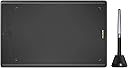
Desertcart purchases this item on your behalf and handles shipping, customs, and support to Senegal.
๐จ Elevate your digital art game with precision and freedom โ donโt just create, inspire!
The HUION Inspiroy H610X is a professional-grade drawing tablet featuring a large 10x6.25 inch active area, 8192 levels of pen pressure sensitivity, and ยฑ60ยฐ tilt support for natural brush strokes. Equipped with 8 customizable hotkeys and broad OS compatibility (Windows, macOS, Linux, Android), it offers a seamless, ergonomic, and highly responsive drawing experience ideal for artists, designers, and educators alike.


| ASIN | B092D14XZ7 |
| Active Surface Area | 10 x 6.25 inch |
| Additional Features | 60ยฐ Tilt Support, Large Drawing Area, Programmable Press Key, Stylus Dock, Support Android Device |
| Best Sellers Rank | #43 in Computer Graphics Tablets |
| Brand | HUION |
| Built-In Media | Digital Pen, Pen Holder, Pen Nib Clip, Replacement Nib, USB Cable |
| Color | Black |
| Compatible Devices | Desktop, Laptop, Smartphone, Tablet |
| Connectivity Technology | USB |
| Customer Reviews | 4.6 out of 5 stars 269 Reviews |
| Display Type | No Screen |
| Item Dimensions L x W | 10"L x 6.25"W |
| Item Type Name | Computer Graphics Tablets |
| Item Weight | 1.1 pounds |
| Manufacturer | ShenZhen Huion Animation Technology Co., LTD |
| Mfr Part Number | HUION-H610X |
| Model Name | H610X |
| Model Number | H610X |
| Native Resolution | 1920x1080 |
| Number of Items | 1 |
| Operating System | Android 6.0 and above, Mac OS 10.12 and above, Windows 7 and above, linux(Ubuntu) |
| Pressure Sensitivity | 8192 levels |
| Screen Size | 10 |
| Special Feature | 60ยฐ Tilt Support, Large Drawing Area, Programmable Press Key, Stylus Dock , Support Android Device |
| Specific Uses For Product | Designing & Animation, Digitial Writing & Online Teaching, Drawing & Painting |
| Target Audience | Art Student, Artist, Designer, Teacher |
| Warranty Description | Every Huion product comes with a one-year warranty |
J**X
Excelent and cheap
I'm not a pro digital artist but I think this is a very good tablet pen, its acurate, lines do not wobble, the pressure sensitivity and tilt are pretty amazing and its pretty big compared to my Wacom intuos small, I do not really notice any different betwen the two, other than the Wacom has a 4thousand something pressure sensitivity and this one os 8thousand something so it feels more accurate to do diferent shaped marks. And the cherry on top is that it's so cheap, the price does not match with the quality, it's so good. If you're a beginner I definitely recommend this one because when I began with my Wacom small, it was so uncomfortable and my monitors are 24" so that difference in size made my experience a little uncomfortable at the beginning, but with this one it's so much more comfortable, you can make bigger gestures and bigger marks. In summary, if you're not a pro you'll not notice the difference between this one and a Wacom equivalent, but imo not even the pro will notice it, and for the price it's so good.
U**O
Exselente para divujar en Corel Pint y en otras aplicasiones de dibujo y pintar
Exsente para divujar Corel Pinnt y en otras application de divujar y pintar
L**R
Loves it uses it quite often
Son loves this and uses it to draw
T**R
Great value for the price
I really set my expectations low when I bought it, but it's quite an amazing tool. The little huion driver allows orientation customization and keybind adjustments... And the precision / pressure sensitivity works great. I've been drawing some stuff with it and sincerely enjoy it
R**A
Review honesta de mi primera tableta grรกfica
Como alguien que acaba de entrar al mundo del arte digital, quiero compartir mi experiencia con esta tableta grรกfica desde la perspectiva de un principiante. Esta es mi primera tableta grรกfica real. La comprรฉ para usar en mis tiempos libres como aficionado, ya que normalmente dibujo en papel tradicional. Inicialmente pensรฉ que el cambio del papel al digital serรญa brutal y complicado. Para mi sorpresa, la adaptaciรณn ha sido mucho mรกs suave de lo esperado. Actualmente uso Krita para dibujar y la experiencia ha sido excelente. La tableta se siente muy cรณmoda durante las sesiones de dibujo, y hasta ahora no tengo quejas significativas. Las herramientas digitales, especialmente el lรกpiz, se sienten muy naturales. La transiciรณn desde el dibujo tradicional no ha sido tan difรญcil como temรญa. Para alguien que estรก comenzando en el arte digital, esta tableta cumple perfectamente con las expectativas. Es una excelente puerta de entrada al mundo del dibujo digital sin ser abrumadora para principiantes.
M**A
I enjoy using it
Awesome in all sense. Very enjoyable to use and fun.
A**R
Huion Tablet Works Great!
This thing is ginormous! Unsure about other programs or phones, but it works well with my Pixel 6 and Sketchbook. For some reason though, it is not registering the clicks to select text in Google Keep, but it does for Google Docs. The OTG cable works great out of the box, but the USB A to USB C adapter is a bit bulky, so I had to take my phone out of its case for it to fit. The tablet surface texture feels decent. I am no artist, so I am reviewing this from a note taker perspective and someone who just doodles. I hope this tablet lasts a while, but I am happy with it so far. Thanks!
T**Y
Buy the HUION HS610 instead, same price more features, same performance.
I bought this and exchanged it for the HUION HS610 instead, same price more features, same performance. the I thought this one was suppose to feel most like paper but I feel no difference compared to the HS610, the HS610 to more programable buttons, and a zoom in\out touch knob. BOTH work on my Chromebook, they have pressure and tilt, BUT lack support for the buttons (typically), it's just plug and play. If you are ONLY using it on a chromebook, buy a cheaper one without the buttons.
C**N
Qualitรฉ abordable
J'ai choisis le modรจle 610X qui a la plus grande surface de travail. Je ne regrette pas ce choix. La surface est similaire ร un carnet de dessin de bonne taille. Lisse et lรฉgรจre, mais pas pour autant trop fragile. Le porte crayon est agrรฉable pour รฉviter d'abรฎmer la pointe inutilement. Les pointes supplรฉmentaires sont ร l'abri des enfants ร l'intรฉrieur. Compatible avec beaucoup d'appareils (verifiez avec lesquels avant l'achat pour vous assurer que le matรฉriel est compatible avec votre tรฉlรฉphone, tablette et/ou ordinateur.) Confortable ร utiliser, se transporte super bien, branchez et commencez l'utilisation. J'adore et je trouve idรฉal pour se mettre ร l'art digital. Je considรจre achetรฉ une tablette ร dessin avec l'รฉcran dans le futur. Je n'arrรชterai quand mรชme pas d'utiliser celles-ci.
O**E
Packaged well. Delivery tracking was amazing as usual. Product was in good condition.
M**N
New Fav Brand
After using competitors for along time, I decided to give this a go. I think I'm here to stay. It's awesome, it works, it feels like an upgrade from where I was coming from, price is great spot. I think I'll stay here for my monitors too.
J**5
Excellent hardware but drivers need improvement
Been using Wacom tablets for over two decades now, and this is the first time I purchased one from another company. In terms of hardware this Huion Inspiroy H610X is very well made, on par with Wacom products but at a far more economical price point. No issues installing the latest driver for Win 10 directly from Huion's website, which at this time is V15.6.2.80. Quick install, plugged in the tablet, driver detected it immediately and that's it. Tested drawing in Clip Studio Paint as well as playing ARPG Path of Exile. The accuracy and response time is excellent! Pen is lightweight and comfortable. Tablet surface texture is just slightly rough, which for me is a good thing as it means I won't run through pen nips quickly. The only negative I can say about this tablet is that the drivers still need improvement, in that they don't work in many apps or even Windows pop-ups like User Account Control. The main drawing as well as common usage apps like web browsers are supported. But once you use something like for example MSI Afterburner (graphics card monitoring app) when it is the app in focus the cursor is dead in the water.
E**N
Very good drawing tablet
My kid loves it easy to use lots of different graphics and programs to choose from. The drivers are easy to download on to the computer
Trustpilot
2 months ago
2 weeks ago