

Desertcart purchases this item on your behalf and handles shipping, customs, and support to Senegal.
🚪 Unlock convenience everywhere you go — your garage’s new best friend!
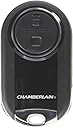
The Chamberlain MC100-P2 Universal Mini Garage Door Remote offers a compact, ergonomic design with radio frequency connectivity and a long-lasting lithium battery. Featuring a 2-button layout, it controls multiple garage doors, entry gates, and myQ-enabled lights. Its universal compatibility and simple wireless programming make it a versatile, durable solution for modern smart home access.


| ASIN | B0749HB5QT |
| Additional Features | Ergonomic |
| Battery Type | Lithium |
| Brand | CHAMBERLAIN |
| Built-In Media | Universal Mini Garage Door Remote |
| Button Quantity | 2 |
| Color | Plain |
| Colour | Plain |
| Compatible Devices | garage door, myQ-enabled lights |
| Compatible devices | garage door, myQ-enabled lights |
| Connectivity Technology | Radio Frequency |
| Connectivity technology | Radio Frequency |
| Controller Type | Radio control |
| Customer Reviews | 4.5 out of 5 stars 3,251 Reviews |
| Global Trade Identification Number | 00012381186594 |
| Item Dimensions L x W x H | 6L x 3.4W x 1.5H centimeters |
| Item Type Name | Universal Mini Garage Door Remote |
| Item Weight | 68 g |
| Manufacturer | Chamberlain |
| Max number of supported devices | 1 |
| Maximum Number of Supported Devices | 1 |
| Mfr Part Number | MC100-P2 |
| Model Name | Mini Garage Door Remote |
| Model Number | MC100-P2 |
| Number of Batteries | 1 CR123A batteries required. |
| Number of Items | 1 |
| Special features | Ergonomic |
| UPC | 012381186594 |
| Unit Count | 1.0 Count |
L**N
Great replacement for original
To replace original door opener..works great
D**N
Read this if having trouble programming
Took me a couple of tries, but then I figured out what the remote was doing and why it wouldn't program. First off... keep in mind that this is a UNIVERSAL remote that can work with a variety of units. As a result, it has to cycle through a series of program codes until it finds the one that works for your unit (much like programming a universal TV remote). Once I started thinking of it in this manner, the instructions made perfect sense and I easily programmed the unit for both of my garage door openers. So here's my version of this instructions, that I hope will help you. 1) Start with the garage door closed. I don't think this really matters, other than it's probably safer that way so you don't accidentally bonk someone on the head when the garage door starts to close. :) 2) Press AND HOLD the bottom button on the remote for approximately 15 seconds (the instructions say 10 seconds, but it's really closer to 15). Once you start pressing the button a blue light will start flashing. After 15 seconds the light will stop flashing and turn solid blue*. Once it is solid blue, release the button. 3) Press and release the learn button on your door opener unit. For my garage door openers I only need to press the button once to enter "learn" mode, but for yours you may need to press the button twice. Follow instructions for your unit. 4) On the remote control, press the button you wish to program - twice. Once you do this it will start sending a series of pre-programmed codes to your door opener unit.** When it starts cycling through the various codes it will blink rapidly for a second... then it will take a brief pause and then start cycling through the next code. So on and so on. When it finally hits the jackpot and your garage door starts to open, you know that you have found the correct code for your unit. When that happens... 5) Immediately hit the button on the remote again (the one you want to program). This will confirm the correct code and it should now work with your opener. NOTE: * The first time I tried to program the unit, the light flashed blue for 15 seconds and then went out (it did not turn solid blue as it was supposed to). I tried it again and the same thing happened. On the third attempt it blinked blue and then went out, so I just continued with the programming instructions as if it had turned solid blue and it worked fine. When I went to program my second garage door opener, the blue light DID turn solid blue as it was supposed to. ** On the second garage door opener I tried to program, when I executed step 4 above (pressed the remote button twice), it blinked rapidly (sending the first code) and then stopped. It just sat there for several seconds and did nothing. Finally I pressed the button on the remote one more time and it continued cycling through the program codes until it finally found the one that opened my door. Then I immediately pressed the button again to confirm the program. It worked fine after that.
C**N
Excelente!
Para programarlo, hay videos en youtube. Vivo en una privada y a veces necesito abrir la reja desde mi casa, la cual está como a 50 mts de distancia y abre sin problemas.
J**.
Cumple su función. Cómo nuevo.
Escelente producto, buen alcancé práctico tipo llavero. Solo me costó trabajo la configuración ya que no lo detectaba mi motor del abre puertas lo que tuve que hacer fue: dejar apretado botón del mando hasta que su luz deje de parpadear, después se aprieta botón de elegido del mando, botón de luz del mando de la pared y botón de pared del abre puertas.
M**J
A Must-Have for Garage Doors
I have purchased this remote several times, four in fact. Our Chamberlain garage door has the MyQ smart feature and we use it, but the simplicity and reliability of this remote simply makes sense. There’s no WiFi to rely on, and the range is amazing. I live in a row house and I can be on my bicycle or in my car halfway down my block before I get to my driveway, and the remote works! Battery Life and Replacement Changing the CR2032 battery can feel like you’re going to break it, but I’ve only had to do it once after nearly 3 years of using it. Reliability There are other brands out there, but stick to the original. It works and is very reliable. Setup Note: My garage door opener has the yellow learn button. It’s pretty easy to set up with this feature. I don’t know how easy it is with other brands or models with more than just the single learn button.
Trustpilot
2 weeks ago
1 month ago