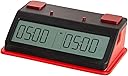
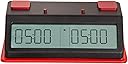
Tap N Set Digital Chess Clock - by US Chess (Touch - Red and Red)
Product ID: 313467184
⏳Supports up to 3 time controls + increments
📱NFC smartphone programmable
⚖️Lightweight & portable (under 1 lb)
Desertcart purchases this item on your behalf and handles shipping, customs, and support to Senegal.
♟️ Master your time, own the game—smart, sleek, and tournament tough!
The Tap N Set Digital Chess Clock by US Chess is the world’s first NFC smartphone-programmable chess clock, enabling instant setup of complex time controls via a free app. Lightweight and portable, it supports up to three time periods with increments or delays, move counting, and customizable presets. Designed for both casual players and tournament directors, it offers dual manual and app-based operation, making it a versatile, modern essential for competitive timed games.

| ASIN | B08VFC1VRY |
| Additional Features | Timer |
| Alarm Clock | No |
| Batteries are Included | No |
| Best Sellers Rank | #5,190,742 in Home & Kitchen ( See Top 100 in Home & Kitchen ) #2,060 in Desk & Shelf Clocks |
| Brand | US Chess Federation |
| Brand Name | US Chess Federation |
| Color | Touch - Red and Red |
| Customer Reviews | 3.6 out of 5 stars 15 Reviews |
| Display Type | Digital |
| Frame Material | Plastic |
| Item Dimensions W x H | 7.25"W x 2.25"H |
| Manufacturer | Zmart Fun |
| Material Type | Plastic |
| Operation Mode | Electrical |
| Power Source | Battery Powered |
| Product Dimensions | 7.25"W x 2.25"H |
| Room Type | Living Room |
| Shape | Rectangular |
| Special Feature | Timer |
| Style | Modern |
| Style Name | Modern |
| Theme | Sport |
D**S
Works great with recent iPhone, easily sets more complex timings, clear helpful indicators on screen
I hesitated to get this clock because of some problematic early reviews. It’s most helpful feature, quickly and easily programming even more complex timings via a phone app, seems to have gotten off to a rocky start, mainly with Android phones where it did not always work reliably. The phone app depends on NFC (near field communication, a hardware feature on newer mobile phones), so older phones without NFC will not work. I had read that the manufacturer (ZMF, i.e. Zmart Fun) has addressed the earlier startup issues in more recent versions, so I decided to chance it working with my recent-model iPhone. The results?… I’m delighted. I downloaded the app before the clock arrived and picked out several timings that I thought would be favorites, and got familiar with the programming screens. It took me a few moments to realize there is a sideways-scroll of the app screens to get from one setting screen to the next, but once I figured that out, putting together custom time controls was quick and easy. When the clock arrived, I put in some AA batteries, exercising care with the flimsy and finicky battery cover, and started up the clock. I first did a quick tryout of the manual controls; other than the control button being in a different place (underneath) it works exactly the same as on the ZMF II clock. So manual operation and setting (identical to other ZMF clocks) is always there as an option, even if one’s phone is unavailable. After the manual button-check I started up the iPhone app, picked a timing, clicked on “Write” and held it up to the top of the clock… zip, zing!… it loaded, no problem. Nice! Other reactions: I bought the button version; my other clocks have touch-pads or levers and I wanted to try something different. I *love* the buttons; they provide a very tactile response, with a positive feel and pleasant audible feedback when a button engages. This may be my new favorite clock for speed chess. Programming via the app is easy, even for complex multi-period tournament time controls. Each game period (up to 3) has its own independent move-count and time. The Tap-N-Set clock supports either delay or increment (bonus time) per move, and any delay or increment will apply to all periods within the same game. On some clocks (e.g. Chronos, DGT 3000) each game-period can have independent delay or increment; I’m unsure to what degree other clocks allow that, and don’t believe many mere-mortal-level chess tournaments require independent period-based increments or delays. So until you’re invited to a FIDE World Championship match you’ll probably be set. I wasn’t sure I would like the clocks’ narrow LCD numbers (preferring somewhat fatter numbers), but when using it I found it to be clear and legible in ordinary lighting. The numbers and text displayed are quite crisp. There is much more information available on this screen than with the other ZMF clocks; the newer LCD on the Tap N Set has a number of other fields it can display. It always displays the game time, but has smaller indicators for delay countdown, increment, and game period, as well as alarm, pause, and active-player arrows. In tournament mode it will display any delay or increment in a smaller font, then after the delay or increment has been applied it switches to display the current move for each player. It is so lightweight that I wondered about its sturdiness, but the plastic used seems robust enough in use; the clock feels solidly anchored during play on a table. I’m thinking the light weight will make it ideal as a travel clock... it won’t add much weight to your luggage or backpack. The play buttons seem very solid and appear to be durable. Having the control button and power-switch underneath may be inconvenient for some tastes, but it’s not bad to have them out of the way when time gets short and play gets rambunctious. The control button is easy to find and use by feel, and thus far has worked well when needed. As others have noted, the battery cover is unusually finicky and fragile-feeling, so some care is called for when installing batteries. Bottom line: I like this clock a lot… much more than I expected. I’m very happy with the purchase, and expect this clock will get a lot of use.
D**R
Handy App Setting Chess Clock
Item as advertised and pictured. Sets time controls using the free App as stated with one tap... a lot of the time. Sometimes my iPhone 8 needs more than one tap. Be aware that some tournaments may prevent presence of phones in the hall, so then setting a different time control is the same button-pressing mess as other modern chess clocks. I chose the mechanical switch version because I like to use the piece I just captured to activate it (doesn't work with the thermal variety). Switches have worked reliably and have a good quality feel. Wish they looked a little less electronic nerdy.
U**R
Must have NFC
It works but still, lots of bugs need to be fixed. Lots of hit and miss. Especially when you have multiple time controls. You must have Near Feild Communication (NFC) capability on your phone in order to work. It Should include the ability to manually set up simple time controls.
C**S
We could not stop it from beeping with each move
The clock arrived with zero instructions, literally just the clock in a box. We downloaded the app and the clock works fine for tracking time and the app is easy to use. However, when you tap after a move, it makes a small buzz, and there’s a constant whining. Can’t make either sound stop and it’s just ridiculously annoying. I can’t remember ever hearing a pinging clock in a tournament but maybe we aren’t experienced enough - but the sounds are so annoying it’s Unusable for us.
C**T
Android app doesn't work
The players and officers at our club have been frustrated no end by the un-intuitive, convoluted combinations of buttons and cryptic characters that are used to set most digital chess clocks. (And every make of clock seems to have a different combination of arcane programming sequences.) The printed "manuals" are typically of little to no help. We were hoping that the Tap N Set would solve these problems with a phone app that was simple to use because you would be programming the clock on a real screen. Well, the app (version 1.5.1) is indeed fairly simple and straightforward to use, but I have not managed to actually change a setting on the Tap N Set clock with their Android app. I have enabled NFC as directed, but after tapping in the suggested area of the clock dozens of times with every edge and surface of the phone I have only gotten the clock to respond one single time, and then even though the phone app claimed that the clock had been successfully programmed, the time setting on the clock remained unchanged at 05:00 05:00. I'll have to seek permission from somebody else to install the app on their phone to see if it works any better there. Thus far, this clock has been a disappointment. Had to resort to setting the clock manually and that did work, but it's not the feature that we were looking for. Now it's just one more brand of clock that you have to either remember how to set, or to figure it out anew every time. UPDATE 1/1/22: Since the original review, we have subsequently discovered that the iPhone app works to perfection in every situation, but that if you have an Android phone the app will only work to select one of the preset time controls. If you want to set a time control that's not among the presets, the Android app will not work and you'll have to program the Tap N Set by hand. We don't use any of the preset times, so we're out of luck unless somebody walks in with an iPhone and is OK with installing the Tap N Set app on their phone. UPDATE 12/8/22: I have a brand-new Samsung Galaxy phone and the Tap N Set app for Android has been updated to the latest version (1.5.6). It still doesn't work on these clocks. (Yes, NFC is enabled.) In fact, it's even worse than before as now we cannot change the clocks from their current settings to even a preset time control. The most I get when placing the phone on the clock is a vague rumbling, but nothing ever gets changed and there is no notification of any kind. Our club is in need of new clocks and the Tap N Set simply doesn't offer any advantage over other digital models, it's just as difficult and maddening to try to set manually as any other brand.
M**Y
No android app anymore.
The clock works great but I no longer see an Android app on the Play store. It can be set manually though. The knobs are a little fragile.
X**E
Go elsewhere for a clock
The only pro for this clock is the NFC ability to bring a programmed setting from your phone to the clock, and only when that works properly. Now for the cons: Extremely cheap construction (a fall from 3 feet would easily break a leg) looks and feels like it came from Dollar Tree (MAYBE Dollar General). The speakers are directly from a cheaper 90s toy speaker. I am not surprised if the owner of the company, Roberto Socorregut, pays less than 5$ per unit in bulk. Place your money elsewhere (Chronos DX, DGT line, or Leap).
T**I
No optional move counter for single time control?
I bought this clock about a year ago. I can use the optional move counter with multiple time control programs, but not with the single time control programs. Why is this? Has this been corrected?
Trustpilot
2 weeks ago
3 days ago