Buy anything from 5,000+ international stores. One checkout price. No surprise fees. Join 2M+ shoppers on Desertcart.
Desertcart purchases this item on your behalf and handles shipping, customs, and support to Senegal.
โจ๏ธ Elevate your workspace with wireless power and seamless multi-device flow
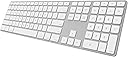
The Matias FK418BTS is a premium Bluetooth wireless keyboard featuring a rechargeable battery, integrated numeric keypad, and the ability to sync effortlessly with up to 4 devices across Mac, iPhone, iPad, Android, and Windows platforms. Its sleek space gray aluminum design offers a lightweight yet durable solution for professionals seeking efficiency and style in one compact package.


| ASIN | B0195OOSHW |
| Additional Features | Backlit |
| Antenna Location | Office |
| Best Sellers Rank | #5,468 in Computer Keyboards |
| Brand | Matias |
| Built-In Media | USB Cable |
| Button Quantity | 78 |
| Color | Space Gray |
| Compatible Devices | PC, Tablet |
| Compatible Operating System Family | Android |
| Connectivity Technology | Micro USB |
| Customer Reviews | 3.6 out of 5 stars 85 Reviews |
| Enclosure Material | Aluminum |
| Hand Orientation | Ambidextrous |
| Item Weight | 0.63 Kilograms |
| Keyboard Description | Wireless |
| Keyboard Layout | QWERTY |
| Manufacturer | Matias |
| Mfr Part Number | FK418BTS |
| Model Name | FK418BTS |
| Model Number | FK418BTS |
| Number of Keys | 104 |
| Power Source | Battery Powered |
| Recommended Uses For Product | Office |
| Special Feature | Backlit |
| Style Name | Contemporary |
| Switch Type | Mechanical |
| Theme | Space |
| UPC | 833742004179 |
| Unit Count | 1.0 Count |
B**R
Good Wireless Full-Length Replacement Keyboard
For those who have sought a good full-length, untethered replacement for the Apple Magic Keyboard (wireless) and for the Apple Keyboard with Numeric Keypad (wired), the Matias Wireless Aluminum Keyboard may be your solution. The Matias Keyboard is solidly built and possesses practically all of the capability of the wired Apple keyboard with numeric pad, but allows you to snip the string, giving you freedom of movement and freedom from clutter. The layout and size of the Matias Keyboard is essentially the same as the wired Apple keyboard, except that function keys F16 โ F19 are replaced with four individually-programmable Bluetooth pairing keys. These keys allow you to pair your Matias Keyboard with up to four different computers. Iโve found that this works well for at least two computers; Iโve not had the opportunity to try the additional two. But pairing was easy. Compared with the Apple Magic Keyboard, the letter and number keys are the same size and at the same spacing. The Delete, Return, Shift, Command, Option and Control keys are a bit longer on the Matias Keyboard, but nonetheless in keeping with the size and location of the keys on the wired Apple Keyboard. When typing, you may find that the Matias keys are a mite firmer than the Apple keys and definitely have a longer key travel distance. It does not take much time to get used to this, and some users may prefer it. The only criticism I have of the key feel is that the Matias keys are a tiny bit โlooserโ than the Apple keys. That is, if you hold a key between your fingers and move it back and forth, the Matias keys have a *tiny* bit more play than the Apple keys. Another difference is that the angle of the Matias keyboard is slightly greater than the Apple keyboard. As an old touch typist, I prefer this greater angle. It does stand in aesthetic contrast to the angle of the Apple Magic Touchpad, but thatโs a first world problem. And I love once again having a numeric keypad and (!) a back-delete button. The Matias Keyboard has a permanent, rechargeable internal battery and the instruction pamphlet says that one five-hour charge should last an entire year. That will be nice if it holds true, but a slightly bothersome point is that in the Bluetooth drop-down menu in the menu bar, the entry for the keyboard does not show battery level. This is in contrast to the menu item for the Apple Magic Keyboard and is an opportunity for improvement by Matias. Charging is accomplished with a mini-USB cable instead of a Lightning cable. Fit and finish are excellent. My unit is aluminum colored, although you can order yours in four different colors, including a Space Gray. The style of this keyboard looks essentially like that of the Apple and it is right at home sitting next to my MacBook Pro. So far, this seems to be a very good choice for me, and I recommend it to others. If any issues pop up, Iโll update this review.
P**R
Defective Keys
Looks good only on design but has glitches where the keys would sometimes keep typing repetitive keys. Sometimes the delete button keeps going on it's own which really sucks cause you can't stop it. Had another one prior which some keys didn't even respond. Thought it was a one off defect and thought to purchase another but would not buy again.
H**S
Nice review of the keyboard here
Nice review of the keyboard here: [...] Pros: Battery lasts a year between recharging, and it has a very high build quality. Itโs the wireless keyboard with numeric keypad that Apple shouldโve made. It looks just like an Apple keyboard design wise. Cons: Keyboard is wireless only and wonโt function as a USB keyboard when plugged in. It would also be great if it had an additional three F keys, F-16 through F 19. Doesnโt report battery status to the Bluetooth Menu in macOS Sierra. These are minor quibbles on an otherwise excellent product.
D**L
Apple should make this keyboard!
For my iMac, I have tried several different keyboards because the little Magic keyboard that comes with the iMac is just insufficient for my typing needs due to my frequent use of the 10 key. Of all the keyboards I tried, the solar charged Logitech K750 was my favorite and one I used for a couple of years. Then I learned about the Matias keyboard. I thought I would give it a try and ordered it. I've had it a week now, and I can offer this to you. Pros: I will tell you that I do really love this keyboard. It looks like Apple designed it because the body of the keyboard is milled from aluminum and looks exactly like the Magic keyboard. It is a typical Apple layout for a keyboard, so that is good and familiar. The battery is supposed to last a full year which is amazing and helpful. I love that I can use this on my iPad, and my iPhone with no problems. It is seamless between devices and works perfectly every time. Cons: The keys are not backlit which doesn't bother me, but might matter to you. It does not have feet so that you can angle the keyboard, but it does have the large battery compartment under it that helps the keyboard angle, so I consider that a wash. It is a slightly louder keyboard than the K750 or Magic keyboard but I am a hard, fast typist so I'm sure that factors into things. Overall, I recommend this keyboard for its build, look, and performance. Cheers!
M**R
Nice Expanded Keyboard Over Apple Regular Bluetooth, But Small Impactful Quality Issues...
I really enjoyed the larger keyboard with the numeric touchpad, multiple device connection options and solid build quality. Also a key thing I really enjoyed over the apple keyboard is that the Matias stayed a whole lot cleaner, even when starting out whiter than the apple keyboard keys. My main problem with the keyboard is that they micro USB port loosened up after the second charging period. I was able to key it locked in enough for another charge or two, then about 2 weeks ago when the keyboard charge ran out, it would no longer charge. I can say this is 100% due to the micro USB port, but if it's not, then I just have a completely failed unit. Either way, I'm out of a keyboard, $$, and back to the drawing board. Would I recommend this keyboard? If it had lasted beyond 15 months and not developed an issue early one, definitely. But now, I have to say a firm no. At $99, it was not super expensive, but should be less than half of that if it is to only last 15 months. In looking at the reviews for both keyboard and seller (Quantum Networks), it's hard to say where the blame lies, so I would say be cautious with both.
R**R
Ok wireless keyboard
I've bought and discarded 3 logitech wireless keyboards. 2 were designed for windows computers and after going through 2 sets of batteries in relatively short period of time (and the guilty conscience of the waste kicked in) I went to a Mac friendly logitech solar keyboard. That keyboard was even worse and I was begging to go back to the battery powered keyboard after the keyboard went into modes where I wasn't sure whether it was going to produce the characters I typed onto the screen and I needed to wait a few seconds before typing the next character. After searching a little bit more, I ran across this Matias keyboard. Holy Cow! A wireless keyboard that works. It puts the keys that you type onto the screen! I was hoping to not need to submit to diminished expectations by going wireless (needed to get wireless keyboard, mouse, and external monitor to improve ergonomic issues working on laptop for hours on end). No I didn't not get a free sample. I paid all $110 for it and it's so totally worth it to have something that works. You need to spend a fair amount of time charging it when you first get it (2-3 hours I think), but you get just about flawless key stroke to character production and I'm kind of a fast typer. The battery allegedly lasts about a year before it needs to be recharged, so crossing fingers and hoping it does recharge in a year. Yay, thank you Matias! Update: So 6 months later, the keyboard started flaking out. The description indicates the battery should last up to a year, but 3 months out I needed to plug it in. Not bad, so I plugged it in to charge it and the battery died a few days later. After doing this a few times, I just left it plugged in. Ok, so it's tethered now. Even plugged in, it stops working intermittently so I power it off for a little bit and then power it back on when it goes unresponsive. It does that sometimes while I'm typing (frustrating when working on code for school or work late at night), but usually if I've stepped away for some amount of time. It's still usable, but not the perfect keyboard I thought it was. Better than most I've tried so far. Hoping something better comes along.
F**K
Letters Wore Off Keya after 2-1/2 months use - Not the quality I expected
I've had the keyboard about 2 1/2 months and the letters are wering off the keys. See pictures and note the A, S, N, E, T, I, O key. I expected a higher quality product. Keyboard has nice touch. I need the 4 device, bluetooth connectivity and this was the only keyboard that provided that feature. Looking for another option.
I**R
OUTSTANDING KEYBOARD!!!!
This keyboard is amazing. Let me go over some key features. DESIGN The keyboard feels really great in your hands, especially with the apple design with the silent scissor switches. Typing moves lightning fast, but it takes some getting used to when switching between the regular windows keyboard. Overall Score in DESIGN: 8 RESPONSE TIME No issues yet! Overall Score in RESPONSE TIME: 10 BLUETOOTH SWITCHING Works perfectly but can be a real pain when you accidentally click a key and forgot which one your PC is connected to. You have to repair it and exit out of whatever you are doing. Overall Score in BLUETOOTH SWITCHING: 6 BATTERY LIFE: This is the most amazing part of it all. The battery lasts 2 years! The charging system is not complicated and it takes a couple hours to charge. Overall Score in BATTERY LIFE: 10
F**.
Keine deutsche qwertz Tastatur
Unbrauchbar, weil US Tastatur
A**R
"Delete" works intermittently
Great product except that the delete key doesn't work 100% of the time and I can't find out how to return it.
Trustpilot
2 days ago
1 week ago